Discussion Ideas, questions, etc, Post em here!

I'm new here, and I wanted to learn how to do these kinds of things. I have some experience with these kinds of things, as I've connected up a bunch of things to the Raspberry Pi I have at my dad's, and wanted to do more than that. One of the big questions I have is what are the basic supplies for doing this? I know I'll of course need a soldering and desoldering iron, but what else would I need? One of the first projects I want to do is repair my 3DS XL, as it has an internal screen issue.
On top of the iron you mentioned (make sure to get one that has a station, as the ones that plug straight into the wall are generally just plain bad, either the nicer Hakko 888D or the cheaper Weller), you'll need some screwdrivers to take the things apart along with some other hand tools, and replacements for things you find are broken. If you want to make a portable console, some commonly used parts are listed in the BOM.

Hello friends! I just recently found these forums through Shank Mod's youtube video for the Kill Mii lol. I've actually been wanting to try modifying some of my old electronics around and thought this would be a fun place to start :) The first project I wanna attempt is 'portabilizing' my old PS2 (SCPH-75001), albeit a daunting one for sure. I have so far, a soldering iron (idk if I'll even need to use it?), ordered a 3.5" screen (HiLetgo 3.2" IPS TFT LCD Display ILI9481 480X320) and some screwdrivers and such for getting started. I also will be trying to use this plastic first aid kit as its case (~5.5"x4.5"x1.5" i think?) which is in the picture. Nice to meet you all! :D
View attachment 7888
You'll probably need a slightly larger case than that one (unless you don't plan on having internal batteries, and even then it may be a bit tight), and you'll definately need to use your soldering iron (though if it doesn't have a station I'd suggest one of the irons I suggested above).

Also, welcome!
 
On top of the iron you mentioned (make sure to get one that has a station, as the ones that plug straight into the wall are generally just plain bad, either the nicer Hakko 888D or the cheaper Weller), you'll need some screwdrivers to take the things apart along with some other hand tools, and replacements for things you find are broken. If you want to make a portable console, some commonly used parts are listed in the BOM.
Oh yeah, nearly forgot about the screwdrivers and other tools. My mom has PLENTY of those, as she does a lot of her own car maintenence. We used to have a family business owned by my deceased great-grandpa (a body shop to be specific,) but it is not ours anymore.
 
On top of the iron you mentioned (make sure to get one that has a station, as the ones that plug straight into the wall are generally just plain bad, either the nicer Hakko 888D or the cheaper Weller), you'll need some screwdrivers to take the things apart along with some other hand tools, and replacements for things you find are broken. If you want to make a portable console, some commonly used parts are listed in the BOM.


You'll probably need a slightly larger case than that one (unless you don't plan on having internal batteries, and even then it may be a bit tight), and you'll definately need to use your soldering iron (though if it doesn't have a station I'd suggest one of the irons I suggested above).

Also, welcome!
Thanks for the advice! :) Regarding internal batteries, would you suggest trying to implement them? I dont have a multimeter, and i dont wanna explode anything!
 
Thanks for the advice! :) Regarding internal batteries, would you suggest trying to implement them? I dont have a multimeter, and i dont wanna explode anything!
Probably would be a good idea to get a multimeter. But that is really personal preference. We have a guide about batteries that should get you through the process of setting them up if you'd want them.
 
Probably would be a good idea to get a multimeter. But that is really personal preference
It's like the only safe way to know if your board has shorts x3
a cheap $10 will work most the time, even walmart has them
 
Herp derp I meant to split that up, the personal preference part is about internal batteries, you basically need a multimeter if you want something to work right
 
Hey, I’m sorry if this isn’t the right place to ask, but since I’m not allowed to post anywhere else i figured I’d try here.

I was recommended here by shank mods for a issue with a wii I recently bought at goodwill.

Basically it gives me the system files are corrupted message, and I can only boot it in maintenance mode to not get the error. I tried formatting it and that didn’t help (and made it a nightmare to re setup as I had to rush through it to get to the normal menu screen before the error popped up again)

Originally I did plan to just use this wii for a replacement drive on my original, but I figured it’d at least be interesting to see if I could get it running properly again. I feel the original owner might have tried to software mod it somehow but messed something up.

Anyway forgive me again if this isn’t the place to ask this.
 
Hey there!
I'm a complete newbie into modding and portablizing consoles
I want to know if a portable wii is a good project to start with, or is it too much complex?
 
Hey there!
I'm a complete newbie into modding and portablizing consoles
I want to know if a portable wii is a good project to start with, or is it too much complex?
It's not easy, but it's definitely possible as a beginner given you are patient, willing to read for hours and practice, and do your own research. My portable was my first real electronics project. I'd say it came out pretty good, but I spent around a year before I finished because I spent a lot of time learning along the way.
 
Hi, I’m new. This was the only page I could find I could post on, so I guess this is going here.
I was just considering making a simple Wii Laptop project, and wondering if there were any good sources for beginners besides the great ones on the site. Thanks
 
Hello, I am just starting to get into electronics. I saw @Shank videos on his WiiVision and his PiiWii and am really interested in starting a project of my own. I had an idea and was wondering if anyone had attempted it. Has anyone tried to make a Wii / Gamecube portable inside a Wii U gamepad?
 
Has anyone tried to make a Wii / Gamecube portable inside a Wii U gamepad?
A few have, but I don't think anyone has finished one. The original PiiWii was based off a Wii U gamepad formfactor, but I dropped it for the PiiWii pocket. A few like @cheese have started making one, but never finished. It's one of those ideas everyone has at some point, but nobody seems to finish.
 
Hi, Does anyone know of any type of guide to start building a Wii portable; because I couldn't find any.


Thanks. :rothink:
 
There is no start to finish guide on how to build a portable. We have a variety of guides that walk you through each of the individual processes, which you then use to design and build your own portable. Go ahead and start by looking through the Guide Hub at the top of the forums page, and then look through some Wii portable worklogs to see how other people have done it.

If you are new to electronics in general, be sure to look at all of the pinned threads in the Console Modding 101 section. Good luck!
 
I know I probably sound like a idiot lol, but I was reading the Wii Trimming Guide and I don't quite get a few things and was wondering if you could clarify a few things for me??

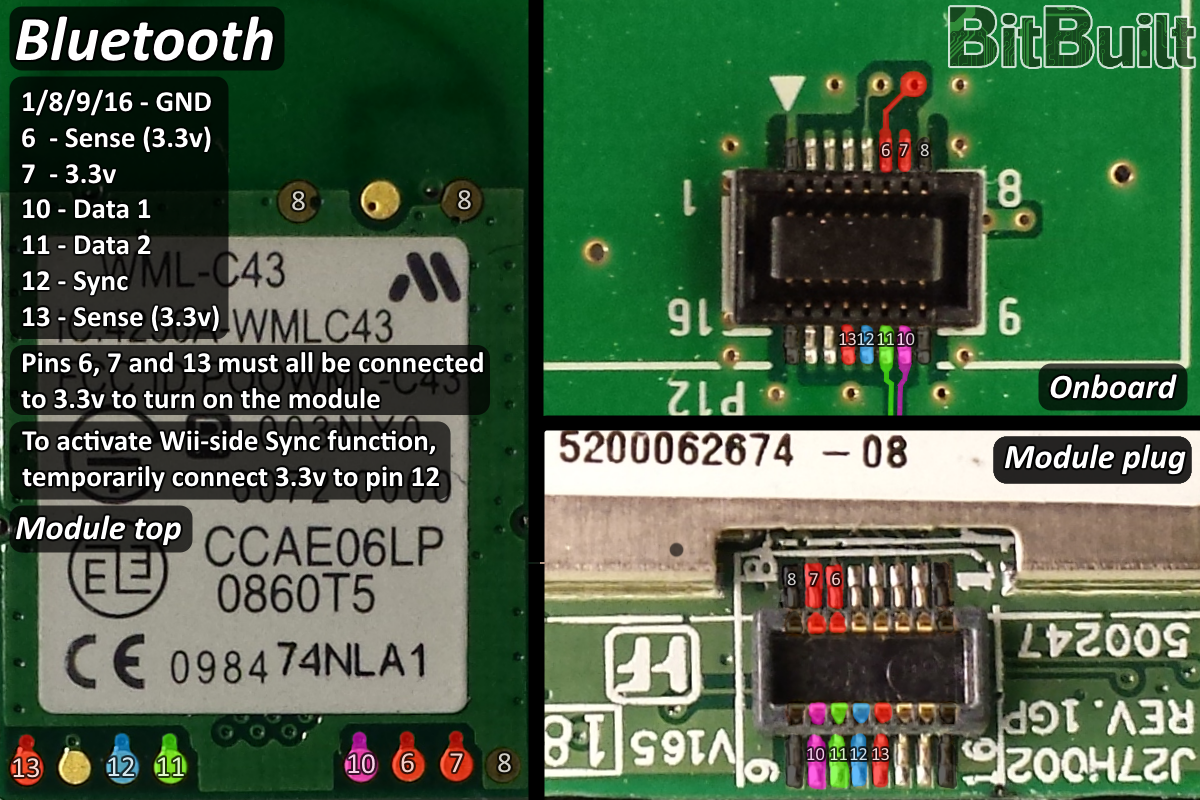
For one, I wanted to do a bluetooth relocation and judging from the pictures shown here..

bluetooth_module.png


I need to connect pins from that module to that onboard connector? Sorry if I sound nooby Im just used to video guides lol. XD

Also I'm doing a LMAOv2 trim and it seems that it cuts off that connector? Where would I solder that back on, if you dont mind me asking?

Also, another thing..

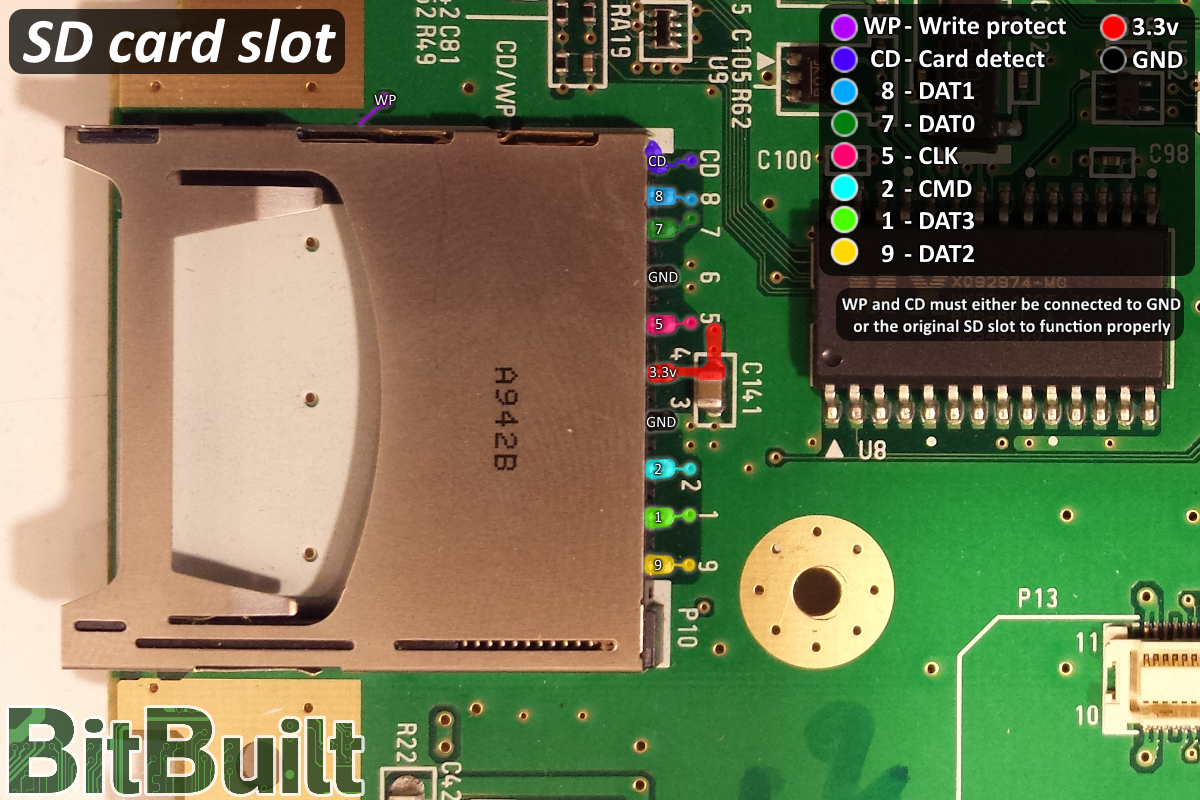
sd_slot.png


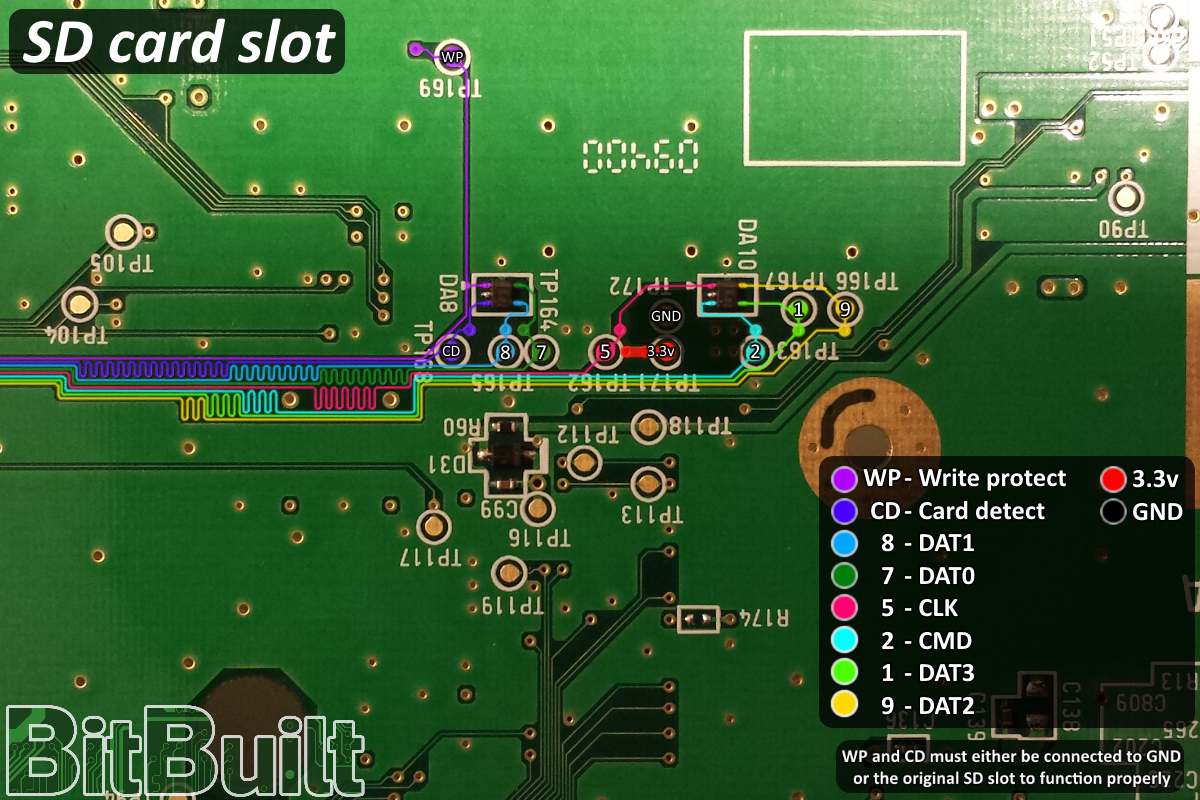
sd_points.png


Judging from that, I need to bridge all the points from the first pic to the points in the second pic?

And does the LMAOv2 trim cut those off? Is there anything I need to take off and resolder on?


And one more thing...


On the MX trim, I understand the pinout and everything, but I just can't figure out where to resolder it back on due to the fact that all trims cut it off.
 
I need to connect pins from that module to that onboard connector? Sorry if I sound nooby Im just used to video guides lol. XD
There are a few different places you can connect, all the things on the module are connected together (the pads on top and the connector on the bottom), and all the things on the main board are connected together. I would suggest using the pads on the top of the module and wire near the GPU on the main board.

Judging from that, I need to bridge all the points from the first pic to the points in the second pic?
We have the information about wiring the SD card slot on the guide in case it is needed for debugging or something similar, but if you are going to be using PortablizeMii it does not support the SD card slot.

And does the LMAOv2 trim cut those off? Is there anything I need to take off and resolder on?
I'd suggest trying out a regular OMGWTF first before jumping to LMAO, especially if you are just starting out, as it is much harder to do a LMAO than a OMGWTF
 
Thanks, will do!

Not ready for a worklog yet, but we will see how getting a rvl-001 black wii on ebay goes!

Hopefully I can get it so I can enter into the summer contest :D

[MERGE]
P.S.
I had a custom edition of PortablizeMii in the works, but it might not be for a while. Reason I wanted to use the SD Card was so I could add a lot of storage. But with GC Memory cards/SD Geckos I might reconsider.
 
I have an idea for a Wii portable, but in either of the sites Wii trim guides there was only a passing mention of the difficulty in keeping the disc drive connection intact. Does anyone here know how to do it anyway?
 
Disc drives are bad.

-Use up a LOT of power
-Are massive
-Provide no benefits over USB loading

We don't support disc drives on trimmed Wiis and never will, so you will need to switch to USB loading.
 
Disc drives are bad.

-Use up a LOT of power
-Are massive
-Provide no benefits over USB loading

We don't support disc drives on trimmed Wiis and never will, so you will need to switch to USB loading.
I just saw your video on Louii, congrats on completing it c:
 
Back
Top