Release Wii native VGA - version 1.5

Running portablizemii again would probably be the simplest option.

Thanks for the quick reply. I'm wondering if the interference is present because the converter wants a higher voltage on the RGB lines - I saw someone a few pages back saying that even at peak it was only about 0.6v, which was low enough to be problematic for a SLG.

Either way that's kinda "baked in" so there's nothing I can really do to sort it out.
 
Running portablizemii again would probably be the simplest option.

Thanks for the quick reply. I'm wondering if the interference is present because the converter wants a higher voltage on the RGB lines - I saw someone a few pages back saying that even at peak it was only about 0.6v, which was low enough to be problematic for a SLG.

Either way that's kinda "baked in" so there's nothing I can really do to sort it out.

Well VGA standard voltage levels are between 0V and 0.7V, so I don't think that's the issue. Although to be honest I don't know what the real issue could be since I never tried one of these converters myself
 
This is amazing. I just have one question. Will composite out still work with mode shorted or will I need a switch to toggle between VGA and composite output
 
This is amazing. I just have one question. Will composite out still work with mode shorted or will I need a switch to toggle between VGA and composite output
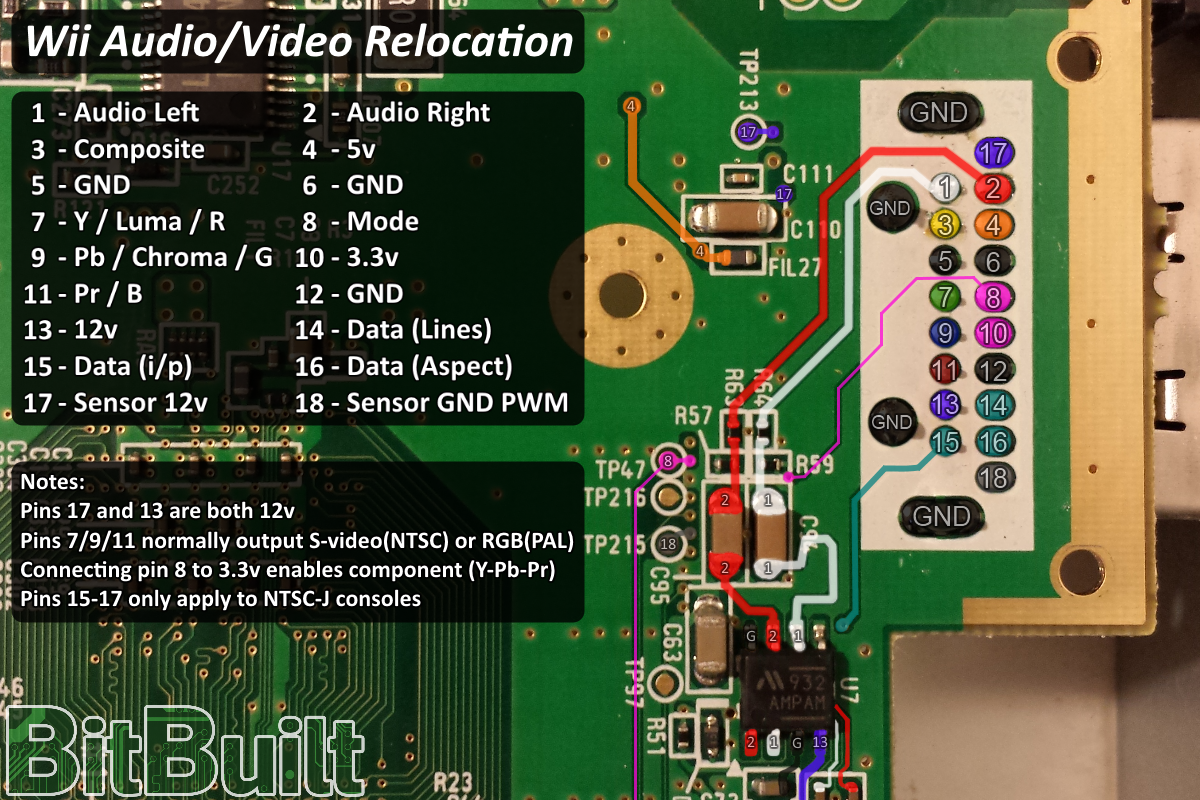
Composite is turned off when mode is shorted to 3.3V, so you need to toggle it if you want to enable composite
 
On the homepage
PiKD8iW.png
 
I have a 6 layer I want to try this on but I'm having trouble find 3.3v on it. I'm still looking around the forum to see if I just missed it but please let me know.
 
Last edited:
I have a 6 layer I want to try this on but I'm having trouble find 3.3v on it. I'm still looking around the forum to see if I just missed it but please let me know.
The AV pinout is the same on 4 layer and 6 layer boards. Pin 10 is 3.3v, and pin 8 is mode.
av_port.png
 
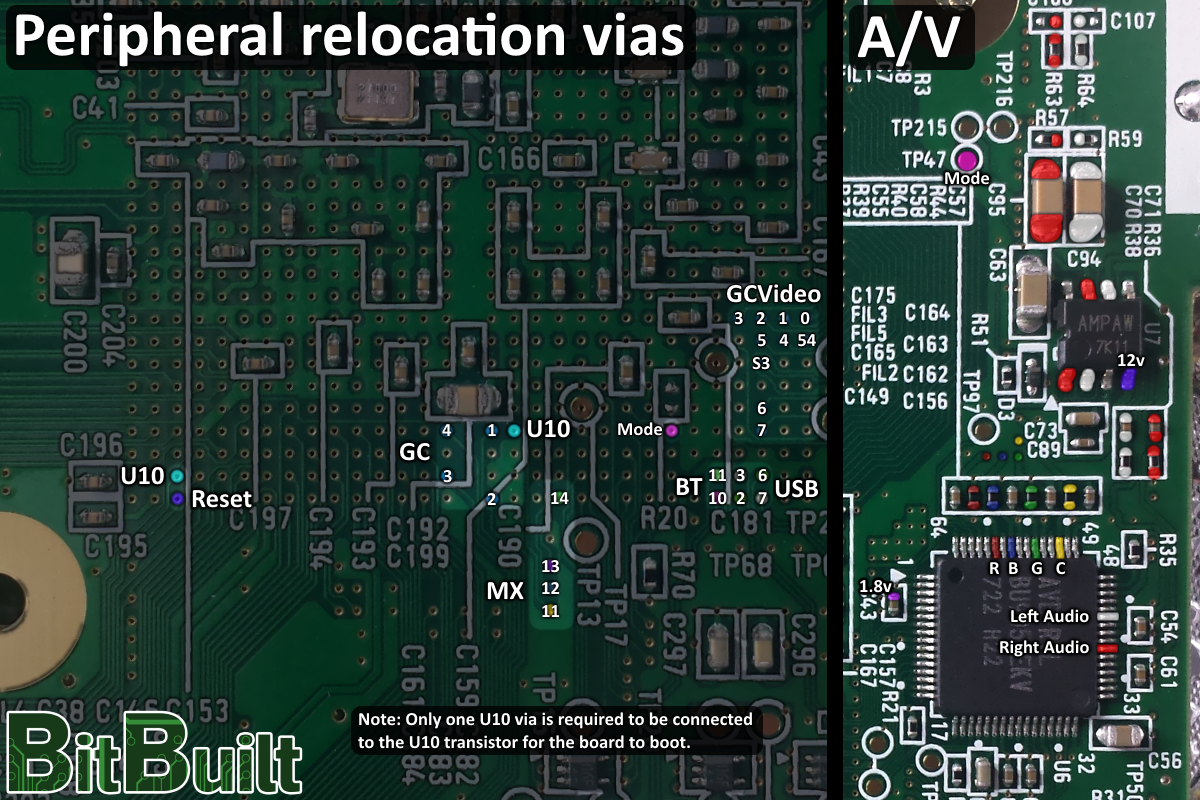
I should have worded it better. I know from the the connector all the revisions are the same but I meant if we found the trace for it that's by the AVE chip. Unless it's that pin 10 between BT and USB.
6bot.png
 
Last edited:
With respect to that pic, on the right edge of the AVE, one of the pad of C61 is 3.3V. Check it with your multimeter to make sure
 
Thank you Aurelio for all your hard work.
I just installed the VGA pack,and soldered 6 lines(hs,vs,r,g,b,GND) to my 10.1"ips screen,It works and show the portablizemii screen,but when I load Wii games(MARIO bro,MARIO kart),the screen shows"unsupported format"then go black screen;
Then I use other 7" screen(800*480) with vga ,also start up normally, but load Wii game show me a red screen then freezed .i'm confused:(
BTW: I found the Wii2hdmi's image quality is better than vga mode on the 10.1" Ips screen ,on the 7" screen(800*480) vga mode is better than Av in(composite video?)
 
Thank you Aurelio for all your hard work.
I just installed the VGA pack,and soldered 6 lines(hs,vs,r,g,b,GND) to my 10.1"ips screen,It works and show the portablizemii screen,but when I load Wii games(MARIO bro,MARIO kart),the screen shows"unsupported format"then go black screen;
Then I use other 7" screen(800*480) with vga ,also start up normally, but load Wii game show me a red screen then freezed .i'm confused:(
BTW: I found the Wii2hdmi's image quality is better than vga mode on the 10.1" Ips screen ,on the 7" screen(800*480) vga mode is better than Av in(composite video?)
Try starting emunand and manually setting the video mode to 480p in settings. That should fix it. The lower image quality is probably because you’re not using shielded wire; Try replacecing your RGB lines with some form of coaxial wire, like the Wii’s wifi antennas. Connect the shielding to gnd on both sides and the inner wire to the signal.
 
No need to start the emunand. Just copy over to it the SYSCONF file. From postloader go to the channel menu, press home/start and select the option to copy SYSCONF from the real NAND.
 
No need to start the emunand. Just copy over to it the SYSCONF file. From postloader go to the channel menu, press home/start and select the option to copy SYSCONF from the real NAND.
Thank you soooo much,it works now:)
 
Try starting emunand and manually setting the video mode to 480p in settings. That should fix it. The lower image quality is probably because you’re not using shielded wire; Try replacecing your RGB lines with some form of coaxial wire, like the Wii’s wifi antennas. Connect the shielding to gnd on both sides and the inner wire to the signal.
Thanks! It can load Wii games now,and I replaced the wire with iPhone's USB cable(of course damaged cable:), the image is better than composite signal:P
 
Can i install this hack without the need of portabilizemii and use the console just like a normal wii? and if i want to remove the hack, how can i do this?

also can i play wii/gc games and my emulatores by HBC? all in vga mode?

Thanx for the this hack and sorry for a lot of questions

Happy new year!
 
No need to start the emunand. Just copy over to it the SYSCONF file. From postloader go to the channel menu, press home/start and select the option to copy SYSCONF from the real NAND.
Hey Aurelio,I met a new problem on my second wii laptop with 7inch screen .It works well in composite mode,but when i shorted mode to 3.3v,The screen in VGA mode only shows A red image .I reinstalle The native VGA patch and check The R,G,B.H.V wires,still doesn't work...I can't remember if i had set 480p display before.Now in composite mode i can't turn 480p on (the 480p toggle is gray)Is this point that cause the red screen?
 
Hi @Aurelio
I just installed this pack today and tried running it to a VGA monitor of mine. I'm having a problem where the VGA output comes out blurry for a few seconds during the portablizemii loading screen and then disappears. It does the same thing if I open the priiloader menu with the reset button. YPbPr and composite still work just fine.
I was hoping to get this working, since the only other video connector on my portable's display is composite.

Thanks,
Alec
 
Hi @Aurelio
I just installed this pack today and tried running it to a VGA monitor of mine. I'm having a problem where the VGA output comes out blurry for a few seconds during the portablizemii loading screen and then disappears. It does the same thing if I open the priiloader menu with the reset button. YPbPr and composite still work just fine.
I was hoping to get this working, since the only other video connector on my portable's display is composite.

Thanks,
Alec
If YPbPr still works then you made some mistakes installing the pack, VGA replaces YPbPr. Try installing it again following all the steps carefully.
 
Back
Top