Worklog Project OPEN WII

Joined
Aug 13, 2017
Messages
20
Likes
57
Location
France
Portables
1
Hi everyone !
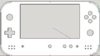
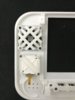
I started my project in september 2017 his name OPENWII.

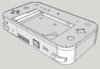
The link to download 3D SKP file : https://github.com/geostigma382
Updated 11/05/2018 :

- minor improve and cleaning model.

Features :
- OMGWTF Trim
- PortabilizeMii NOWIFI
- 1*USB Port for USB
- 1* USB To Composite
- 1*Red chargind board
- 1*Ventilator
- 1*Radiator
- 4*batteries NCR18650B to 7,4V 6800mA/h
- 5’’ TFT LCD screen
- 2*Infrared Leds
- Dslite button and 3Ds sliders
- Dslite speaker's


Advancement :
The principal electronics is finished so i need to wait a new screen to complete the project
 

Attachments

  • IMG_0204.JPG
    IMG_0204.JPG
    385.2 KB · Views: 1,400
  • Face iso 03032018.JPG
    Face iso 03032018.JPG
    85.1 KB · Views: 1,151
  • Face avant 03032018.JPG
    Face avant 03032018.JPG
    47.1 KB · Views: 865
  • Face arriere 03032018 (back).JPG
    Face arriere 03032018 (back).JPG
    95.2 KB · Views: 820
  • Face avant 03032018 (back).JPG
    Face avant 03032018 (back).JPG
    88.1 KB · Views: 835
  • Face arriere 03032018.JPG
    Face arriere 03032018.JPG
    101.2 KB · Views: 856
  • Old Controller.JPG
    Old Controller.JPG
    1.8 MB · Views: 1,062
  • Old Regulator.JPG
    Old Regulator.JPG
    1.6 MB · Views: 1,132
  • FINAL.JPG
    FINAL.JPG
    87.5 KB · Views: 991
  • FINAL2.JPG
    FINAL2.JPG
    87.1 KB · Views: 840
  • FINAL1.JPG
    FINAL1.JPG
    92.7 KB · Views: 796
Last edited:
I like the practicality of the controller and regulator boards. The model looks pretty slick too, you're off to a great start.

Just be aware that you cannot run Wii games from an SD card. Gamecube works, but Wii games have to be on a USB.
 
"Just be aware that you cannot run Wii games from an SD card. Gamecube works, but Wii games have to be on a USB."
Ok i did'nt know
i going to work with 16Go and in the future i replace them. thank ! :)
 
It looks good so far, but there are a few things I should point out.
If you are using 3DS sliders, you should use a GC+ instead of a gamecube controller. The 3DS sliders use different value potentiometers than stock gamecube sticks. This is a problem because the 3ds sliders will not give you full range, meaning you will not be able to move the stick all the way to maximum values in each direction. An example of this being a problem is being unable to move at full speed in zelda games. GC+ was made to rectify this.

The "sensor bar" on the wii doesn't actually sense anything, and is just a row of IR LEDs. The large holes you have for the stock sensor bar are not needed. Instead I would advise just using 2 IR leds, under the 1/4 and 3/4 width of the screen. It will work better at the closer distances that you will hold the remote on a portable when compared to far away with a big screen.

For things like your gamecube controller chip, consider using thinner wire. It will make your life a lot easier. Avoid solid core wire when possible, as it breaks internally very easily with no visible signs, and can cause headaches when you have no idea what is going wrong. Stranded core is better for thicker, power carrying wires.

Having a 100uf cap on both the input and output will give you a cleaner signal and lead to less interference. If you have the room for it, I would recommend it.

Your air intake does not look good for airflow. Consider the fan you are using, and where its air intake portion is. You current holes will most likely not allow enough airflow.

Some of your design such as the holes on the sides may be difficult to print.

Considering all these small things are what Im critiquing you on, you are off to an excellent start.
 
It looks good so far, but there are a few things I should point out.
If you are using 3DS sliders, you should use a GC+ instead of a gamecube controller. The 3DS sliders use different value potentiometers than stock gamecube sticks. This is a problem because the 3ds sliders will not give you full range, meaning you will not be able to move the stick all the way to maximum values in each direction. An example of this being a problem is being unable to move at full speed in zelda games. GC+ was made to rectify this.
Just a a tiny correction. The fact that 3DS sliders have a different total resistance doesn't really matter for the output range.
 
For my Gc controller I had not received the 30-gauge wire, I received it later now i'm asking if i resolder it smaller or not. For the 3ds slider i have found it "https://bitbuilt.net/forums/index.php?threads/wiring-up-3ds-sticks-to-your-controller.173/#post-1164" i think it's possible to connect directly, but it's sure the gc + makes life easier.
I see for the sensor bar its 10 infrared led i use directly the infrared cover of sensor bar to avoid having make them, but it's true i lost a lot of place.I will review the modeling and integration only 2 infrared led
The distance to the I have placed it is therefore 1/4 of the length of the screen below?
"
Having a 100uf cap on both the input and output will give you a cleaner signal and lead to less interference. If you have the room for it, I would recommend it."
about the regulator ?
i have printed 6 time the model to correct step by step it. I think this is the most complicated.
thank you for these small correction that would surely avoid the hours of additional printing ! :)
 
For my Gc controller I had not received the 30-gauge wire, I received it later now i'm asking if i resolder it smaller or not. For the 3ds slider i have found it "https://bitbuilt.net/forums/index.php?threads/wiring-up-3ds-sticks-to-your-controller.173/#post-1164" i think it's possible to connect directly, but it's sure the gc + makes life easier.
You can connect them directly, but the range is fucked up and most importantly the 3DS slider require a bigger dead zone, so on the stock GC pad it might see a movement even if the slider is still.
 
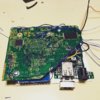
ok now, the USB work, all 4 players be ready to connect to the output connector. The screen work perfectly and the Wii boot ! i need to finish the 3d part and i wait to receive the battery to finish.
But do you know why i don't have sound? (picture 2) i have an sizzle sound
IMG_0199.jpg
 
Last edited:
ok now, the USB work, all 4 players be ready to connect to the output connector. The screen work perfectly and the Wii boot ! i need to finish the 3d part and i wait to receive the battery to finish.
But do you know why i don't have sound? (picture 2) i have an sizzle soundView attachment 5288View attachment 5287
You're pulling audio from the output of the preamp, which you are not powering. Pull audio from the input of the preamp.
 
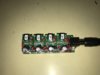
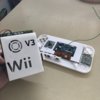
Hi everyone i have receive my BMS, i need to finish my 3D modeling before assembling all parts but that's what it look likeView attachment 5384
That looks very clean. I'm impressed! One thing I did in my case is make the screen cover in your case overlap the driver board where there's no components to effectively secure the driver board to the back of the screen.
 
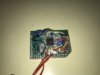
Hi ! I have finish my 3d model and now i'm start to connect all of parts.
I'm worried about the bluetooth because i have made a several damage on trace, but it's the first model. Now i have the 3D file and the list of component to build another without mistakes i made for this one.
I'm taking over the fusion360 software to convert my bugged sketchup modelling it's take a time but it's not a priority for the moment !
IMG_0290.jpg
 

Attachments

  • IMG_E0297.JPG
    IMG_E0297.JPG
    1.1 MB · Views: 844
  • IMG_E0298.JPG
    IMG_E0298.JPG
    1.1 MB · Views: 845
  • IMG_E0299.JPG
    IMG_E0299.JPG
    2.2 MB · Views: 862
Last edited:
It seems like you really have the organization of this project down. The case looks amazing too great job so far!
 
Hi i have a lot of problem i going to buy a new WII today,
The usb port have unfortunately stop working and the screen to, the Bluetooth doesn't work. So i thing it's the humidity because i have trim this console there is 8 month ago and I did not store it properly. With solder and re-solder electrical tracks are damaged.
But the charging system work perfectly i just worried about the RED BOARD produces a lot of heat when the battery was completly discharge. I hope that the voltage regulators will not be affected.
The cooling work perfectly for the moment the Wii ( blocked on the portablizemii "no usb device blablabla..") after 5-10 minutes starting is at 40-45 degrees.
IMG_0312.jpg
 
Hi!
i have received my new wii and i installed portabilizemii and relocate the bluetooth chip this time!
I having trim and put into my case !
So, now i can play with an external controller and external screen with my USB to COMPOSITE cable!
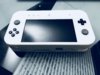
I need to receive my screen (it broken: '() to complete the front face!
I have remade the ABXY support to put a soft button to improve the touch qualities. The trigger is
comfortable and work nice thanks to Madmorda for the double tact button enclosure !
IMG_0354(1).jpg
 

Attachments

  • IMG_0349.jpg
    IMG_0349.jpg
    1.9 MB · Views: 862
  • IMG_0359(1).jpg
    IMG_0359(1).jpg
    1,002.7 KB · Views: 795
This is one of my favorite Portables!
I like how everything has a spot, messy, but still so clean.
 
I really like the look of that ABXY platform. I hope it's strong enough to last.
 
Back
Top