Question Is there a way to tell if an AVE is dead?

Gh0st

.
Joined
Aug 6, 2023
Messages
13
Likes
1
This might be a dumb question.. I soldered up the VGA, and get voltage readings from all lines except the H Sync and V Sync. Component works fine, although I have reset bridged to gnd because BBloader wont boot for some reason. 3.3v is bridged with mode and VGA patch is installed, I've rewired multiple times and checked the continuity to make sure there are no shorts. Any help is appreciated.
 
Last edited:
You should post pictures of your wiring, that will help with troubleshooting. Also, if you are using BBLoader maybe you should upgrade to RVLoader, it's newer and what most people use now.
 
Last edited:
Have you tested this trim with composite yet? That should definitely be done prior to trying VGA. If you're still not getting a signal with composite (and mode not connected to 3v3), then it would seem like the Wii is not booting. It's also worth mentioning that some screen driver boards (notably the one for the 3.5" 640x480 screen that is well-loved around here) have H and V swapped on the silkscreen, meaning that you'd need to wire H from the Wii to "V" on the driver board, and vice versa.

It's pretty hard to kill an AVE, but I have seen it happen before. I've even had a Wii where either H or V (I forget which) had an internal short to ground in the AVE that didn't allow VGA to work, but if you're resistances between your H and V pins (and each to ground) are okay, I wouldn't worry.

1694009918595.png
 
Yes, tested composite and it works fine. I am actually using RVloader 1.6, still won't boot without the reset to GND. I've checked H sync and V sync with a multimeter and not getting anything from it but I am getting power from the RGB lines.
 

Attachments

  • PXL_20230907_233804895.jpg
    PXL_20230907_233804895.jpg
    2.6 MB · Views: 185
  • PXL_20230907_233820301.jpg
    PXL_20230907_233820301.jpg
    2.7 MB · Views: 174
  • PXL_20230907_233825427.jpg
    PXL_20230907_233825427.jpg
    2.7 MB · Views: 182
Highly unlikely your AVE is fried.

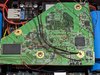
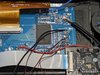
If it wont boot without priiloader reset to ground, its likely a wiring issue. I suspect USB. Your method of "twisting wire" by having one wire wrapped around the other is not correct at all. For USB, both lines should be the same gauge, as close to the same length as possible, and wrapped around each other evenly. Your red wires are substantially longer than your green wires, and it appears the wires are very different thicknesses. Without proper twisting, the USB data lines will not cancel out interference. For more details on why this is so important, look into "differential signaling".

Another source of priiloader working and nothing else working can be bad U10 wiring or not installing the Wifi Patch. Are you sure you relocated the U10 properly, every connection is correct, and it is behaving as expected? Are you sure you installed NoWifi patches?

If you have activity on the color lines but not the sync lines, sounds like you didn't properly install VGA patches. Plus you saying "Component works fine" is also a sign of this, as VGA patching disables Component Video.

One last thing, you mentioned BB Loader. Are you running BB Loader or RVLoader?

 
Thank you for all the info, I will definitely replace the wiring with the same gauge and twist accordingly. I removed the U5 but never soldered up the u10. The u10 is coming from the PMS2, and I was told it wasn't needed to relocate the u10 if you were using the one from the PMS2. When testing component I have to remove the 3.3v from mode to get it to work, and when it is connected component doesn't work which is normal from what I read. I have reinstalled the iOS patches a couple times to be absolutely sure. It always completes and then shows a DSI error. And using RVLoader 1.6

Thank you again! I'm fairly new to this so your input means a lot to me.
 

Attachments

  • PXL_20230906_030451902.jpg
    PXL_20230906_030451902.jpg
    2.5 MB · Views: 171
  • PXL_20230906_030447401.jpg
    PXL_20230906_030447401.jpg
    2.5 MB · Views: 178
Back
Top