Question I need help with some things!

Joined
Feb 3, 2025
Messages
25
Likes
0
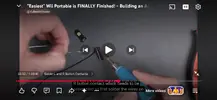
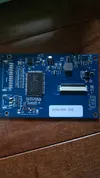
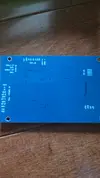
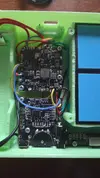
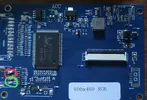
I have looked everywhere for this part even the tools needed thread and there is no post saying anything about for the wiring the legs of the speakers with connecting them to the pads since the legs can't make good contact with the pads. I don't want to do the wrong one so I need help knowing what size is needed. This is for the controller board since the speakers don't make good contacts. I also don't know what sized wires I need for the L and R buttons that go onto the brackets for running the contacts on the controller board for the Ashida. I also need help with the driver board for ips screen since I got the blue driver board not green so I could have completely messed up the contact when trying so hard to remove the ports since there was no way to desolder them for this driver board only the green one could. So I need help if its going to work with the AV Composite wiring on it for the screen. Since a YouTuber named Dubesinhower did VGA signal instead so I don't how to do it for composite since I need video tutorials for these kind of things. The last thing I need help with is U-Amp2 which I'm not sure if Im doing it right and I don't know what to connect to the pads for wiring so it will work. I will show pictures to help showing what I'm talking about since I'm not the greatest at writing.
 
Last edited:
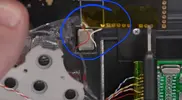
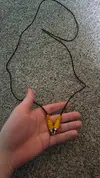
Here are pictures of what I am talking about.
 

Attachments

  • Screenshot_20260621_115917_YouTube.webp
    Screenshot_20260621_115917_YouTube.webp
    707.3 KB · Views: 1
  • Screenshot_20260621_124447_YouTube.webp
    Screenshot_20260621_124447_YouTube.webp
    135.5 KB · Views: 1
  • Screenshot_20260621_124344_YouTube.webp
    Screenshot_20260621_124344_YouTube.webp
    70.6 KB · Views: 1
  • 20260621_125401.webp
    20260621_125401.webp
    1.4 MB · Views: 1
  • 20260621_125412.webp
    20260621_125412.webp
    1.5 MB · Views: 1
  • 20260621_125502.webp
    20260621_125502.webp
    1.6 MB · Views: 1
Last edited:
Not much current is passing through the speaker, so you don't need thick wire. 22-30awg should be fine.

For composite, just wire up the single composite video wire and ground; details for the wii are in the wii trimming guide, and for the display driver board it should be labeled with a silkscreen. Your video quality will be poor, and limited to 480i, so it's not recommended.

For uamp, see the diagrams on the 4layer tech product page. There's a variety of configurations; choose the one that fits your use case.
 
I didn't know how vga would have worked because I have never heard of it. So I ordered a YPBR wii motherboard off of Aliexpress since I messed up my wii motherboard.
 
All non-mini Wiis have native YPbPr, and are capable of VGA output with the VGA patch on RVLoader.

VGA is common on display driver boards, but YPbPr is not. Chances are your driver board is not capable of accepting it, as is the case for the vast majority of current driver boards. This is why VGA is used instead. I would strongly advise familiarizing yourself with the Wii trimming guide, and reading through as many wii portable worklogs as you can. There are several worklogs here of ashida builds.
 
By silkscreen do you mean by the lettering on the back of the driver board because I don't know where to connect the wire on the driver by even looking at it. Since I don't really know this plus there is multiple grounds and it I still don't know where to put it even if it says "VGA -YPBPR IN" then I don't know which pad since I'm not an expert. Or do I not need the driver board I'm confused. Also how about the L and R Button Contacts what size wire for that?
 
Last edited:
For the button contacts you can basically use any wire, I went with a 30awg wire.
As for the screen, most people opt for VGA because the picture quality is waaayy better (just follow the dubesinhower video for that). Only downside is that you need, 3 data + 3gnd wires, so 6 in total instead of just 2.
 
For the button contacts you can basically use any wire, I went with a 30awg wire.
As for the screen, most people opt for VGA because the picture quality is waaayy better (just follow the dubesinhower video for that). Only downside is that you need, 3 data + 3gnd wires, so 6 in total instead of just 2.
I have to do composite because the board is already trimmed so I need to know what wire for the composite on the driver board like use an actual composite wire like yellow or just a regular wire and on which pad for ground and the one for the other because I can't move on until I know the answer. I can't afford a vga motherboard at the moment I don't got a lot of money so ill have to do composite. It will be easier for me anyway until I want to upgrade because I want the old TV look on the screen just like the old wii screen because it doesn't matter that much to me.
 

Attachments

  • 17821594196742167728268834253696.webp
    17821594196742167728268834253696.webp
    2.3 MB · Views: 1
Last edited:
Ah I see. So in order to try Composite out on the wii you can just follow the dubesinhower video ( around the 17min mark)
You can either cut up the cable you showed or tightly twist two magnet wires (best case 34awg) tighly together (see part 3 when he wires up the display)
You connect one end of the cable to the wii like in the video and the other end you wire to gnd and Composite in
 
It would be best if you look a bit through the forums and maybe also watch some of Gingers streams, they can also be very helpful :)
 
It would be best if you look a bit through the forums and maybe also watch some of Gingers streams, they can also be very helpful :)
But im talking about the driver board for the screen not the TV because I don't know which pad because I really need help because I have seen that video already. Because how will that work on my screen because thats meant for the tv. How will I find forums if most people are not doing composite?
 
Last edited:
You can use either of those (labeled on the back as AV1 and AV2, just make sure to set the screen to the right input mode, it doesnt automatically switch, you can do so withe the K (1,2,3,4,5) pads, even though you ripped them of you can still short the tiny transitors right next to them to gnd for the same result)
 

Attachments

  • IMG_3531.webp
    IMG_3531.webp
    106.1 KB · Views: 1
How will I use it if both av 1 and av 2 is ripped? And it looks like quanity one by the looks of it pad of 2 or 3 or 4 K seems to be the only one not ripped because I can't tell if thats going to work because wouldn't I need a new one?
 
If both AV ports a ripped, your best bet is to connect it to VGA right away or see if you have another monitor which supports AV in.
You could try to scrape some masking away from the trace to the pad, but that seems kinda hard to do
 
Great looks like I am going to have buy a new board because the one I got was impossible to remove the ports without melting all of them off I don't want to get the blue board because its going to get damaged again I need a green one and I don't have like any money so I hope there is some way to message 4 layer tech to give me a green one instead of blue.
 
Why don't you just connect VGA? That's what you want after all
The AV is just a quick way to test if you get video
 
I don't quite understand what you mean

Most people use the AV out to just quickly check if the Wii still boots because it just 2 quick wires.
But in the finished built you wire the the Wii to the VGA port on the screen because,ou get much better image quality. There are no extra costs involved or anything, you just use 6 wires (+2 for h and v sync)
 
I don't quite understand what you mean

Most people use the AV out to just quickly check if the Wii still boots because it just 2 quick wires.
But in the finished built you wire the the Wii to the VGA port on the screen because,ou get much better image quality. There are no extra costs involved or anything, you just use 6 wires (+2 for h and v sync)
Once you trim the wii you can't change the video because i bought composite as video not VGA.
 
Back
Top