
You are using an out of date browser. It may not display this or other websites correctly.
You should upgrade or use an alternative browser.
You should upgrade or use an alternative browser.
Worklog Some PS2 Project
- Thread starter Tschicki
- Start date


Tschicki
.
Time for a long overdue update!
Work has been a little bit tough in the last months, so I wasn’t too motivated to work on electronics stuff at home… but don’t you think there was no progress on the project!
Testing, Bugfixes and PS1 Mode
I’ve been using the prototype during my commutes for probably more than 200 hours and in parallel I was fixing a lot of the bugs I encountered.
The most interesting one was probably the random start button presses, that took some time to solve. Essentially, some games would pause randomly every 20 minutes or so. Initially I thought it was a bug in the gamepad emulator, but it was really difficult to catch one of the faulty packets on the logic analyzer, because I didn’t really know what kind of problem to expect (missing packets, all buttons zero, wrong gamepad mode…). After way too much time I managed to capture the issue and it turned out that the gamepad emulator was fine, but the start button really appeared to be pressed for exactly one packet! In the end it was a hardware problem – the start button doubles as BOOTSEL button for the Sycon, to update the firmware via USB. I was aware of possible issues that could arise, so in the right gamepad schematics I added a diode to prevent the Syscon from pulling down the start button. I just then made the mistake of populating that diode with a 0R resistor…
Right now it was fixed by adding the diode. but the next mainboard revision fixes this by buffering the bootsel signal.
Then we get to PS1 mode:
In April I discovered the awesome homebrew called DKWDRV, a custom PS1 driver that allows running PS1 backups using the PS2’s PS1 mode. Even better for Deckard PS2s: using some black magic, the devs managed to emulate the CD drive using the PPC IOP and load PS1 games from USB instead! Not dealing with Popstarter and playing PS1 games “natively” on a PS2 portable sound amazing, so I had to give it a try! It even supports SD2PSX and game ID for saving on the latest release!
While the custom mainboard is perfectly compatible with DKWDRV, there were some problems:
For some reason the gamepad was not working in most PS1 games, so I was trying find the reason for that. In the beginning I was really clueless to why it wouldn’t work, as the gamepad implements all gamepad modes. I started by going through my reverse engineering notes again and did some refactoring on the gamepad emulator core functions, but that did not help either. At some point I hooked up the logic analyzer to a dualshock 2 again and tried launching a PS1 game via DKWDRV on a 90k console… there I noticed that the original controller is in dualshock 2 before launching a PS1 game, and in digital mode after launching a PS1 game – without any explicit mode changes -> this means there must be some sort of timeout in dualshock 2 mode, where the gamepad defaults back to digital mode when no communication occurs for a couple of seconds!
Turns out older PS1 games will not recognize a dualshock controller, only a digital controller. I guess that’s why Sony added the analog mode button to the gamepad. After that discovery it made sense that the gamepad wasn’t working – there was no way to reset the gamepad back to digital mode once it entered dualshock mode. To fix this I added a similar 3s timeout to dualshock mode, which will reset the gamepad’s mode while a PS1 game is launched. Maybe in the future I will add an analog mode toggle in the menu, if I see that the current solution is not sufficient.
Interestingly, the video output of PS1 games was accepted straight away by the video processor. It makes sense because I considered those modes when defining the architecture, but I actually never tested them in simulation or hardware. Nice.
Another addition to the gamepad emulator is what I call “PS1 Analog” mode. It essentially translates the left analog stick to d-pad presses for PS1 games that don’t support analog controls. I tried to play DOOM with the d-pad and this mode was the result.... the option is selectable via the Syscon’s menu.
The current release of DKWDRV still has lots of audio issues on most games, but otherwise everything I tested ran perfectly. Mainly Crash Bandicoot 3 and Rayman 2 were flawless, here is some footage of Crash:
Housing
Since the last update I was looking into filling and painting the housing and I did a little practice run on the front half:


The color is ruby red (RAL3003)I and I actually quite like the red/black combo, might even keep it for one of the final portables. For filling the areas around the overhangs I used some Plasto filler and for the layer lines I first did a rough sand and then used a couple layers of filler spray with fine sanding in between. A clear coat is still missing, I’m considering some 2 component spray paint as I had some pretty bad experiences using the standard acrylic clear coat in previous portables. Still doing some research about which types of spray paint are compatible…
New Gamepads
In the last weeks I was working on finalizing the new gamepad PCBs. The mechanical design was actually already done since last year and would have involved 2 flex PCBs on multiple levels and two folds. Upon revisiting the design, I wasn’t happy with its flexibility and I opted for two 0.8mm rigid PCBs and four small flex PCBs instead.
A big requirement for the new gamepads was to keep compatibility to the current mainboard revision, so I can upgrade the prototype to the latest design for testing.
This would be the right gamepad:


And the two flex PCBs for the right gamepad:


The rigid PCBs make component placement way more flexible, because it allows me to place the RP2040 on the bottom layer (previously reserved for the FR4 stiffener). In the last revision I put all electronics directly below the analog sticks, but in the current portable I noticed that the sticks protrude about 0.5mm more than they should be; moving them inwards leaves no space below them for the RP2040, so the circuits needed to go to the bottom layer. The shoulder buttons and connection to the mainboard are still implemented using small and inexpensive flex PCBs. Price-wise the new solution is about equal to two big flex PCB gamepads with FR4 stiffener.
Another addition was rumble-support. The respective functions and registers were already in the Syscon and gamepad code since the very beginning, but I always treated rumble as nice to have feature and actually never tested it.
Of course, there needs to be a good compromise between rumble strength and power consumption - it’s a portable PS2 after all – so I’ve chosen 10x3.4mm coin-style vibration motors for the rumble. One consumes about 250mW and after some first tests I think they are actually quite strong for what they are. In order to compensate for their small size, I’m planning to place them in the grips directly under the player’s palm. In any case, there will be a setting in the menu to change the intensity of the rumble (can also be turned off).

There is how the mechanical design looks right now:


All the gamepad PCBs were manufactured already and are on their way from JLC, so I guess in a week or two I will have a functional prototype to play with.
Mainboard Rev. 0.3
I was working on the rev. 0.3 mainboard from time to time and I think now is a good time to report the progress.


The main intention of the next revision is to fix one bodge, consolidate the power planes on (mostly) one layer, add the 64Mbit boot rom mod, optimize the BOM and fix a few potential oversights in rev. 0.2.
Here you can see the new power routing on inner layer 2:

Inner layer 3 used to be a (mostly) power layer too in rev. 0.2, now it contains a GND pour and lower speed signals. Apart from that, some video traces had to go to inner3 as well, but I made sure to add adjacent GND. In order to have an easier time routing power, I had to slightly adjust component placement in the power management section. For the new power routing I would have preferred a stackup with 1oz inner copper, but JLC doesn’t seem to have an affordable and suitable alternative. But 0.5oz should still be fine for this application.
The battery connectors are still unchanged, as I couldn’t find any more suitable low-profile connectors for the application + soldering the wires was a no-go for me. I actually found a cheap crimping tool on aliexpress that can be used to crimp EZmate HC connectors properly, without spending 500 bucks for the tool from molex. You find it as “IWS-0302BS” on aliexpress.
Additionally to the other changes, I swapped the 16Mbit flash of the Syscon for a 128Mbit flash (same as the SD2PSX to save BOM items). The 32Mbit PS2 boot ROM was upgraded to my latest circuit using the 64Mbit NOR flash (actually not necessary currently, but good for future-proofing). Lastly, I added open drain buffers to the HPSense signal and the BOOTSEL of the Syscon. The first is to avoid and potential problems with switching between headphones and speakers and the second one is to mitigate the “random start pressing” bug I described earlier.
The BOM was also further optimized, especially some of the capacitor values. In total we have about 760 components on the mainboard now… not counting the gamepads and the memory card flex.
Currently I’m still looking into an alternative for the USB A port from a 79k console. The port from 90k consoles is just ever so slightly different that it doesn’t quite fit (not even when flipping it). So that’s still ongoing. GND via stitching, fixing some clearance rules for the differential pairs, reworking some of the polygons, going through the DRC check results and reviewing schematics & PCB are also still on the list of things to do.
Next Steps
First, I will try to get the new gamepads working on the current portable prototype. This also includes rumble support. In parallel I will continue to work on finishing the new mainboard and its heatsink. I’m actually quite far already with the heatsink, but some optimizations are still pending.
In parallel I will start writing a rough draft of an assembly procedure for the portable, but it will probably not be finished before I assemble the next revision (need to take pictures). A BOM for all mechanical & custom components was started and I will try to fill it with some more information and ordering parameters (that's why you see all the REF numbers on the PCBs, it's their ID in the BOM)
Some minor task to be done in parallel is to find a suitable mesh for the speaker holes and maybe even the air intake on the back. Other missing parts would be the sealing compound/tape between screen lens and screen to keep dust out, a thin adhesive backed foam as damper for the speakers, and a thicker thermal pad for the battery thermistors.
That’s it for now! Expect to see a small update once I get the new gamepads assembled and tested!
Work has been a little bit tough in the last months, so I wasn’t too motivated to work on electronics stuff at home… but don’t you think there was no progress on the project!
Yes, that's the plan!Are you going to make everything opensource so that anyone can build it themselves and/or make their own modifications?
Testing, Bugfixes and PS1 Mode
I’ve been using the prototype during my commutes for probably more than 200 hours and in parallel I was fixing a lot of the bugs I encountered.
The most interesting one was probably the random start button presses, that took some time to solve. Essentially, some games would pause randomly every 20 minutes or so. Initially I thought it was a bug in the gamepad emulator, but it was really difficult to catch one of the faulty packets on the logic analyzer, because I didn’t really know what kind of problem to expect (missing packets, all buttons zero, wrong gamepad mode…). After way too much time I managed to capture the issue and it turned out that the gamepad emulator was fine, but the start button really appeared to be pressed for exactly one packet! In the end it was a hardware problem – the start button doubles as BOOTSEL button for the Sycon, to update the firmware via USB. I was aware of possible issues that could arise, so in the right gamepad schematics I added a diode to prevent the Syscon from pulling down the start button. I just then made the mistake of populating that diode with a 0R resistor…
Right now it was fixed by adding the diode. but the next mainboard revision fixes this by buffering the bootsel signal.
Then we get to PS1 mode:
In April I discovered the awesome homebrew called DKWDRV, a custom PS1 driver that allows running PS1 backups using the PS2’s PS1 mode. Even better for Deckard PS2s: using some black magic, the devs managed to emulate the CD drive using the PPC IOP and load PS1 games from USB instead! Not dealing with Popstarter and playing PS1 games “natively” on a PS2 portable sound amazing, so I had to give it a try! It even supports SD2PSX and game ID for saving on the latest release!
While the custom mainboard is perfectly compatible with DKWDRV, there were some problems:
For some reason the gamepad was not working in most PS1 games, so I was trying find the reason for that. In the beginning I was really clueless to why it wouldn’t work, as the gamepad implements all gamepad modes. I started by going through my reverse engineering notes again and did some refactoring on the gamepad emulator core functions, but that did not help either. At some point I hooked up the logic analyzer to a dualshock 2 again and tried launching a PS1 game via DKWDRV on a 90k console… there I noticed that the original controller is in dualshock 2 before launching a PS1 game, and in digital mode after launching a PS1 game – without any explicit mode changes -> this means there must be some sort of timeout in dualshock 2 mode, where the gamepad defaults back to digital mode when no communication occurs for a couple of seconds!
Turns out older PS1 games will not recognize a dualshock controller, only a digital controller. I guess that’s why Sony added the analog mode button to the gamepad. After that discovery it made sense that the gamepad wasn’t working – there was no way to reset the gamepad back to digital mode once it entered dualshock mode. To fix this I added a similar 3s timeout to dualshock mode, which will reset the gamepad’s mode while a PS1 game is launched. Maybe in the future I will add an analog mode toggle in the menu, if I see that the current solution is not sufficient.
Interestingly, the video output of PS1 games was accepted straight away by the video processor. It makes sense because I considered those modes when defining the architecture, but I actually never tested them in simulation or hardware. Nice.
Another addition to the gamepad emulator is what I call “PS1 Analog” mode. It essentially translates the left analog stick to d-pad presses for PS1 games that don’t support analog controls. I tried to play DOOM with the d-pad and this mode was the result.... the option is selectable via the Syscon’s menu.
The current release of DKWDRV still has lots of audio issues on most games, but otherwise everything I tested ran perfectly. Mainly Crash Bandicoot 3 and Rayman 2 were flawless, here is some footage of Crash:
Housing
Since the last update I was looking into filling and painting the housing and I did a little practice run on the front half:
The color is ruby red (RAL3003)I and I actually quite like the red/black combo, might even keep it for one of the final portables. For filling the areas around the overhangs I used some Plasto filler and for the layer lines I first did a rough sand and then used a couple layers of filler spray with fine sanding in between. A clear coat is still missing, I’m considering some 2 component spray paint as I had some pretty bad experiences using the standard acrylic clear coat in previous portables. Still doing some research about which types of spray paint are compatible…
New Gamepads
In the last weeks I was working on finalizing the new gamepad PCBs. The mechanical design was actually already done since last year and would have involved 2 flex PCBs on multiple levels and two folds. Upon revisiting the design, I wasn’t happy with its flexibility and I opted for two 0.8mm rigid PCBs and four small flex PCBs instead.
A big requirement for the new gamepads was to keep compatibility to the current mainboard revision, so I can upgrade the prototype to the latest design for testing.
This would be the right gamepad:
And the two flex PCBs for the right gamepad:
The rigid PCBs make component placement way more flexible, because it allows me to place the RP2040 on the bottom layer (previously reserved for the FR4 stiffener). In the last revision I put all electronics directly below the analog sticks, but in the current portable I noticed that the sticks protrude about 0.5mm more than they should be; moving them inwards leaves no space below them for the RP2040, so the circuits needed to go to the bottom layer. The shoulder buttons and connection to the mainboard are still implemented using small and inexpensive flex PCBs. Price-wise the new solution is about equal to two big flex PCB gamepads with FR4 stiffener.
Another addition was rumble-support. The respective functions and registers were already in the Syscon and gamepad code since the very beginning, but I always treated rumble as nice to have feature and actually never tested it.
Of course, there needs to be a good compromise between rumble strength and power consumption - it’s a portable PS2 after all – so I’ve chosen 10x3.4mm coin-style vibration motors for the rumble. One consumes about 250mW and after some first tests I think they are actually quite strong for what they are. In order to compensate for their small size, I’m planning to place them in the grips directly under the player’s palm. In any case, there will be a setting in the menu to change the intensity of the rumble (can also be turned off).
There is how the mechanical design looks right now:
All the gamepad PCBs were manufactured already and are on their way from JLC, so I guess in a week or two I will have a functional prototype to play with.
Mainboard Rev. 0.3
I was working on the rev. 0.3 mainboard from time to time and I think now is a good time to report the progress.
The main intention of the next revision is to fix one bodge, consolidate the power planes on (mostly) one layer, add the 64Mbit boot rom mod, optimize the BOM and fix a few potential oversights in rev. 0.2.
Here you can see the new power routing on inner layer 2:
Inner layer 3 used to be a (mostly) power layer too in rev. 0.2, now it contains a GND pour and lower speed signals. Apart from that, some video traces had to go to inner3 as well, but I made sure to add adjacent GND. In order to have an easier time routing power, I had to slightly adjust component placement in the power management section. For the new power routing I would have preferred a stackup with 1oz inner copper, but JLC doesn’t seem to have an affordable and suitable alternative. But 0.5oz should still be fine for this application.
The battery connectors are still unchanged, as I couldn’t find any more suitable low-profile connectors for the application + soldering the wires was a no-go for me. I actually found a cheap crimping tool on aliexpress that can be used to crimp EZmate HC connectors properly, without spending 500 bucks for the tool from molex. You find it as “IWS-0302BS” on aliexpress.
Additionally to the other changes, I swapped the 16Mbit flash of the Syscon for a 128Mbit flash (same as the SD2PSX to save BOM items). The 32Mbit PS2 boot ROM was upgraded to my latest circuit using the 64Mbit NOR flash (actually not necessary currently, but good for future-proofing). Lastly, I added open drain buffers to the HPSense signal and the BOOTSEL of the Syscon. The first is to avoid and potential problems with switching between headphones and speakers and the second one is to mitigate the “random start pressing” bug I described earlier.
The BOM was also further optimized, especially some of the capacitor values. In total we have about 760 components on the mainboard now… not counting the gamepads and the memory card flex.
Currently I’m still looking into an alternative for the USB A port from a 79k console. The port from 90k consoles is just ever so slightly different that it doesn’t quite fit (not even when flipping it). So that’s still ongoing. GND via stitching, fixing some clearance rules for the differential pairs, reworking some of the polygons, going through the DRC check results and reviewing schematics & PCB are also still on the list of things to do.
Next Steps
First, I will try to get the new gamepads working on the current portable prototype. This also includes rumble support. In parallel I will continue to work on finishing the new mainboard and its heatsink. I’m actually quite far already with the heatsink, but some optimizations are still pending.
In parallel I will start writing a rough draft of an assembly procedure for the portable, but it will probably not be finished before I assemble the next revision (need to take pictures). A BOM for all mechanical & custom components was started and I will try to fill it with some more information and ordering parameters (that's why you see all the REF numbers on the PCBs, it's their ID in the BOM)
Some minor task to be done in parallel is to find a suitable mesh for the speaker holes and maybe even the air intake on the back. Other missing parts would be the sealing compound/tape between screen lens and screen to keep dust out, a thin adhesive backed foam as damper for the speakers, and a thicker thermal pad for the battery thermistors.
That’s it for now! Expect to see a small update once I get the new gamepads assembled and tested!

Fly_5
.
- Joined
- Apr 4, 2022
- Messages
- 105
- Likes
- 130
- Location
- Spain
- Portables
- Megadrive portable / PS2 Next-G portable
Time for a long overdue update!
Work has been a little bit tough in the last months, so I wasn’t too motivated to work on electronics stuff at home… but don’t you think there was no progress on the project!
Yes, that's the plan!
Testing, Bugfixes and PS1 Mode
I’ve been using the prototype during my commutes for probably more than 200 hours and in parallel I was fixing a lot of the bugs I encountered.
The most interesting one was probably the random start button presses, that took some time to solve. Essentially, some games would pause randomly every 20 minutes or so. Initially I thought it was a bug in the gamepad emulator, but it was really difficult to catch one of the faulty packets on the logic analyzer, because I didn’t really know what kind of problem to expect (missing packets, all buttons zero, wrong gamepad mode…). After way too much time I managed to capture the issue and it turned out that the gamepad emulator was fine, but the start button really appeared to be pressed for exactly one packet! In the end it was a hardware problem – the start button doubles as BOOTSEL button for the Sycon, to update the firmware via USB. I was aware of possible issues that could arise, so in the right gamepad schematics I added a diode to prevent the Syscon from pulling down the start button. I just then made the mistake of populating that diode with a 0R resistor…
Right now it was fixed by adding the diode. but the next mainboard revision fixes this by buffering the bootsel signal.
Then we get to PS1 mode:
In April I discovered the awesome homebrew called DKWDRV, a custom PS1 driver that allows running PS1 backups using the PS2’s PS1 mode. Even better for Deckard PS2s: using some black magic, the devs managed to emulate the CD drive using the PPC IOP and load PS1 games from USB instead! Not dealing with Popstarter and playing PS1 games “natively” on a PS2 portable sound amazing, so I had to give it a try! It even supports SD2PSX and game ID for saving on the latest release!
While the custom mainboard is perfectly compatible with DKWDRV, there were some problems:
For some reason the gamepad was not working in most PS1 games, so I was trying find the reason for that. In the beginning I was really clueless to why it wouldn’t work, as the gamepad implements all gamepad modes. I started by going through my reverse engineering notes again and did some refactoring on the gamepad emulator core functions, but that did not help either. At some point I hooked up the logic analyzer to a dualshock 2 again and tried launching a PS1 game via DKWDRV on a 90k console… there I noticed that the original controller is in dualshock 2 before launching a PS1 game, and in digital mode after launching a PS1 game – without any explicit mode changes -> this means there must be some sort of timeout in dualshock 2 mode, where the gamepad defaults back to digital mode when no communication occurs for a couple of seconds!
Turns out older PS1 games will not recognize a dualshock controller, only a digital controller. I guess that’s why Sony added the analog mode button to the gamepad. After that discovery it made sense that the gamepad wasn’t working – there was no way to reset the gamepad back to digital mode once it entered dualshock mode. To fix this I added a similar 3s timeout to dualshock mode, which will reset the gamepad’s mode while a PS1 game is launched. Maybe in the future I will add an analog mode toggle in the menu, if I see that the current solution is not sufficient.
Interestingly, the video output of PS1 games was accepted straight away by the video processor. It makes sense because I considered those modes when defining the architecture, but I actually never tested them in simulation or hardware. Nice.
Another addition to the gamepad emulator is what I call “PS1 Analog” mode. It essentially translates the left analog stick to d-pad presses for PS1 games that don’t support analog controls. I tried to play DOOM with the d-pad and this mode was the result.... the option is selectable via the Syscon’s menu.
The current release of DKWDRV still has lots of audio issues on most games, but otherwise everything I tested ran perfectly. Mainly Crash Bandicoot 3 and Rayman 2 were flawless, here is some footage of Crash:
Housing
Since the last update I was looking into filling and painting the housing and I did a little practice run on the front half:
View attachment 39212View attachment 39213
The color is ruby red (RAL3003)I and I actually quite like the red/black combo, might even keep it for one of the final portables. For filling the areas around the overhangs I used some Plasto filler and for the layer lines I first did a rough sand and then used a couple layers of filler spray with fine sanding in between. A clear coat is still missing, I’m considering some 2 component spray paint as I had some pretty bad experiences using the standard acrylic clear coat in previous portables. Still doing some research about which types of spray paint are compatible…
New Gamepads
In the last weeks I was working on finalizing the new gamepad PCBs. The mechanical design was actually already done since last year and would have involved 2 flex PCBs on multiple levels and two folds. Upon revisiting the design, I wasn’t happy with its flexibility and I opted for two 0.8mm rigid PCBs and four small flex PCBs instead.
A big requirement for the new gamepads was to keep compatibility to the current mainboard revision, so I can upgrade the prototype to the latest design for testing.
This would be the right gamepad:
View attachment 39203View attachment 39204
And the two flex PCBs for the right gamepad:
View attachment 39206View attachment 39205
The rigid PCBs make component placement way more flexible, because it allows me to place the RP2040 on the bottom layer (previously reserved for the FR4 stiffener). In the last revision I put all electronics directly below the analog sticks, but in the current portable I noticed that the sticks protrude about 0.5mm more than they should be; moving them inwards leaves no space below them for the RP2040, so the circuits needed to go to the bottom layer. The shoulder buttons and connection to the mainboard are still implemented using small and inexpensive flex PCBs. Price-wise the new solution is about equal to two big flex PCB gamepads with FR4 stiffener.
Another addition was rumble-support. The respective functions and registers were already in the Syscon and gamepad code since the very beginning, but I always treated rumble as nice to have feature and actually never tested it.
Of course, there needs to be a good compromise between rumble strength and power consumption - it’s a portable PS2 after all – so I’ve chosen 10x3.4mm coin-style vibration motors for the rumble. One consumes about 250mW and after some first tests I think they are actually quite strong for what they are. In order to compensate for their small size, I’m planning to place them in the grips directly under the player’s palm. In any case, there will be a setting in the menu to change the intensity of the rumble (can also be turned off).
View attachment 39214
There is how the mechanical design looks right now:
View attachment 39210View attachment 39211
All the gamepad PCBs were manufactured already and are on their way from JLC, so I guess in a week or two I will have a functional prototype to play with.
Mainboard Rev. 0.3
I was working on the rev. 0.3 mainboard from time to time and I think now is a good time to report the progress.
View attachment 39207View attachment 39208
The main intention of the next revision is to fix one bodge, consolidate the power planes on (mostly) one layer, add the 64Mbit boot rom mod, optimize the BOM and fix a few potential oversights in rev. 0.2.
Here you can see the new power routing on inner layer 2:
View attachment 39209
Inner layer 3 used to be a (mostly) power layer too in rev. 0.2, now it contains a GND pour and lower speed signals. Apart from that, some video traces had to go to inner3 as well, but I made sure to add adjacent GND. In order to have an easier time routing power, I had to slightly adjust component placement in the power management section. For the new power routing I would have preferred a stackup with 1oz inner copper, but JLC doesn’t seem to have an affordable and suitable alternative. But 0.5oz should still be fine for this application.
The battery connectors are still unchanged, as I couldn’t find any more suitable low-profile connectors for the application + soldering the wires was a no-go for me. I actually found a cheap crimping tool on aliexpress that can be used to crimp EZmate HC connectors properly, without spending 500 bucks for the tool from molex. You find it as “IWS-0302BS” on aliexpress.
Additionally to the other changes, I swapped the 16Mbit flash of the Syscon for a 128Mbit flash (same as the SD2PSX to save BOM items). The 32Mbit PS2 boot ROM was upgraded to my latest circuit using the 64Mbit NOR flash (actually not necessary currently, but good for future-proofing). Lastly, I added open drain buffers to the HPSense signal and the BOOTSEL of the Syscon. The first is to avoid and potential problems with switching between headphones and speakers and the second one is to mitigate the “random start pressing” bug I described earlier.
The BOM was also further optimized, especially some of the capacitor values. In total we have about 760 components on the mainboard now… not counting the gamepads and the memory card flex.
Currently I’m still looking into an alternative for the USB A port from a 79k console. The port from 90k consoles is just ever so slightly different that it doesn’t quite fit (not even when flipping it). So that’s still ongoing. GND via stitching, fixing some clearance rules for the differential pairs, reworking some of the polygons, going through the DRC check results and reviewing schematics & PCB are also still on the list of things to do.
Next Steps
First, I will try to get the new gamepads working on the current portable prototype. This also includes rumble support. In parallel I will continue to work on finishing the new mainboard and its heatsink. I’m actually quite far already with the heatsink, but some optimizations are still pending.
In parallel I will start writing a rough draft of an assembly procedure for the portable, but it will probably not be finished before I assemble the next revision (need to take pictures). A BOM for all mechanical & custom components was started and I will try to fill it with some more information and ordering parameters (that's why you see all the REF numbers on the PCBs, it's their ID in the BOM)
Some minor task to be done in parallel is to find a suitable mesh for the speaker holes and maybe even the air intake on the back. Other missing parts would be the sealing compound/tape between screen lens and screen to keep dust out, a thin adhesive backed foam as damper for the speakers, and a thicker thermal pad for the battery thermistors.
That’s it for now! Expect to see a small update once I get the new gamepads assembled and tested!
Congratulations on your excellent work. I've been following you from the beginning, and it seems like a work of art to me. I've never seen a project of such quality. If you make it open source, I'll try to make one. Regards.

- Joined
- Apr 6, 2020
- Messages
- 128
- Likes
- 355
The battery connectors are still unchanged, as I couldn’t find any more suitable low-profile connectors for the application + soldering the wires was a no-go for me. I actually found a cheap crimping tool on aliexpress that can be used to crimp EZmate HC connectors properly, without spending 500 bucks for the tool from molex. You find it as “IWS-0302BS” on aliexpress.
As always, your work is excellent and inspiring, about the battery connectors, I found these ones that are low profile and interesting, they served me well, maybe they will work for you.
Just found this on AliExpress:
$9.47 | 10pcs 51146 1.25mm ultra thin terminal wire 15cm a1254 molex smd horizontal housing bracket lcd connector 2p 3p 4p 5p 6p mx1.25

10PCS 51146 1.25mm Ultra-thin Terminal wire 15cm A1254 MOLEX SMD Horizontal housing Holder LCD connector 2p 3p 4p 5p 6p MX1.25 - AliExpress 13
Smarter Shopping, Better Living! Aliexpress.com
 a.aliexpress.com
Tschicki
.
As always, your work is excellent and inspiring, about the battery connectors, I found these ones that are low profile and interesting, they served me well, maybe they will work for you.
Hey, thanks for the suggestion, those connectors look like the PanelMate series from Molex! They would actually be quite neat, as pre-crimped cables are available and they are low profile enough to fit between mainboard and LCD (<2.2mm mated height). The side-entry type might make it a bit awkward to connect though, as the connectors are not located at a PCB edge. The 1A current rating per contact and 28AWG (?) wire would require at least 4 pins for each connector (better 6 to stay within spec) to cover my max. specified discharge current, that could be the main limiting factor here. Will think about it!
As promised, a small update about the gamepads:
All PCBs finally arrived and were assembled. After flashing the new gamepad firmware and updating the syscon it was time to test! And to my surprise, rumble worked first try, kind of:
So, the dualshock 2 has a "strong" and "weak" rumble motor, the weak one can only be turned on/off while the strong one can be set to a value of 0 to 255 for adjustable strength. Naturally, I mapped this to the PWM so that 0 would turn off the motor and 255 would turn it fully on (3.3V). What I forgot was that the rumble motors I use only start spinning at ~2V, so actually the PS2 input of 1-255 needs to be mapped in a way to create 2V-3.3V and 0 should disable PWM. That's why in the beginning only one rumble motor was spinning most of the time. After adding the respective mapping function in the gamepad firmware, rumble was working as expected.
The syscon menu now includes a rumble intensity setting with a range of 0(off) to 3(full strength) and that setting will also be stored in flash.
While disassembling the portable to swap the gamepad PCBs, I also took the time to update the left and right gamepad subassemblies to the latest mechanical design. Apart from some small tolerance adjustments everything fits quite well, so I think this is not far from the final mechanical design!
Let's also sneak in a small video processor update:
I'm still playing PS2 games during my commutes and last week I finally managed to find a game that was incompatible with the video processor: ICO (PAL). It's a 256p game and while I know that 240p works, I don't think I ever tested a 256p source before. That was confirmed by running the US version of ICO, which did output (240p)video.
I was really excited to finally debug the FPGA again and whipped out the logic analyzer to create some captures of these video signals, just to discover some more PAL weirdness. Maybe first a comparison of the VSYNC/HSYNC timings:
All other PS2 progressive modes I've seen so far have HSYNC low at the rising edge of VSYNC, you can also see it for 240p. For some reason with 256p, a frame always starts in the center of a line.
When counting the HSYNC pulses per frame and CLK cycles per line we come to the next discovery: 256p has the same amount of CLK cycles per line as 512i, but it seems to have 314 lines per frame instead of 312.5 for 512i.
For 240p it's similar, but with one distinct difference: same amount of CLK cycles per line as 448i, but 263 lines per frame (instead of 262.5 for 448i).
-> 240p has half a line more than 448i and 256p has 1.5 lines more than 512i.
240p and 256p were implemented in the video processor under the assumption that the video signals are equivalent to their interlaced counterparts, so the video mode detection of the video processor is expecting 262-263 lines for NTSC and 312-313 lines for PAL. According to the current implementation, they are then (incorrectly) processed like an interlaced signal. Here is the problem: 256p has 314 lines, which is outside the range which is classified as valid PAL signal by the video processor. The fix was easy, just replace "313" with "314" for now, that's all it took get support for 256p.
This is of course not a nice solution and while creating all those captures I realized that HSYNC/VSYNC contain all the information for the video processor to recognize 240p/256p as separate resolutions, which means they can also be processed differently without changing settings manually. That would enable seamless switching and automatic line doubling to be feasible without user interaction. The video input module and deinterlacer will need to be updated to achieve this, but it should be very straightforward! I will add this to the to-do list, as it could enhance the video quality for PS1 games and 240/256p PS2 games!
But hey, after all that debugging I can finally play ICO!

- Joined
- Dec 29, 2016
- Messages
- 102
- Likes
- 39
This is incredible.
I apologise if this is rude to ask but have you considered releasing your video processor FPGA as a mod for the stock PS2? There is a legitimate hole in the market for a HDMI mod that simply delivers a clean digital signal to upscalers like the Retrotink 4K. Something like this could be a low cost alternative to the RetroGem.
This could be for the PS2 what the Pluto II is for the GameCube or the electronAVE is for the Wii.
I apologise if this is rude to ask but have you considered releasing your video processor FPGA as a mod for the stock PS2? There is a legitimate hole in the market for a HDMI mod that simply delivers a clean digital signal to upscalers like the Retrotink 4K. Something like this could be a low cost alternative to the RetroGem.
This could be for the PS2 what the Pluto II is for the GameCube or the electronAVE is for the Wii.
Last edited:

Yes, absolutely—what @Diminuendo said.
With the highest respect for your work—it's amazing because of the possibilities you're creating through what you're doing.
With the highest respect for your work—it's amazing because of the possibilities you're creating through what you're doing.
Tschicki
.
Update time!
I was actually thinking about this a couple of times, but mainly for easier debugging of the video processor. Something like the Sil9022 HDMI transmitter would be quite fun to play around with!
Considering the frustrating amount of different PS2 revisions, I imagine it would be a real pain to develop a general HDMI mod. And seeing the price point of a RT4K, it would probably make no sense to create an arguably worse alternative to the RetroGem for cost reasons.
Still, I may look into this when the portable is finished, mainly because I really enjoy the FPGA part of the project. But if I ever create a standalone mod, it would probably be for one or two revisions max. Maybe one day it will find its way into a tiny custom developed PS2 console...
Apart from that, I have a couple of updates:
There has been quite an old issue in the video processor that I wanted to fix, but never found the cause of – some games would show vertical artifacts which look like a sampling rate mismatch. Other games would be completely fine. I also had one instance (Rayman 3) where the PAL output had such issues, but the NTSC mode was OK. In general, I observed it for all resolutions but 480p.
Two weeks ago, I had an idea:
For my initial tests at the beginning of the video processor’s development I found that that the tested NTSC and PAL resolutions output a new pixel every 4 pixel-clock cycles (480p every 2 cycles). First the value was hardcoded in the FPGA, as none of my measurements proved that theory wrong, but later I changed the implementation to allow changes of this “sampling divider” during runtime. It was however still hardcoded in the syscon firmware, which stores all the video configs.
So, the question at the start of my debugging session was the following: Do some games output different horizontal resolutions and if yes, why does the width of the displayed image not change then?
The first question was verified using PCSX2, and the horizontal resolution does indeed differ from game to game! I found for example that Rayman 3 outputs PAL with 512x512 and NTSC with 448x640. That discovery finally made it click: one active line of a PAL/NTSC image has 2560 pixel-clock cycles, divide this by 4 and you get the 640 pixels for NTSC. However, if you divide it by 5, you end up with 512 pixels!
->For one of the affected games with artifacts I built a custom syscon firmware, which changed the sampling divider from 4 to 5. While this was a hack and the scaling for that mode was wrong, the vertical lines were gone!
Next question was: if 5 is a valid sampling divider, which other values are required to support?
I actually managed to find the answer in the graphics synthesizer user guide I discovered in the depths of the internet. Specifically, sections 5.1 and 5.2. The registers of interest are called MAGH and MAGV, and their purpose is to magnify the framebuffer output. The value of MAGH directly corresponds to the number of pixel-clock cycles per pixel. MAGH values of 3, 4, 6, 7, and 9 are listed as supported for PAL/NTSC. That corresponds to the horizontal resolutions 640, 512, 384, 320 and 256. Additionally, I found that Okami for example uses an undocumented value of 5 for 448 pixels horizontally. This is how the PS2 can output different horizontal resolutions without a visible difference in image width! Regarding MAGV we’re probably safe, as I cannot imagine a case that breaks the implementation, based on the given descriptions. But there is most likely a game out there that proves me wrong!
So, what are we doing with all this? Thankfully the video processor supports changing the sampling divider during runtime, all required changes were done in the syscon. And coincidentally, the value of my "sampling divider" directly correcponds to the MAGH register value! I added another setting called “MAGH” to the menu now. It will trigger an update of the sampling divider + it’s necessary to automatically recalculate the horizontal parameters and scaling factors with each change (this causes the video glitch you see in the demonstration). While I could not find a game to test each MAGH setting, the ones I tried had a tremendous video quality improvement!
If we count each MAGH value as its own resolution, we support 25 resolutions now! Thanks Sony!
Line doubling!
Last week I used a couple train rides to implement proper handling of 256p and 240p, based on the findings from my last update. They are now detected as separate resolutions and line-doubled accordingly. This allows to change their settings independently of their 512i and 448i counterparts. Switching between the resolutions should take around 5 to 6 frames (you can even see it in the demonstration - as short blanking of the menu text). So far, I only tested ICO for NTSC and PAL and the implementation looks functionalso far. I still need to do more testing to verify that it's fully working, some texts look oddly pixelated in 256p. Fun fact: while the PAL version of ICO runs in 256p, there is one FMV in the menu that runs in 512i for whatever reason. You can see a demonstration in the video below.
While implementing this I also fixed another bug in the scaler, which made the last line of the image flicker in certain settings. It was an easy fix, the vertical border logic was displaying one line too much, essentially outputting invalid video data from the deinterlacer. There is still another bug I know of, and so far I’ve only seen it in NTSC mode – with certain combinations of settings, it looks like the sequence of odd/even lines is inverted, which distorts the image. Will work on that during one of my next commutes…
Mainboard and Assembly
The rev. 0.3 mainboard, heatsink, new uSD2PSX and all the required components for 2 portables were ordered and should arrive within the next 2 weeks. On top of that, I prepared two sets of PS2 components for assembly. This time the reballing process was surprisingly smooth, and in parallel I even finished writing the reballing guide!
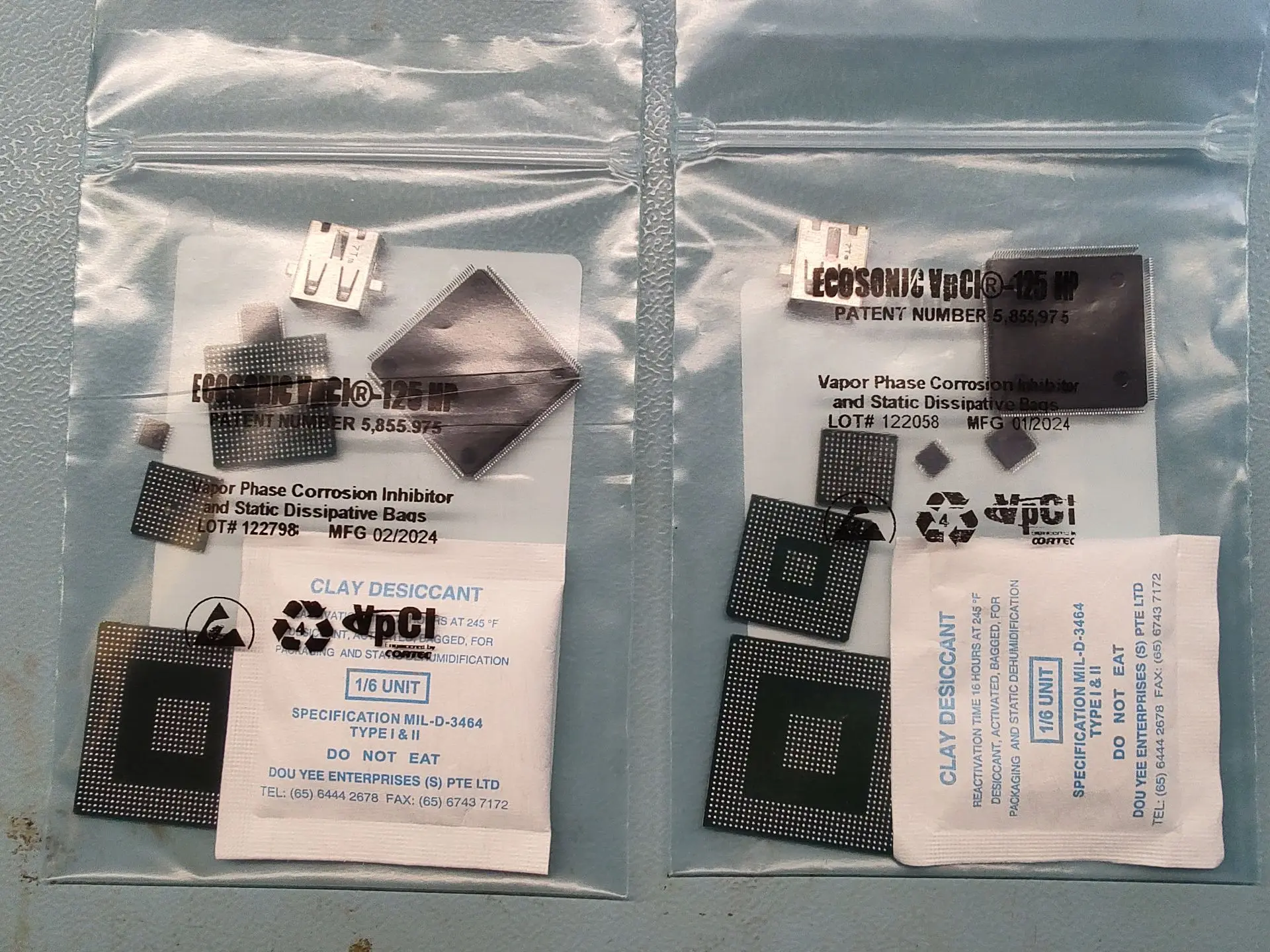
I’m also still working on filling the BOM for the whole portable. For the first time I have a rough estimation of the BOM cost for the whole portable, it’s in the ballpark of 300-350€ without taxes and shipping costs. Not included are tools, consumables, paint and printing filament. It also ignores the fact that for e.g. PCBs there is a MOQ usually. The mainboard itself is around 130€ to build in single units, this already includes a donor PS2.
In the next update we will most likely find out whether the new mainboard works!
This is incredible.
I apologise if this is rude to ask but have you considered releasing your video processor FPGA as a mod for the stock PS2? There is a legitimate hole in the market for a HDMI mod that simply delivers a clean digital signal to upscalers like the Retrotink 4K. Something like this could be a low cost alternative to the RetroGem.
This could be for the PS2 what the Pluto II is for the GameCube or the electronAVE is for the Wii.
I was actually thinking about this a couple of times, but mainly for easier debugging of the video processor. Something like the Sil9022 HDMI transmitter would be quite fun to play around with!
Considering the frustrating amount of different PS2 revisions, I imagine it would be a real pain to develop a general HDMI mod. And seeing the price point of a RT4K, it would probably make no sense to create an arguably worse alternative to the RetroGem for cost reasons.
Still, I may look into this when the portable is finished, mainly because I really enjoy the FPGA part of the project. But if I ever create a standalone mod, it would probably be for one or two revisions max. Maybe one day it will find its way into a tiny custom developed PS2 console...
Apart from that, I have a couple of updates:
- Video Processor Bugfixes
- 240p and 256p FPGA implementation
- Mainboard design
There has been quite an old issue in the video processor that I wanted to fix, but never found the cause of – some games would show vertical artifacts which look like a sampling rate mismatch. Other games would be completely fine. I also had one instance (Rayman 3) where the PAL output had such issues, but the NTSC mode was OK. In general, I observed it for all resolutions but 480p.
Two weeks ago, I had an idea:
For my initial tests at the beginning of the video processor’s development I found that that the tested NTSC and PAL resolutions output a new pixel every 4 pixel-clock cycles (480p every 2 cycles). First the value was hardcoded in the FPGA, as none of my measurements proved that theory wrong, but later I changed the implementation to allow changes of this “sampling divider” during runtime. It was however still hardcoded in the syscon firmware, which stores all the video configs.
So, the question at the start of my debugging session was the following: Do some games output different horizontal resolutions and if yes, why does the width of the displayed image not change then?
The first question was verified using PCSX2, and the horizontal resolution does indeed differ from game to game! I found for example that Rayman 3 outputs PAL with 512x512 and NTSC with 448x640. That discovery finally made it click: one active line of a PAL/NTSC image has 2560 pixel-clock cycles, divide this by 4 and you get the 640 pixels for NTSC. However, if you divide it by 5, you end up with 512 pixels!
->For one of the affected games with artifacts I built a custom syscon firmware, which changed the sampling divider from 4 to 5. While this was a hack and the scaling for that mode was wrong, the vertical lines were gone!
Next question was: if 5 is a valid sampling divider, which other values are required to support?
I actually managed to find the answer in the graphics synthesizer user guide I discovered in the depths of the internet. Specifically, sections 5.1 and 5.2. The registers of interest are called MAGH and MAGV, and their purpose is to magnify the framebuffer output. The value of MAGH directly corresponds to the number of pixel-clock cycles per pixel. MAGH values of 3, 4, 6, 7, and 9 are listed as supported for PAL/NTSC. That corresponds to the horizontal resolutions 640, 512, 384, 320 and 256. Additionally, I found that Okami for example uses an undocumented value of 5 for 448 pixels horizontally. This is how the PS2 can output different horizontal resolutions without a visible difference in image width! Regarding MAGV we’re probably safe, as I cannot imagine a case that breaks the implementation, based on the given descriptions. But there is most likely a game out there that proves me wrong!
So, what are we doing with all this? Thankfully the video processor supports changing the sampling divider during runtime, all required changes were done in the syscon. And coincidentally, the value of my "sampling divider" directly correcponds to the MAGH register value! I added another setting called “MAGH” to the menu now. It will trigger an update of the sampling divider + it’s necessary to automatically recalculate the horizontal parameters and scaling factors with each change (this causes the video glitch you see in the demonstration). While I could not find a game to test each MAGH setting, the ones I tried had a tremendous video quality improvement!
If we count each MAGH value as its own resolution, we support 25 resolutions now! Thanks Sony!
| 512i(256p) x 256 at 50Hz | 448i(240p) x 256 at 60Hz |
| 512i(256p) x 320 at 50Hz | 448i(240p) x 320 at 60Hz |
| 512i(256p) x 384 at 50Hz | 448i(240p) x 384 at 60Hz |
| 512i(256p) x 448 at 50Hz | 448i(240p) x 448 at 60Hz |
| 512i(256p) x 512 at 50Hz | 448i(240p) x 512 at 60Hz |
| 512i(256p) x 640 at 50Hz | 448i(240p) x 640 at 60Hz |
VESA 480x800 at 60Hz |
Line doubling!
Last week I used a couple train rides to implement proper handling of 256p and 240p, based on the findings from my last update. They are now detected as separate resolutions and line-doubled accordingly. This allows to change their settings independently of their 512i and 448i counterparts. Switching between the resolutions should take around 5 to 6 frames (you can even see it in the demonstration - as short blanking of the menu text). So far, I only tested ICO for NTSC and PAL and the implementation looks functionalso far. I still need to do more testing to verify that it's fully working, some texts look oddly pixelated in 256p. Fun fact: while the PAL version of ICO runs in 256p, there is one FMV in the menu that runs in 512i for whatever reason. You can see a demonstration in the video below.
While implementing this I also fixed another bug in the scaler, which made the last line of the image flicker in certain settings. It was an easy fix, the vertical border logic was displaying one line too much, essentially outputting invalid video data from the deinterlacer. There is still another bug I know of, and so far I’ve only seen it in NTSC mode – with certain combinations of settings, it looks like the sequence of odd/even lines is inverted, which distorts the image. Will work on that during one of my next commutes…
Mainboard and Assembly
The rev. 0.3 mainboard, heatsink, new uSD2PSX and all the required components for 2 portables were ordered and should arrive within the next 2 weeks. On top of that, I prepared two sets of PS2 components for assembly. This time the reballing process was surprisingly smooth, and in parallel I even finished writing the reballing guide!
I’m also still working on filling the BOM for the whole portable. For the first time I have a rough estimation of the BOM cost for the whole portable, it’s in the ballpark of 300-350€ without taxes and shipping costs. Not included are tools, consumables, paint and printing filament. It also ignores the fact that for e.g. PCBs there is a MOQ usually. The mainboard itself is around 130€ to build in single units, this already includes a donor PS2.
In the next update we will most likely find out whether the new mainboard works!
Tschicki
.
Hey, time for a small update!
First the good news:
Last weekend I assembled Rev. 0.3 of the PS2 mainboard and so far it is fully functional!
The bad news:
Actually none, apart from... I unfortunately forgot to order some components required for assembling the portable. They will probably be here in 2 weeks, but at least the 21700 batteries arrived for testing yesterday! And sadly I ran out of black PLA and PETG, so another week of waiting...
Assembly
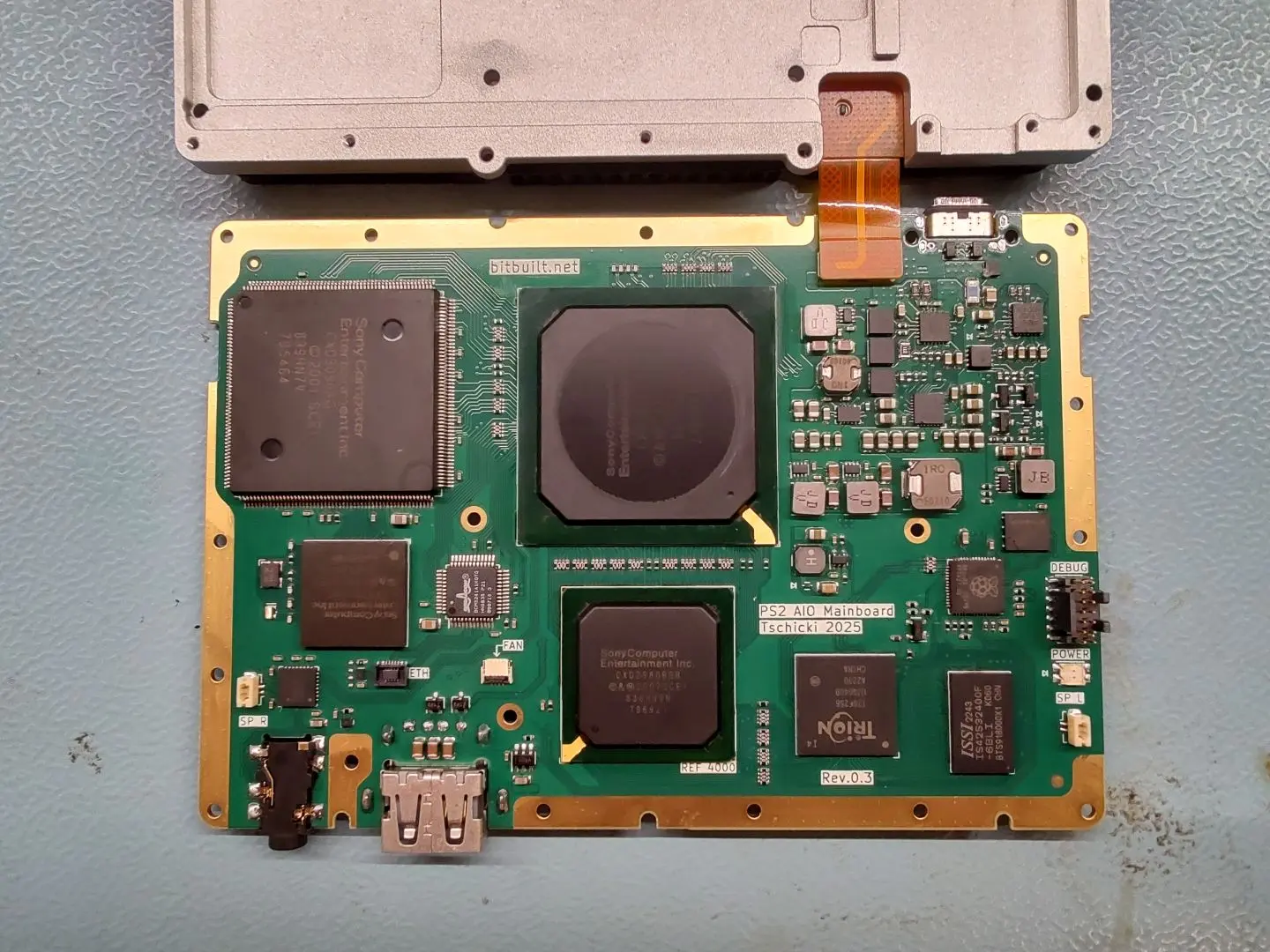
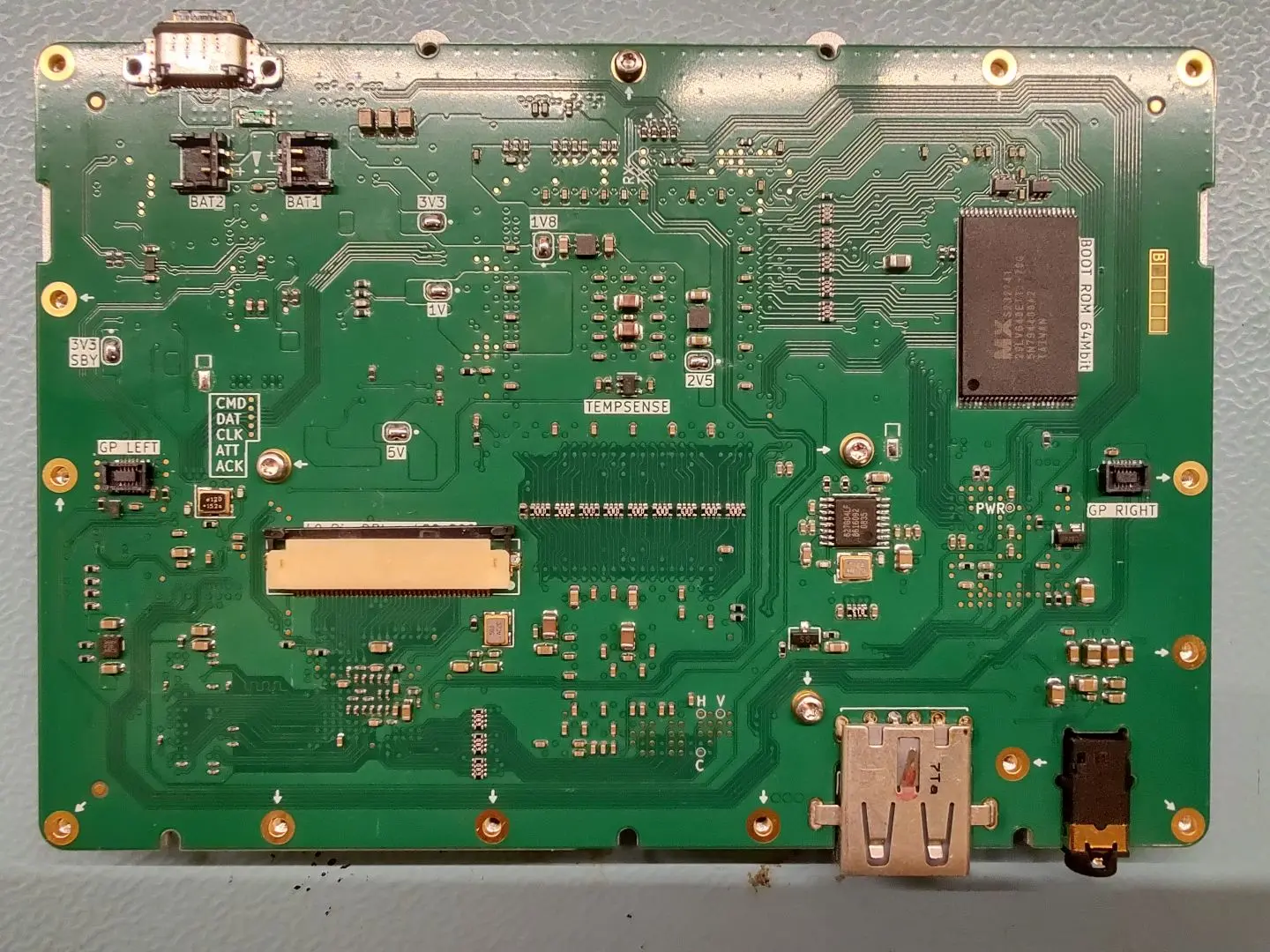
Assembly was surprisingly smooth this time! Only a handful of shorts to fix after reflowing and the board bringup was successful the first try, no troubleshooting!
I tried to stick to the same procedure as for revision 0.2, which worked out very well! My main gripe last time was soldering the DSP, this time I made sure to pre-tin all pins with some fresh leaded solder -> solder wetting was much improved, no pins were shorted or unconnected!
The overall procedure from pasting to first power-on took about 12h and was spread over the whole last weekend. It could be done faster, but I also made lots of pictures and wrote down all the steps and tips along the way, to create the mainboard assembly and bringup procedures. They are drafted now, but the formatting is still all over the place.
During the bringup I also refined the steps and simplified compilation of the testing firmwares. I'm planning to describe the bringup in five major steps:
The left and right gamepads, flex PCBs and the memory card flex were also assembled, actually pretty much the same way as last time. Here I'm still missing the speakers, some buttons and black filament. I also took the time to document the assembly in a procedure, with images.
Here are some pictures of all the assembled PCBs and the heatsink
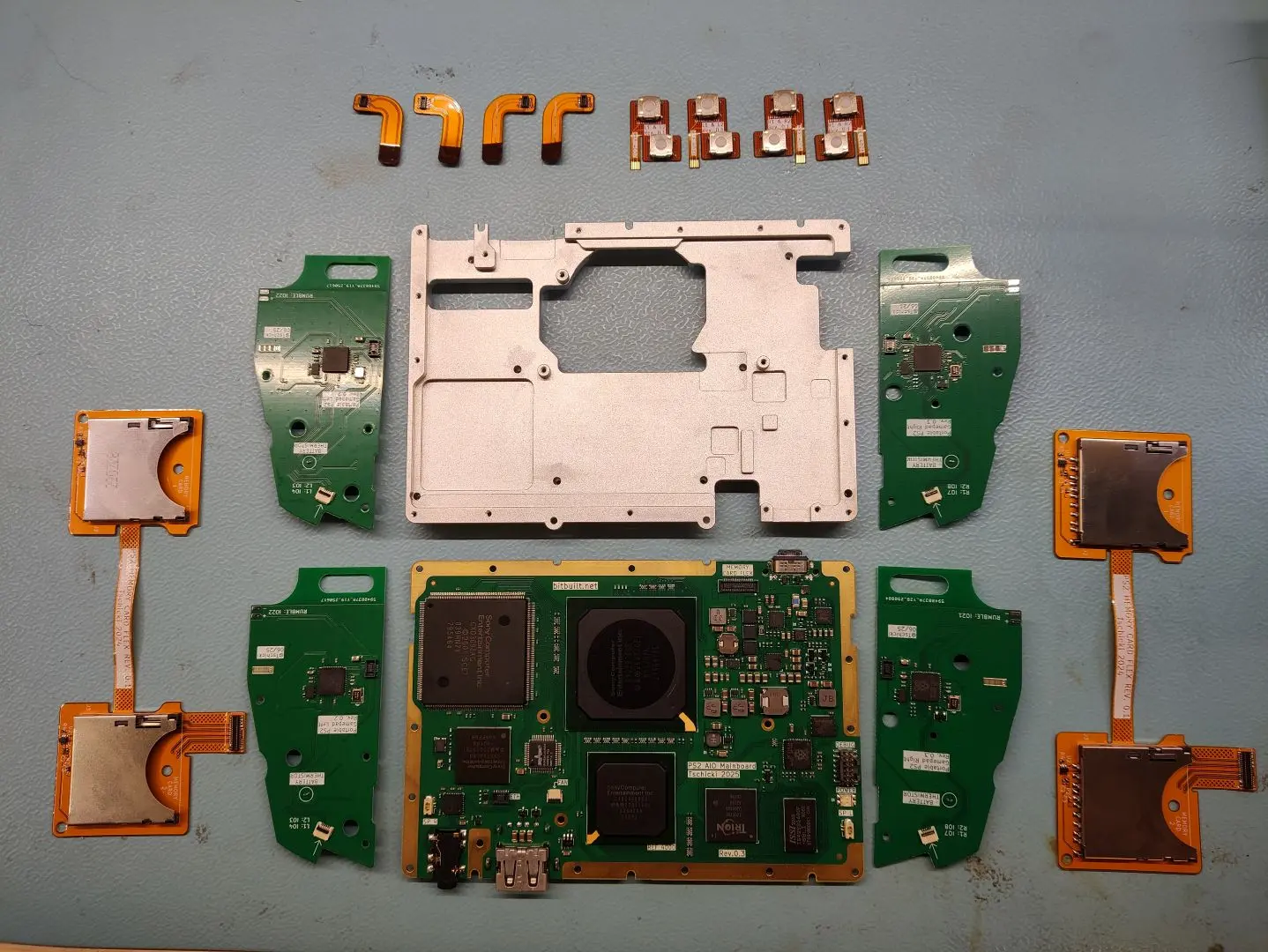
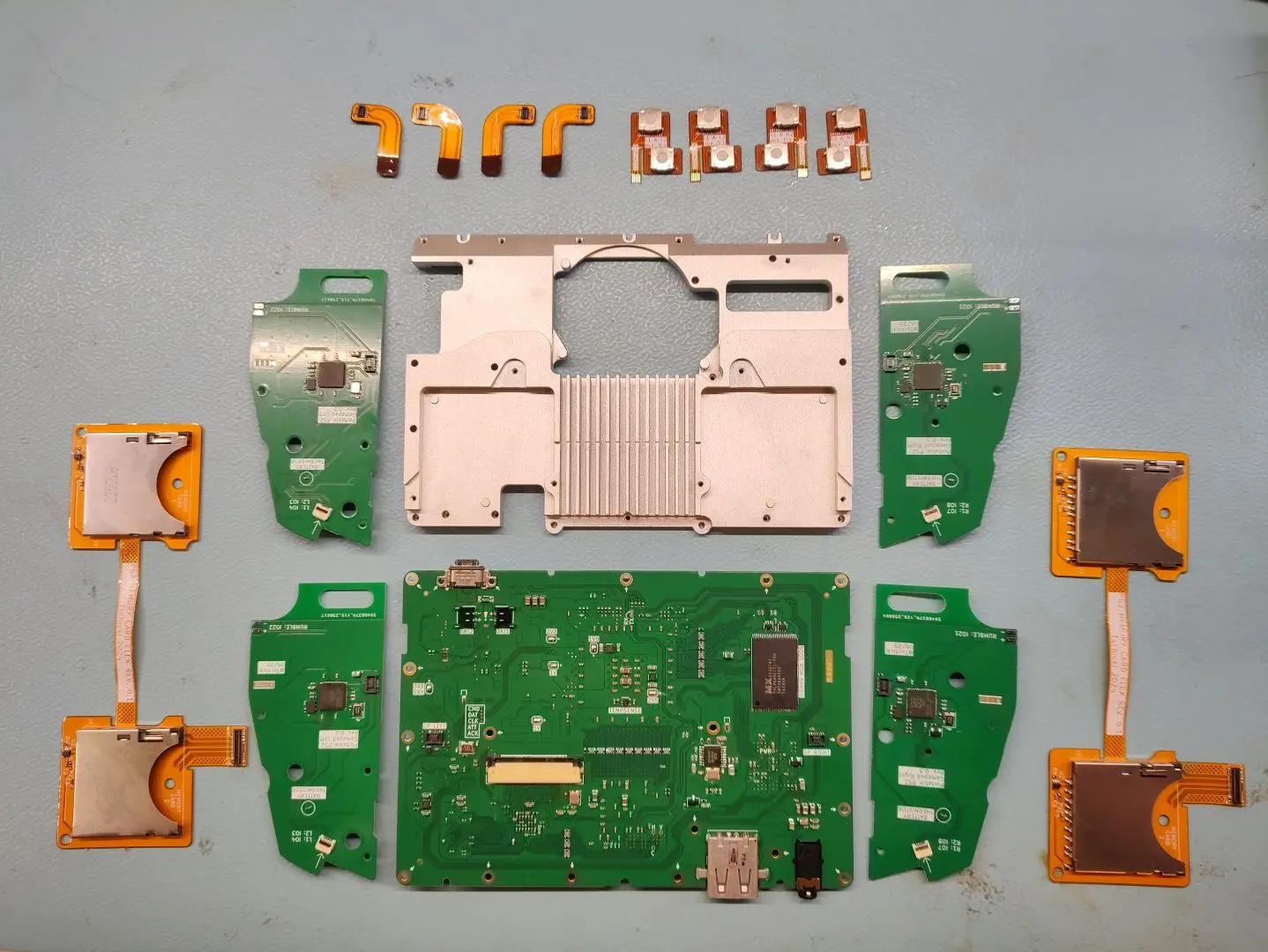
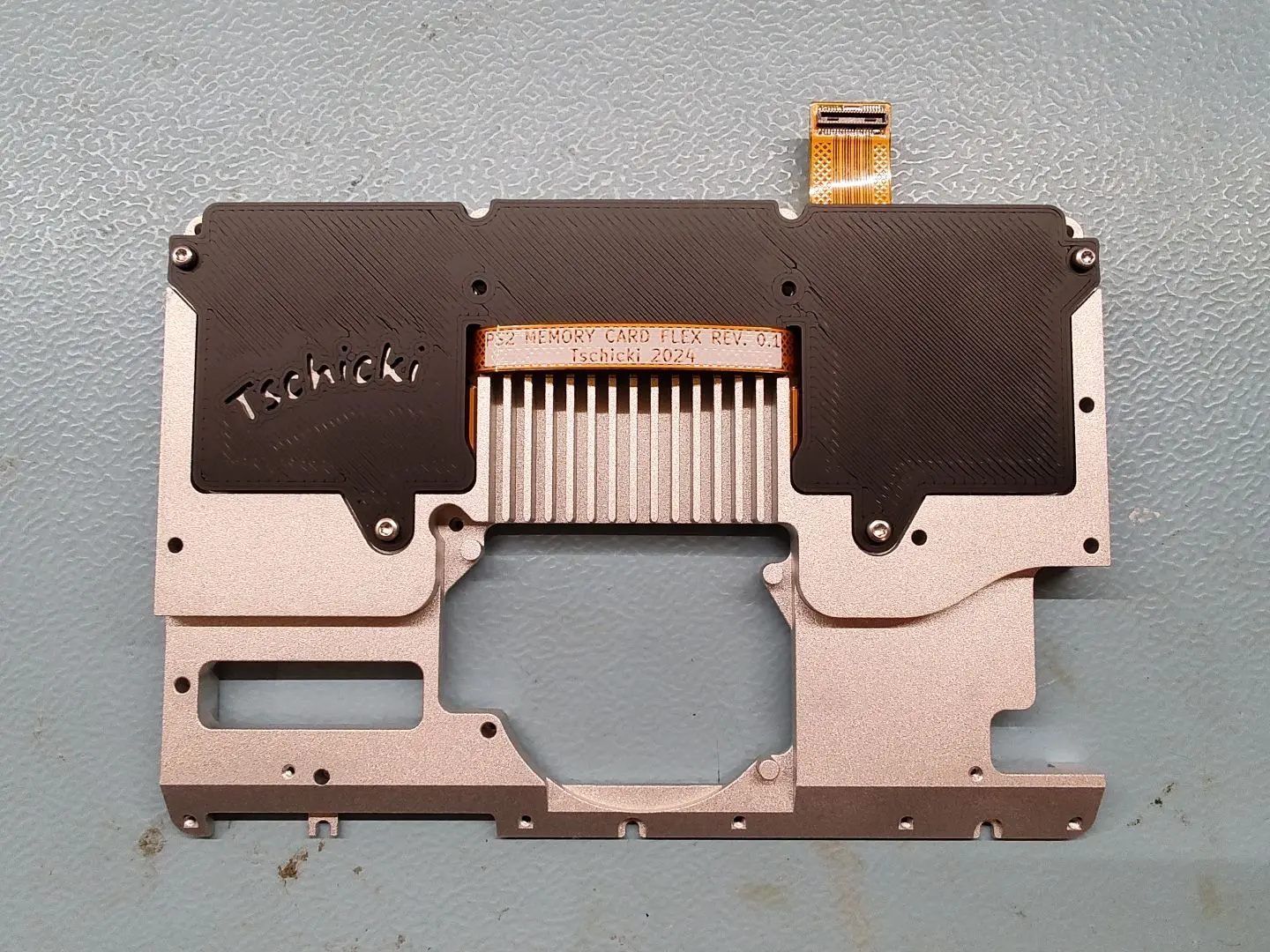
The heatsink is really nice and not warped this time, I opted for bead blasting to get a beautiful surface finish. I still had to tap all the M1.6 threads myself, as I couldn't justify paying the premium for JLC doing that. Due to the improvements in the design, this was actually really easy to do now. It's still one of my least favorite things to do, but at least it was quick and easy this time...
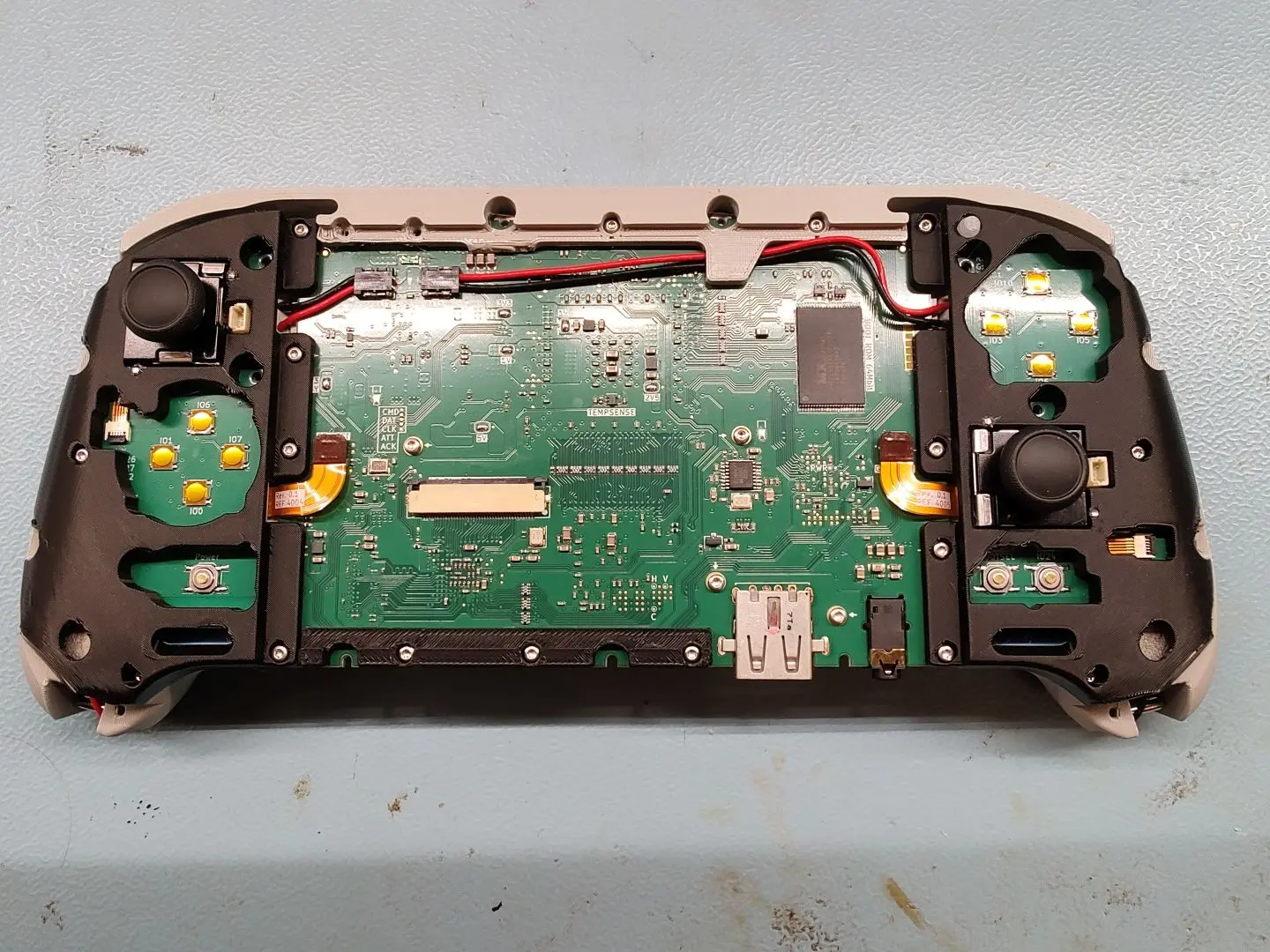
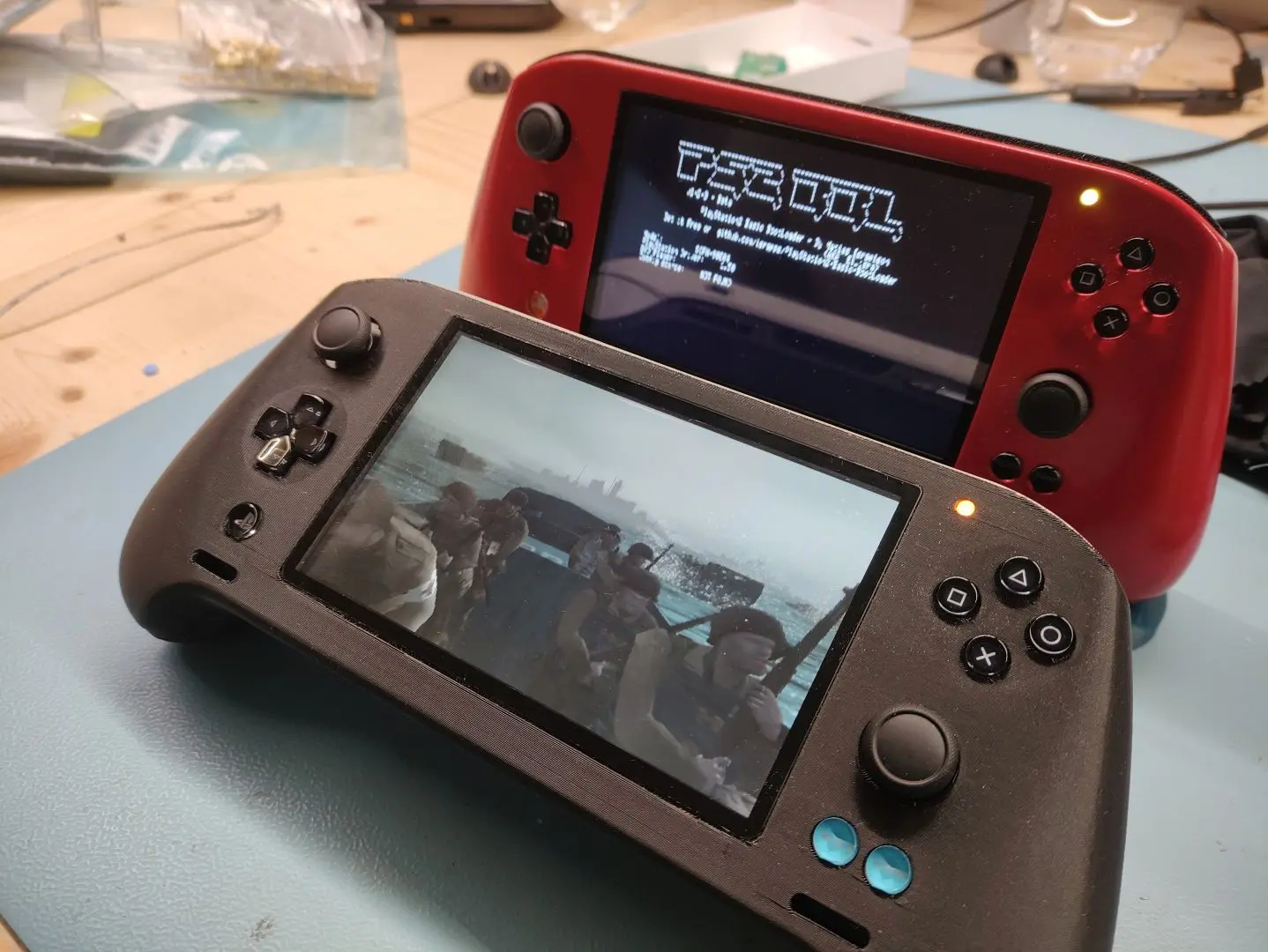
So here we are... I assembled everything temporarily for testing and used old housing parts for now. There is still no switch lite fan, so I should only run it for a limited time before the EE gets too hot. Also no speakers yet, but I verified that it outputs audio on the headphone jack.
Boot Rom
In parallel to the assembly stuff I set up a Linux environment to be able to compile PS2BBL using the PS2SDK. There is one change I would like to do - the default PS2BBL gets stuck in emergency mode when no config file was found. This all OK when the console is softmodded, but not when PS2BBL is in the boot rom - if you plug no memory card or USB with a PS2BBL config into the portable, it only ever boots into an error message; essentially it's bricked. To circumvent this, I replaced the emergency function with a call to OSDSYS, so the console always falls back to OSDSYS when no config was found. An alternative would be to embed a config file in the boot rom, but at this point it's not my preferred solution. I tried my change already in PCSX2 and it seems to work, in the next week I may try flashing it onto one of my consoles.
What's next?
- I will have to wait for all remaining components to be delivered and then I can fully assemble this revision.
- In the meantime, I may prepare another outer housing (if there is time I may also sand and paint it).
- If everything fits together nicely, I will use the new revision for a couple of weeks to find possible problems.
- During those weeks I will try to work on finishing the assembly procedures and get all the other files cleaned up.
My goal is to then assemble a third portable using these procedures to check whether I forgot to describe anything. If that goes well I will start planning the release of everything on github.
First the good news:
Last weekend I assembled Rev. 0.3 of the PS2 mainboard and so far it is fully functional!
The bad news:
Actually none, apart from... I unfortunately forgot to order some components required for assembling the portable. They will probably be here in 2 weeks, but at least the 21700 batteries arrived for testing yesterday! And sadly I ran out of black PLA and PETG, so another week of waiting...
Assembly
Assembly was surprisingly smooth this time! Only a handful of shorts to fix after reflowing and the board bringup was successful the first try, no troubleshooting!
I tried to stick to the same procedure as for revision 0.2, which worked out very well! My main gripe last time was soldering the DSP, this time I made sure to pre-tin all pins with some fresh leaded solder -> solder wetting was much improved, no pins were shorted or unconnected!
The overall procedure from pasting to first power-on took about 12h and was spread over the whole last weekend. It could be done faster, but I also made lots of pictures and wrote down all the steps and tips along the way, to create the mainboard assembly and bringup procedures. They are drafted now, but the formatting is still all over the place.
During the bringup I also refined the steps and simplified compilation of the testing firmwares. I'm planning to describe the bringup in five major steps:
- First measure the resistances to GND for all supply rails, I created a table now with the measurement results of a known working mainboard.
- Then flash the STUSB4500 config and measure all supply voltages before closing all supply jumpers to the PS2 portion. The firmware for that is obtained by compiling the SysCon firmware with the MFG_STEP_1 flag set. The gamepads are also flashed with their firmware here.
- Then testing whether the PS2 portion is functional (i.e. boots) without batteries. The firmware for that is obtained by compiling the SysCon firmware with the MFG_STEP_2 flag set.
- Then flash the MAX17320 NVM config to enable usage with batteries. The firmware for that is obtained by compiling the SysCon firmware with the MFG_STEP_3 flag set.
- The last bringup step is to flash the normal SysCon firmware by disabling all flags from above and testing whether the system runs off batteries.
The left and right gamepads, flex PCBs and the memory card flex were also assembled, actually pretty much the same way as last time. Here I'm still missing the speakers, some buttons and black filament. I also took the time to document the assembly in a procedure, with images.
Here are some pictures of all the assembled PCBs and the heatsink
The heatsink is really nice and not warped this time, I opted for bead blasting to get a beautiful surface finish. I still had to tap all the M1.6 threads myself, as I couldn't justify paying the premium for JLC doing that. Due to the improvements in the design, this was actually really easy to do now. It's still one of my least favorite things to do, but at least it was quick and easy this time...
So here we are... I assembled everything temporarily for testing and used old housing parts for now. There is still no switch lite fan, so I should only run it for a limited time before the EE gets too hot. Also no speakers yet, but I verified that it outputs audio on the headphone jack.
Boot Rom
In parallel to the assembly stuff I set up a Linux environment to be able to compile PS2BBL using the PS2SDK. There is one change I would like to do - the default PS2BBL gets stuck in emergency mode when no config file was found. This all OK when the console is softmodded, but not when PS2BBL is in the boot rom - if you plug no memory card or USB with a PS2BBL config into the portable, it only ever boots into an error message; essentially it's bricked. To circumvent this, I replaced the emergency function with a call to OSDSYS, so the console always falls back to OSDSYS when no config was found. An alternative would be to embed a config file in the boot rom, but at this point it's not my preferred solution. I tried my change already in PCSX2 and it seems to work, in the next week I may try flashing it onto one of my consoles.
What's next?
- I will have to wait for all remaining components to be delivered and then I can fully assemble this revision.
- In the meantime, I may prepare another outer housing (if there is time I may also sand and paint it).
- If everything fits together nicely, I will use the new revision for a couple of weeks to find possible problems.
- During those weeks I will try to work on finishing the assembly procedures and get all the other files cleaned up.
My goal is to then assemble a third portable using these procedures to check whether I forgot to describe anything. If that goes well I will start planning the release of everything on github.
- Joined
- Apr 29, 2020
- Messages
- 146
- Likes
- 167
Fantastic work!!

- Joined
- Sep 3, 2020
- Messages
- 443
- Likes
- 980
- Portables
- 8
This is some next level stuff dude! I didn't even realize the PS2 motherboard's CPU and other main components could all be transplanted onto a new board! Absolutely amazing! Bravo dude!
Did you use hot air to remove and reball the chips? Or was it something else?
Did you use hot air to remove and reball the chips? Or was it something else?
Wow,looks crazy dude, congratulations for the Amazing work you done on it!

Absuolutely fantantastic work!! Always look forward to your updates.

- Joined
- Nov 22, 2024
- Messages
- 7
- Likes
- 0
Hi there, I absolutely love this project and absolutely support it! This is truly a marvel of engineering
Probably a stupid question, but would it be possible to incorporate support for IDE drives?
700XX models do have the IDE connections present on the board and these can be used to connect an IDE drive and use adaptors for nvme drivers and SD cards!
I don’t know if the IDE traces are still on the newer 79000 or 90000 models processors but it might be worth a look?
I barely know anything about the PS2 so please don’t expect much from me…
Probably a stupid question, but would it be possible to incorporate support for IDE drives?
700XX models do have the IDE connections present on the board and these can be used to connect an IDE drive and use adaptors for nvme drivers and SD cards!
I don’t know if the IDE traces are still on the newer 79000 or 90000 models processors but it might be worth a look?
I barely know anything about the PS2 so please don’t expect much from me…
Sony actually removed those components/traces from the newer PS2 models, specifically the Deckard revisions (SCPH-75xxx through 90xxx). Yeah, this is the thread to watch!!Hi there, I absolutely love this project and absolutely support it! This is truly a marvel of engineering
Probably a stupid question, but would it be possible to incorporate support for IDE drives?
700XX models do have the IDE connections present on the board and these can be used to connect an IDE drive and use adaptors for nvme drivers and SD cards!
I don’t know if the IDE traces are still on the newer 79000 or 90000 models processors but it might be worth a look?
I barely know anything about the PS2 so please don’t expect much from me…
- Joined
- Nov 22, 2024
- Messages
- 7
- Likes
- 0
But if the traces and functionality is still existent in the processor, can’t the missing components be added back on the custom mainboard?Sony actually removed those components/traces from the newer PS2 models, specifically the Deckard revisions (SCPH-75xxx through 90xxx). Yeah, this is the thread to watch!!
uyjulian
.
- Joined
- Apr 11, 2024
- Messages
- 10
- Likes
- 9
HDD support was part of the SPEED chip. SPEED and DEV9C chips were removed on 75k+But if the traces and functionality is still existent in the processor, can’t the missing components be added back on the custom mainboard?
Similar threads
- Replies
- 12
- Views
- 4K


- Replies
- 4
- Views
- 3K


- Replies
- 31
- Views
- 20K