Rv loader

Tyson9

.
Joined
Jul 18, 2016
Messages
67
Likes
8
A friend has a Chinese made portable wii from aliexpress. Anyway the sd card went corrupt. He has tried to get it back and working with a better sd card to no avail. What should the sd card file structure for rv loader.? There is no usb only a tf card. Thank
 
RVLoader doesn't work properly on SD cards; it requires USB flash storage.

What kind of Chinese unit does he have?
 
I don't the make but it looks like a gameboy. Anyway the sd card had rv loader on it plus games.
Apparently there is a way but how the maker did it is unknown. He tried to contact the maker to no avail.
Thanks
 
It's possible that there's an internal SD card to USB adapter, otherwise I'm not sure how it ever worked correctly to begin with.
 
That might be. Great advice and thanks it sure looks tough to get apart though
 
If they used the Nintendo tri-wing screws in it, you can buy any cheap tri-wing screwdriver on ebay or amazon to get it open and inspect the internals
 
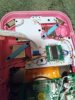
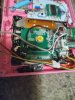
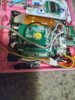
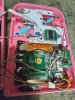
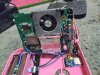
Well got it apart easier than I thought but we both inspected the internals and there is no usb anywhere to be found. The sd card reader is wired and soldered to the board. I have no idea how this worked
 
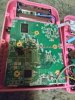
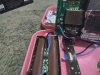
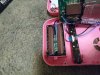
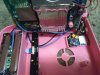
How many wires come out of the SD socket? If it's only 4 wires then it is in fact a USB adapter. If you can get your friend to provide photos of the internals, we can try to determine if it's a physical problem like a broken wire.

Also, can you describe specifically what the system is doing when it is turned on? Is it just blank screening, or does it show the no storage device found error?
 
I'll try get some pics. When turned on the sd card in which it does say usb 1 lights up blinks twice blinks twice again then once that's it blank screen.
 
Can you make a diagram of the file structure that should be on the sd card? I think this might be the problem. Thanks
 
Pics
 

Attachments

  • 20250725_060849.jpg
    20250725_060849.jpg
    1.3 MB · Views: 89
  • 20250725_060845.jpg
    20250725_060845.jpg
    1.3 MB · Views: 80
  • 20250725_060839.jpg
    20250725_060839.jpg
    1.3 MB · Views: 74
  • 20250725_060833.jpg
    20250725_060833.jpg
    1.4 MB · Views: 78
  • 20250725_060827.jpg
    20250725_060827.jpg
    1.4 MB · Views: 79
  • 20250725_060727.jpg
    20250725_060727.jpg
    4 MB · Views: 74
  • 20250725_060718.jpg
    20250725_060718.jpg
    4 MB · Views: 85
  • 20250725_060712.jpg
    20250725_060712.jpg
    4 MB · Views: 87
  • 20250725_060703.jpg
    20250725_060703.jpg
    4 MB · Views: 73
Lot of goop in that one......

The correct file structure is just all of the folders within the RVLoader_v2.1 archive extracted to the root of the SD card.
1753442311207.png

The SD card must be formatted as FAT32 with 32k cluster size. You can use the guiformat tool from Ridgecrop for this if Windows won't do it normally.
 
Thanks in the games folder this is where I am lost. I don't where the files go or format and names. Sorry I am a newbie
 
I want to thank you for the help but still nothing but I still think it's software related
 
The structure of the games doesn't affect booting. If the console has no display when powered on and the battery is confirmed functional, then there's a physical problem.

It could be any number of things with these cheap shit units, so the list of things to check is pretty long. If your friend has a multimeter, I'd start with checking the voltages on the 1v, 1.15v, 1.8v, and 3.3v lines to be sure they're working correctly. It might be as simple as a dead regulator.
 
This means if there are no games the rv loader should still show up on the screen?

One thing when turned on it lights up and then the lcd lights then a blank screen

I think the usb drive is okay because when powered on it flashes 6 times then 2 times and stays lit. According to what I read this is because files are missing or wrong file structure and files in the wrong location.

Admin edit: Merged triple post
 
Last edited by a moderator:
I'm not trying to backseat moderate, but I'm pretty sure the forum rules say you should try to avoid double posting. You can just edit your original post if you have more information to update it with rather than just making another post a minute later.

Anyways, have you verified that your games are in .iso format? I'm pretty sure that's the only format that works RVLoader IIRC. If you're testing with Wii games, those need to be in .wbfs format.
 
Last edited:
Sorry about the double post. Yes the gc games are iso and wii iso are converted with wii backup manager.
When I unzip rvloader what folder do I use? I have read that the rvloader boot.dol is supposed to be at the root. I have no idea plus games are renamed. Do all the games have their own folders.
I don't mean to be a pain but I am new and learnin
 
Sorry about the double post. Yes the gc games are iso and wii iso are converted with wii backup manager.
When I unzip rvloader what folder do I use? I have read that the rvloader boot.dol is supposed to be at the root. I have no idea plus games are renamed. Do all the games have their own folders.
I don't mean to be a pain but I am new and learnin
Don't worry about the boot.dol, that's from a wayyyyyyy old version of a different loader.

When you unzip the RVLoader archive that you download from the github page, it will make a folder with the same name as the .zip file. Open that folder and you'll have one folder labelled RVLoader_v2.1, and one labelled _MACOSX. Open the RVLoader_v2.1 folder and you'll have this list of folders and a LCDDriver.bit file.
index.php

Copy all of these, then open the USB drive/SD card and paste them. When you open the USB drive/SD card you should see only these folders and the .bit file. That is the correct structure for RVLoader to boot.

For games the structure differs based on Wii and Gamecube games.
Wii games just need to be in WBFS format and placed in the folder labelled "wbfs". No special structure required, just dump them all in. You can name them whatever you want. If you want the cover art for games, you can find it by searching for them on the gameTDB website.

Gamecube games must be in the ISO format, not a processed format like WBFS or NKIT. The ISOs must be raw or trimmed, but cannot be compressed. Gamecube games must be put inside the "games" folder, and each game must be placed inside its own folder within the games folder. So if you want to play Pikmin for example, then you must:
  1. create a Pikmin folder inside the games folder
  2. Put the Pimin ISO file inside that Pikmin folder
  3. Rename the ISO file to "game.iso"
The way the Gamecube loader works requires every Gamecame iso file to be named "game.iso" and placed in a named folder within the games folder or it will not be detected. The loader will inherit the name of the game from the folder name rather than the ISO file. If you want to use title art for Gamecube games, you can get them from gameTDB like Wii games.

As a matter of troubleshooting, can you ask your friend to leave the Wii on the blank screen for about a minute to see if the no device detected error shows up? If it does, then it narrows down the problem significantly.

 
Back
Top