Wii portable build troubleshooting

There aren't many internal fuses on the Wii, and video problems could be a thousand things. Got any photos of your new wiring?
 
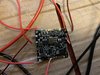
yeah, sure. Here they are:
The wires are probably a bit longer than they should be, so a little messy, but I know everything goes in the right place and power is getting to the board. Also, I'm pretty sure U10 is working. I have also tried straight from AVE-RVL and still nothing
 

Attachments

  • 01326F8F-BDB3-4767-952E-8FF2A093F7E6.jpeg
    01326F8F-BDB3-4767-952E-8FF2A093F7E6.jpeg
    3 MB · Views: 262
  • 6E210E0B-3295-44D4-8D2D-F54BA0AFD189.jpeg
    6E210E0B-3295-44D4-8D2D-F54BA0AFD189.jpeg
    3.6 MB · Views: 270
Last edited:
Well I can tell you that all of those solder joints are painful to look at, and verily asking for transient shorts and poor conductivity. Way too much exposed wire, and the joints are visibly cold formed. You need to up your iron's temperature, and ideally also grab some brand name tacky non-rosin based flux.

In the photos you provided you have the composite wire soldered to the wrong side of the capacitor footprint, but you said you tried connecting closer to the AVE and still no luck? Do the CPU and GPU get warm after a short time?
 
Ok, I will try to do that and fix some of those joints. The cpu and gpu do get warm after the power is on for a few seconds.
 
Ok, I will try to do that and fix some of those joints. The cpu and gpu do get warm after the power is on for a few seconds.
Do they get just warm or is it really hot that you can't touch it for a second. Had a Wii that got crazy hot and didn't boot.
 
Not hot, just a little warm. Edit: I have decided to buy another wii. This time I am going to take more care, be more thorough and do everything right. I will make neater solder joints and neater cuts. I will update you once it has arrived and I have trimmed it
 
Last edited:
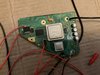
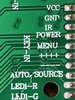
I have the new screen driver board, are the key inputs the same as the old one or different? Because they are labelled differently, but they have the same number
 

Attachments

  • image.jpg
    image.jpg
    811.4 KB · Views: 239
  • image.jpg
    image.jpg
    1.1 MB · Views: 230
okay, so I have the new trim but i cant get video out of it. Is there any way of checking if U10 is actually working? I know power is getting to the board and the chips warm up. There must be something I am missing. EDIT: I GOT IT TO WORK!!!!!!!!!!!!!!! Will update with more progress soon!
 
Last edited:
okay, so I have the new trim but i cant get video out of it. Is there any way of checking if U10 is actually working? I know power is getting to the board and the chips warm up. There must be something I am missing
Photos pls, we might spot something you missed
 
Okay, just a quick question. I’m guessing the audio straight out of the rvl-ave is analog but I’m not sure. Is it analog or digital?
 
Hi, so more issues… I‘m really struggling with this one. The PMS-LITE is shutting itself down whenever U10 is connected. It doesn’t shut itself down with just the voltages connected but as soon as U10 is connected it turns off after about 1-2 seconds. Is the U10 voltage on the PMS meant to go away after a while? On mine, it is just staying on 3.3v. I really don’t think it’s my wiring. I have been prodding with a multimeter and changing bits and bobs for hours now and I am not sure what the problem is.
 
okay, so I have the new trim but i cant get video out of it. Is there any way of checking if U10 is actually working? I know power is getting to the board and the chips warm up. There must be something I am missing. EDIT: I GOT IT TO WORK!!!!!!!!!!!!!!! Will update with more progress soon!
What exactly was the issue? My first trim I couldn't get to boot, and I have pretty much the same issue that you did (proper voltages everywhere, chips get warm after a few seconds, no boot though) Hoping that I can still salvage my first trim and make another Wii portable after I'm done with the current one.
 
Okay, so I got pretty much everything working, but I have one problem/question, how do I make USB reliable. I have tried twisting the wire as tight as I can get it, but I still can’t keep it going that long without an error. Are there any tips/tricks anyone can recommend for this?
 
What type of wire are you using? How are you twisting it? How long are you trying to make it? Ideally you'd use a drill to twist some magnet wire, and the run should be kept under 10cm for decent reliability.
 
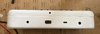
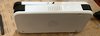
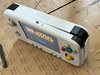
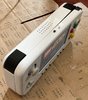
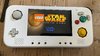
It’s done! Thanks to everyone who helped me along the way, it is so much appreciated! It is VERY rough around the edges and quite obviously a first portable, but I am still proud of it. In the end I skipped out on Bluetooth because I couldn’t get it to work. I may try again in the future, but for now it is left out. In the top right corner, it bulges a little bit due to a design flaw on my part that would need a new case print to fix. Other than that, it’s all done. Thanks especially to Stitches, Crazygadget and Viilmo. P.S. Sorry for the not great images.
 

Attachments

  • IMG_0877.jpeg
    IMG_0877.jpeg
    856 KB · Views: 219
  • IMG_0876.jpeg
    IMG_0876.jpeg
    817.3 KB · Views: 210
  • IMG_0875.jpeg
    IMG_0875.jpeg
    1 MB · Views: 200
  • IMG_0874.jpeg
    IMG_0874.jpeg
    1.1 MB · Views: 216
  • IMG_0873.jpeg
    IMG_0873.jpeg
    1.6 MB · Views: 226
Grats my dude! You've done an amazing job for a first project
 
Back
Top