Question RVL AMP presses volume up constantly

Strix

.
Joined
Oct 11, 2024
Messages
36
Likes
6
So, I've got my RVL AMP outputting audio, but it's constantly pressing the volume up button so when I launch a wii game my audio is maxed out and it's just not enjoyable. It's to loud.
When I play a gamecube game, I get no audio at all.
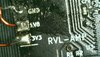
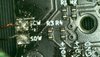
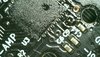
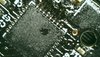
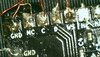
I'll post pictures, Please note that the picture of the vol + and - area was taken when I was isolating the issue to rule out the switches being shorted, so the ground has been removed from the board.
I can disconnect all wires except from sdw and it still shows the hud with the volume trying to vol up. I'm at a loss, I've been troubleshooting it since yesterday and the only thing I can think of at this point is that the board is bad. The issue with that is that it worked earlier in the day yesterday before I moved it out of an old prototype case into a new case. I've improved my solder joints, double checked my data lines to make sure they were going to the correct place and I simply just cant figure this out.
 

Attachments

  • IMG_0001.JPG
    IMG_0001.JPG
    183.5 KB · Views: 122
  • IMG_0002.JPG
    IMG_0002.JPG
    251.5 KB · Views: 116
  • IMG_0003.JPG
    IMG_0003.JPG
    222 KB · Views: 118
  • IMG_0004.JPG
    IMG_0004.JPG
    211.5 KB · Views: 111
  • IMG_0005.JPG
    IMG_0005.JPG
    152 KB · Views: 122
  • IMG_0007.JPG
    IMG_0007.JPG
    200.5 KB · Views: 116
  • IMG_0006.JPG
    IMG_0006.JPG
    162.5 KB · Views: 128
I'd give the board a good clean to remove all that flux residue before doing anything else. When you said you checked for a short, did you check with a multimeter or just eyeball it?
 
I'd give the board a good clean to remove all that flux residue before doing anything else. When you said you checked for a short, did you check with a multimeter or just eyeball it?
multimeter
 
I'd give the board a good clean to remove all that flux residue before doing anything else. When you said you checked for a short, did you check with a multimeter or just eyeball it?
I've removed the RVL AMP completely and cleaned it real nice now. I'm going to relocate it closer to the vias with easier access to my board and rewire everything later on. I'm going to go to bed now. I plan on grabbing some of the traces in different places rather than the vias that way I can spread out the wires so I'm not accidentally shorting anything. So I'm going to put my MC on pin 25 and connect my shielding wire to ground via for 35. I'm going to grab my SDA from, I believe that's a resistor. and pull my voltages off the wii itself instead of pulling off the pms, things are awfully crowded on that thing. I really don't feel like trying to wire up everything directly to the vias because I think I'm starting to wear them down with how much I've messed with them over the last 2-3 days.
 
I'd give the board a good clean to remove all that flux residue before doing anything else. When you said you checked for a short, did you check with a multimeter or just eyeball it?
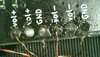
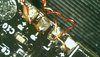
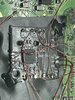
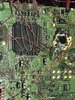
So, I went ahead and wired up everything except I wired it all up directly to the chip, all except for HS and SDA and again, I've got audio, but the controls are stuck putting it to max volume. It's strange that when the console is turned off, there is no connection for the vol + and vol - buttons, but the second you turn it on. You get a 0ohm resistance reading, not to mention i have no sound in gamecube or vc games. I'm going to go ahead and order another RVL AMP. I'm not happy about it, but something just is not right. I would still like to solve this problem if it is solvable/fixable. I really just cant figure out what could be causing this.
 

Attachments

  • IMG_4975.jpg
    IMG_4975.jpg
    3.9 MB · Views: 129
  • IMG_4976.jpg
    IMG_4976.jpg
    4.1 MB · Views: 125
You need to connect the volume up/down signals to the Wii as well when you use RVL-Amp. Volume maxes out in Wii games if you don't. Take another look at the 4-Layer Tech diagrams, one of them shows where to connect those lines.
 
You need to connect the volume up/down signals to the Wii as well when you use RVL-Amp. Volume maxes out in Wii games if you don't. Take another look at the 4-Layer Tech diagrams, one of them shows where to connect those lines.
I'll get right on that. I believe it was still doing it earlier when I had them hooked up. But I'll give it a go, I thought those were only if you wanted to be able to control the volume using the button combinations.
 
You need to connect the volume up/down signals to the Wii as well when you use RVL-Amp. Volume maxes out in Wii games if you don't. Take another look at the 4-Layer Tech diagrams, one of them shows where to connect those lines.
Can I use braded cable for that?
 
You'll be soldering to vias on the Wii motherboard, use magnet wire.

Edit: do you mean twisted magnet wire, like for USB? If so, no, just use 2 individual magnet wires.
 
You'll be soldering to vias on the Wii motherboard, use magnet wire.

Edit: do you mean twisted magnet wire, like for USB? If so, no, just use 2 individual magnet wires.
Yes I meant twisted magnet wire. And I am using 2 individual wires and I am still having the same problem
 
Can you post an updated photo of those wires soldered to the Wii and the RVL-Amp
 
So I've made progress on the audio on my wii. The issue seems to be that I didn't understand that the HS line and the Headphone sensor line on the jack were not connected and a jumper wire was needed to connect the two. I now have audio on gamecube and VC Games. But as I was told about the Vol + and - lines, if they are not connected, wii games will turn the volume up by default. The only problem I'm having currently is that the wii games volume is constantly turning up the volume. But I seem to have continuity with the vias, I tested by pulling a resistance off of the RVL AMP and the other side of the via that the Vol + and - are connected to.
 
I feel obligated to put this out there incase anyone searches for this particular problem again either here on bitbuilt or on google. If your portable wii has a headphone sign on the HUD, it's not enough to connect HS to the via on the wii, You do have to wire HS to the pad on the back of the RVL AMP that acts as the switch for the Headphone jack. I'm sure most people probably figured that out quickly, but I'm an idiot and it did take me a while.
 
The headphone sense castellated pad (HS) on the RVL-AMP is directly electrically connected to the tip switch pad for the headphone jack. I’m not sure why you would need to add an additional wire here, unless you severed the trace between HS and the headphone jack somehow.
 
Wait, are you on RVLoader 2.1? for whatever reason the audio gets cranked up to max in Wii games when you have the audio amp connected in this config.
 
Back
Top