

Lazr
.
The Wii U, interesting little failure right?
This is going to be a post where I dump whatever random info I know about the Wii U, because it can't stay with me forever.
This probably isn't going to be 100% complete, but when I remember something or learn something new I'll update this post.
I'm also going to follow a similar layout to Shanks Wii infodump.
Wii U Anatomy
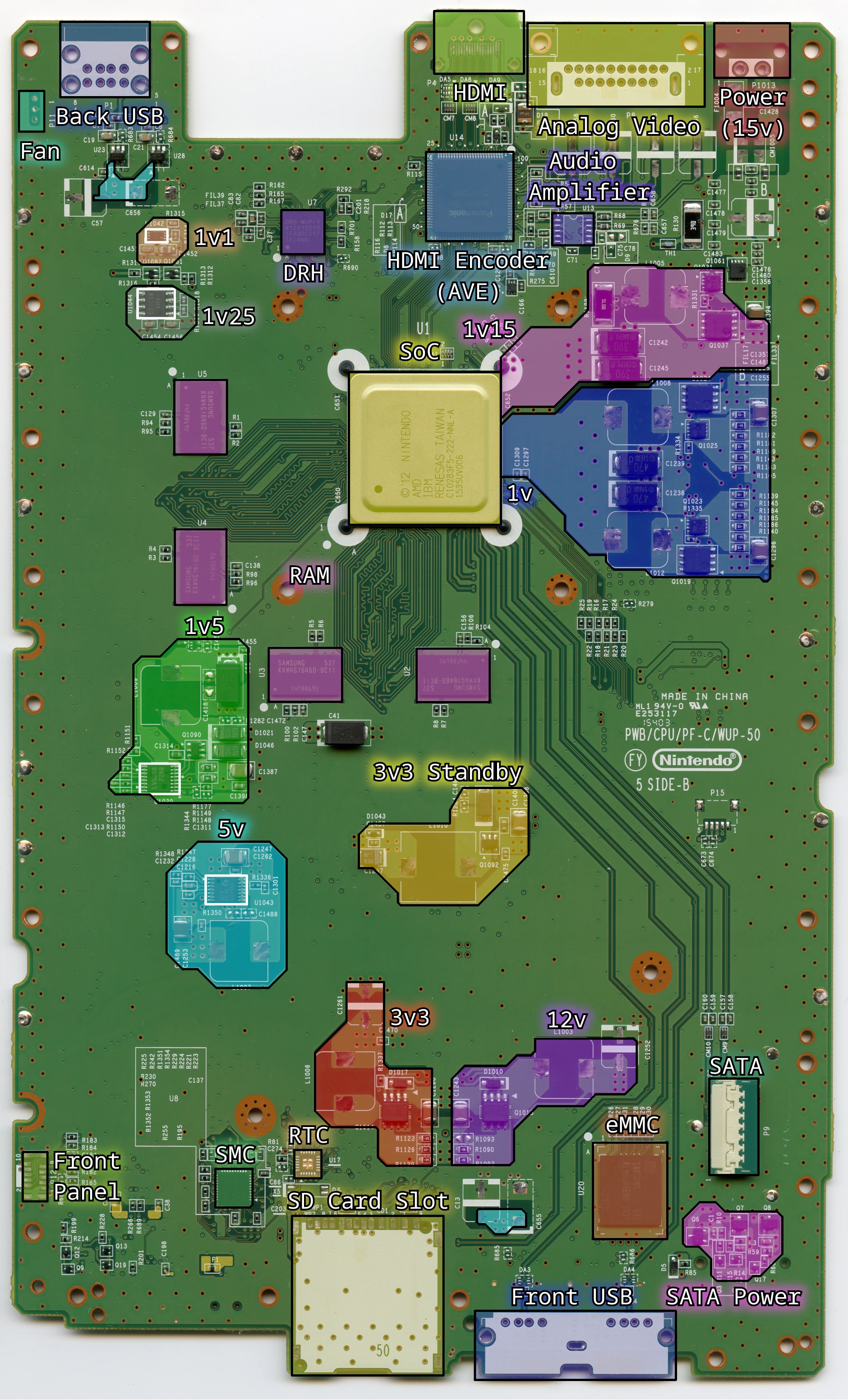
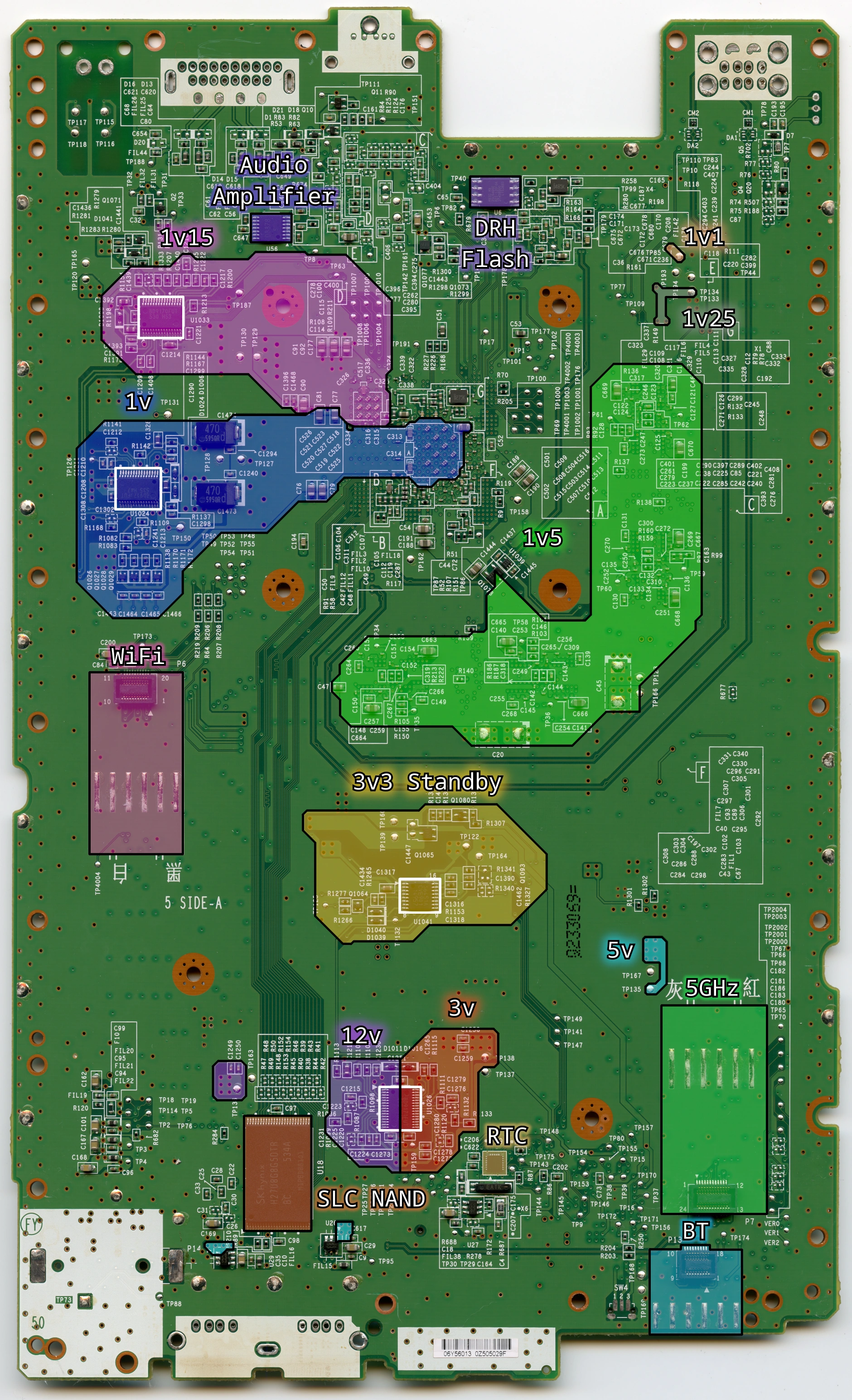
Voltages
Daughterboards
Disc Drive
Bluetooth
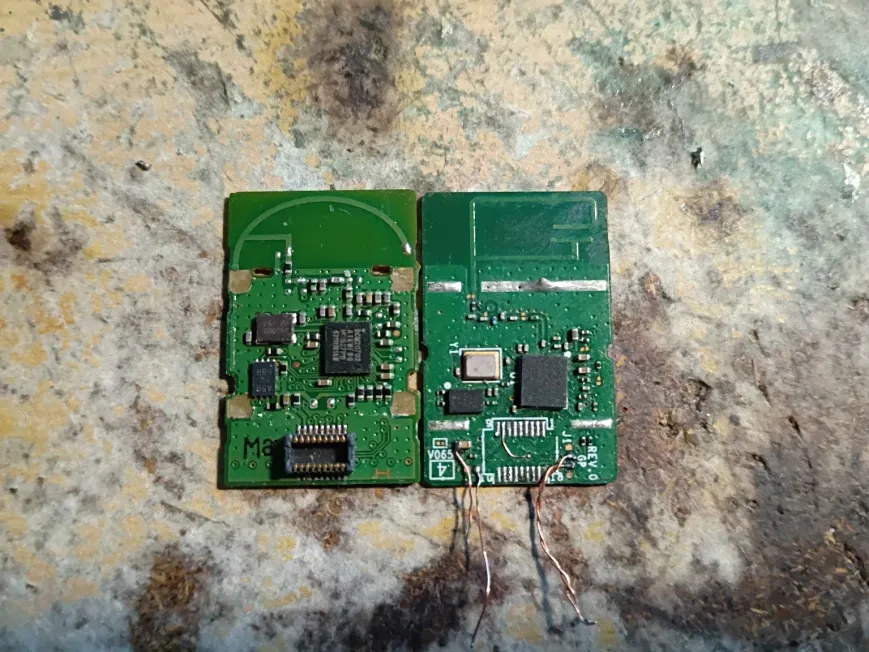
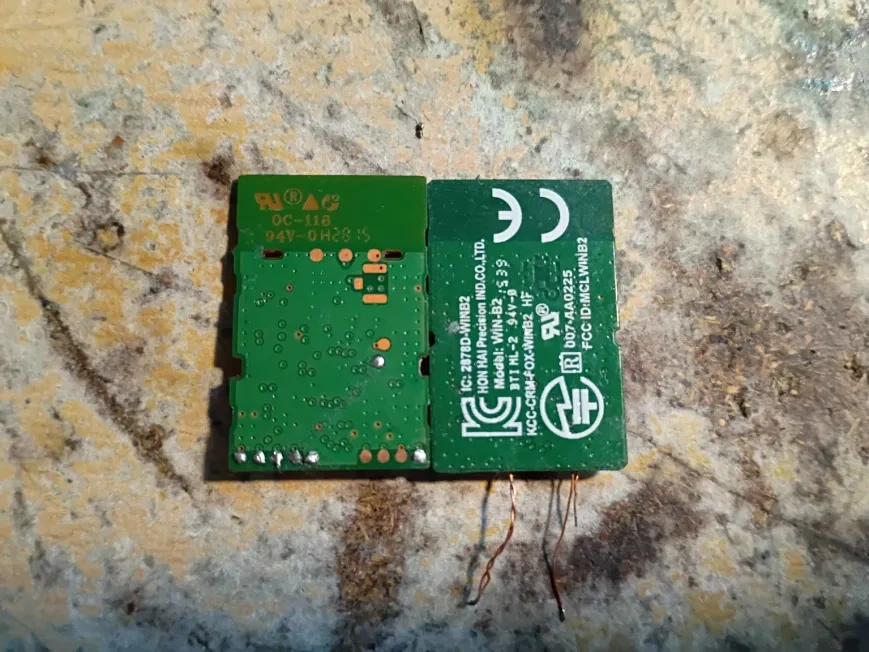
- The module is ran on the 3v3 Standby power rail, so it is always on when the console is plugged in.
- It communicates through USB, and has a custom 18-pin connector.
- The SoC isn't always on, so to power on the console from a Wii remote/Wii U pro controller, there are GPIOs connected to the SMC.
- There are two versions of the module: one with testpads, and one without.
- The one with testpads is from Mitsumi, the one without is from Foxconn.
ICs:
- BCM20702
- "V51X" "5330K". It's an SPI flash for firmware patches from the Wii U.
2.4GHz WiFi
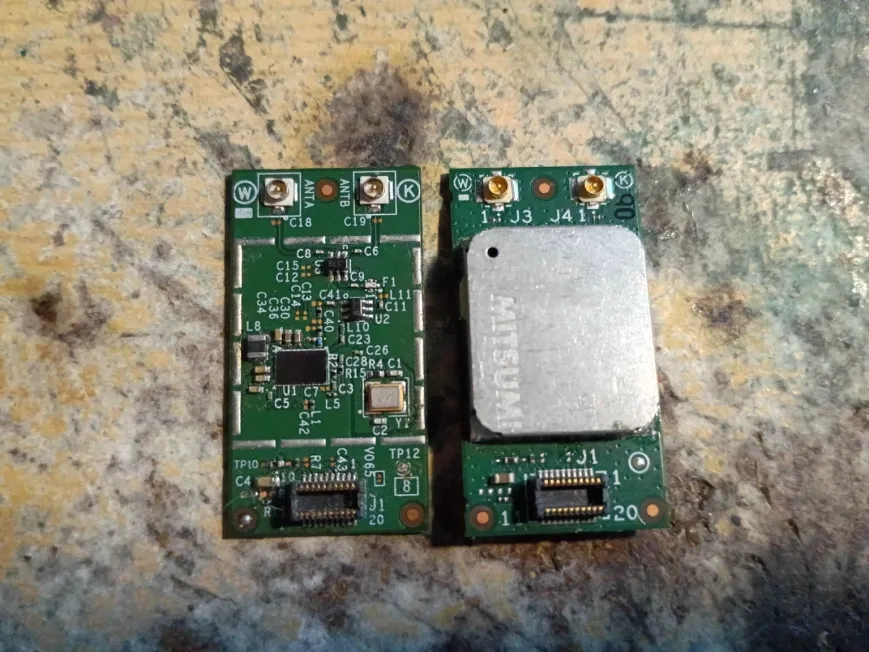
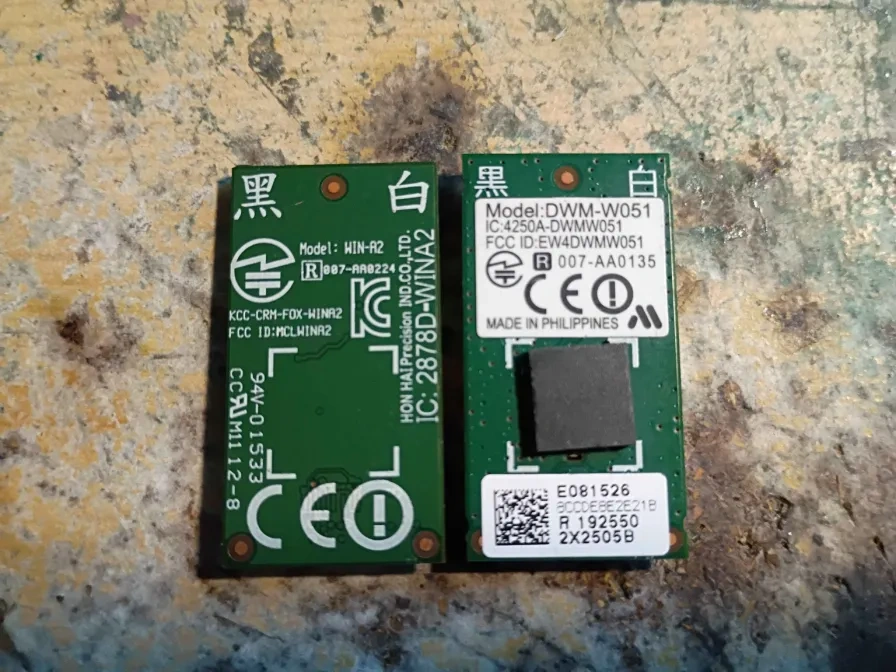
- The module is ran on the same 3v3 Standby rail as the other modules, but it's not always on. There is a transistor (Q1065) between it and the rail, and is only turned on by the RTC when the rest of the console is on.
- It communicates through SDIO to the SoC, with a custom 20-pin connector.
- The firmware of the module is served to it as the Wii U is booting up.
- Two versions of the module exist, one from Foxconn (the one with the can removed) and Mitusmi (the one that looks stock).
IC's:
U1 - A little hard to read, but it is a BCM43362KUB6.
U2/U3 - Label is "S79"
5GHz WiFi
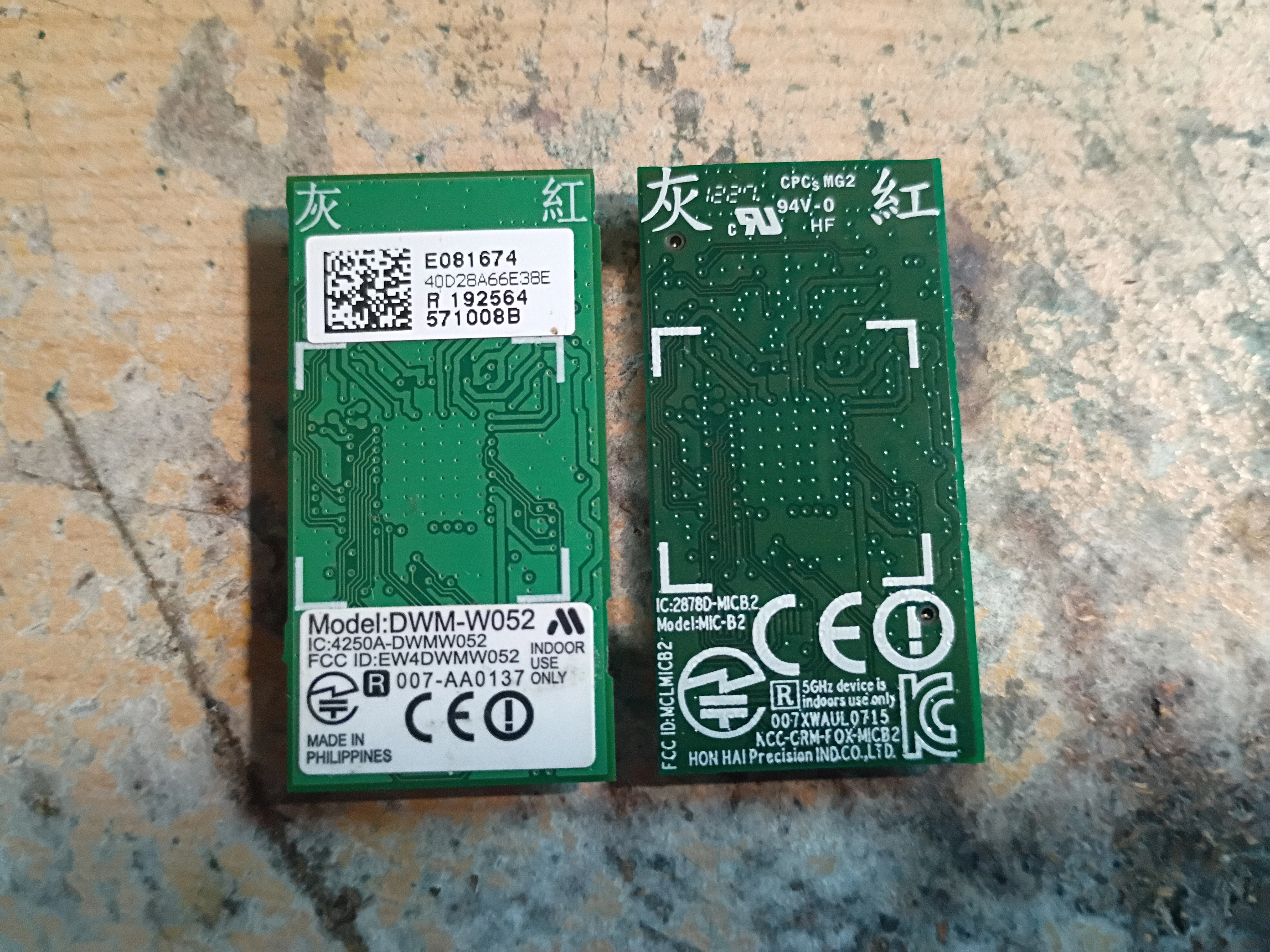
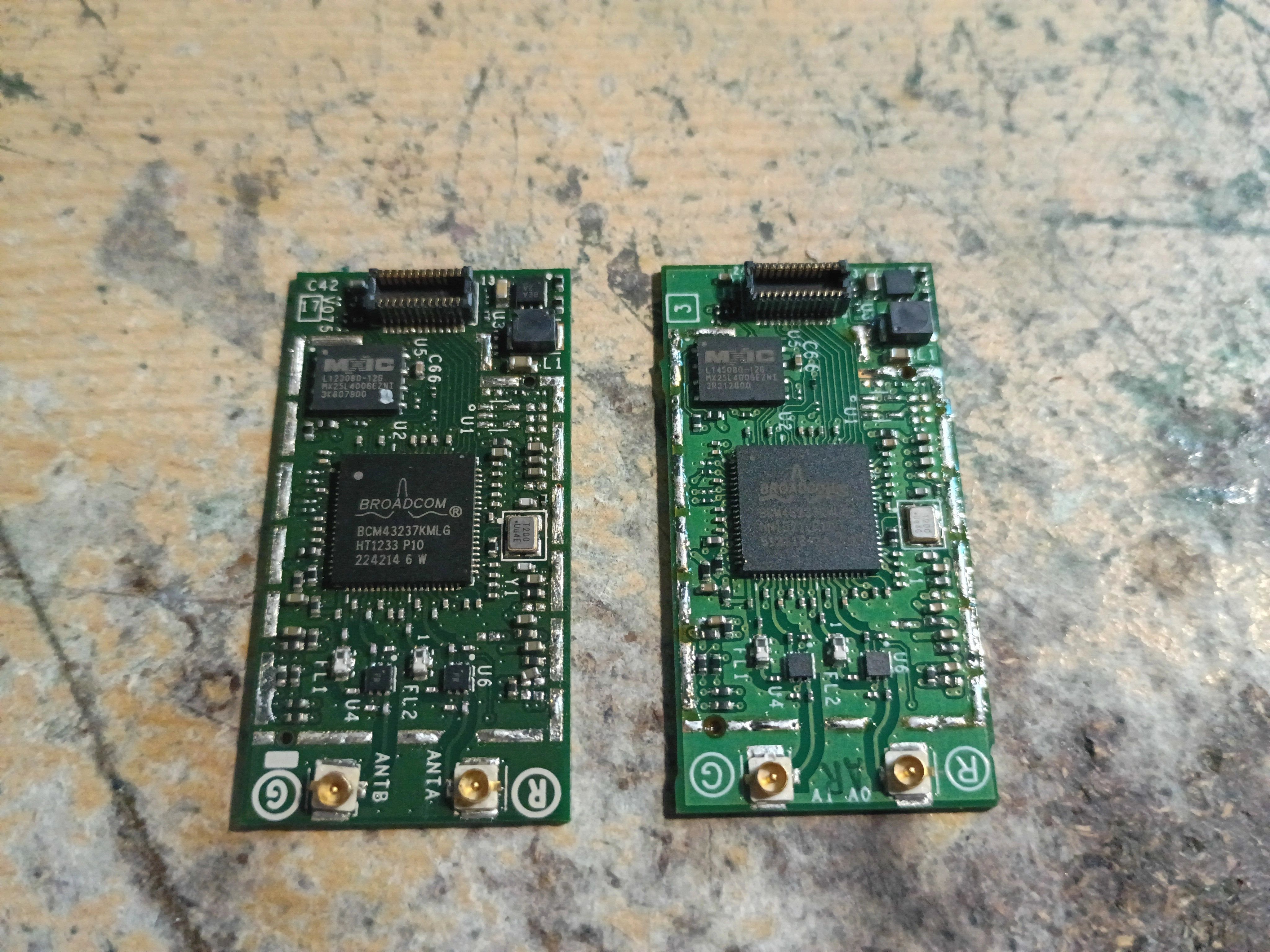
- The module is ran on the 3v3 Standby power rail, so it is always on when the console is plugged in.
- It communicates to the DRH through SDIO, and has a custom 24-pin connector.
- The DRH isn't always on, so to power on the console from the Gamepad, there are GPIOs connected to the SMC.
- Two versions of the module exist, one from Mitusmi and Foxconn.
IC's:
U2 - BCM43237KMLG
U3 - Probably a regulator?
U5 - MX25L4006EZNT (SPI flash)
U4/U6 - Labeled with "FB"
A5X vs B1X
Revisions
Layers
Integrated Circuits
Transistors
Resistors
Capacitors
Pinout Diagrams
Compendium
This is going to be a post where I dump whatever random info I know about the Wii U, because it can't stay with me forever.
This probably isn't going to be 100% complete, but when I remember something or learn something new I'll update this post.
I'm also going to follow a similar layout to Shanks Wii infodump.
This info dump was 100% written by Lazr but that's not to say that there's not some credit due.
@YveltalGriffin - WUP-01 Compendium, WUP-50 scans, endless time reversing the Wii U hardware.
@GaryOderNichts - The disc drive pictures on WiiUBrew were from him.
Gary's discord - Feedback for the Wii U Anatomy diagrams.
alldatasheets.com - Basically having almost all of the datasheets one could need.
@YveltalGriffin - WUP-01 Compendium, WUP-50 scans, endless time reversing the Wii U hardware.
@GaryOderNichts - The disc drive pictures on WiiUBrew were from him.
Gary's discord - Feedback for the Wii U Anatomy diagrams.
alldatasheets.com - Basically having almost all of the datasheets one could need.
Wii U Anatomy
Voltages
Unlike the Wii, the Wii U takes in 15v. In theory it could be as low as 9v, but U1041 (the 3v3 Standby controller) doesn't seem to operate on anything below 15v.
Power draw of the Wii U is 30w-35w, with the WUP-10 and WUP-50 being at about 25w.
It runs on 8 (or 9 if WUP-50) voltage rails, most of them similar to the Wii:
- 1v
- 1v15
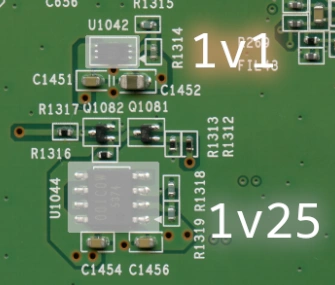
- 1v1 (WUP-50 only)
- 1v25
- 1v5
- 3v3
- 3v3 Standby (Always on)
- 5v
- 12v
What do they power?
- 1v/1v15 are the core rails for the SoC (Latte/Starbuck and Espresso respectively). 1v on earlier boards (minus WUP-10) is around 14A. 1v on the WUP-10/WUP-50 is 9A. All boards have a power draw of ~5a on 1v15.
- 1v1 powers the DRH processor.
- 1v25 powers the DRH and some glue logic in the SoC.
- 1v5 powers the DDR3 RAM.
- 3v3 powers the NANDs, certain parts of the SMC, HDMI encoder, and the DRH.
- 3v3_Standby powers the RTC, parts of the SMC, all of the wireless modules.
- 5v powers the HDMI port, USB, disc drive, and the Fan.
- 12v powers the sensor bar, disc drive motors, and the audio amplifier.
Types of regulators
Up until the WUP-50, every board used a switching regulator for each voltage. This changed with the WUP-50, where they moved 1v25 to a linear regulator and added 1v1, which is also linear.
Power draw of the Wii U is 30w-35w, with the WUP-10 and WUP-50 being at about 25w.
It runs on 8 (or 9 if WUP-50) voltage rails, most of them similar to the Wii:
- 1v
- 1v15
- 1v1 (WUP-50 only)
- 1v25
- 1v5
- 3v3
- 3v3 Standby (Always on)
- 5v
- 12v
What do they power?
- 1v/1v15 are the core rails for the SoC (Latte/Starbuck and Espresso respectively). 1v on earlier boards (minus WUP-10) is around 14A. 1v on the WUP-10/WUP-50 is 9A. All boards have a power draw of ~5a on 1v15.
- 1v1 powers the DRH processor.
- 1v25 powers the DRH and some glue logic in the SoC.
- 1v5 powers the DDR3 RAM.
- 3v3 powers the NANDs, certain parts of the SMC, HDMI encoder, and the DRH.
- 3v3_Standby powers the RTC, parts of the SMC, all of the wireless modules.
- 5v powers the HDMI port, USB, disc drive, and the Fan.
- 12v powers the sensor bar, disc drive motors, and the audio amplifier.
Types of regulators
Up until the WUP-50, every board used a switching regulator for each voltage. This changed with the WUP-50, where they moved 1v25 to a linear regulator and added 1v1, which is also linear.
Daughterboards
The Wii U has 5 daughterboards:
- Disc Drive board
- Bluetooth module
- 2.4GHz WiFi module
- 5GHz WiFi module
- Power button/LED board
None of them are required for the console to boot, but functional is another story.
Disc Drive
On a stock console it is required to do anything, but with softmods it is possible to completely remove it:
Edit the SEEPROM and change the SATA device to "None" (0). minute_minute can do this for you.
- Communicates with the SoC through SATA.
- The disc drive uses a custom FFC, but that FFC is just a Nintendo Approved SATA cable.
- It is possible to replace the drive with a SATA SSD/HDD and use it as an eMMC replacement.
Bluetooth
Without it the system will freeze launching anything from the Wii U Menu.
In theory it could be patched out in software, but no one has done so yet.
- Communicates with the SoC through USB.
- Two versions of the module exist, one with testpads.
- Antenna is integrated on the module PCB.
2.4GHz WiFi
On a stock system if removed the system will eventually freeze, but with softmods this has been patched out.
- Communicates with the SoC through SDIO
- Two versions of the module exist, neither with testpads.
- Has two antennas: White and Black
5GHz WiFi
This is how the Wii U Gamepad and DRH communicate. I don't think the system will eventually freeze without it, but more testing is required (I just don't remember).
Without it, you can't use the Gamepad (obviously).
- Communicates to the DRH through SDIO.
- Two versions of the module exist, neither with testpads.
- Has two antennas: Red and Gray.
- A thermal pad is used to disipate heat away from it into the bottom shield.
Power/LED board
Houses the Power/Eject buttons, as well as 4 LEDs (White, Blue, Red, and Yellow)
There are other ways to power on the console without this, but the LEDs can be useful to tell what the console is doing.
- White LED is used to indicate when a disc is inserted, but if the disc drive isn't connected it will always be on.
- All connections are to the SMC.
- Disc Drive board
- Bluetooth module
- 2.4GHz WiFi module
- 5GHz WiFi module
- Power button/LED board
None of them are required for the console to boot, but functional is another story.
Disc Drive
On a stock console it is required to do anything, but with softmods it is possible to completely remove it:
Edit the SEEPROM and change the SATA device to "None" (0). minute_minute can do this for you.
- Communicates with the SoC through SATA.
- The disc drive uses a custom FFC, but that FFC is just a Nintendo Approved SATA cable.
- It is possible to replace the drive with a SATA SSD/HDD and use it as an eMMC replacement.
Bluetooth
Without it the system will freeze launching anything from the Wii U Menu.
In theory it could be patched out in software, but no one has done so yet.
- Communicates with the SoC through USB.
- Two versions of the module exist, one with testpads.
- Antenna is integrated on the module PCB.
2.4GHz WiFi
On a stock system if removed the system will eventually freeze, but with softmods this has been patched out.
- Communicates with the SoC through SDIO
- Two versions of the module exist, neither with testpads.
- Has two antennas: White and Black
5GHz WiFi
This is how the Wii U Gamepad and DRH communicate. I don't think the system will eventually freeze without it, but more testing is required (I just don't remember).
Without it, you can't use the Gamepad (obviously).
- Communicates to the DRH through SDIO.
- Two versions of the module exist, neither with testpads.
- Has two antennas: Red and Gray.
- A thermal pad is used to disipate heat away from it into the bottom shield.
Power/LED board
Houses the Power/Eject buttons, as well as 4 LEDs (White, Blue, Red, and Yellow)
There are other ways to power on the console without this, but the LEDs can be useful to tell what the console is doing.
- White LED is used to indicate when a disc is inserted, but if the disc drive isn't connected it will always be on.
- All connections are to the SMC.
Disc Drive
Nothing crazy about the disc drive compared to the Wii. There are 3 boards, and 4 different main chips.
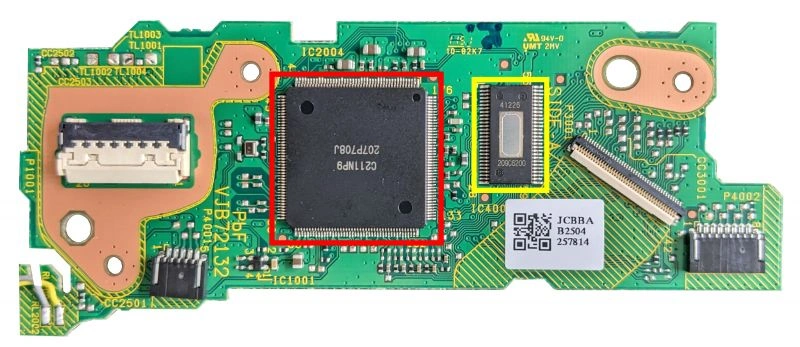
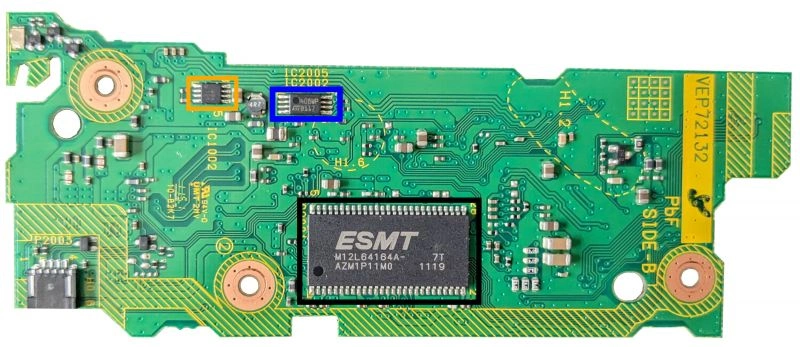
VXX72132
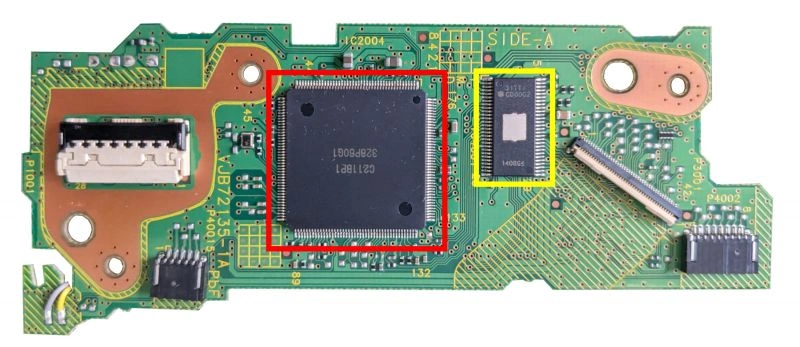
VXX72135
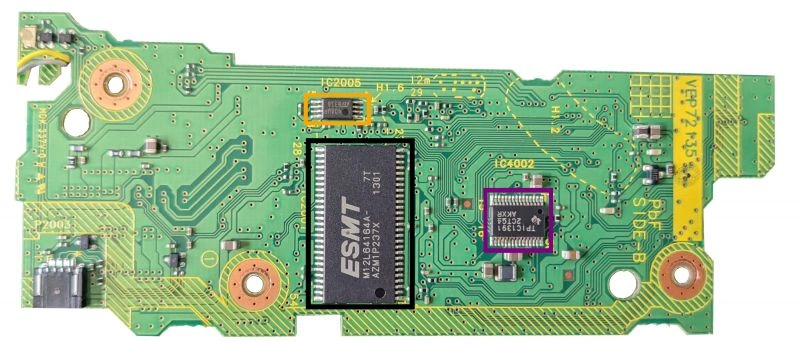
VXX72137
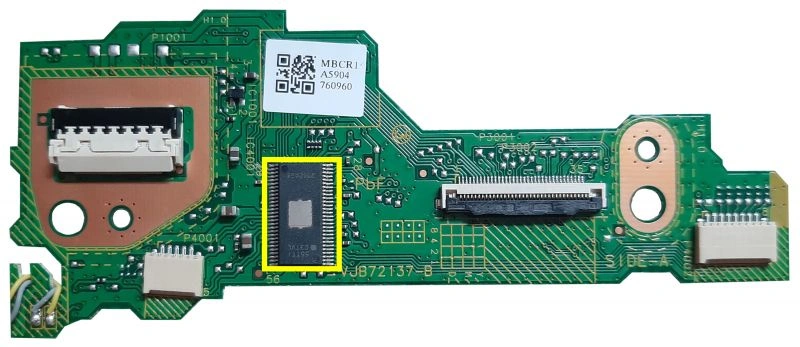
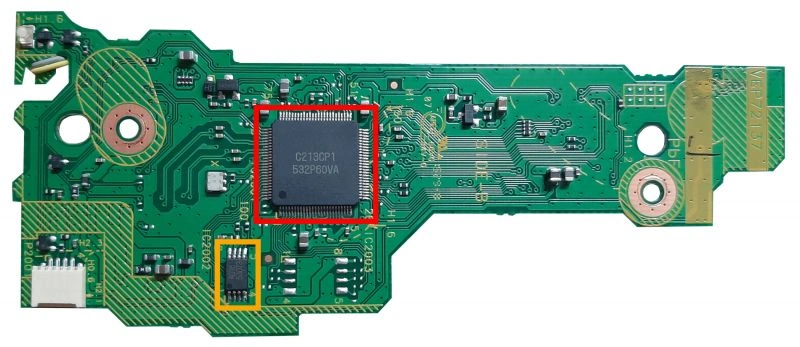
Notes:
- VXX72132 can either have "C211NP9" or "C212NR9".
- VXX72132 is a 4 layer board.
- VXX72135 and VXX72137 are 2 layer boards.
- VXX72137 has a smaller main chip with 100 pins, compared to the 176 pin chips in previous revisions.
Pictures taken from WiiUBrew.
VXX72132
VXX72135
VXX72137
Notes:
- VXX72132 can either have "C211NP9" or "C212NR9".
- VXX72132 is a 4 layer board.
- VXX72135 and VXX72137 are 2 layer boards.
- VXX72137 has a smaller main chip with 100 pins, compared to the 176 pin chips in previous revisions.
Pictures taken from WiiUBrew.
Bluetooth
- The module is ran on the 3v3 Standby power rail, so it is always on when the console is plugged in.
- It communicates through USB, and has a custom 18-pin connector.
- The SoC isn't always on, so to power on the console from a Wii remote/Wii U pro controller, there are GPIOs connected to the SMC.
- There are two versions of the module: one with testpads, and one without.
- The one with testpads is from Mitsumi, the one without is from Foxconn.
ICs:
- BCM20702
- "V51X" "5330K". It's an SPI flash for firmware patches from the Wii U.
2.4GHz WiFi
- The module is ran on the same 3v3 Standby rail as the other modules, but it's not always on. There is a transistor (Q1065) between it and the rail, and is only turned on by the RTC when the rest of the console is on.
- It communicates through SDIO to the SoC, with a custom 20-pin connector.
- The firmware of the module is served to it as the Wii U is booting up.
- Two versions of the module exist, one from Foxconn (the one with the can removed) and Mitusmi (the one that looks stock).
IC's:
U1 - A little hard to read, but it is a BCM43362KUB6.
U2/U3 - Label is "S79"
5GHz WiFi
- The module is ran on the 3v3 Standby power rail, so it is always on when the console is plugged in.
- It communicates to the DRH through SDIO, and has a custom 24-pin connector.
- The DRH isn't always on, so to power on the console from the Gamepad, there are GPIOs connected to the SMC.
- Two versions of the module exist, one from Mitusmi and Foxconn.
IC's:
U2 - BCM43237KMLG
U3 - Probably a regulator?
U5 - MX25L4006EZNT (SPI flash)
U4/U6 - Labeled with "FB"
A5X vs B1X
- Unlike the Wii, the Wii U only had one SoC revision.
- The B1X has a much lower power consumption compared to the A5X.
- Both are an MCM that house the Espresso, Latte/Starbuck, and an EEPROM.
- It it unknown whether B1X was a dieshrink, or just silicon optimizations. The dies themselves are the same size.
A5X:
- Espresso: 45nm
- Latte: 40nm(?)
B1X:
- Espresso: ?
- Latte: ?
- The B1X has a much lower power consumption compared to the A5X.
- Both are an MCM that house the Espresso, Latte/Starbuck, and an EEPROM.
- It it unknown whether B1X was a dieshrink, or just silicon optimizations. The dies themselves are the same size.
A5X:
- Espresso: 45nm
- Latte: 40nm(?)
B1X:
- Espresso: ?
- Latte: ?
Revisions
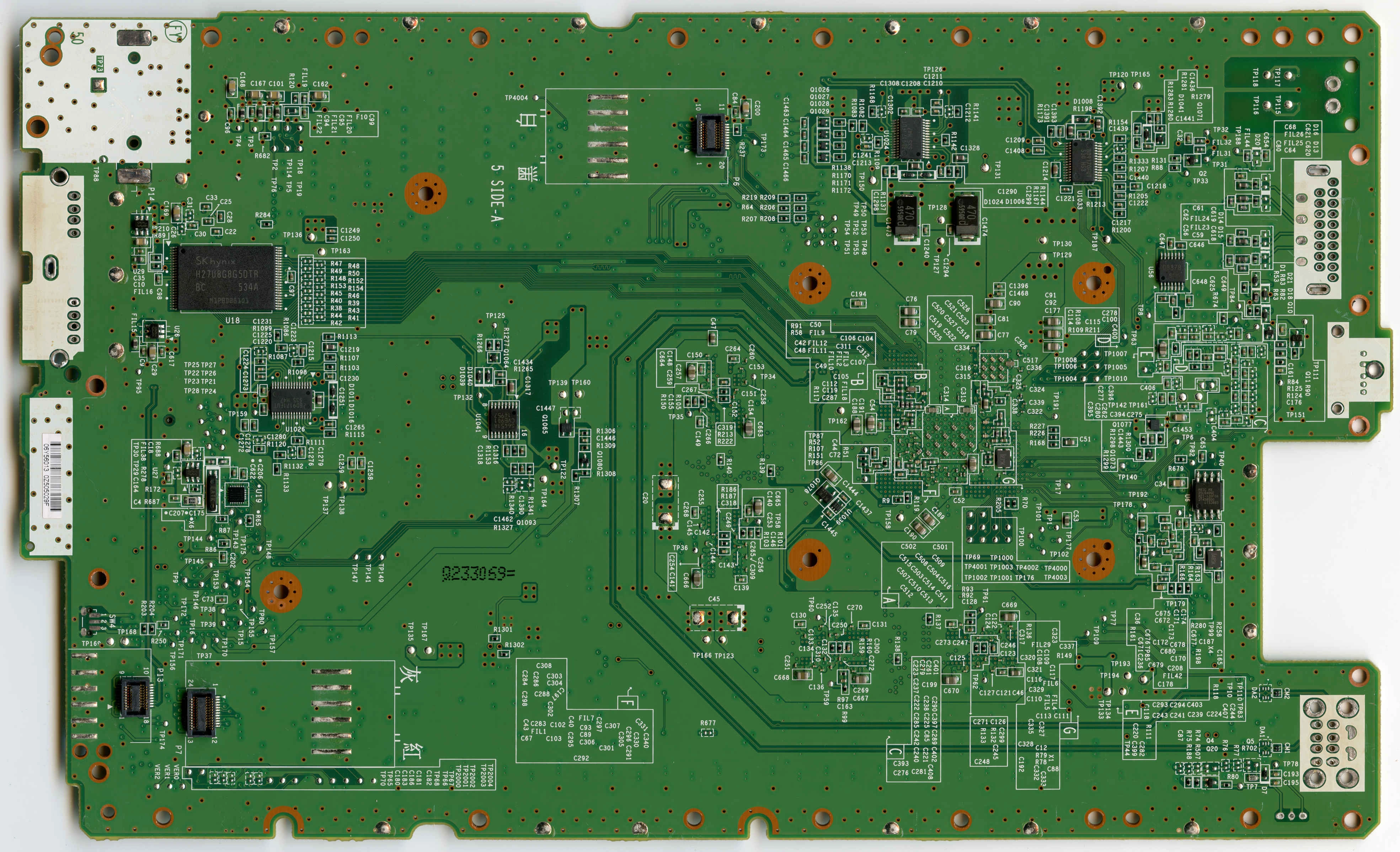
The Wii U has 5 known board revisions, with one theoretically existing (need to find one):
- WUP-01
- WUP-10
- WUP-30
- WUP-40
- WUP-50
The board that theoretically exists is the WUP-20, but I do not have one to confirm.
The easiest way to tell what revision you have is the QR sticker on the bottom of the console:

- There are other ways if this sticker is missing:
- ALL Wii U boards are 6 layers.
- Unlike the Wii, the Wii U used white and black shells throughout its entire life, never using any other colors. Because of this, it is impossible to tell what the revision is just by looking at it.
- It's worth noting that white shell does NOT immediately mean 8GB, as 32GB white Wii Us do exist. They are very common in Japan and NA units were sold as refurbished systems. That being said, if its a white system from the NA region, its more likely than not to be an 8GB unit.
Why does it matter?
- All boards can be trimmed, but the only revision that matters in the context of portablizing is the WUP-50. Its the most common board with the B1X.
- The WUP-50 has the RAM brought in a little (most likely due to the smaller package), which in turn makes the trim smaller.
- The WUP-10 also has B1X, but they are very rare.
- WUP-20 might have B1X but you're not finding one.
- Every other board has the A5X.
- B1X matters because of the lower power draw (and in turn, generate less heat and last longer on batteries).
WUP-01
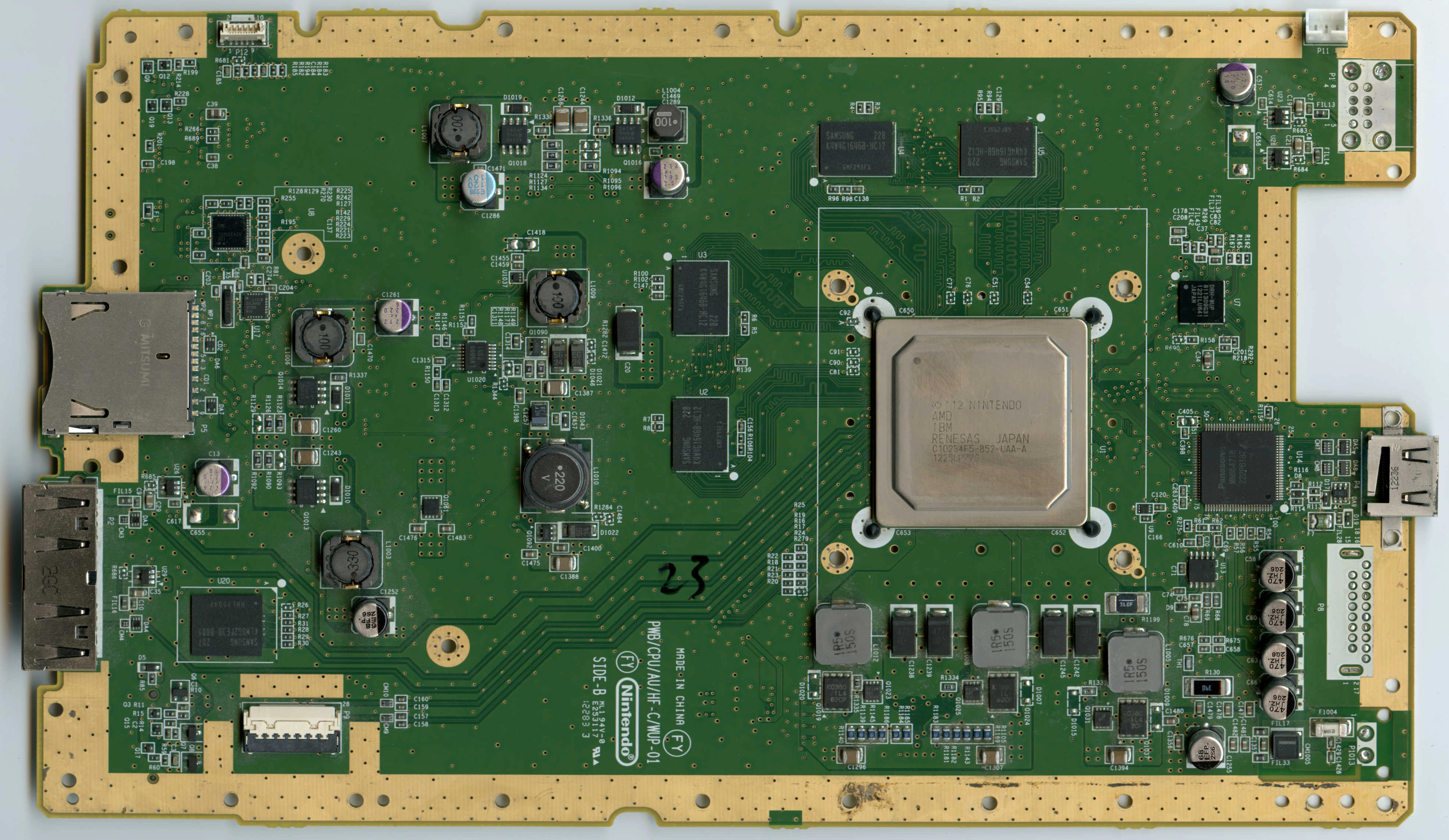
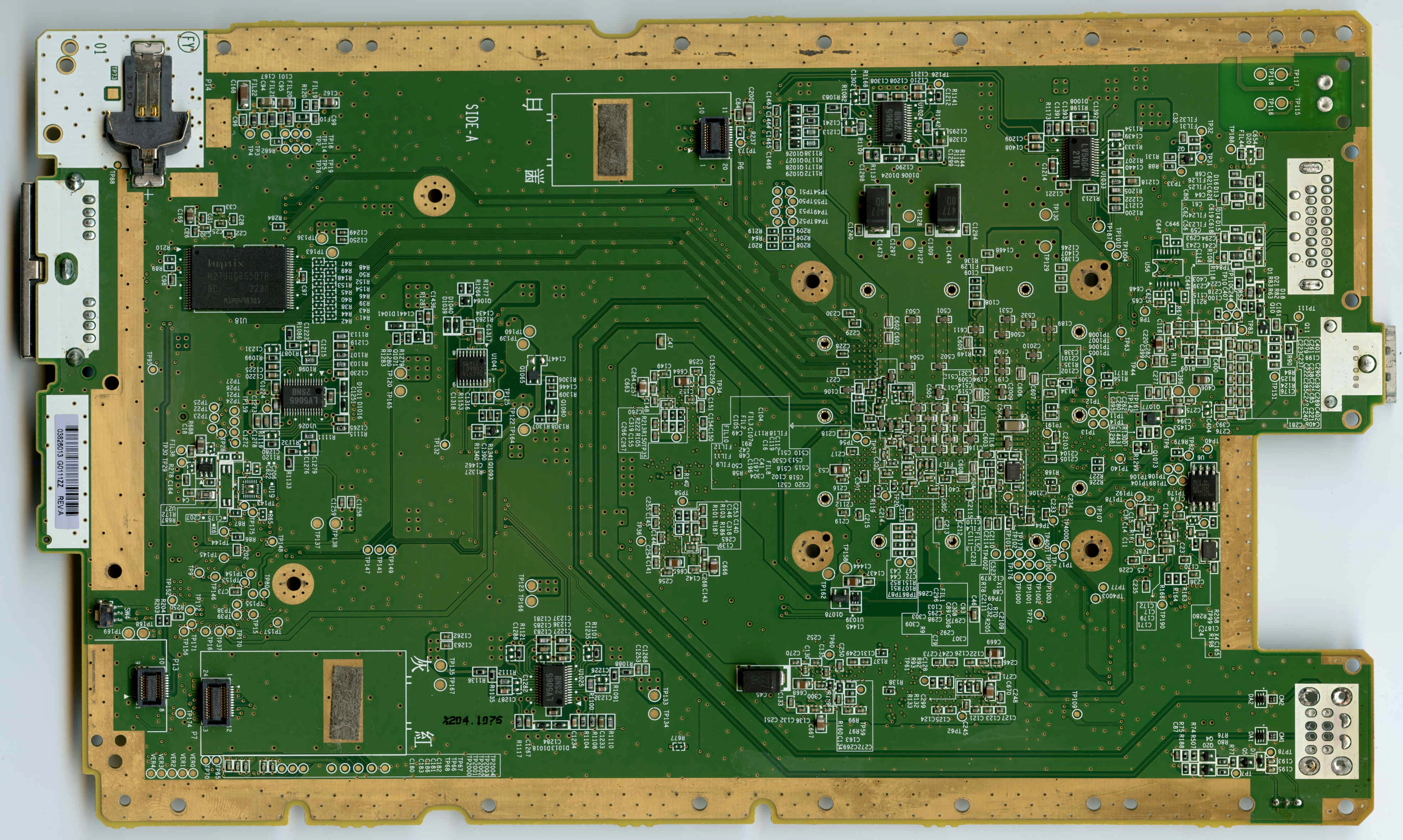
Die size: 45nm/40nm
Power consumption: High
Heat generation: High
- First and most common.
- It is easy to tell from the other boards because the entire perimeter is gold-plated.
WUP-10
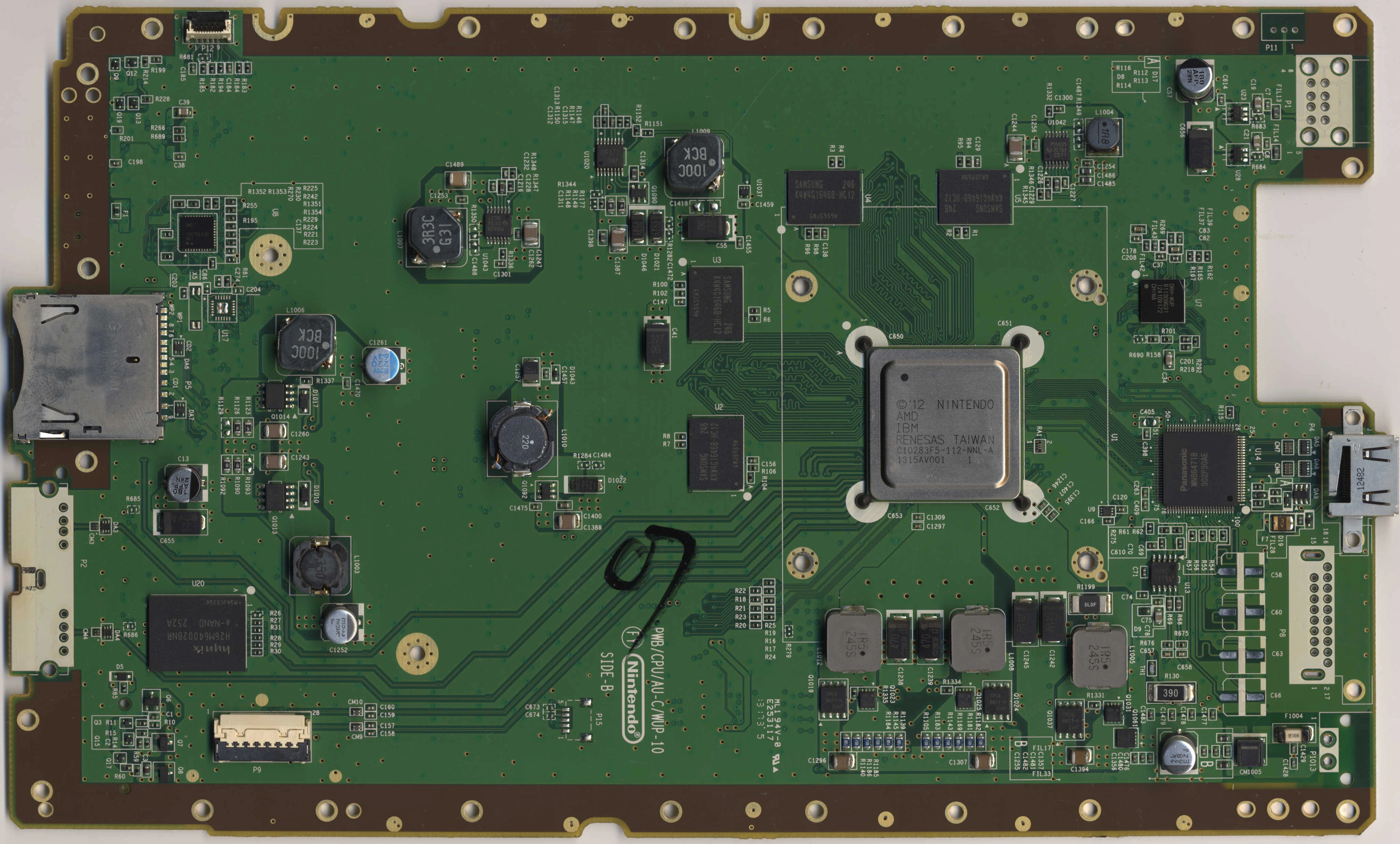
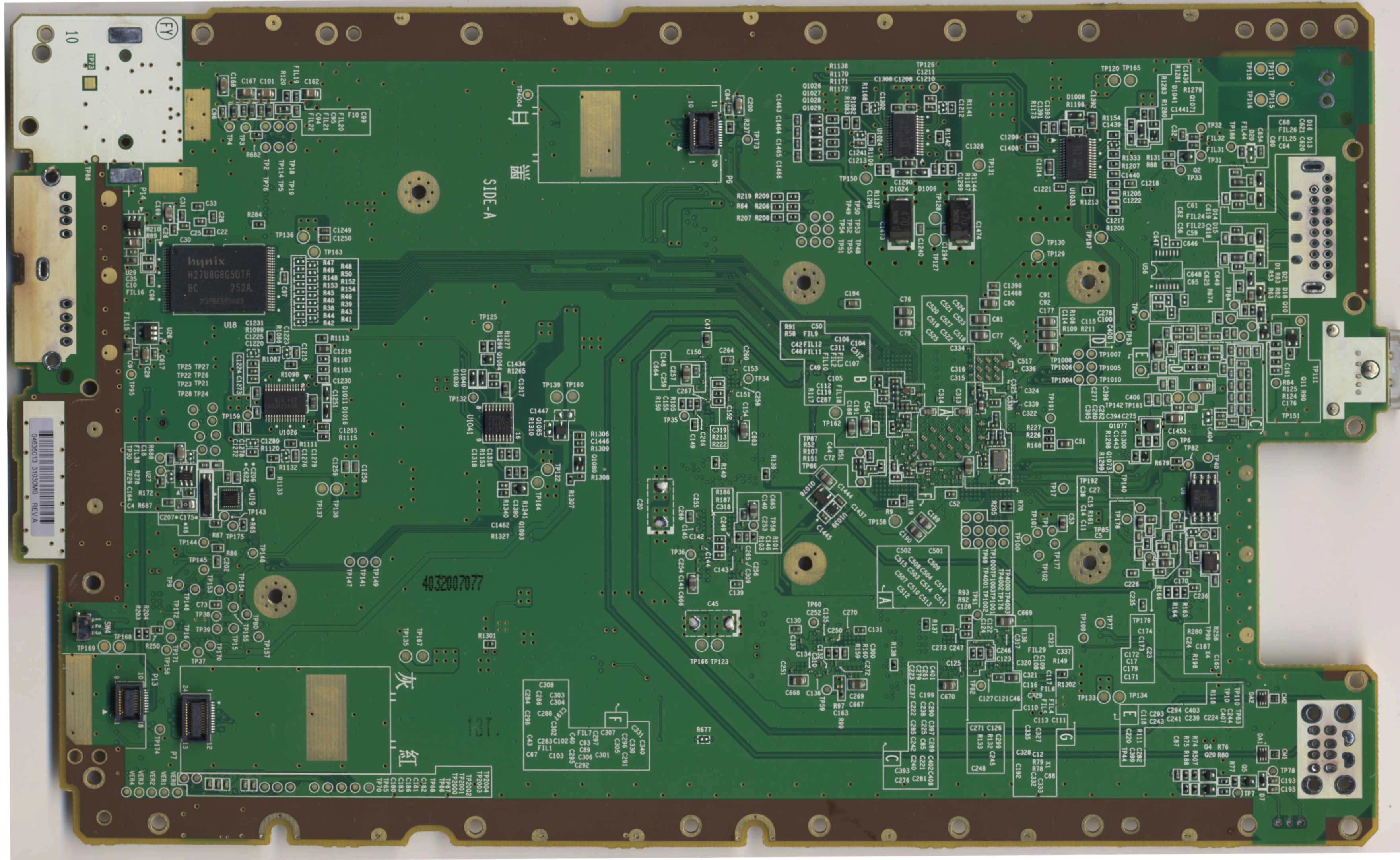
Die size: ?/?
Power consumption: Low
Heat generation: Low
- Second and one of the least common Wii U boards.
- Japanese only(?)
- Removed the gold-plating.
- Added P15 from the kiosk units.
- Introduced the B1X.
- Completely overhauled the routing.
- Vias are plugged.
- Separated the 1v25 and 5v regulators. Every subsequent board would follow this.
- Please don't trims these ones.
WUP-20
Die size: ??/??
Power consumption: ?
Heat generation: ?
- I can't find one.
- Theorized to have B1X.
WUP-30
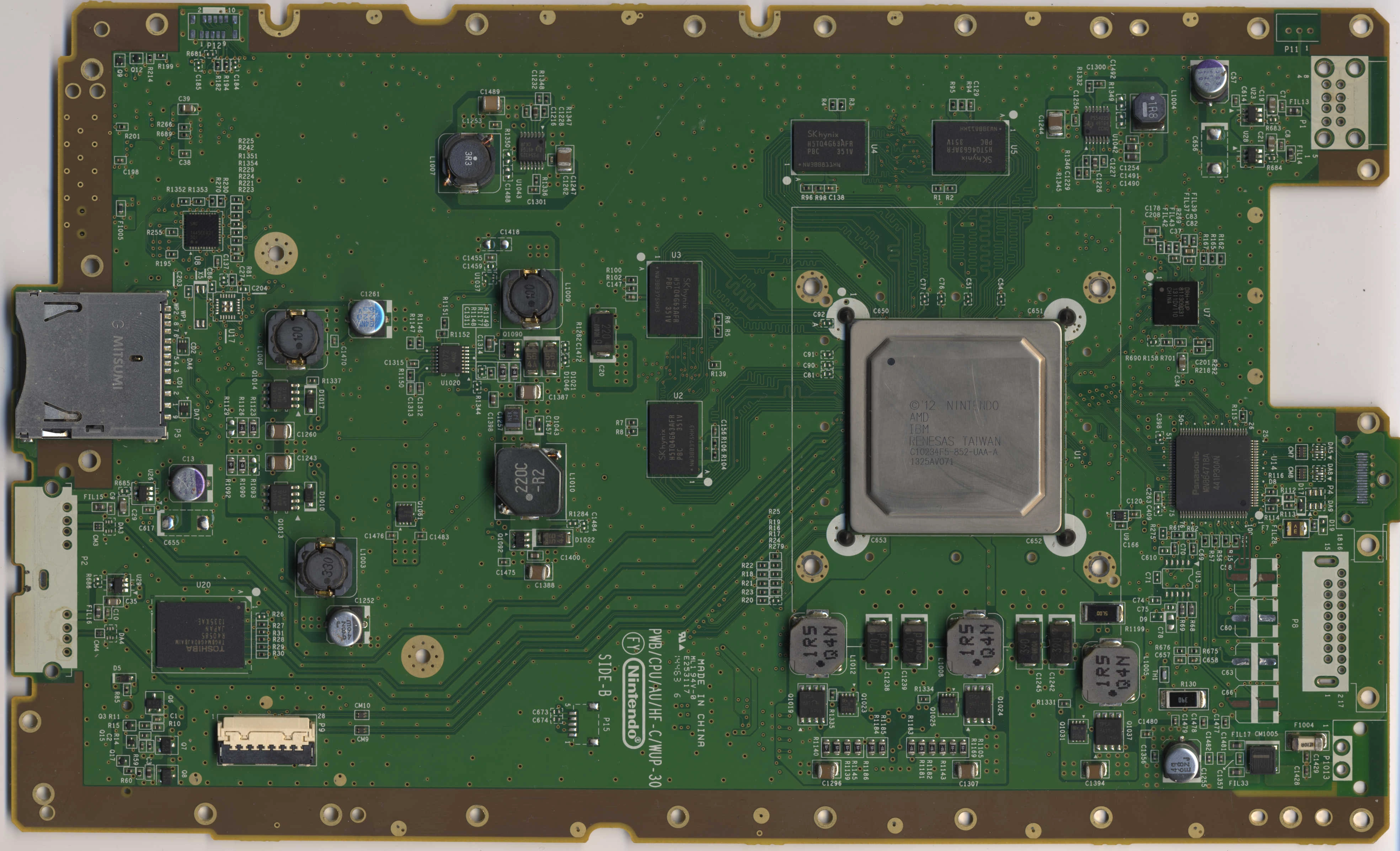
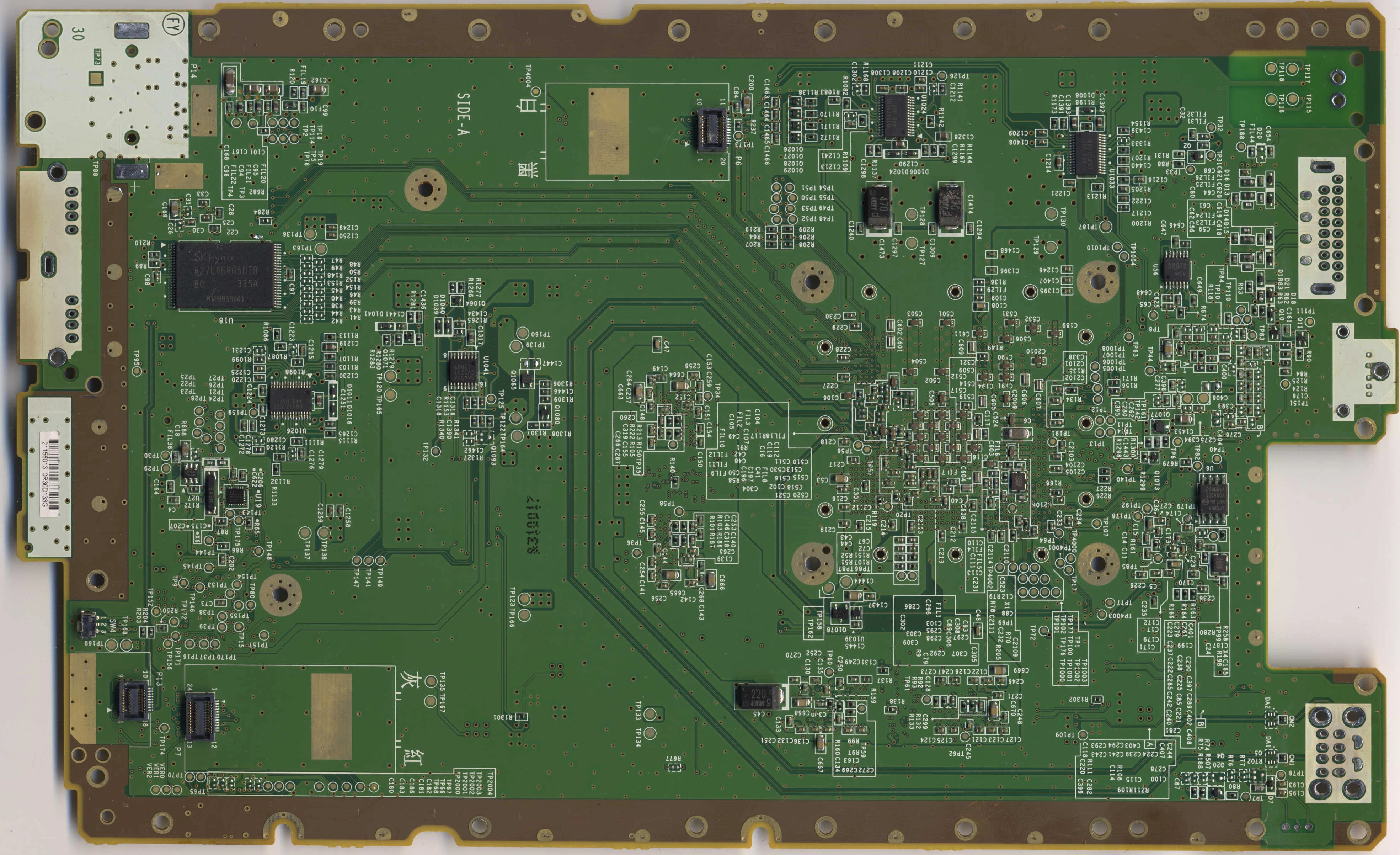
Die size: 45nm/40nm
Power consumption: High
Heat generation: High
- 4th board and second most common.
- It's the WUP-01 again but without the gold perimeter.
- Went back to the WUP-01 routing/layout.
- Removed the DC blocking capacitors on the SATA port..?
- Vias are no longer plugged.
WUP-40
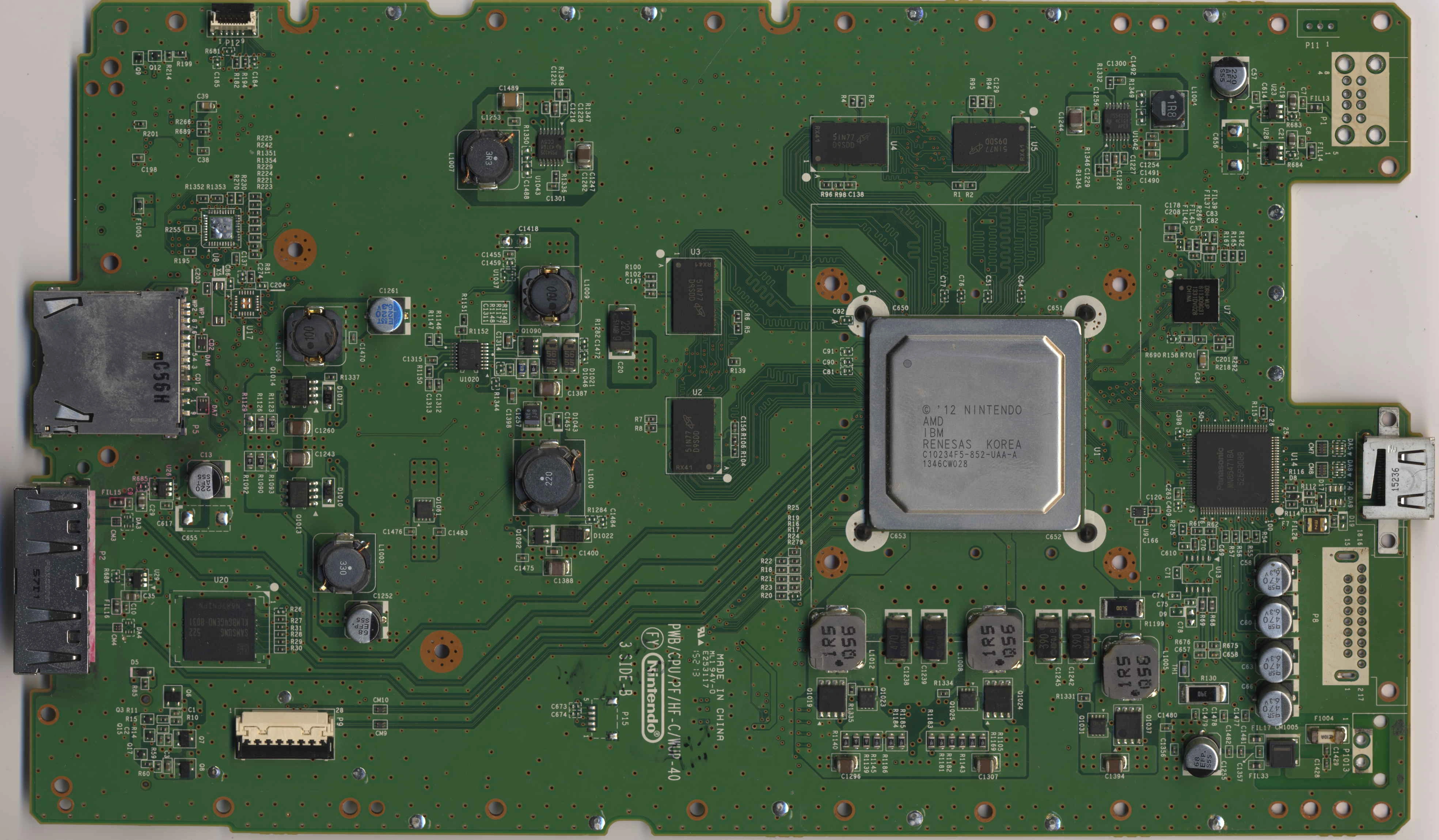
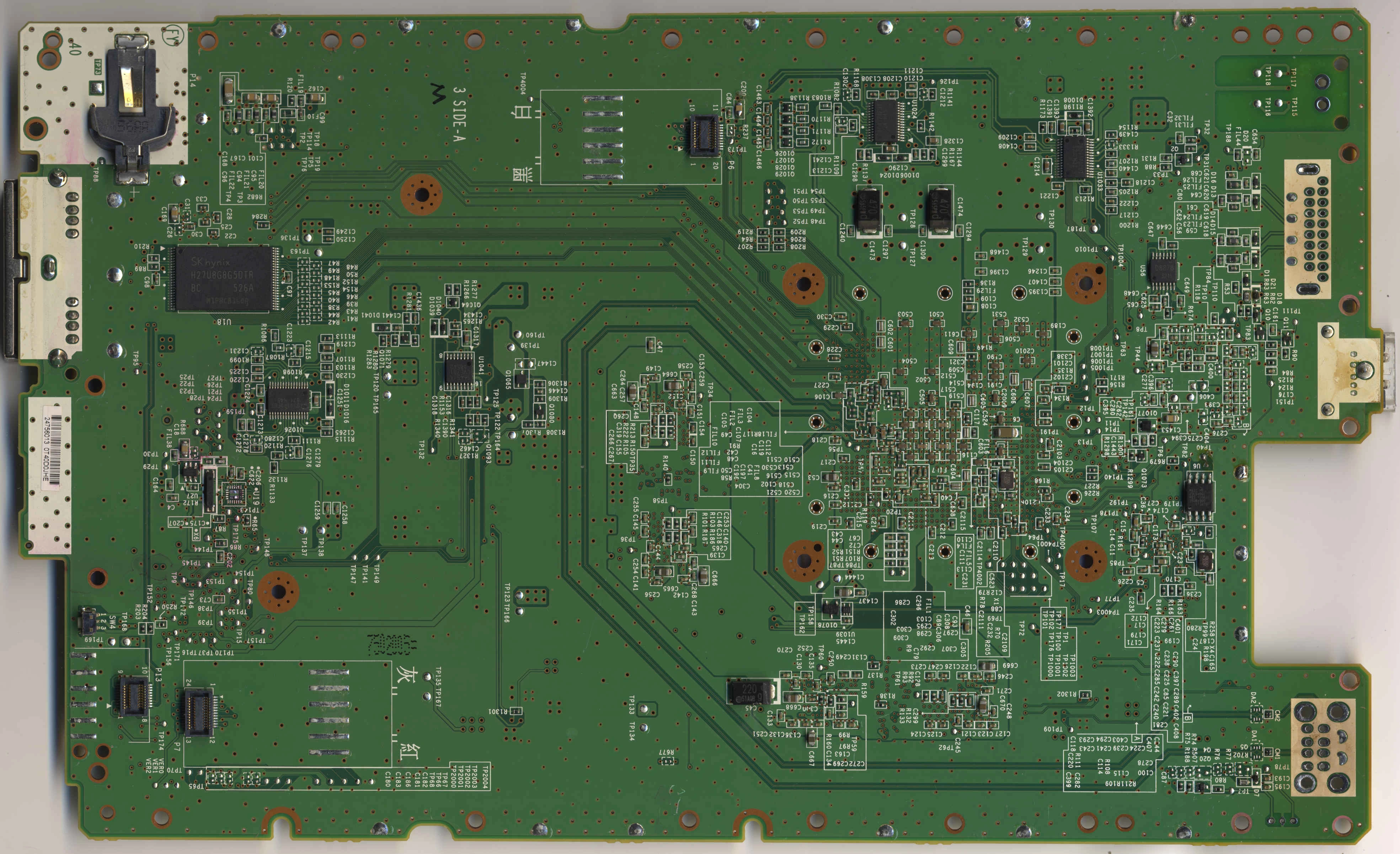
Die size: 45nm/40nm
Power consumption: High
Heat generation: High
- 5th board, its in a middle ground between "somewhat common" and "not really common".
- Plating is a copper-like color (OSP?)
- The copper goes to the edges of the board
- The ground connections from the board to the can of the modules is different.
- Everything is tinned with solder now.
- I'm not entirely sure why this revision exists.
WUP-50
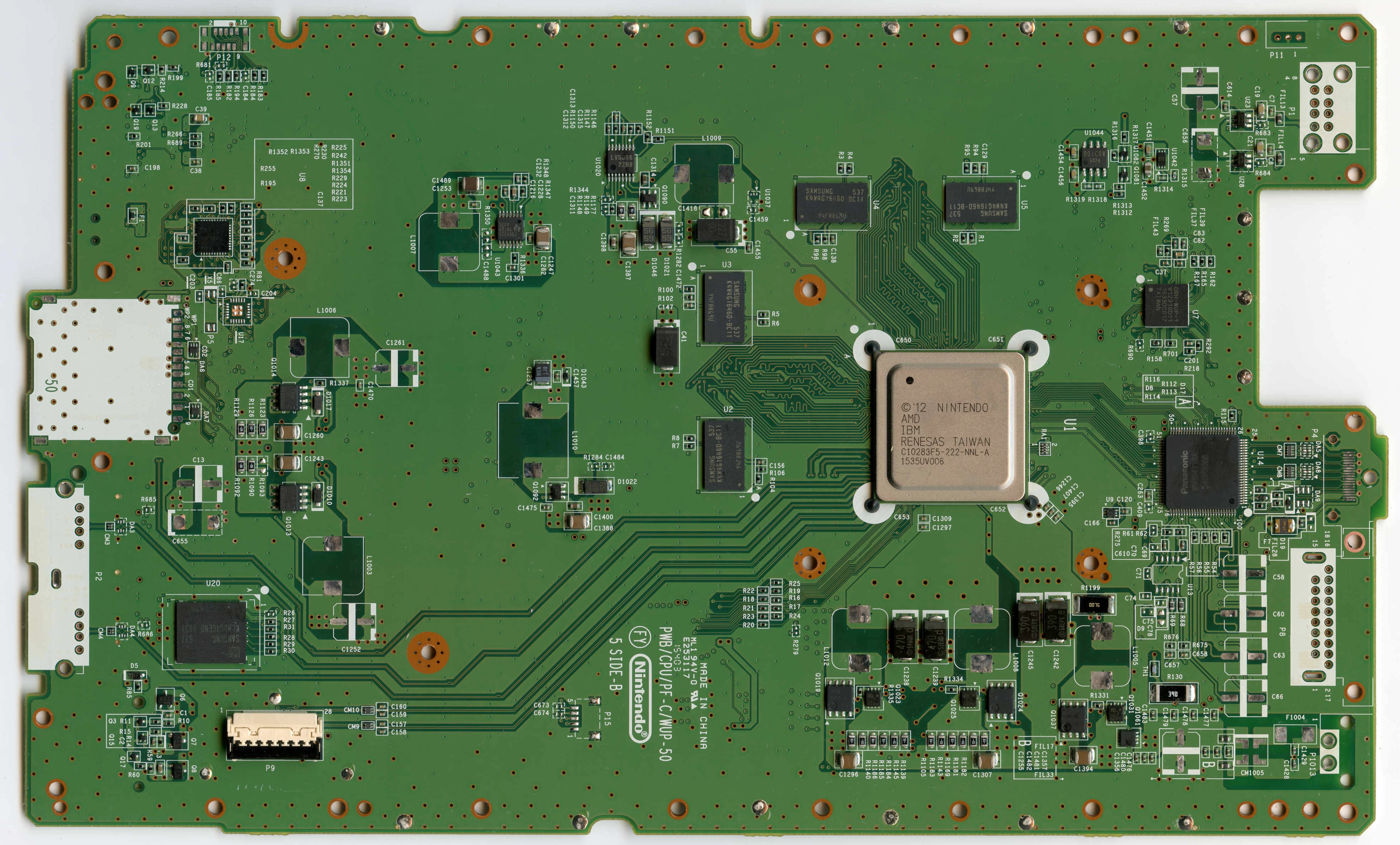
Die size: ?/?
Power consumption: Low
Heat generation: Low
- 6th and final board. It's more common than the WUP-40 but not as common as the WUP-01 or WUP-30.
- Went back to the B1X and the WUP-10/WUP-20(?) routing.
- Everything tinned with solder and copper to the edges, same as WUP-40.
- Vias are plugged again.
- WUP-01
- WUP-10
- WUP-30
- WUP-40
- WUP-50
The board that theoretically exists is the WUP-20, but I do not have one to confirm.
The easiest way to tell what revision you have is the QR sticker on the bottom of the console:
- There are other ways if this sticker is missing:

Why Revisions Matter
Not unlike the Wii, Nintendo had made several changes to the Wii U throughout its short life. The biggest change was the usage of the B1X SoC, which draws less power and generates less heat than the A5X. Here's a general overview of the advantages and disadvantages:
A5X SoC:
Cons:
- Consume a lot of power (13A@1V idle, 14-15A@1V while in-game)
- Generates more heat
- Found on WUP-01 / WUP-30 / WUP-40, which are the most common motherboards.
B1X SoC:
Pros:
- Consume a lot less power...
Not unlike the Wii, Nintendo had made several changes to the Wii U throughout its short life. The biggest change was the usage of the B1X SoC, which draws less power and generates less heat than the A5X. Here's a general overview of the advantages and disadvantages:
A5X SoC:
Cons:
- Consume a lot of power (13A@1V idle, 14-15A@1V while in-game)
- Generates more heat
- Found on WUP-01 / WUP-30 / WUP-40, which are the most common motherboards.
B1X SoC:
Pros:
- Consume a lot less power...
- Lazr
- Replies: 4
- Forum: Guide Submissions

- Unlike the Wii, the Wii U used white and black shells throughout its entire life, never using any other colors. Because of this, it is impossible to tell what the revision is just by looking at it.
- It's worth noting that white shell does NOT immediately mean 8GB, as 32GB white Wii Us do exist. They are very common in Japan and NA units were sold as refurbished systems. That being said, if its a white system from the NA region, its more likely than not to be an 8GB unit.
Why does it matter?
- All boards can be trimmed, but the only revision that matters in the context of portablizing is the WUP-50. Its the most common board with the B1X.
- The WUP-50 has the RAM brought in a little (most likely due to the smaller package), which in turn makes the trim smaller.
- The WUP-10 also has B1X, but they are very rare.
- WUP-20 might have B1X but you're not finding one.
- Every other board has the A5X.
- B1X matters because of the lower power draw (and in turn, generate less heat and last longer on batteries).
WUP-01
Die size: 45nm/40nm
Power consumption: High
Heat generation: High
- First and most common.
- It is easy to tell from the other boards because the entire perimeter is gold-plated.
WUP-10
Die size: ?/?
Power consumption: Low
Heat generation: Low
- Second and one of the least common Wii U boards.
- Japanese only(?)
- Removed the gold-plating.
- Added P15 from the kiosk units.
- Introduced the B1X.
- Completely overhauled the routing.
- Vias are plugged.
- Separated the 1v25 and 5v regulators. Every subsequent board would follow this.
- Please don't trims these ones.
WUP-20
Die size: ??/??
Power consumption: ?
Heat generation: ?
- I can't find one.
- Theorized to have B1X.
WUP-30
Die size: 45nm/40nm
Power consumption: High
Heat generation: High
- 4th board and second most common.
- It's the WUP-01 again but without the gold perimeter.
- Went back to the WUP-01 routing/layout.
- Removed the DC blocking capacitors on the SATA port..?
- Vias are no longer plugged.
WUP-40
Die size: 45nm/40nm
Power consumption: High
Heat generation: High
- 5th board, its in a middle ground between "somewhat common" and "not really common".
- Plating is a copper-like color (OSP?)
- The copper goes to the edges of the board
- The ground connections from the board to the can of the modules is different.
- Everything is tinned with solder now.
- I'm not entirely sure why this revision exists.
WUP-50
Die size: ?/?
Power consumption: Low
Heat generation: Low
- 6th and final board. It's more common than the WUP-40 but not as common as the WUP-01 or WUP-30.
- Went back to the B1X and the WUP-10/WUP-20(?) routing.
- Everything tinned with solder and copper to the edges, same as WUP-40.
- Vias are plugged again.
Layers
All Wii U boards are 6 layers.
- Top visible layer: Surface layer routing, along with half of the components.
- 2nd layer: GND layer
- 3rd layer: Power planes. Some DDR3 routing is here too.
- 4th layer: Internal IO. SMC/RTC/SD Card is all here. eMMC probably is too on WUP-10/WUP-50.
- 5th layer: GND layer
- 6th layer: Surface layer routing, along with the other half of the components.
(3rd and 4th layer could be the other way around, I'm not entirely sure)
- Top visible layer: Surface layer routing, along with half of the components.
- 2nd layer: GND layer
- 3rd layer: Power planes. Some DDR3 routing is here too.
- 4th layer: Internal IO. SMC/RTC/SD Card is all here. eMMC probably is too on WUP-10/WUP-50.
- 5th layer: GND layer
- 6th layer: Surface layer routing, along with the other half of the components.
(3rd and 4th layer could be the other way around, I'm not entirely sure)
Integrated Circuits
This is a computer (basically), its gonna have a few of these.
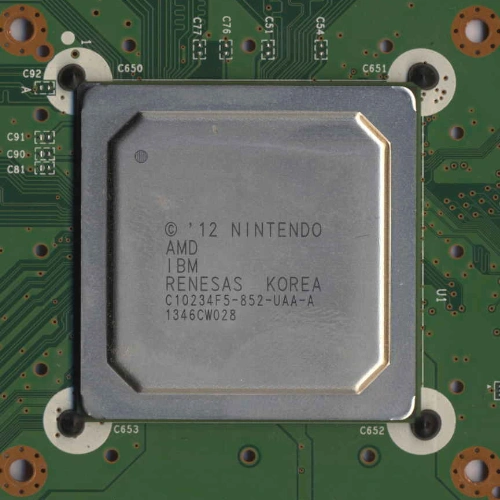
A5X
B1X
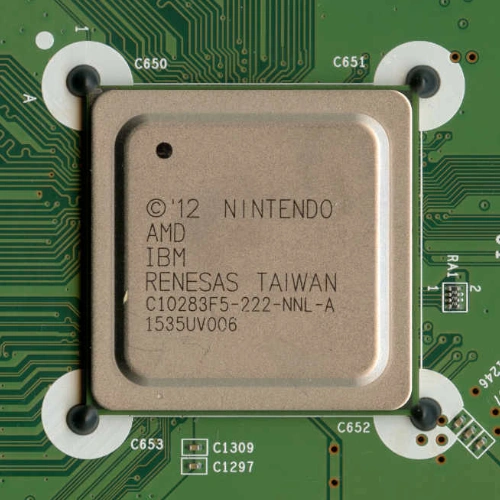
Reference Designator: U1 (top)
Datasheet:
Mandatory: Yes (....otherwise its not a Wii U.)
Solder Type: BGA
- This is the Espresso, Latte/Starbuck, and EEPROM packed into a single package.
RAM:
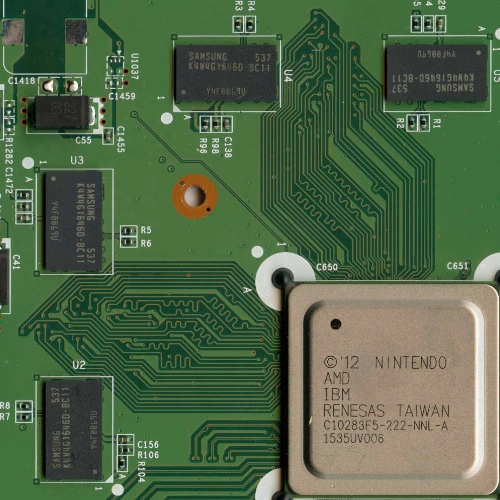
Reference Designators: U2/U3/U4/U5, 4 chips, 512MB each. (top)
Datasheet: MT41K256M16HA-125:E (This is the Micron datasheet but all chips used are drop-in replacements)
Mandatory: Yes
Solder Type: BGA
- Micron/Elpida and Hynix chips were also used.
DRH:
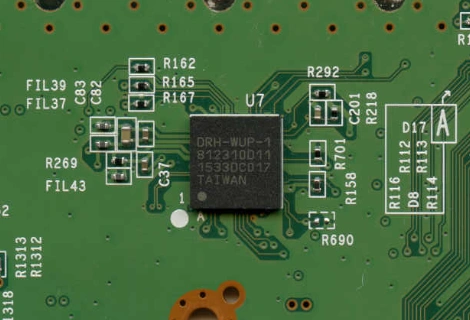
Reference Designator: U7 (top)
Datasheet:
Mandatory: Yes
Solder Type: BGA
- The DRH is a complete ARM9 processor that takes the video feed from the GPU and encodes it into H264 packets to send to the Gamepad. It also receives button/touchscreen/camera/mic inputs and communicates that to the SoC through USB.
- To actually communicate to the Gamepad, the DRH is connected to the 5GHz WiFi module through SDIO.
- The only differences between the DRH and DRC (ARM9 processor on the Gamepad) is the pinout and whatever is on the flash - the bootROM is the exact same.
- On earlier boards (basically all of them) the DRH only ran on 1v25 and 3v3, but on the WUP-50 they revised the DRH (DRH-WUP-1) and it runs on an additional 1v1 voltage.
SLC NAND:
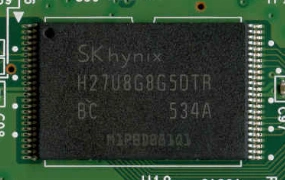
Reference Designator: U18 (bottom)
Datasheet: H27U8G8G5DTA
Mandatory: Yes
Solder Type: SMD/TSOP48
- Samsung, Toshiba, and Spansion chips were also used.
MLC eMMC:
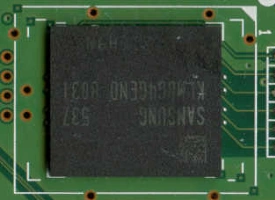
Reference Designator: U20 (top)
Datasheet: KLMBG4GEND-B031
Mandatory: Yes*
- Solder Type: BGA/BGA153
- Toshiba and Hynix chips were also used.
*It can be replaced with a microSD card.
SMC:
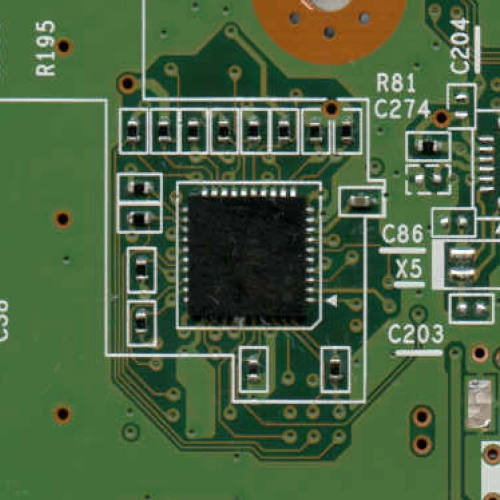
Reference Designator: U8 (top)
Datasheet:
Mandatory: Yes
Solder Type: SMD/QFN
- Handles LEDs, buttons, module resets, Power-ON from Gamepad/Wii remote, disc drive sensors and power. It is always on.
- Pinout:
RTC:
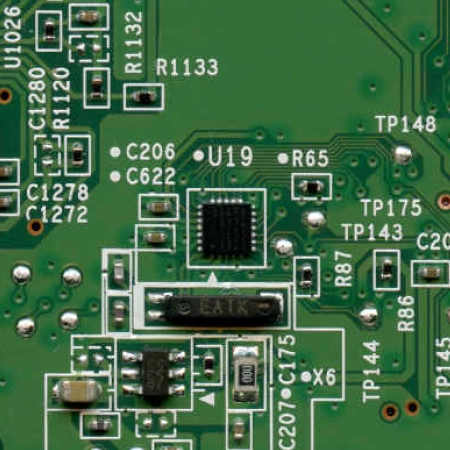
Reference Designator: U17 (top) or U19 (bottom)
Datasheet:
Mandatory: Yes
Solder Type: SMD/QFN
- There's two different RTC footprints, one is on the top, and one is on the bottom. There is only ever one populated.
- RTC handles enabling 15v to the regulators, time clock, enables the 1v5 reg, and enables power to the WiFi module. It is always on.
- Pinout:
Video Encoder:
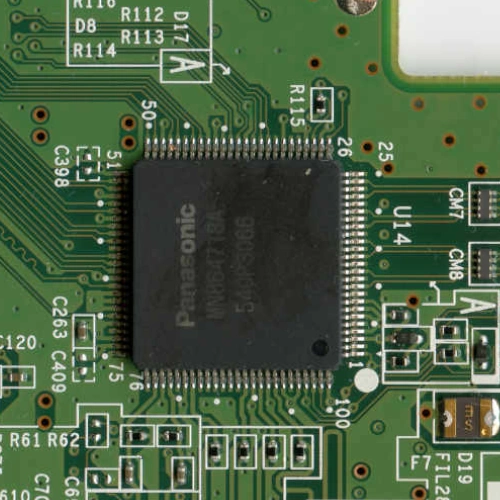
Reference Designator: U14 (top)
Datasheet:
Mandatory: No*
Solder Type: SMD/QFP
- It's a custom Panasonic part that takes in whatever digital video the GPU outputs and converts it to HDMI, Component, or Composite.
- The full pinout is not known, but the output pins are: * It is not needed for boot, but you're either stuck with the Gamepad or it needs to be replaced with another encoder.
Audio Amplifier:
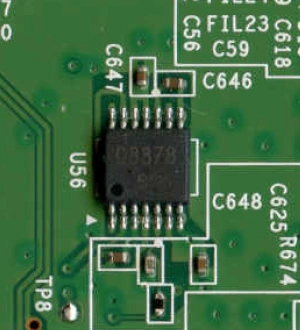
Reference Designator: U13 (top) or U56 (bottom)
Datasheet:
Mandatory: No
Solder Type: SMD
- It is only ever used if outputting analog video/audio.
- Much like the RTC, there is a footprint on both the top and bottom of the board, only one is ever populated though.
- Runs on 12v.
"ABLIC":
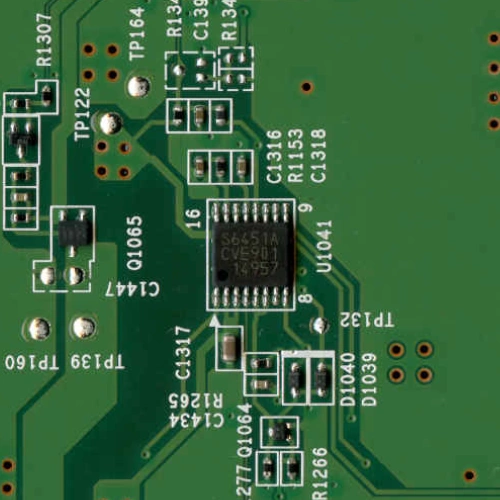
Reference Designator: U1041 (bottom)
Datasheet:
Mandatory: No
Solder Type: SMD
- U1041, or as the community calls it, the "ABLIC", monitors all PGOODs of each regulator and forcefully shuts power off to the regulators if something goes wrong. It's also the controller for the 3v3 Standby voltage rail.
- I think it also does something special with the 1v15 regulator? At least, that one wouldnt power on with the ABLIC missing.
- With custom regulators, this can easily be removed.
- Pinout: https://bitbuilt.net/forums/threads/wii-u-r-d-thread-wurd.3683/post-62028
Switch mode controllers:
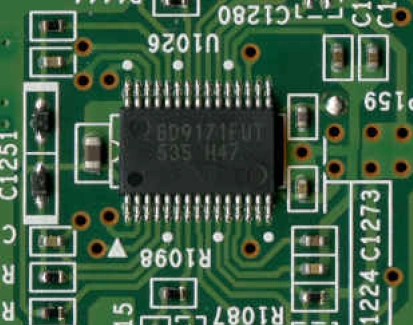
Reference Designator: U1024 (1v), U1025(1v25/5v), U1026(3v/12v), U1033 (1v15) (all on bottom)
Datasheet: U1024/U1025/U1026
Mandatory: No
Solder Type: SMD
- Okay things get really weird with these chips.
- First off is that there are two that are used: LV5065 or BD9171FUT. 1v15 uses a different varient of those: LV5064 or BD9170FUT.
- After the WUP-01, they got rid of U1025 and split 1v25 and 5v into their own seperate switching regulators, until the WUP-50 which made 1v25 into a linear regulator.
- 1v has its own because they use it in a dual-phase configuration.
1v25 switch mode controller:
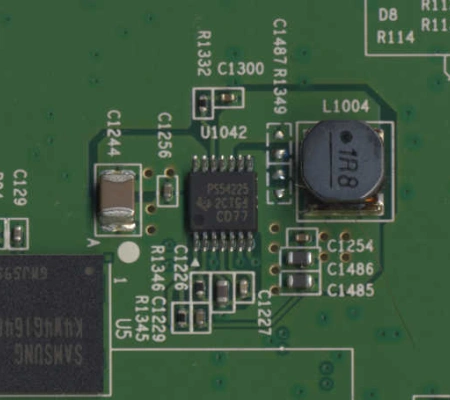
Reference Designator: U1042 (top)
Datasheet: Mandatory: No
Solder Type: SMD
- 1v25 controller on every board past the WUP-01, up until the WUP-50.
5v switch mode controller:
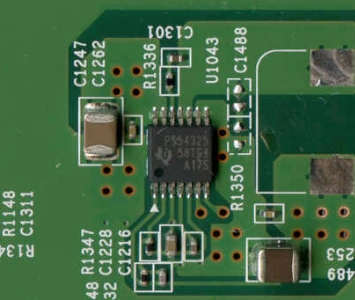
Reference Designator: U1043 (top)
Datasheet: Mandatory: No
Solder Type: SMD
- 5v controller on every board past the WUP-01.
1v1/1v25 LDOs:
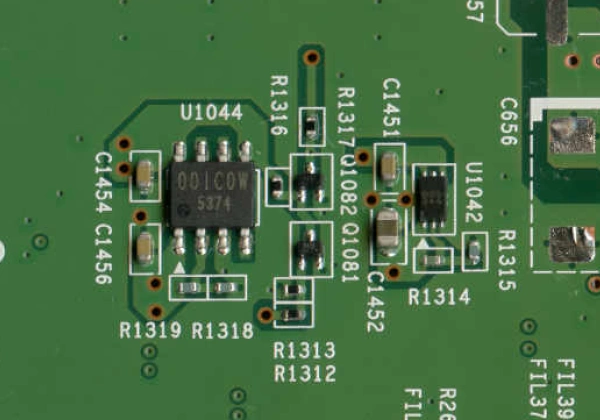
Reference Designator: U1044 (1v25) and U1042 (1v1???) (top)
Datasheet: U1044
Mandatory: No
Solder Type: SMD
- These are on the WUP-50 ONLY.
- They took the designator for the old 1v25 switching controller and gave it to the 1v1 LDO..?
1v5 switch mode controller:
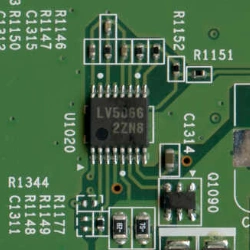
Reference Designator: U1020
Datasheet: https://www.alldatasheet.com/datasheet-pdf/view/449517/SANYO/LV5066V.html
Mandatory: No
Solder Type: SMD
- It has labels similar to the other switching controllers (LV5066) but it has a completely different pinout.
- The chip is the same on all boards, but on WUP-10 and WUP-50, its closer to the RAM. On every other board, its next to the 3v3 Standby regulator.
U9:
- Probably not mandatory, but I don't think anyone has tried to remove it yet. It's next to the SoC, so its not really a big deal if it is.
- I think it's a very basic temperature sensor, and when it gets too hot it'll send a signal to ABLIC to shut everything off (or it forces one of the PGOODs low).
Confused yet?
A5X
B1X
Reference Designator: U1 (top)
Datasheet:
Mandatory: Yes (....otherwise its not a Wii U.)
Solder Type: BGA
- This is the Espresso, Latte/Starbuck, and EEPROM packed into a single package.
RAM:
Reference Designators: U2/U3/U4/U5, 4 chips, 512MB each. (top)
Datasheet: MT41K256M16HA-125:E (This is the Micron datasheet but all chips used are drop-in replacements)
Mandatory: Yes
Solder Type: BGA
- Micron/Elpida and Hynix chips were also used.
DRH:
Reference Designator: U7 (top)
Datasheet:
Mandatory: Yes
Solder Type: BGA
- The DRH is a complete ARM9 processor that takes the video feed from the GPU and encodes it into H264 packets to send to the Gamepad. It also receives button/touchscreen/camera/mic inputs and communicates that to the SoC through USB.
- To actually communicate to the Gamepad, the DRH is connected to the 5GHz WiFi module through SDIO.
- The only differences between the DRH and DRC (ARM9 processor on the Gamepad) is the pinout and whatever is on the flash - the bootROM is the exact same.
- On earlier boards (basically all of them) the DRH only ran on 1v25 and 3v3, but on the WUP-50 they revised the DRH (DRH-WUP-1) and it runs on an additional 1v1 voltage.
SLC NAND:
Reference Designator: U18 (bottom)
Datasheet: H27U8G8G5DTA
Mandatory: Yes
Solder Type: SMD/TSOP48
- Samsung, Toshiba, and Spansion chips were also used.
MLC eMMC:
Reference Designator: U20 (top)
Datasheet: KLMBG4GEND-B031
Mandatory: Yes*
- Solder Type: BGA/BGA153
- Toshiba and Hynix chips were also used.
*It can be replaced with a microSD card.
SMC:
Reference Designator: U8 (top)
Datasheet:
Mandatory: Yes
Solder Type: SMD/QFN
- Handles LEDs, buttons, module resets, Power-ON from Gamepad/Wii remote, disc drive sensors and power. It is always on.
- Pinout:
RTC:
Reference Designator: U17 (top) or U19 (bottom)
Datasheet:
Mandatory: Yes
Solder Type: SMD/QFN
- There's two different RTC footprints, one is on the top, and one is on the bottom. There is only ever one populated.
- RTC handles enabling 15v to the regulators, time clock, enables the 1v5 reg, and enables power to the WiFi module. It is always on.
- Pinout:
Video Encoder:
Reference Designator: U14 (top)
Datasheet:
Mandatory: No*
Solder Type: SMD/QFP
- It's a custom Panasonic part that takes in whatever digital video the GPU outputs and converts it to HDMI, Component, or Composite.
- The full pinout is not known, but the output pins are: * It is not needed for boot, but you're either stuck with the Gamepad or it needs to be replaced with another encoder.
Audio Amplifier:
Reference Designator: U13 (top) or U56 (bottom)
Datasheet:
Mandatory: No
Solder Type: SMD
- It is only ever used if outputting analog video/audio.
- Much like the RTC, there is a footprint on both the top and bottom of the board, only one is ever populated though.
- Runs on 12v.
"ABLIC":
Reference Designator: U1041 (bottom)
Datasheet:
Mandatory: No
Solder Type: SMD
- U1041, or as the community calls it, the "ABLIC", monitors all PGOODs of each regulator and forcefully shuts power off to the regulators if something goes wrong. It's also the controller for the 3v3 Standby voltage rail.
- I think it also does something special with the 1v15 regulator? At least, that one wouldnt power on with the ABLIC missing.
- With custom regulators, this can easily be removed.
- Pinout: https://bitbuilt.net/forums/threads/wii-u-r-d-thread-wurd.3683/post-62028
Switch mode controllers:
Reference Designator: U1024 (1v), U1025(1v25/5v), U1026(3v/12v), U1033 (1v15) (all on bottom)
Datasheet: U1024/U1025/U1026
Mandatory: No
Solder Type: SMD
- Okay things get really weird with these chips.
- First off is that there are two that are used: LV5065 or BD9171FUT. 1v15 uses a different varient of those: LV5064 or BD9170FUT.
- After the WUP-01, they got rid of U1025 and split 1v25 and 5v into their own seperate switching regulators, until the WUP-50 which made 1v25 into a linear regulator.
- 1v has its own because they use it in a dual-phase configuration.
1v25 switch mode controller:
Reference Designator: U1042 (top)
Datasheet: Mandatory: No
Solder Type: SMD
- 1v25 controller on every board past the WUP-01, up until the WUP-50.
5v switch mode controller:
Reference Designator: U1043 (top)
Datasheet: Mandatory: No
Solder Type: SMD
- 5v controller on every board past the WUP-01.
1v1/1v25 LDOs:
Reference Designator: U1044 (1v25) and U1042 (1v1???) (top)
Datasheet: U1044
Mandatory: No
Solder Type: SMD
- These are on the WUP-50 ONLY.
- They took the designator for the old 1v25 switching controller and gave it to the 1v1 LDO..?
1v5 switch mode controller:
Reference Designator: U1020
Datasheet: https://www.alldatasheet.com/datasheet-pdf/view/449517/SANYO/LV5066V.html
Mandatory: No
Solder Type: SMD
- It has labels similar to the other switching controllers (LV5066) but it has a completely different pinout.
- The chip is the same on all boards, but on WUP-10 and WUP-50, its closer to the RAM. On every other board, its next to the 3v3 Standby regulator.
U9:
- Probably not mandatory, but I don't think anyone has tried to remove it yet. It's next to the SoC, so its not really a big deal if it is.
- I think it's a very basic temperature sensor, and when it gets too hot it'll send a signal to ABLIC to shut everything off (or it forces one of the PGOODs low).
Confused yet?
Transistors
I am a moron so these descriptions probably don't make much sense. Maybe someone smarter than me could tell me how they work exactly / explain them better
Q2 - Sensor bar
Q3 - Enable 3v3 for disc drive
Q4 - Something for the fan. Not populated on WUP-50
Q5 - Something for the fan. Not populated on WUP-50
Q6 - 3v3 for disc drive
Q7 - 5v for disc drive
Q8 - 12v for disc drive
Q9 - Something for the blue LED
Q10 - ??
Q11 - ??
Q12 - Something for the blue LED
Q13 - Something for the white LED
Q15 - Enable 5v for disc drive
Q17 - Enable 12v for disc drive
Q19 - Something for the white LED
Q20 - Something for the fan.
Q1013 - MOSFET for 12v
Q1014 - MOSFET for 3v3
Q1019 - Negative voltage MOSFET for 1v switcher (1)
Q1023 - Positive voltage MOSFET for 1v switcher (1)
Q1024 - Negative voltage MOSFET for 1v switcher (2)
Q1025 - Positive voltage MOSFET for 1v switcher (2)
Q1031 - Positive voltage MOSFET for 1v15 switcher
Q1037 - Negative voltage MOSFET for 1v15 switcher
U1039 - Enable Q1078
Q1061 - Between power plug and the main 15v rail
Q1064 - ??
Q1065 - 3v3 Standby for 2.4GHz WiFi
Q1071 - Enable 15v PFET (Q1061)
Q1073 - Enable Q1077
Q1077 - 3v3 to HDMI encoder and DRH. Enabled by 1v25/5v PGOOD
Q1078 - 1v5 to SoC. Enabled by 3v3/12v PGOOD
Q1080 - Enable 3v3 Standby to 2.4GHz WiFI
Q1081 - ??
Q1082 - ??
Q1090 - MOSFET for 1v5
Q1092 - MOSFET for 3v3 Standby
Q1093 ??, not populated on WUP-50
Q2 - Sensor bar
Q3 - Enable 3v3 for disc drive
Q4 - Something for the fan. Not populated on WUP-50
Q5 - Something for the fan. Not populated on WUP-50
Q6 - 3v3 for disc drive
Q7 - 5v for disc drive
Q8 - 12v for disc drive
Q9 - Something for the blue LED
Q10 - ??
Q11 - ??
Q12 - Something for the blue LED
Q13 - Something for the white LED
Q15 - Enable 5v for disc drive
Q17 - Enable 12v for disc drive
Q19 - Something for the white LED
Q20 - Something for the fan.
Q1013 - MOSFET for 12v
Q1014 - MOSFET for 3v3
Q1019 - Negative voltage MOSFET for 1v switcher (1)
Q1023 - Positive voltage MOSFET for 1v switcher (1)
Q1024 - Negative voltage MOSFET for 1v switcher (2)
Q1025 - Positive voltage MOSFET for 1v switcher (2)
Q1031 - Positive voltage MOSFET for 1v15 switcher
Q1037 - Negative voltage MOSFET for 1v15 switcher
U1039 - Enable Q1078
Q1061 - Between power plug and the main 15v rail
Q1064 - ??
Q1065 - 3v3 Standby for 2.4GHz WiFi
Q1071 - Enable 15v PFET (Q1061)
Q1073 - Enable Q1077
Q1077 - 3v3 to HDMI encoder and DRH. Enabled by 1v25/5v PGOOD
Q1078 - 1v5 to SoC. Enabled by 3v3/12v PGOOD
Q1080 - Enable 3v3 Standby to 2.4GHz WiFI
Q1081 - ??
Q1082 - ??
Q1090 - MOSFET for 1v5
Q1092 - MOSFET for 3v3 Standby
Q1093 ??, not populated on WUP-50
Resistors
I think I measured all of the resistors:
Capacitors
I know damn well I didnt measure all of the capacitors, but here's what I got so far:
Pinout Diagrams
Front Panel (P12):
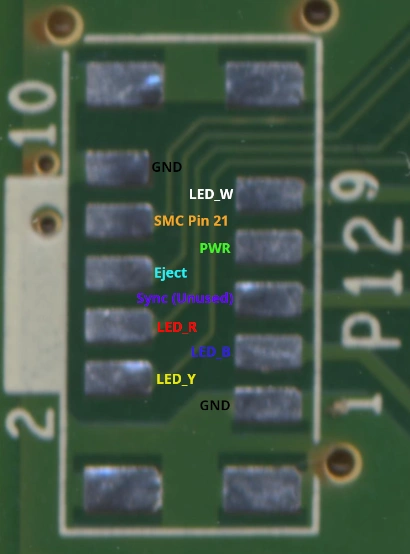
IDK what else would need to be added, I'll think on it.
IDK what else would need to be added, I'll think on it.
Compendium
Last edited:


