
You are using an out of date browser. It may not display this or other websites correctly.
You should upgrade or use an alternative browser.
You should upgrade or use an alternative browser.
G-boy rev 3 vga problem?
- Thread starter 1NK
- Start date

- Joined
- Dec 16, 2016
- Messages
- 1,144
- Likes
- 2,868
- Location
- The Oregon Wildlands
- Portables
- just so many i am so cool
Did you connect the mode pin to 3.3v?
- Joined
- Dec 16, 2016
- Messages
- 1,144
- Likes
- 2,868
- Location
- The Oregon Wildlands
- Portables
- just so many i am so cool
Yep
1NK
.
- Joined
- Apr 29, 2022
- Messages
- 84
- Likes
- 18
Ok, another problem. I am wiring audio right now, and was going to test if it worked, but I need to put my games onto the drive so I have something I can play that has audio. The game I have on the drive right now is super smash bros virtual console, but when I load it up it just stays on the launching screen and never launches. Where on the drive do I put my Wii and GameCube games? I think If virtual console isn't working right now then I can test with a Wii or GameCube game instead.
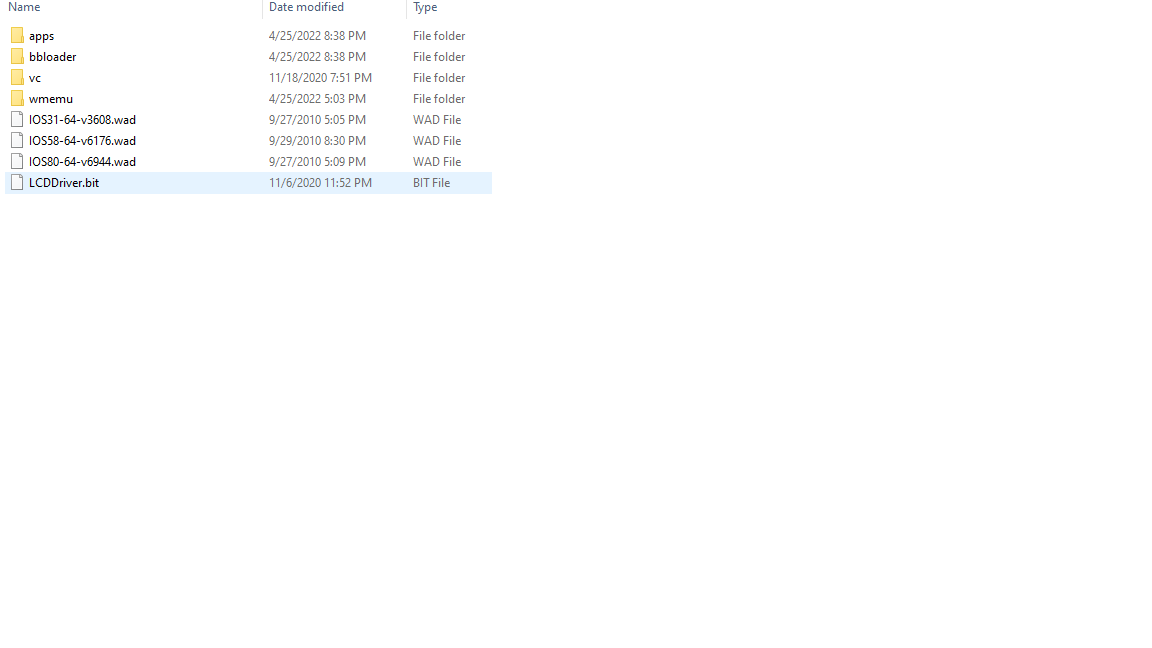

Ok, another problem. I am wiring audio right now, and was going to test if it worked, but I need to put my games onto the drive so I have something I can play that has audio. The game I have on the drive right now is super smash bros virtual console, but when I load it up it just stays on the launching screen and never launches. Where on the drive do I put my Wii and GameCube games? I think If virtual console isn't working right now then I can test with a Wii or GameCube game instead.
View attachment 22401

Gamecube iso files must be named "game.iso" in order for it to work. You can name the containing folder whatever you like, but the iso file must be game.isoI can't seem to get GameCube games to work.
View attachment 22403
Remove the comma from the folder name, and take the .iso out of the file name. I just realised you have file extensions hidden, so it's actually named "game.iso.iso" currently

Have you verified that all of your VGA lines are all good? Nothing shorted together or missing continuity between the Wii and screen?
I had a green tint issue myself vga lines were mixed up. https://bitbuilt.net/forums/index.php?threads/gwii-green-tint-on-lcd.4801/It also seems like everything is tinted green now for some reason, no matter what I do to adjust color settings.
1NK
.
- Joined
- Apr 29, 2022
- Messages
- 84
- Likes
- 18
Ok, apparently the blue signal wire had snapped. I soldered it back and now the video is normal again. I have another question regarding the audio circuitry now that I have games to test sound with on my G-boy now. I'm not getting any audio out of the speakers or the headphone jack.
![20120110_182203[1].jpg](https://bitbuilt.net/forums/attachments/20120110_182203-1-jpg.22411/ "20120110_182203[1].jpg")
My solder points; from motherboard to audio amp
SD - SDA
SC - SCL
W - WS
D - D
M - MC
C - C
S - S
My solder points; from motherboard to audio amp
SD - SDA
SC - SCL
W - WS
D - D
M - MC
C - C
S - S
Before going crazy with the wiring, just double check that the speakers are in the way! If that's not the issue, go ahead and double check each one of those wires. That's the correct mapping, it could just be a bad solder joint.
1NK
.
- Joined
- Apr 29, 2022
- Messages
- 84
- Likes
- 18
I got some pops/crackles and glitchy audio that wasn't recognizable in the slightest from the speakers, still no audio on the headphone jack. The audio that was coming out of the speakers went on and off, It wasn't constant crackling. I checked and the speakers and they seem to be making contact with the board.
Definitely sounds like a cold solder joint somewhere. Double check your connections, maybe reflow them with some extra flux.


