I installed the homebrew channel, but am struggling on how to get game cube iso filed, and I also don't know if I did the wifi disabling bit to allow me to trim the motherboard

I tried to, but couldn't get rvloader to run properlyThe nowifi and VGA patches are a part of the RVLoader installer. Have you installed RVLoader yet?
Can you elaborate on "run properly"? What issues did you run into?I tried to, but couldn't get rvloader to run properly
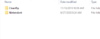
I downloaded the zip, and put it on the root of my sd card, and it doesn't show up in the homebrew channel. the only thing that shows up is nintendont, and clean ripCan you elaborate on "run properly"? What issues did you run into?

I've got RVLoader downloaded. (Homebrew is upside down which is correct so I hear)I don't really understand a lot of what you are trying to say but if you are using a SD card you should definitely use a USB drive instead, RVLoader needs USB. That's probably the reason why you saw only Nintendon't. Once you get the homebrew channel installed, you don't need a SD card anymore, you can remove it. Just get a USB drive and extract the RVLoader files into the root of the drive (not the folder, put the files inside of the main RVLoader folder there) and plug it into the Wii. Then go to the homebrew channel and you should see RVLoader. If that doesn't work try to switch to USB in homebrew settings, use a different USB port, or try a different drive.
I did see that you said you got the FAT error, so you probably installed it somehow? Just do what I said before and get a drive but make sure to format it to FAT32 first if you haven't already. Make sure you keep the homebrew programs if you have any you want to keep, also.
There's an explanation for the file structure for Wii and Gamecube games here. For games that you own the discs for, you can use any disc ripping software that will create iso images to make your backups. I used ImgBurn. Gamecube iso files can be trimmed to save space if desired, and Wii games need to be converted to wbfs format via a tool you can find online. We can't help you find roms online or allow any discussion on the subject for legal reasons.I've got RVLoader downloaded. (Homebrew is upside down which is correct so I hear)
So now I just need to figure how to put games on. I have physical games to copy if cd rip is the best option for that.
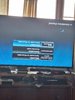
Bad pictures, but the menu wheel comes up too
Ps I have no idea how to get roms/isos
hey, so I got Mario Galaxy 2 and the legend of zelda gamecube collectors edition converted to files on my pc (also I have run RVLoader, so that's ready) I know generally how to format the file names because of the threads you sent. the only file I need in Games is the Disk image file (game.iso for gamecube, and the two wbfs files for wii) for it to run correct? or do I need another one. also sorry the progress was slow. I realized I wasn't working on a 4 core wii (ie wasting my time) so I restarted the process, and installed rvloader, and the homebrew channel on a new 4 core wii. the tutorial I was watching wants me to name the wii files game.iso 001 and game.iso 002 and merge them through hj split or something like that, but that didn't seem to follow the thread you provided for advice.There's an explanation for the file structure for Wii and Gamecube games here. For games that you own the discs for, you can use any disc ripping software that will create iso images to make your backups. I used ImgBurn. Gamecube iso files can be trimmed to save space if desired, and Wii games need to be converted to wbfs format via a tool you can find online. We can't help you find roms online or allow any discussion on the subject for legal reasons.
Also, you need to run RVLoader at least once before trimming to perform the installation process. The first runtime installs essential system patches that makes portablising possible, as well as the option for VGA video output.
hey, so I got Mario Galaxy 2 and the legend of zelda gamecube collectors edition converted to files on my pc (also I have run RVLoader, so that's ready) I know generally how to format the file names because of the threads you sent. the only file I need in Games is the Disk image file (game.iso for gamecube, and the two wbfs files for wii) for it to run correct? or do I need another one. also sorry the progress was slow. I realized I wasn't working on a 4 core wii (ie wasting my time) so I restarted the process, and installed rvloader, and the homebrew channel on a new 4 core wii. the tutorial I was watching wants me to name the wii files game.iso 001 and game.iso 002 and merge them through hj split or something like that, but that didn't seem to follow the thread you provided for advice.
hey, I got the gamecube game to boot. I notice i named it game.iso, but I looked at the file name and notice it was already an Iso, so I was effectively naming it Game.iso.iso.....so I just named it game and it booted lolRVLoader runs entirely off the USB drive. Once it's installed, you're meant to discontinue usage of the SD card slot. All your games, Virtual Console wads, and homebrew apps should be on the USB drive in order for RVLoader to properly detect them.
Ignore anything that any tutorials you've seen have told you, RVLoader doesn't work like other loaders.
The Wii games can be titled whatever you like, so long as they are in wbfs format, are placed within the "wbfs" folder on the USB drive, and have been split to suit the FAT32 filesystem that RVLoader requires. The filenames that are set by the isotowbfs tool are fine. Wii games can also all be in the same folder, they don't need to be in individual folders like Gamecube games do, but you can put each game in subfolder if you want to.
Gamecube games must all be named "game.iso" and be in their own named folder within the "games" folder on the USB drive. The only time a game should be named anything other than "game.iso" is if it's the second disc in a multi-disc game, in which case the file should be named "disc2.iso". You do not need to process the iso files in any way for them to be bootable, but you can "trim" the files to remove the junk padding data that fills every game to be exactly 1.36GB. This saves space on the drive, but is not a necessary step.
If you have named your Gamecube iso files correctly and they aren't showing up, you may need to enable visible file extensions in the Windows folder and file settings to check what the true file name is.
Yep, that happens a lothey, I got the gamecube game to boot. I notice i named it game.iso, but I looked at the file name and notice it was already an Iso, so I was effectively naming it Game.iso.iso.....so I just named it game and it booted lol
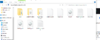
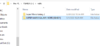
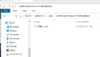
There's a problem with the wii game booting. I have a video of it, but it's too large to process, so I'll put a link to it if that's okay, and I'll send a picture of the filesYep, that happens a lot
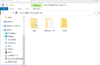
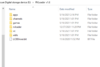
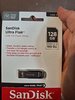
I'm not using a modded iso for mario galaxy which is probably a problem. I just used clean rip to get it, so it's completely vanilla. i'll upload a picture of the usb I'm usingFile structure looks fine. I'm assuming Super Mario Galaxy More is a modded iso, which I have no knowledge or experience with so I can't really help there.
With the Galaxy 2 issues, have you pressed B on it and checked that you're forcing the correct video type? Also what USB drive are you using?
darnnn....well I can run game cube games. I'm just going to go ahead with the trim, and worry about wii gamnes later. the build was meant for a gamecube game anyways. wii games will just be a bonus if I figure that out laterI'm afraid I'm not familiar with that drive. The recommended drive to use for portables atm is the Sandisk Ultra Fit 3.1
I will eventually, I figure I can swap to a different drive once it's built (idk if that's not true, but it seems like it would be fine)I had a USB drive for RVLoader that could only play GameCube games also. All you have to do is get another drive, it's worth it.