Worklog First Brazilian Ashida

jose_Leo12

.
.
2024 1st Place
Joined
Jul 1, 2024
Messages
84
Likes
219
Location
https://maps.app.goo.gl/vCaAZtp5vGEjMX469
Portables
3
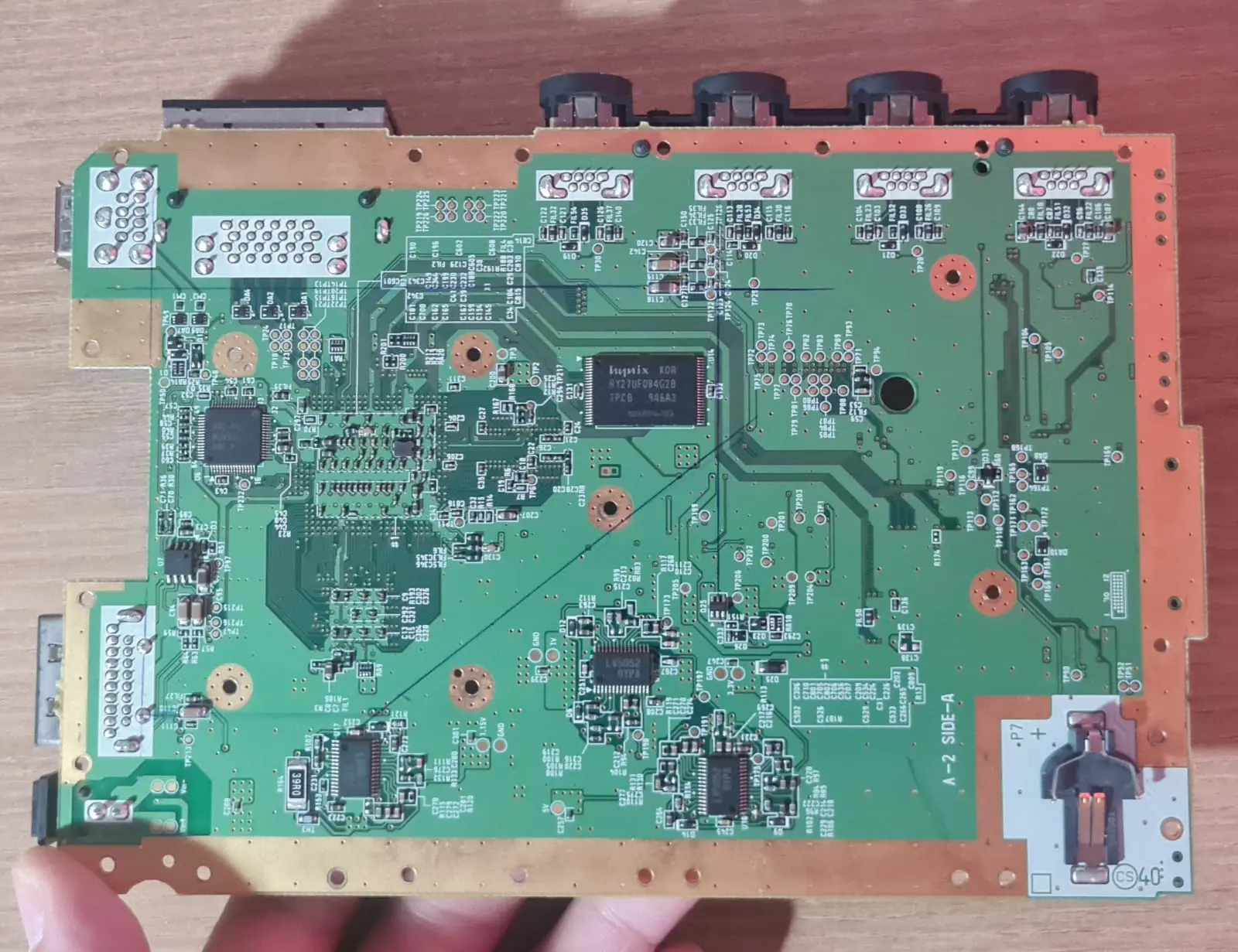
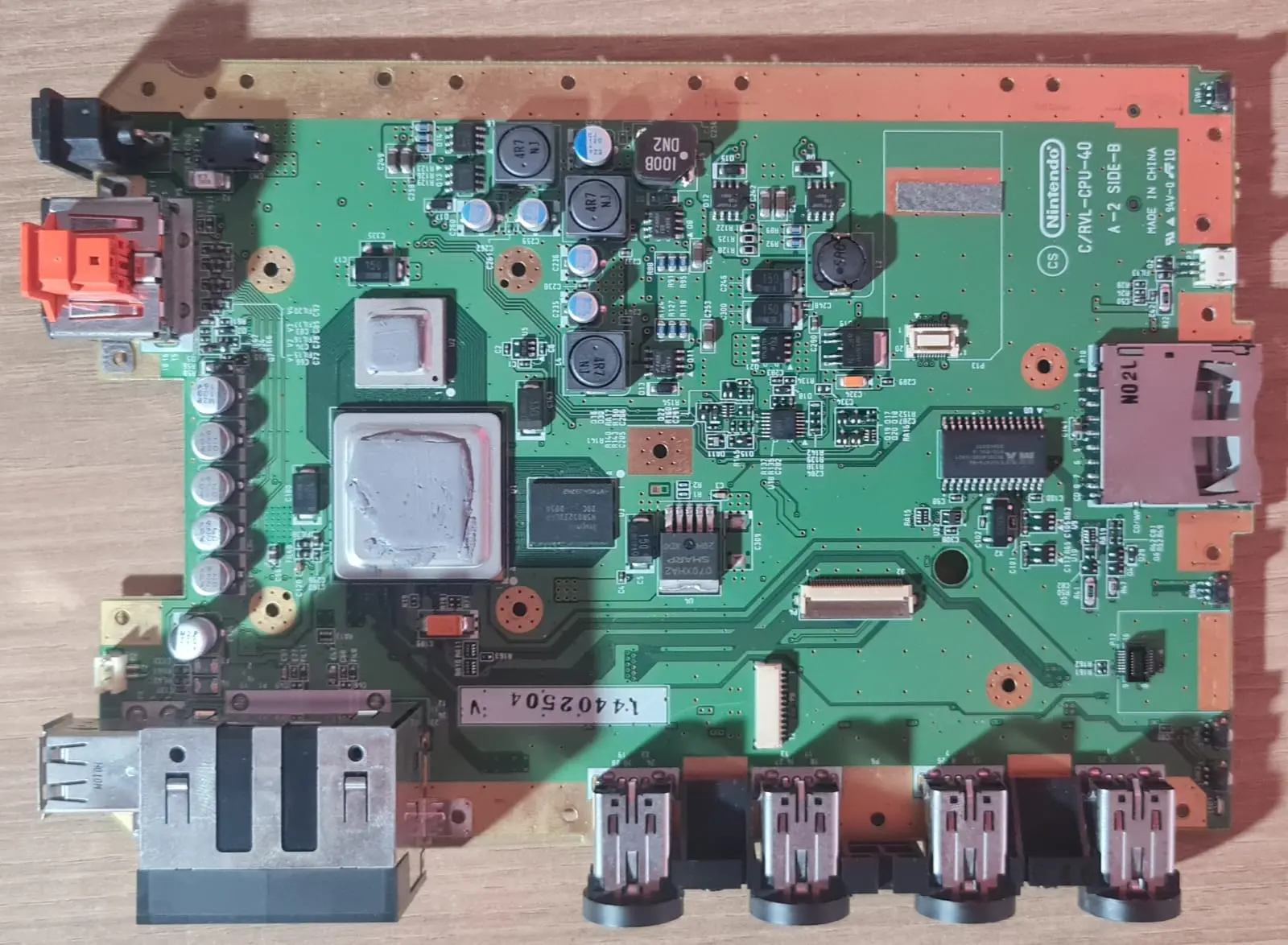
Hello everyone, I'm creating this thread to document the construction of the Ashida and in case any questions arise. As the title suggests, I believe this is the first Brazilian Ashida; I've seen people here building portable Wii consoles, but no Ashida, so I'm taking advantage of this opportunity.


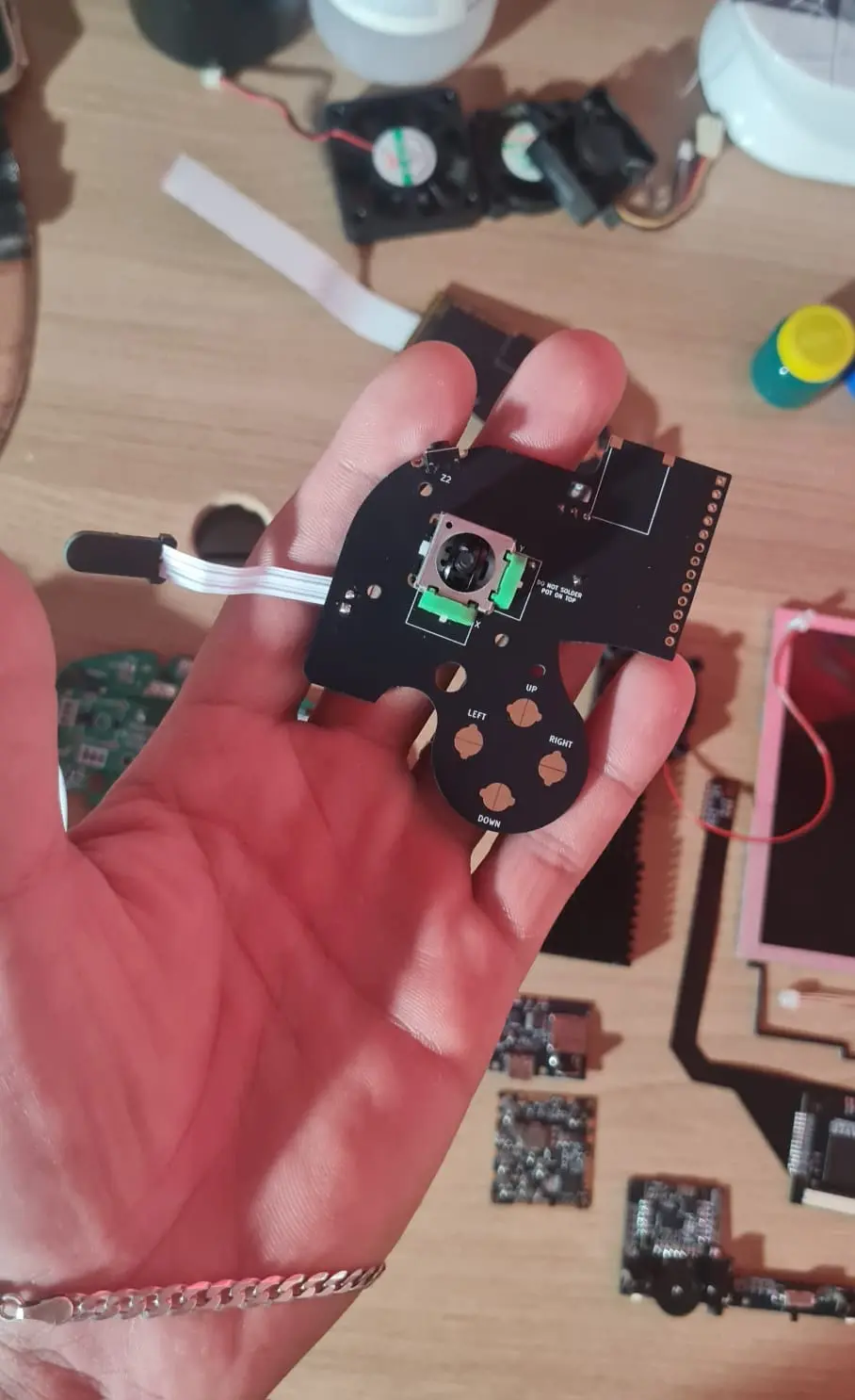
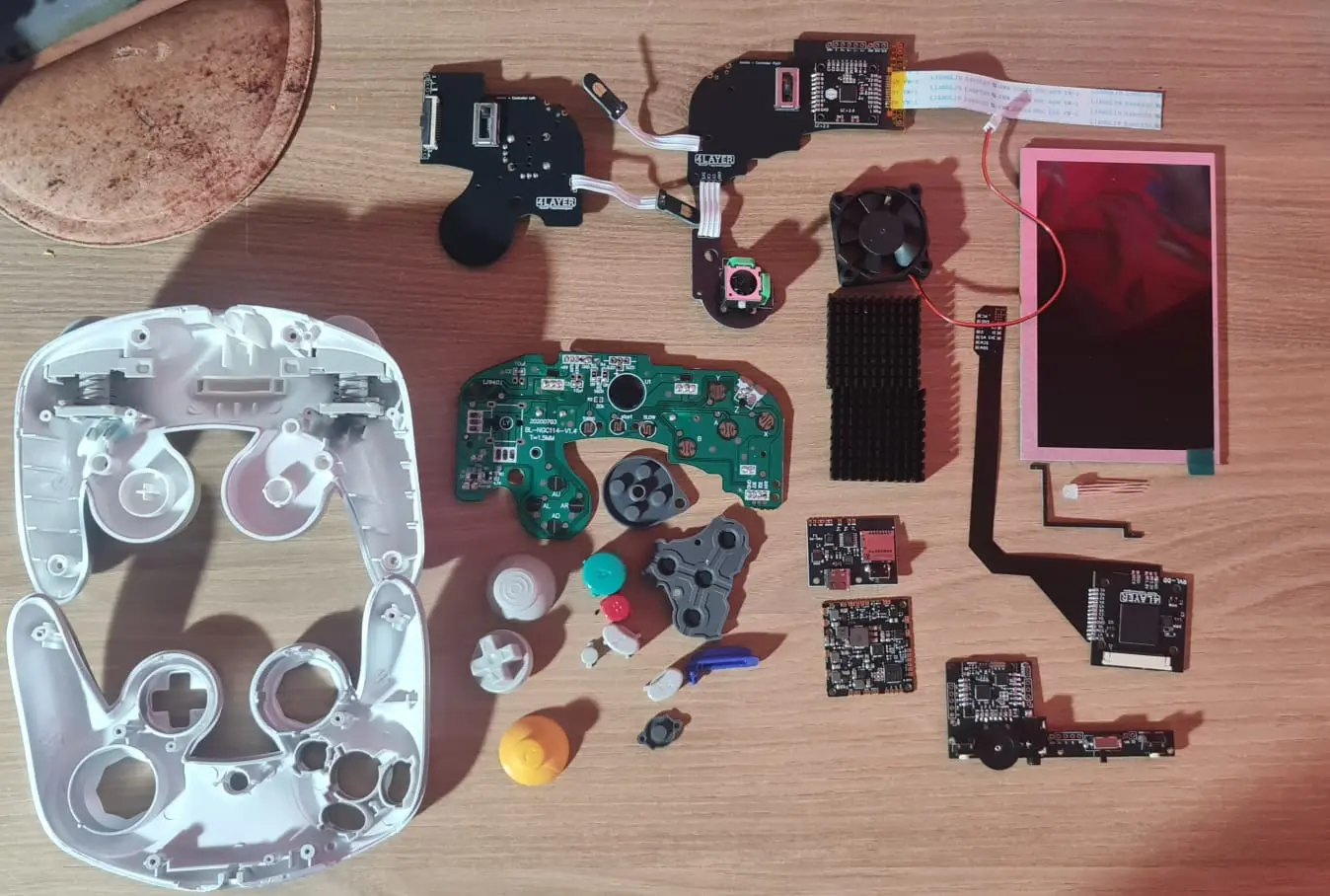
I'm taking this opportunity to share photos of the first steps in its construction, pieces I won in a summer contest. If anything is missing, please let me know... I've read many publications about Ashida and I believe it's ready to begin.
WhatsApp Image 2026-03-06 at 2.47.51 PM.webp
WhatsApp Image 2026-03-06 at 2.47.51 PM (1).webp
WhatsApp Image 2026-03-06 at 2.47.52 PM (2).webp
WhatsApp Image 2026-03-06 at 2.47.52 PM (3).webp
WhatsApp Image 2026-03-06 at 2.47.53 PM.webp


There are still a few steps to go, like installing the RV charger and then making the cut where I've already marked.

What surprised me most was the quality of the 4-layer pieces; they are truly unparalleled!
WhatsApp Image 2026-03-06 at 2.47.52 PM.webp
WhatsApp Image 2026-03-06 at 2.47.53 PM (1).webp
WhatsApp Image 2026-03-06 at 2.48.18 PM.webp
WhatsApp Image 2026-03-06 at 2.48.18 PM (1).webp


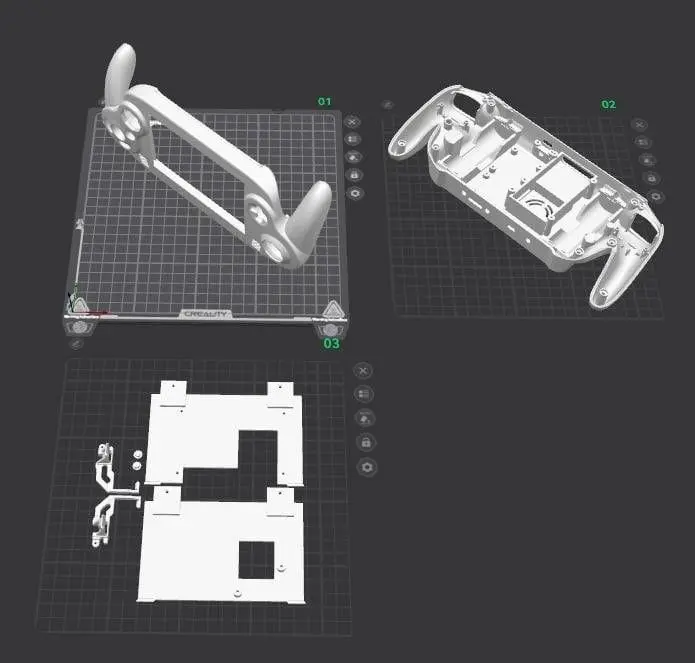
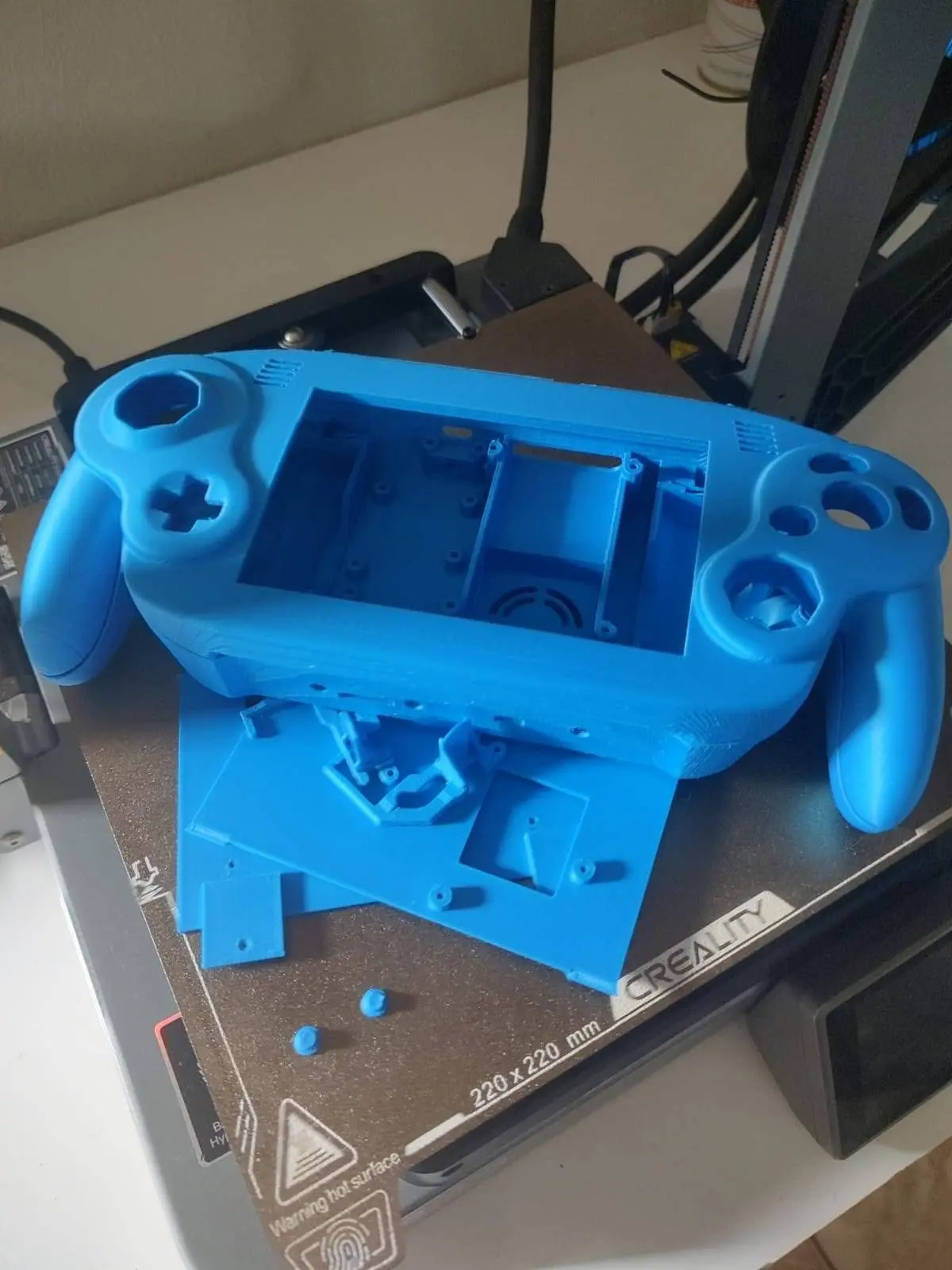
Finally, the casing is printed (my first 3D printed laptop) and the quality isn't bad at all; I don't think it will need painting!

I think this thread will be updated quite frequently, as I'm very excited. I hope I don't mess anything up... if anyone has any suggestions or tips, please send them to me. Thanks and see you soon.
 

Attachments

  • WhatsApp Image 2026-03-06 at 2.47.52 PM.webp
    WhatsApp Image 2026-03-06 at 2.47.52 PM.webp
    46.7 KB · Views: 18
Hello everyone, I'm creating this thread to document the construction of the Ashida and in case any questions arise. As the title suggests, I believe this is the first Brazilian Ashida; I've seen people here building portable Wii consoles, but no Ashida, so I'm taking advantage of this opportunity.


I'm taking this opportunity to share photos of the first steps in its construction, pieces I won in a summer contest. If anything is missing, please let me know... I've read many publications about Ashida and I believe it's ready to begin.
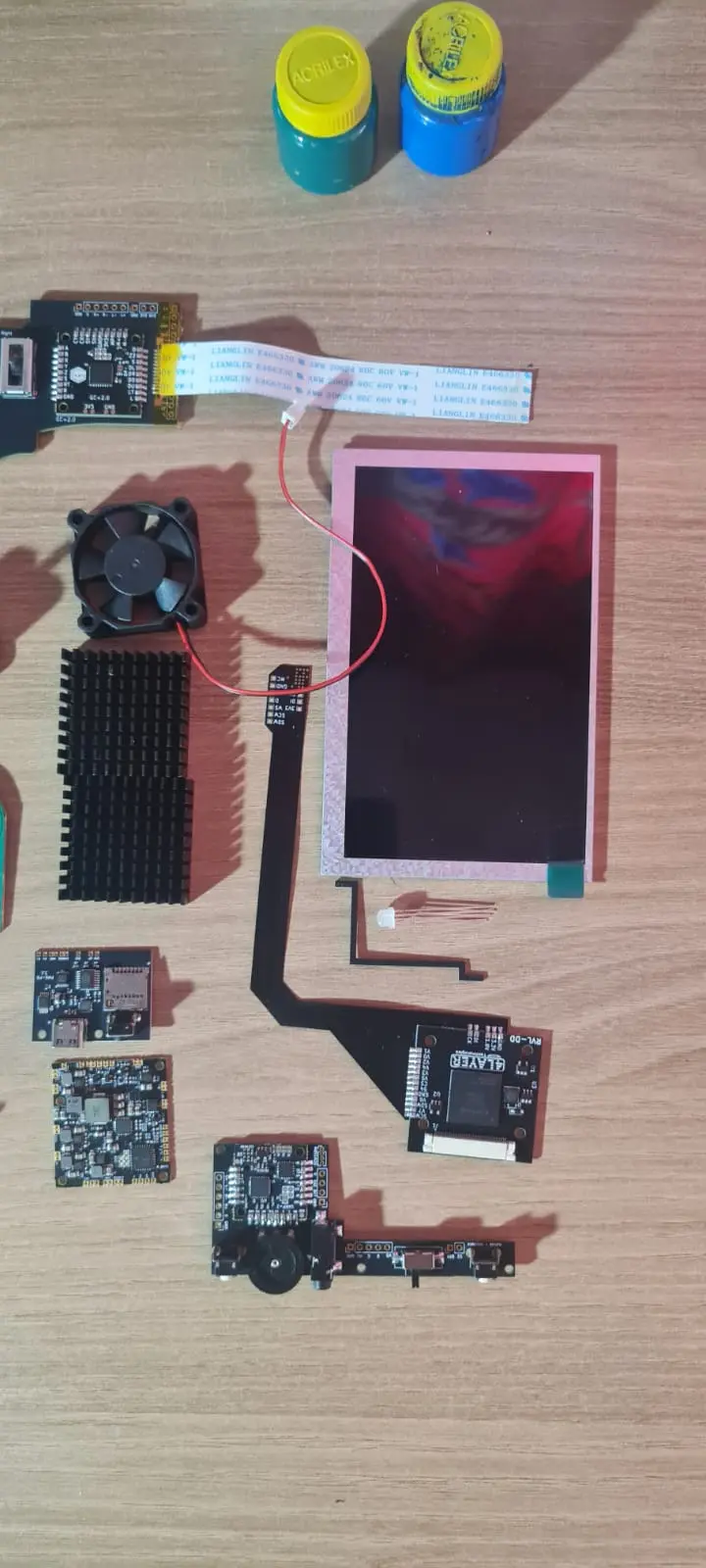
View attachment 41858View attachment 41859View attachment 41860View attachment 41862View attachment 41863

There are still a few steps to go, like installing the RV charger and then making the cut where I've already marked.

What surprised me most was the quality of the 4-layer pieces; they are truly unparalleled!
View attachment 41864View attachment 41865View attachment 41866View attachment 41867


Finally, the casing is printed (my first 3D printed laptop) and the quality isn't bad at all; I don't think it will need painting!

I think this thread will be updated quite frequently, as I'm very excited. I hope I don't mess anything up... if anyone has any suggestions or tips, please send them to me. Thanks and see you soon.
Can't wait to see how it turns out, That case looks great! Im probably gonna start an ashida as my first portable here in a couple weeks, really exited to get into portablizing!
 
Can't wait to see how it turns out, That case looks great! Im probably gonna start an ashida as my first portable here in a couple weeks, really exited to get into portablizing!
Just as a warning. If you follow tutorials etc that tell you to install cios, don't. Specially if you want to use bluetooth (cios breaks bluetooth on trimmed wii's). I didn't know that and I killed 2 wii's bc of that. Also don't reinstall priiloader once it's trimmed.

Anyways, both of you good luck. I finished my Ashida, but I broke my last wii and flexcable when trying to get wiiware to work.
If you manage to get wiiware to work, pls let me know. My issue might be bc I'm using PAL wii's, but I can't get them to work.
 
Just as a warning. If you follow tutorials etc that tell you to install cios, don't. Specially if you want to use bluetooth (cios breaks bluetooth on trimmed wii's). I didn't know that and I killed 2 wii's bc of that. Also don't reinstall priiloader once it's trimmed.
I've been pulling info from worklogs, the diagrams on 4layer and the ashida builds from ginger, plus the trim guide, never heard mention of installing cios for that, is it necessary? I do have them on my regular wii with an ssd full of my games
 
I've been pulling info from worklogs, the diagrams on 4layer and the ashida builds from ginger, plus the trim guide, never heard mention of installing cios for that, is it necessary? I do have them on my regular wii with an ssd full of my games
It's not necessary at all, you need ios files for rvloader to get installed. But there is a yt tutorial on the bottom of the main ashida post where the youtuber tells you to install cios. I followed that one for preparing my wii to trim untill I got informed by others on the discord that you should never do this for a portable wii.
Ginger's video's should be fine to follow. Didn't see him mentioning it once.
 
Hello everyone, some updates... everything is correctly positioned, the board is cut, but it's not displaying an image. I had placed the U10 in the wrong place, you can see it in one of the photos, but I've already put it in the right place. Even so, there's no image. All voltages are correct, the board heats up and, with the SD card inserted, the fan sometimes turns on briefly and then turns off again without displaying an image. I'll test later with composite video to see if it displays an image on another screen. Does anyone have any suggestions?
20260311_025132.webp
rn_image_picker_lib_temp_7748f09d-4d92-4bb2-a01b-70b3754a5256.webp
20260311_025139.webp

I also checked if the controller driver was correctly installed in the root directory of the SD card in RV Loader, and it is. I don't know what the problem could be. Can anyone help me?
 
I would try seeing if the wii will display over composite, just to rule out the DD wiring as a potential issue!
 
Hello everyone, some updates... everything is correctly positioned, the board is cut, but it's not displaying an image. I had placed the U10 in the wrong place, you can see it in one of the photos, but I've already put it in the right place. Even so, there's no image. All voltages are correct, the board heats up and, with the SD card inserted, the fan sometimes turns on briefly and then turns off again without displaying an image. I'll test later with composite video to see if it displays an image on another screen. Does anyone have any suggestions?
View attachment 41902View attachment 41903View attachment 41904
I also checked if the controller driver was correctly installed in the root directory of the SD card in RV Loader, and it is. I don't know what the problem could be. Can anyone help me?
Looking at the first image, it looks like you've cut through the NAND traces. AFAIK rewiring the necessary connections to the vias is your best bet at fixing this. You can refer to this guide to see which points need to be rerouted to the vias.
 
Looking at the first image, it looks like you've cut through the NAND traces. AFAIK rewiring the necessary connections to the vias is your best bet at fixing this. You can refer to this guide to see which points need to be rerouted to the vias.
Okay, but I followed the cuts suggested by other users, and theirs worked with this cut.
 
You are correct! This is the correct trim line as the nand traces on the cut line side are routed underneath the nand itself.

Have you tried the trim bare bones before installing? I.e. PMS, with only power and button wired with wii connected via composite?
 
You are correct! This is the correct trim line as the nand traces on the cut line side are routed underneath the nand itself.

Have you tried the trim bare bones before installing? I.e. PMS, with only power and button wired with wii connected via composite?
I'll do the test with composite video as soon as I get home.
 
Update: Ashida is working. The image problem was that pin 54 of the controller was connected to ground. I removed the wires and the image appeared. Now, a persistent problem is that it automatically turns on as soon as I connect the battery, even without turning the key. I believe the reason is the excessive length of the SCW and SDW wires, which are not grounded, and their proximity to the battery. I think it's pure interference.
WhatsApp Image 2026-03-12 at 3.06.14 PMs.webp

Sometimes, when it's working normally, it shows 195% battery charge, haha, then it turns on by itself.
WhatsApp Image 2026-03-12 at 2.56.27 PM.webp

@Y2K and @cy suggested twisting the SCW and SDW wires separately, along with their respective ground wires, so I'll do that and improve the USB connection. At least I know the board works, so I'm more relieved. Thanks to everyone who's helping me and who wasn't mentioned in this thread, you guys are awesome!
WhatsApp Image 2026-03-12 at 2.56.27.webp
WhatsApp Image 2026-03-11 at 7.53.52 AM.webp

I'm also going to braid DI and CK to ease my conscience, I'll give you more updates soon!
 
Update: Ashida is working. The image problem was that pin 54 of the controller was connected to ground. I removed the wires and the image appeared. Now, a persistent problem is that it automatically turns on as soon as I connect the battery, even without turning the key. I believe the reason is the excessive length of the SCW and SDW wires, which are not grounded, and their proximity to the battery. I think it's pure interference.View attachment 41909
Sometimes, when it's working normally, it shows 195% battery charge, haha, then it turns on by itself.
View attachment 41911
@Y2K and @cy suggested twisting the SCW and SDW wires separately, along with their respective ground wires, so I'll do that and improve the USB connection. At least I know the board works, so I'm more relieved. Thanks to everyone who's helping me and who wasn't mentioned in this thread, you guys are awesome!
View attachment 41912View attachment 41913
I'm also going to braid DI and CK to ease my conscience, I'll give you more updates soon!
Clean wiring! I love it when my consoles are -273 degrees.
 
Hello everyone, I'm creating this thread to document the construction of the Ashida and in case any questions arise. As the title suggests, I believe this is the first Brazilian Ashida; I've seen people here building portable Wii consoles, but no Ashida, so I'm taking advantage of this opportunity.


I'm taking this opportunity to share photos of the first steps in its construction, pieces I won in a summer contest. If anything is missing, please let me know... I've read many publications about Ashida and I believe it's ready to begin.
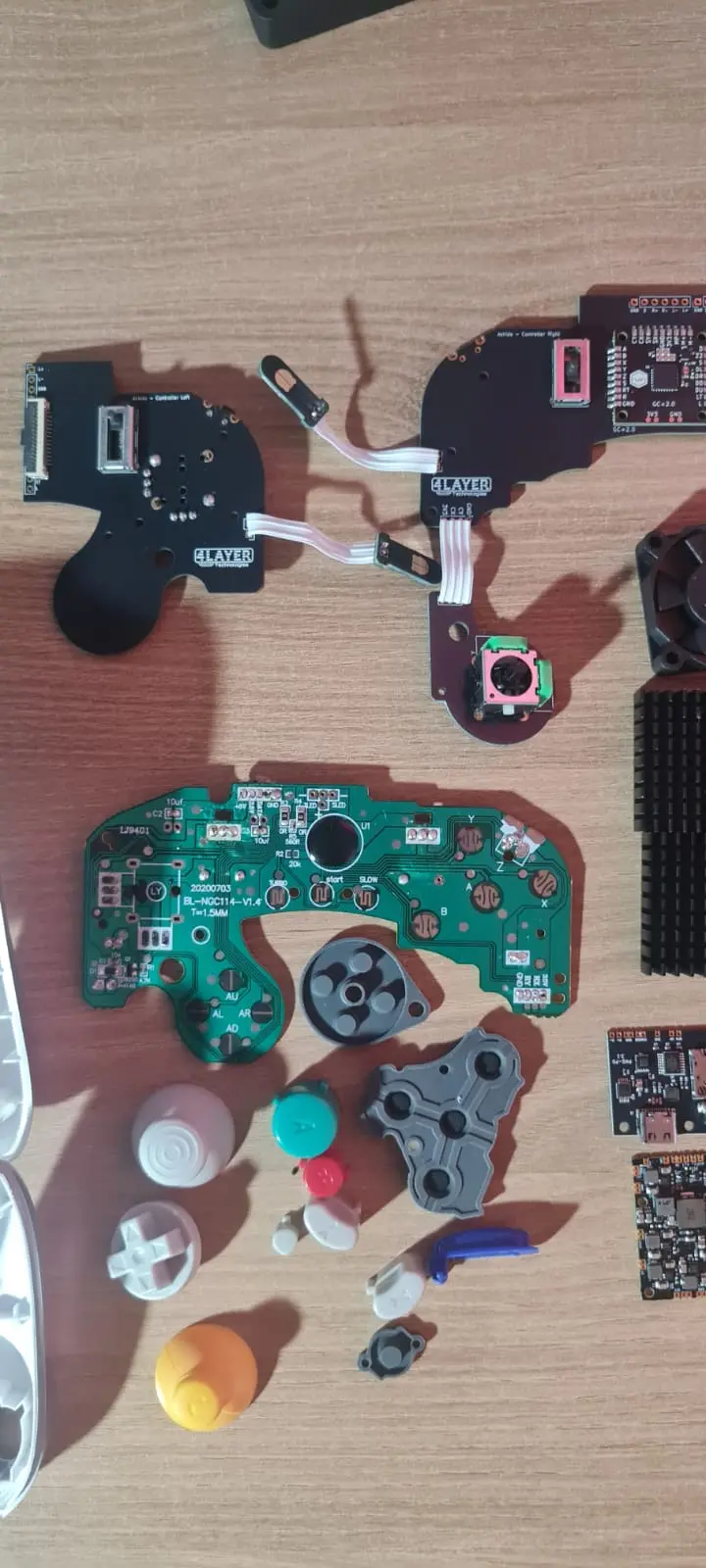
View attachment 41858View attachment 41859View attachment 41860View attachment 41862View attachment 41863

There are still a few steps to go, like installing the RV charger and then making the cut where I've already marked.

What surprised me most was the quality of the 4-layer pieces; they are truly unparalleled!
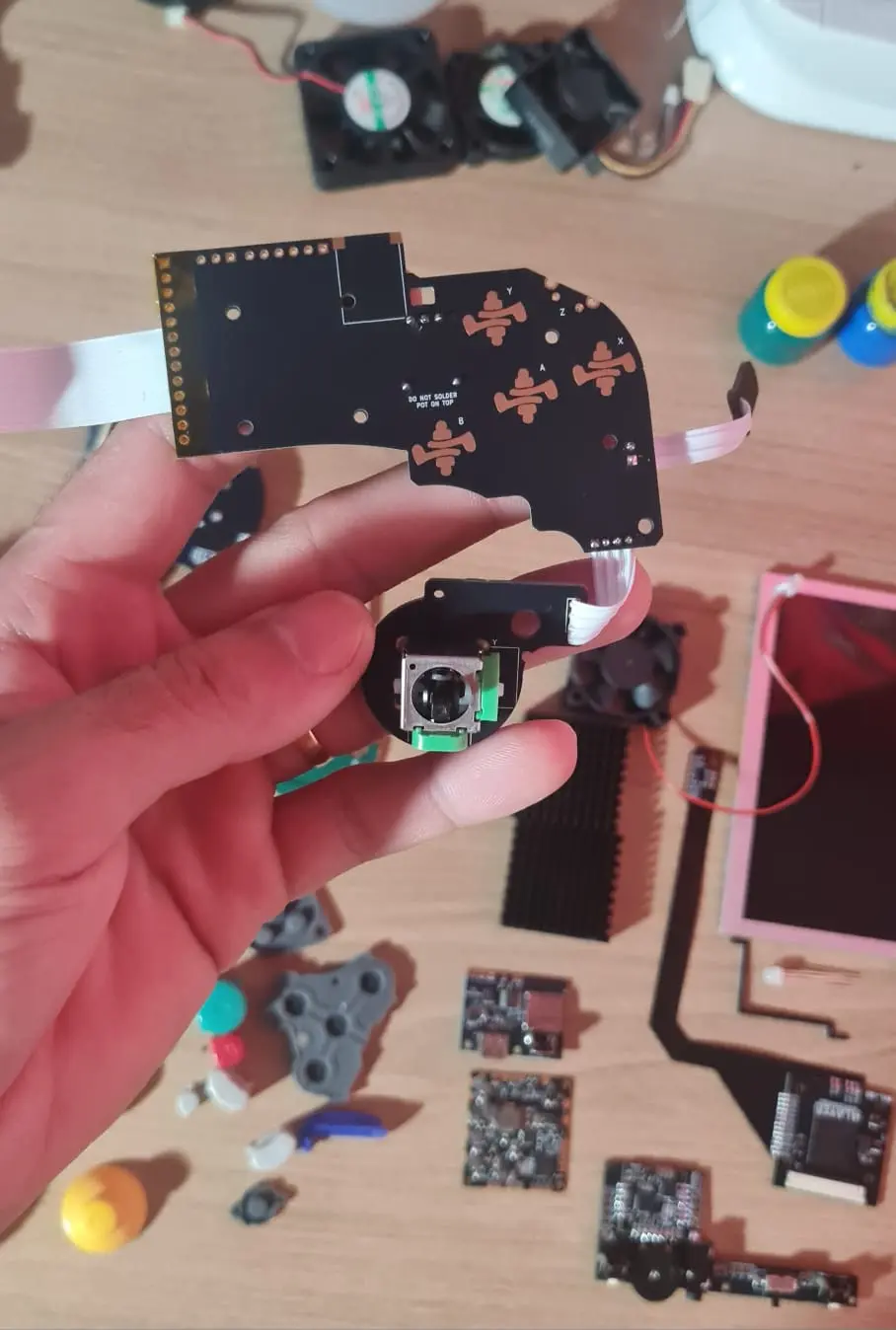
View attachment 41864View attachment 41865View attachment 41866View attachment 41867


Finally, the casing is printed (my first 3D printed laptop) and the quality isn't bad at all; I don't think it will need painting!

I think this thread will be updated quite frequently, as I'm very excited. I hope I don't mess anything up... if anyone has any suggestions or tips, please send them to me. Thanks and see you soon.
Was that your first attempt at printing the case? Im Getting ready to print my own case in a day or two, are there any print settings that I should keep mind?
 
Last edited:
Was that your first attempt at printing the case? Im Getting ready to print my own case in a day or two, are there any print settings that I should keep mind?
I sent it to a company here; the top part turned out well, but the bottom part, where the potentiometer is, didn't turn out so well...
 
Now I don't know what to do anymore. I redid all the wiring and it keeps turning on by itself, even without turning the key. Even with the U10 removed from the board, the Wii still turns on as soon as the battery is connected...
20260312_205407.webp
Can anyone help me? Has anyone else experienced this?
 
Any shortages on the power switch? I would say, remove power cables from the wii and see if the pms turns on. Then if it does still turn on, you can eliminate the wii itself from being the cause.
 
Back
Top