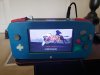
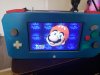
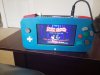
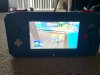
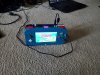
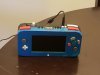
Worklog Contest Entry "KoopaShell"

As of now the only problems I have are the usb which I'm going to rewire and the c and s sticks. I can plainly see the s stick is wired like sht so I'm going to redo that and solder to the pins instead, what's throwing me for a loop is when I move the c stick the screen goes black like some things getting shorted..I sure hope it's not the gc+ chip..we'll see
You'd better check if the 3.3v and gnd are shorting on the c stick/c stick wiring.
 
I havent gotten to the stick wirings yet although it looks okay. I'll probably re-wire them though..the frst issue I wanted to tackle was the usb seeing as I cant do anything without PM loading. ...its getting 5v, and is grounded I redid the data lines and instead of using the small ic I used the 6, and 7 vias instead this time with new twisted magnet wire. I removed the old line and soldered to said vias..still getting the no usb/configuration screen and its driving me crazy..almost thinking about cutting out another usb from my other board and trying that? Any thoughts?
 
It doesn't make sense to waste a Wii board just for the USB port. You can take a USB port from anything. Anyway, be aware the 5v lines aren't bridged so make sure both ports or at least the one you're using is in fact powered. If that's not it then try a different drive.
 
Yeah im powering the 5v pin that Is in line with the 6 and 7 pin, I'm not using the other port at all. Checked it's getting 4.9v. I hope that's not undervolted by just .1? I havent done anything to the reg. And it worked fine before. :( I'll mess with it again tonight but if I cant get it to work I might have to use another..doesnt look like I'll be done by the contest at this point I just hope I can get the damn thing to work right. Not looking forward to messing with the gc+ microcontroller pins..I'm good at bridging pins :/
 
Not looking forward to messing with the gc+ microcontroller pins..I'm good at bridging pins :/

Did you see what Jeff said? You can follow the traces of the broken pads to vias or resistors on the backside to solder to, that'll be much safer.

Also, 4.9v may be too low for USB to be stable. What resistance does your resistor on that reg have? It would probably be a good idea to switch it out for a 330 ohm resistor.
 
I'll check the ohm on the resistor, and I must have misread what he said, I thought I could only solder to the pads the traces or the pins on the microcontroller, that would be much easier I'll look at those thanks. I ordered new sliders the ones in now just look butchered..I would ideally like to just start with a new gc+ but they're hard to get ahold of. I populated my own I had printed through oshpark but I cant get it to program or be detected in mplab..fk lol one way or another I will get it to work
 
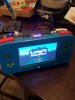
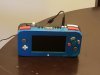
So I finished my portable finally. To an extent it still has some work and I am having one issue still. Everything seems to be working well but the main stick still veers to the left at boot about 90% of the time. I've tried xya at boot and it seems to slow it down when it calibrates the dead zones but it still does it. I noticed when I move the slider around it will stop sometimes and work normally no problems. And playing the game is alright as long as I'm moving the stick, does anyone know of a setting I can use to fix this??? I tried going into the gc+ config. settings to fix it but the text is really small and I cant navigate it it wont work. Is there an update I'm missing?? Thanks everybody

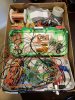
Oh and the internals look bad
 

Attachments

  • 20180825_162831.jpg
    20180825_162831.jpg
    1.1 MB · Views: 415
  • 20180825_170816.jpg
    20180825_170816.jpg
    499.2 KB · Views: 424
  • 20180825_181131.jpg
    20180825_181131.jpg
    953.4 KB · Views: 396
  • 20180825_181141.jpg
    20180825_181141.jpg
    1.1 MB · Views: 398
Are you 100% sure that the slider is wired up correctly and that all the wires have good contact? And are you using stranded or solid core on the power/ ground wires? If you are using solid, maybe try swapping them out for stranded as a break in the wire could be the reason it doesn't work reliably. If that still doesn't fix it then there is a GC+ homebrre that'll fix the ranges if it is a software issue, but I'd do everything Hing you can to be sure that it isn't a hardware one, which is what it is most of the time.
 
So far I checked the continuity between the main stick cx,cx,sx,sy with the corresponding pin on the pic. All had good contact. I used stranded copper wire power and ground checked out with my multimeter. I dont know why my gc+ calibration isnt working but all other settings and menu navigations work fine.

Magnet wire for the x and y on the sliders and stranded for the v, and g
 
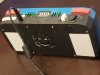
So I'm 99 percent completed. Thanks to everyone on here for all of your help @Aurelio @Gman @DeoNaught @Shank especially. But everyone else that has helped as well. I still need to fix the right shoulder buttons analog it's hard to press, my button design wasn't that well done, and I going to replace my red board as I'm pretty sure it's not charging right. But other than that everything works pretty good.

I do have a question, I can't get save states to work for snes? It says save to I think sram or something like that it creates a save but when loaded it just reboots the game? N64 works fine, and sega didnt have em anyway so that's cool too.

 

Attachments

  • 20180831_104244.jpg
    20180831_104244.jpg
    1.3 MB · Views: 380
  • 20180831_105017.jpg
    20180831_105017.jpg
    1.5 MB · Views: 385
  • 20180831_103125.jpg
    20180831_103125.jpg
    1.2 MB · Views: 388
  • 20180826_093854.jpg
    20180826_093854.jpg
    1.3 MB · Views: 380
  • 20180826_094614.jpg
    20180826_094614.jpg
    2.2 MB · Views: 390
  • 20180825_181131.jpg
    20180825_181131.jpg
    953.4 KB · Views: 432
So I'm 99 percent completed. Thanks to everyone on here for all of your help @Aurelio @Gman @DeoNaught @Shank especially. But everyone else that has helped as well. I still need to fix the right shoulder buttons analog it's hard to press, my button design wasn't that well done, and I going to replace my red board as I'm pretty sure it's not charging right. But other than that everything works pretty good.

I do have a question, I can't get save states to work for snes? It says save to I think sram or something like that it creates a save but when loaded it just reboots the game? N64 works fine, and sega didnt have em anyway so that's cool too.
Did you relocate the MX chip and RTC battery?
 
No I didnt. I did the most basic portable basically seeing as it was my first one. No wifi or bt, no mx. Just emulators and gc really. I really like the look of the G-Wii and want to build that next. 100% more efficient and less bulky than mine. Overall I'm content with it but I really want something slimmer, with better button design, and no more sliders..ever. I'm just going to stick to the OEM sticks instead, also why I wanna build the G-Wii
 
No I didnt. I did the most basic portable basically seeing as it was my first one. No wifi or bt, no mx. Just emulators and gc really. I really like the look of the G-Wii and want to build that next. 100% more efficient and less bulky than mine. Overall I'm content with it but I really want something slimmer, with better button design, and no more sliders..ever. I'm just going to stick to the OEM sticks instead, also why I wanna build the G-Wii
So you're just using the SNES emulator? Have you configured it, or are you running on stock settings?
 
Yeah I'm just using the emulator I just figured it out I had to change the setting to autosave to snapshot and it works fine now
 
Back
Top