Question Wii Ashida shopping list with a few extras

SamIam

.
Joined
Jan 13, 2026
Messages
36
Likes
8
I'm planning to build a wii ashida with some additional features:

-Video out
-build-in-sensor bar
-relocating bluetooth module (I'm considering WiFi too, but doesn't seem worth it to me)

I wanted to ask if someone could check my shopping list in case I missed something or don't need it. I used the Ashida BOM for reference.
I already have:
-OG GameCube Controller
-Wii sensor Bar (already did some test with the build in infra read LED's)
-Wii family edition with the RVK-CPU-01 (from what I can tell it is perfect for this build, 4-layers etc.)
-128GB micro SD card

As for my shopping list:
-for video out I found the VGA switch by electronic shepherd was recommend in another thread (https://bitbuilt.net/forums/threads/is-video-out-in-a-portable-possible.6634/), is that still the way to go?
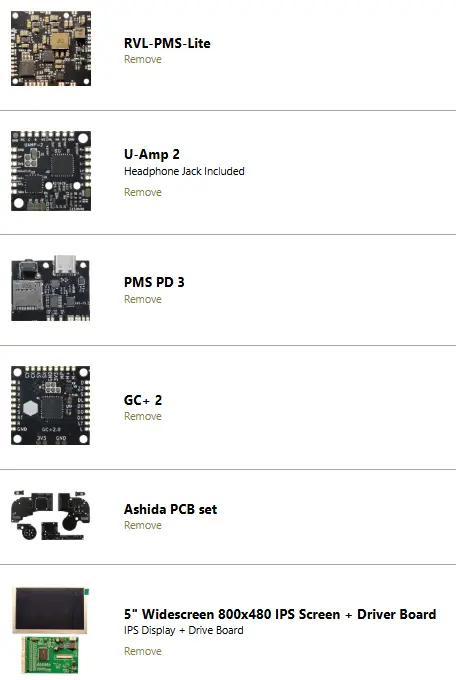
-From 4LayerTech I would order everything that is listed on the BOM
1772886500702.webp

-From Digikey too:

From what I can tell this is everything except for the 10K Potentiometer from mouser, which is out of stock and shipping is very high, is there a good alternative I can order? (preferably EU). This just leaves me with ordering wires (can I just buy any wires with the right awg?) and 21700s.

I'm sorry for the amount of long questions!
 
Last edited:
I'm planning to build a wii ashida with some additional features:

-Video out
-build-in-sensor bar
-relocating bluetooth module (I'm considering WiFi too, but doesn't seem worth it to me)

I wanted to ask if someone could check my shopping list in case I missed something or don't need it. I used the Ashida BOM for reference.
I already have:
-OG GameCube Controller
-Wii sensor Bar (already did some test with the build in infra read LED's)
-Wii family edition with the RVK-CPU-01 (from what I can tell it is perfect for this build, 4-layers etc.)
-128GB micro SD card

As for my shopping list:
-for video out I found the VGA switch by electronic shepherd was recommend in another thread (https://bitbuilt.net/forums/threads/is-video-out-in-a-portable-possible.6634/), is that still the way to go?
-From 4LayerTech I would order everything that is listed on the BOM
View attachment 41875
-From Digikey too:

From what I can tell this is everything except for the 10K Potentiometer from mouser, which is out of stock and shipping is very high, is there a good alternative I can order? (preferably EU). This just leaves me with ordering wires (can I just buy any wires with the right awg?) and 21700s.

I'm sorry for the amount of long questions!
Prepare to pay lots of taxes. I had to do the same. You could also buy a sensor bar that works on batteries. I also recommend printing this stand.
When you want to play with the sensor bar. That or something similar. I saw a model of pins that you put in the screwholes, but they destroyed the paint on my ashida, so I wouldn't recommend those pins.

I'd also recommend to put the bluetooth on the top left corner of the wii board, on the side where you stick the heatshields. That part of the wii board isn't close to touch other pcb's and it's pretty close to everything you need to connect to the bluetooth chip.

As for your shopping list. It looks complete to me, at least the 4 layer tech side (didn't bother to look at the others.
As for the wires, magnet wires are just better in general and some issues might be fixed by using them. But you can buy them anywhere you'd like. You don't need more than 1 spool of each.
For the pot, I'm afraid you're not gonna get a good answer on that. It's best to either find 1 yourself and hope it fits and works, or you'll order it from mouser. I ordered some other stuff with the pot like a soldering iron stand.

As long as your main buying guide is including everything from the BOM. It should be fine.

And just as a warning so you don't make the mistake I did. Never install CIOS. It leads to bluetooth not working (so no wii motes) and possibly bricking your wii. I lost 2 wii's to it.
 
IIRC any linear taper 10k pot with a matching footprint will work.
Wire you can get anywhere yes, so long as you remember to use stranded wire for voltage supply. Solid core wire is only advised at thin gauge (32 to 38AWG) for logic connections, like the U10 wire, controller data, and any other via soldering for the 4layertech boards.
Batteries are also generic. Just make sure you buy from a reputable brand so that the cells you recieve match the purchase specifications. Cut price cells are usually rejects or are packed with flour or talcum powder inside to make up weight, and contain a tiny little cell hiding inside. If you're able to find them locally, Vapcell, Panasonic, and Samsung are good manufacturers. You can probably find some legit 6000mAh cells and get a bit of extra runtime compared to the standard 5000mAh cells in the BOM.

Be sure to fully charge them individually before connecting both cells to the system to prevent damage from load balancing.
 
Thanks too both of you! I really appreciate every help I can get.
Does anyone know about the video-out idea? Is it very hard to do and will the VGA switch from electronic Shepard do the job?
As for video port I found this adapter lying around which I was thinking would be perfect to the just use with a
headphone jack
1000051278.webp
 
I completely forgot that I would have to convert the VGA signal to AV, but I found this wiring diagram which would allow me to do so.
Is this feasible (maybe with custom PCB) or is there a way I can directly get AV from a trimmed wii?
I really don't know anything about analog video, on the ultimate Wii trimming guide there is some information about video out on the wii, but I cannot make mich of it regarding my issue (bitbuilt.net/forums/threads/the-definitive-wii-trimming-guide.198/)
1000051285.webp
 
Last edited:
Prepare to pay lots of taxes. I had to do the same. You could also buy a sensor bar that works on batteries. I also recommend printing this stand.
When you want to play with the sensor bar. That or something similar. I saw a model of pins that you put in the screwholes, but they destroyed the paint on my ashida, so I wouldn't recommend those pins.

I'd also recommend to put the bluetooth on the top left corner of the wii board, on the side where you stick the heatshields. That part of the wii board isn't close to touch other pcb's and it's pretty close to everything you need to connect to the bluetooth chip.

As for your shopping list. It looks complete to me, at least the 4 layer tech side (didn't bother to look at the others.
As for the wires, magnet wires are just better in general and some issues might be fixed by using them. But you can buy them anywhere you'd like. You don't need more than 1 spool of each.
For the pot, I'm afraid you're not gonna get a good answer on that. It's best to either find 1 yourself and hope it fits and works, or you'll order it from mouser. I ordered some other stuff with the pot like a soldering iron stand.

As long as your main buying guide is including everything from the BOM. It should be fine.

And just as a warning so you don't make the mistake I did. Never install CIOS. It leads to bluetooth not working (so no wii motes) and possibly bricking your wii. I lost 2 wii's to it.
I already saw some portable sensor bar projects, but I would prefer to build it into the portable if possible. I'll keep the Bluetooth location and the software modding in mind thanks!
 
Custom pcb might be hard to do since there isn't much place for extra pcb's. I know it was already hard to find place for the wifi chip even though the rvl dd board is smaller than the other driver boards.
So if I were you, I would update the 3d model to fit your pcb if you want an extra pcb. Unless you can put it in the handles since I didn't see you planning to add wifi or the mx chip.
I'd also suggest taking a look to replace the fan in your shopping cart. Someone found a better fan on digikey. I experienced the same issues he did with the current bom fan. But I can't tell you wether it's actually better or not since I just ordered it to see for myself. https://bitbuilt.net/forums/threads/ashida-wii-portable.4529/page-27#post-76039

The issue is that the bom fan needs 4v to turn on, which is almost the max value in the fan settings. Everything under that value results in some annoying noise while the fan doesn't turn on. So you're fan is basically on all the time at max speed.

I have no experience with the video thing. But the standard pin that ginger (and everyone else) use to test the video signal won't work after you connect the screen. It might be possible if the headphone jack disconnects the connection of 3.3v to the m via on the wii.
But again, I'm not experienced enough that you can take this for granted. So if someone else can confirm or correct me. Pls do
 
Last edited:
There's an easier way if you want just composite out. If you put a little switch on the wire that supplies 3.3v to MODE, you can turn that switch off to set the Wii back to low definition mode and it'll output composite video natively.
 
Custom pcb might be hard to do since there isn't much place for extra pcb's. I know it was already hard to find place for the wifi chip even though the rvl dd board is smaller than the other driver boards.
So if I were you, I would update the 3d model to fit your pcb if you want an extra pcb. Unless you can put it in the handles since I didn't see you planning to add wifi or the mx chip.
I'd also suggest taking a look to replace the fan in your shopping cart. Someone found a better fan on digikey. I experienced the same issues he did with the current bom fan. But I can't tell you wether it's actually better or not since I just ordered it to see for myself. https://bitbuilt.net/forums/threads/ashida-wii-portable.4529/page-27#post-76039

The issue is that the bom fan needs 4v to turn on, which is almost the max value in the fan settings. Everything under that value results in some annoying noise while the fan doesn't turn on. So you're fan is basically on all the time at max speed.
I‘ll update my shopping list thanks!
 
There's an easier way if you want just composite out. If you put a little switch on the wire that supplies 3.3v to MODE, you can turn that switch off to set the Wii back to low definition mode and it'll output composite video natively.
Okay good to know, so you say I won‘t need the VGA switch?
And could someone explain to me how video out would exactly work or if there is a worklog/guide that explains that. I’m new to using forums and wasn‘t ablet to find anything on it
 
Last edited:
Okay good to know, so you say I won‘t need the VGA switch?
And could someone explain to me how video out would exactly work or if there is a worklog/guide that explains that. I’m new to using forums and wasn‘t ablet to find anything on it
I suppose you put the switch on the 3.3v -> M cable and connect the yellow cable that goes into the white, red and yellow holes in the tv. Connect that cable to the pin everyone uses to test if their wii works after trimming.
But this way, you would still have the get audio to your tv. Maybe you could use the headphone jack for that?
 
Okay good to know, so you say I won‘t need the VGA switch?
And could someone explain to me how video out would exactly work or if there is a worklog/guide that explains that. I’m new to using forums and wasn‘t ablet to find anything on it
You only need a VGA switch if you want to send VGA out to a TV. If you want to use composite out, then using a switch on the mode line is all you need.

As for how to do it, you'll need to probe your RCA jack with a multimeter to find which 3.5mm jack band is for which coloured socket. Once you know which band is for each socket and which is GND, you can connect a wire from the yellow composite video line to the yellow band, left channel from your audio amp to the white band, and right channel to the red band. The audio might blast loudly or be super quiet on the TV depending on impedence, but it'd work out of the box.

The outer metal strip on the sockets will all be GND btw. The positive line for each socket is inside. You also have the option of using two jacks instead of one to get YPbPr component video out using the same method, since it uses 3 lines for video instead of one.
 
Oh alright that sounds simple enough, composite/AV is what I planned on doing! I‘m going to try making a corresponding wiring diagram and send it in here when I find the time
 
I don‘t quite understand, sorry…
So the BOM lists this switch (https://www.digikey.de/en/products/detail/e-switch/EG1206A/251334) for what I assume is turning the console on and of. Sould I just order the same switch twice and the use the second one for switching video?
Sorry, I totally blanked on the conversation history. I thought you were asking something entirely different. Yeah the first switch you linked would work fine as a mode switch. Mounting it securely might be tricky because of how flat it is, but it is suitable.
 
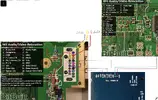
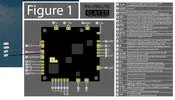
I finally got to looking into the wiring a bit and made a quick diagram. Would everything work out like this? Connecting 8 to 10 with a switch should then switch between internal and external screen. As for powering the 5“ screen from 4layertech, it says you can mod it so it supports 3.3V, should I then just wire it like so? (the black one is of course meant connecting to GND, not 12V also)
 

Attachments

  • IMG_3401.webp
    IMG_3401.webp
    240 KB · Views: 13
  • IMG_3402.webp
    IMG_3402.webp
    88.3 KB · Views: 9
Last edited:
You will need to grab left and right audio from the input legs of the pre-amp rather than the outputs that go to the AV port, but yes that looks correct.

As for the 3.3v mod, there's a diagram for it on the screen listing page. You just remove a certain inductor and supply 3.3v directly to the specified pad.
 
Back
Top