Worklog Vest’s wii portable worklog

vest

.
Joined
Jul 2, 2022
Messages
21
Likes
13
Portables
1
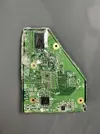
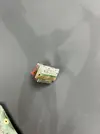
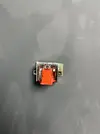
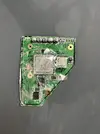
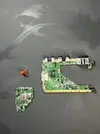
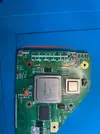
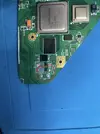
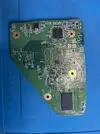
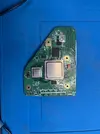
I finally trimmed my first wii! I did the basic omgwtf trim and trimmed out the av port for testing. When I started trimming the main part, I forgot to tape up the gpu cpu and other chips on the board to prevent transient shorts, but remembered after the first cut so hopefully everything is fine. The dremel skipped a couple times but the worst it did was remove a little bit of solder mask.

After school I’m going to remove the capacitors on the top of the board, remove the ldo(With Wesk’s dremel method), trim out the mx chip, sand the edges of everything, and test the voltages.

Does the trim look good so far?
 

Attachments

  • IMG_6830.webp
    IMG_6830.webp
    987.3 KB · Views: 43
  • IMG_6832.webp
    IMG_6832.webp
    647.9 KB · Views: 42
  • IMG_6831.webp
    IMG_6831.webp
    689.8 KB · Views: 28
  • IMG_6829.webp
    IMG_6829.webp
    1.1 MB · Views: 36
  • IMG_6828.webp
    IMG_6828.webp
    844.2 KB · Views: 41
Last edited:
Seems good to me!
Awesome job for a first trim!
Don’t forget to sand it well :)

What will you build with it?
 
Thanks! I’ll make sure to.

I don’t know to be honest. I think Ill probably be doing an ashida, but I’d also like to try to build my own
 
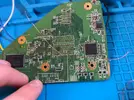
I finished sanding the wii and removing the ldo last night! Ldo went mostly okay, however my hand slipped a little while grinding down the top of it. I attached a picture of the gouge, hopefully it is ok. Sanding went well, all sides are shiny and smooth. I took my time going from 240 all the way to 1000 grit.
I also removed the capacitors at the top of the trim with pliers. A lot of the pads lifted off, but from my understanding those pads are not needed?
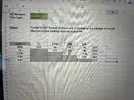
Most of the resistance values I measured with my multimeter looked very similar to nold’s and other modders, but the 1V line looks higher than what I’ve seen. Can anyone confirm that these resistances are ok? (Also pls ignore the revision, I entered it in wrong)
If it all looks good, I’m going to wire the trim up to the pms, some batteries, and the av port, and see if we get a boot
 

Attachments

  • IMG_6844.webp
    IMG_6844.webp
    155.9 KB · Views: 39
  • IMG_6843.webp
    IMG_6843.webp
    108.7 KB · Views: 43
  • IMG_6842.webp
    IMG_6842.webp
    623.1 KB · Views: 37
  • IMG_6841.webp
    IMG_6841.webp
    498.1 KB · Views: 52
  • IMG_6840.webp
    IMG_6840.webp
    2.8 MB · Views: 37
Last edited:
I'm not an expert, but based on some of the previous posts for wii trim resistances, your resistances seem fine imo. And you're right, the pads from the capacitors you removed aren't required. You can use them if you mess up the via wiring for video or something, but you can always solder directly to the AVE in that case as well.

If it were me, I'd full send it! I killed 3 wiis before I got a working trim, and your trim looks much better than any of those did.

Good luck!
 
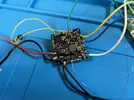
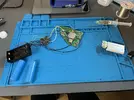
Last night I wired up all the voltage lines, u10 emulation, av port with twisted wires, and batteries, but the trim didnt boot. After holding the button, the gpu and cpu would get hot but nothing would display. I measured all the voltage lines on the wii while connected to the batteries, and they were all within .05 of the target voltage. I also measured the voltage of the u10 line at the via and it was outputting 3.3v as expected. Then I cleaned everything pretty well with isopropyl alchohol.
I’m using a wii2hdmi for output, but from what I’ve seen, wii2hdmi should work fine with composite video.
I’m stumped as to why it isn’t booting. Could it be because I didn’t desolder my av port?
Im going to try redoing all the wires and double checking everything to try to get a boot.
If anyone has an idea as to why the trim isn’t booting, the help would be much appreciated :)
 

Attachments

  • IMG_6859.webp
    IMG_6859.webp
    106.7 KB · Views: 43
  • IMG_6857.webp
    IMG_6857.webp
    497.8 KB · Views: 42
  • IMG_6855.webp
    IMG_6855.webp
    674.7 KB · Views: 30
Last edited:
bit late to give a response. Do you get anything on your screen or does it stay completely black?
Bc you should get a screen with an error message at this point.
The error message is a sign that it works bc you still have to connect your sd card to your wii via the pms-3 (or pms-2)

I also used the pads on the top of the wii to test the AV signal while I was testing it.
 
You’re good, and thanks for the advice :)

I should’ve kept updating, but I did get boot! After doing some research on the wii2hdmi adapter and its compatibility with trims, I decided to order a cheap av cable to make sure that the wii2hdmi wasn’t the issue. After using the av cable, the trim booted!

Since then I’ve been working on my own modified ashida, with the goal of splicing xbox 360 controller meshes onto the ashida mesh, and designing custom controller boards that will host the gc 2+ and breakout to the 360 components. Although gc controllers have some of the best ergonomics, something about 360 controllers just feel so good. However, I’m not so sure of the compatibility of 360 components with the gc 2+, because so far I have not seen any modders use them
in their wii builds. If someone knows if basic 360 components are compatible with the gc 2+ that would be really helpful
IMG_6878.webp
 
You’re good, and thanks for the advice :)

I should’ve kept updating, but I did get boot! After doing some research on the wii2hdmi adapter and its compatibility with trims, I decided to order a cheap av cable to make sure that the wii2hdmi wasn’t the issue. After using the av cable, the trim booted!

Since then I’ve been working on my own modified ashida, with the goal of splicing xbox 360 controller meshes onto the ashida mesh, and designing custom controller boards that will host the gc 2+ and breakout to the 360 components. Although gc controllers have some of the best ergonomics, something about 360 controllers just feel so good. However, I’m not so sure of the compatibility of 360 components with the gc 2+, because so far I have not seen any modders use them
in their wii builds. If someone knows if basic 360 components are compatible with the gc 2+ that would be really helpfulView attachment 40802
It should be possible to do, from what I've learned is that the GC 2+ chip just maps the inputs from your buttons so the wii can use them.
The only real problem you'll probably run into is the R2 (or R for GC) and L2 buttons since they are fully analog on a 360 controller while they are partially digital for a GC controller and RVLoader doesn't accept the analog signals at all (or at least that's what I noticed with wired GC controller, could be different with the GC 2 chip)

I personally destroyed my first wii (exposed too much of the copper so that the copper got removed at some points of the GPU) and I'm currently making a custom theme on my second one.
I got sick of the inconsistent order of the games inside RVloader and it's purely bc that part of RVLoader was programmed like it was homework.

I've had to spend 6 hours to understand and rewrite how the menu navigation worked instead of the max 2 hours the dev who made the code had to spend to have it more flexible.
I also made it so you actually move by pages instead of columns.

(for the 1% of people that care about the order of their games)

Page 1 (low quality is probably bc of the elgato in between)
1763935104703.webp

page 2

1763935134970.webp

main theme's "page 2"
1763935220817.webp
 
It should be possible to do, from what I've learned is that the GC 2+ chip just maps the inputs from your buttons so the wii can use them.
The only real problem you'll probably run into is the R2 (or R for GC) and L2 buttons since they are fully analog on a 360 controller while they are partially digital for a GC controller and RVLoader doesn't accept the analog signals at all (or at least that's what I noticed with wired GC controller, could be different with the GC 2 chip)

I personally destroyed my first wii (exposed too much of the copper so that the copper got removed at some points of the GPU) and I'm currently making a custom theme on my second one.
I got sick of the inconsistent order of the games inside RVloader and it's purely bc that part of RVLoader was programmed like it was homework.

I've had to spend 6 hours to understand and rewrite how the menu navigation worked instead of the max 2 hours the dev who made the code had to spend to have it more flexible.
I also made it so you actually move by pages instead of columns.

(for the 1% of people that care about the order of their games)

Page 1 (low quality is probably bc of the elgato in between)
View attachment 40803
page 2

View attachment 40804
main theme's "page 2"
View attachment 40805
Very nice! Will you be sharing this theme when it's complete?
IIRC the default game order is tied to TitleID, which I personally never liked. Having the option for alphabetic sorting would be great!
 
Well, it's still tied to the TitleID at the moment. But the sorting is better (depending if you thought the original sorting was correct).
I changed the sorting after the first 8-10 games (depending on screensize).

I'll be looking into the file name wether it's achievable for me to find a way to do it (new to lua/python).

Any idea how to add stuff to the menu settings? I'd like to make it flexible so you can choose between several nbr of rows and columns. (And maybe the way it's sorted)
Another thing I would love to add is a last played option.

Naybe it's better if I'd make a different post for this XD.
 
Last edited:
Has been a while since I posted here, but I’m at the last stretch of finishing my ashida! It’s largely assembled, but before testing boot, I was wondering if these smd resistors need to be replaced. I must have knocked them loose when attempting to wire up vga, and can’t seem to find them. (The magnet wire circled is the MC wire that I accidentally dislodged when I took this picture. I fixed it after)
Other than that, 3.3v to gnd reads 2 k ohms, while all others match common resistances.

IMG_7384.webp
IMG_7383.webp
IMG_7385.webp
 
Last edited:
I’m assuming those resistors modulate the red line and without replacing them the image will be left distorted.

Assuming this, I attempted to boot the ashida, but all I get is fan movement and a blue vga screen. After blue screen, the screen stays a static black. Rvloader doesn’t show up at all. I’m trying to troubleshoot but am honestly stumped as to what it is.

Before continuing wiring up the screen, I did confirm that the ashida still booted into rvloader. For some reason, after attaching the screen it failed to boot. When I first tested, I had vga wired up when rvloader was actually set to only composite. Realizing this, I wired up a ground composite wire and disconnected the mode wire from the wii. However it still didn’t boot.

I’m using the pms pd 3 with a sandisk sd card. Right now, rvloader is not on the sd card, just on the wii system which I assume is fine because it booted into rvloader earlier. I did boot with an sd card without rvloader with the screen and it didn’t boot. If Rvloader is needed on the sd card, that is my next step.

If someone could help it would be greatly appreciated:)
IMG_7397.webp

IMG_7398.webp
IMG_7400.webp
IMG_7399.webp
 
Last edited:
Try to boot without an sd card first and see if you get the error screen.
If you don't get an error, it's safe to assume it's not related to the sd card.
I'm afraid those components you removed are required.
Ginger goes over them when explaining the limits of your trim .
You can trim very short to them, but they should still be there.

You normally still need rvloader on your sd card though, there are lots of files that are not installed since you can customise them like your theme.
 
Try to boot without an sd card first and see if you get the error screen.
If you don't get an error, it's safe to assume it's not related to the sd card.
I'm afraid those components you removed are required.
Ginger goes over them when explaining the limits of your trim .
You can trim very short to them, but they should still be there.

You normally still need rvloader on your sd card though, there are lots of files that are not installed since you can customise them like your theme.

I did boot without the sd card and it did not work unfortunately
I’ll make sure to get rvloader on the sd card and replace those components. Any idea as to how I should replace them? Should I order a donor wii or is there an easier way to source those components?
Thanks for the help
 
Ordering from digikey should work, but don't take my word for it since I don't know enough about this myself.
If you're planning to use a donor wii, maybe it might be better to trim it and replace this one instead.
Since it's not guaranteed that replacing these components will help you (unless you have a donor wii where you know that it is broken but you know these components work)

I had a similar issue, but my wii still had/has these components.
For me it was probably the resistance that dropped at the 1.15v for some reason.
 
The cap you lost is a 100nf ceramic and the resistor is 75ohms. I don't know what size they are though, you'll have to measure the neighbouring ones and check the SMT sizing chart.

Video output likely won't work in general until they are replaced. If you still have the removed section of motherboard from that trim, then you can consult Shank's Super Thread to see if there are matching components to harvest. I don't believe you'll find a spare 75ohm resistor since they're mainly only used for video filtering, but there are loads of 100nf caps.
 
Last edited:
After getting the 75 ohm smd resistors from digikey and harvesting a 100nF cap from a leftover part of the Wii, I soldered them next to the AVE (thanks Stitches + Kolenot for the tips!). With batteries inserted, the fan spun up but I still had no video.
IMG_7508.webp


I checked resistance from all voltage rails to ground and found no shorts, then checked voltages on the rails and u10 and everything was within about 0.05 V. On power up I got the VGA blue screen but no RVLoader, and the Wii never got hot.

To reduce complexity I tested composite straight to a TV with an AV cable, but it still would not boot. As a last test I added a second battery and it finally booted.

AV to tv worked, but composite to the portable screen did not. The screen would briefly show the VGA blue screen, then go blank. Thanks to a post by CrazyGadget, I realized the screen was stuck on VGA input. I shorted gnd to K5 (SOURCE) on the driver board to switch to AV1, and “RVLoader boot loader 00” showed up. After inserting the sd card, RVLoader then fully booted and I was able to test games in composite.
IMG_7515.webp


My next step is to fix a dumb mistake during installation: I did not patch in VGA because I thought it would disable composite, which turns out to be wrong. Next up I plan on re-running the installer in safe mode, patching in VGA, wiring up VGA, and closing everything up.

I am on the final stretch of finishing my Ashida! Huge thanks to everyone who helped and to all the BitBuilt resources. It is surreal that this project is almost done.

IMG_7511.webp
 
Last edited:
Well guys, there's some good news, and there's some pretty bad news.

Good news:
I got VGA up and running. Wasn't too hard, just had to re-run the installer and wire it up. Booted up some Super Mario Bros. Wii and the video looked amazing.
IMG_7557.webp


Bad News:
I was so close to finishing. Just had to take out the batteries so I could solder up the speaker wires, then put them back in and close it up. Too easy I guess. Unfortunately, when taking out one of the batteries, I got the dreaded magic smoke. I believe the issue to be: the paper ring separating the outer negative casing of the li-ion to the positive terminal came off and shorted together on the same line. The heat was so much that the wire connecting the battery tab to the pms came loose.
tempImageGz0wOI.webp
The console was off and I took it out as fast as I could. I didn't know what to do next, so I measured some resistances, and put the one leftover battery back in. I was freaking out trying to make sure nothing was fried. I wanted to see if it still booted. I figured the voltage wasn't high enough, so I also inserted the charger.

This is where the second problem came on. While trying discern what the issue was, the GC +2 area of the ashida started smoking. To be honest, I don't know if it was specifically the GC +2 or something around that area, but smoke was coming from there. So I quickly took out the battery and the charger. The Gnd wire connecting the Wii to the 4LT controller breakout board got so hot I believe it disconnected from both sides

tempImageJmyrHf.webp

I believe any of these three problems could've made the ashida smoke twice: Paper ring knocked loose and + and - shorting on the same line for the first issue, Measuring voltages while the charger is connected like a dummy(Cannot remember exactly if I did this, but this could've been the issue) for the second issue, or the simple high output of the charger Im using(for the second issue). It's a 96W Mac charger. I thought the PMS PD 3 was compatible with all chargers so Ive just been using USB C PD that Ive been using for my pinecil. And I have been charging the ashida like this for a while, while testing.

Troubleshooting:
I've measured the Resistances of every line, and the all read what they should normally read(3.3v is reading 1.3k but I figure this is high enough). However when 3.3v and gnd are connected to the 4LT controller breakout board, 3.3v and Gnd on the Wii are shorted together.
Voltages also read what they should, all within their normal readings.
Man, it’s hard going from such a high to such a low. I’m at a loss of what to do next. I really hope this project is salvageable.
 
Last edited:
Well guys, there's some good news, and there's some pretty bad news.

Good news:
I got VGA up and running. Wasn't too hard, just had to re-run the installer and wire it up. Booted up some Super Mario Bros. Wii and the video looked amazing. View attachment 41393


Bad News:
I was so close to finishing. Just had to take out the batteries so I could solder up the speaker wires, then put them back in and close it up. Too easy I guess. Unfortunately, when taking out one of the batteries, I got the dreaded magic smoke. I believe the issue to be: the paper ring separating the outer negative casing of the li-ion to the positive terminal came off and shorted together on the same line. The heat was so much that the wire connecting the battery tab to the pms came loose. View attachment 41394The console was off and I took it out as fast as I could. I didn't know what to do next, so I measured some resistances, and put the one leftover battery back in. I was freaking out trying to make sure nothing was fried. I wanted to see if it still booted. I figured the voltage wasn't high enough, so I also inserted the charger.

This is where the second problem came on. While trying discern what the issue was, the GC +2 area of the ashida started smoking. To be honest, I don't know if it was specifically the GC +2 or something around that area, but smoke was coming from there. So I quickly took out the battery and the charger. The Gnd wire connecting the Wii to the 4LT controller breakout board got so hot I believe it disconnected from both sides

View attachment 41395
I believe any of these three problems could've made the ashida smoke twice: Paper ring knocked loose and + and - shorting on the same line for the first issue, Measuring voltages while the charger is connected like a dummy(Cannot remember exactly if I did this, but this could've been the issue) for the second issue, or the simple high output of the charger Im using(for the second issue). It's a 96W Mac charger. I thought the PMS PD 3 was compatible with all chargers so Ive just been using USB C PD that Ive been using for my pinecil. And I have been charging the ashida like this for a while, while testing.

Troubleshooting:
I've measured the Resistances of every line, and the all read what they should normally read(3.3v is reading 1.3k but I figure this is high enough). However when 3.3v and gnd are connected to the 4LT controller breakout board, 3.3v and Gnd on the Wii are shorted together.
Voltages also read what they should, all within their normal readings.
Man, its hard going from such a high to such a low. I feel pretty dumb right about now. I really hope this project is salvageable.

I felt the same with the cios thing and I had to remove the whole flexcable etc.

Good luck.

I hope that my batteries don't burn up from trying too much. I might buy new ones before the final assembly.
 
Back
Top