Question The G4 GameCube project

Last update before swapping drives: I tried with the original Wii flex cable (much shorter, shielded). The console displays the startup animation at full speed, then displays an error message (same as when no drive is connected).

So, whether my drive is compatible or not, wire length (and probably shielding) have a great impact on the ability for the console to boot.

Whether the console not acknowledging the drive is because of the drive itself or because of my installation is still unknown.

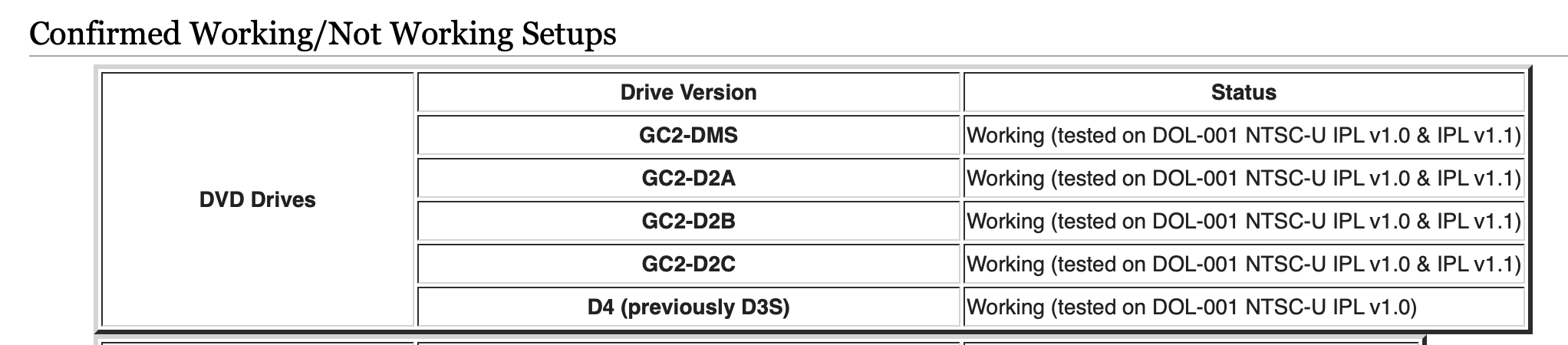
The current drive is GC2-DA1, so not confirmed working. Let's hope the next one is on the list!
1669981171303.png
 
The current drive is GC2-DA1, so not confirmed working. Let's hope the next one is on the list!

Second drive seems to be a D3-2 (no identification on the chip). Doesn't allow the console to boot either. I guess I'll need to triple check my soldering then.
 
Much better. As for your system not booting, see if you can find where those points go to on the mobo and check for continuity between those and the FFC. I wonder if theres some drive test homebrew you could run if you were to install picoboot too, maybe that could help diagnose the issue, assuming the system boots into Swiss with picoboot and this setup at least
 
Picoboot will be installed at some point, I can give it a try later if nothing else works.
 
Yep, all connections are good. So either:
- my drives are not compatible
- my wiring is wrong
- instructions are wrong (unlikely)
 
Maybe try giving the drive 3.3v as well? I know it doesn't normally need it, but for the sake of troubleshooting it's worth a go
 
Sure, let's give it a try! I wish I'd included it on the board, it would have been much easier ^^'
 
Yeah, still nothing. Also the controller doesn't seem to work anymore when the Wii Drive is connected, for some reason. I'll try and track down the people mentioned in the wiki for help :)
 
Does anyone know how to reach @TodorSauce? He seems to know a bit about Wii Drives on GameCube, but I did not manage to get in touch with him.
 
Does anyone know how to reach @TodorSauce? He seems to know a bit about Wii Drives on GameCube, but I did not manage to get in touch with him.
Not much luck on that front. I think the next thing I can do is try and order a Drive version that is known to work, such as:
1672915860431.png


Thing is, they are only confirmed working for NTSC-U IPLs, so.. Wait and see!
 
Well, the GC2-D2C drive didn't fare much better... Still much much noise at booting the consoles, BUT at least the console doesn't freeze immediately. I noticed that the NO/NC button does actually do something: pressing it makes the drive go bzzz, so I guess eject kinda works?

Still, I don't know where to go from here. My next idea would be to try all over again with an NTSC-U console. I don't have one, but I do have an NTSC-J one. Would region modding it make it a real NTSC-U?
 
Still, I don't know where to go from here. My next idea would be to try all over again with an NTSC-U console. I don't have one, but I do have an NTSC-J one. Would region modding it make it a real NTSC-U?

As far as I am aware, yes. There is a tiny area in which you can swap from a NTSC-J menu into a NTSC-U menu. It's a pretty common mod and doesn't take much skill or time to do. Hope you can make it further!
 
Well, the GC2-D2C drive didn't fare much better... Still much much noise at booting the consoles, BUT at least the console doesn't freeze immediately. I noticed that the NO/NC button does actually do something: pressing it makes the drive go bzzz, so I guess eject kinda works?

Still, I don't know where to go from here. My next idea would be to try all over again with an NTSC-U console. I don't have one, but I do have an NTSC-J one. Would region modding it make it a real NTSC-U?

One option could be to first back up your existing NAND image & NAND keys and then use ohneschwanzenegger to create a new NTSC-U nand image. From my understanding NTSC-J & NTSC-U Wiis are identical minus software changes. This might be an easier approach than trying to convert your existing nand image to NTSC-U. Worth looking into at the very least. Before you do anything though 100% make sure to back up your current NAND before proceeding further with further software modifications.
 
Can confirm I have modded an NTSC-J with bridging a jumper to display the menu in English. Its my daily driver GC.
I can't say for certain if it behaves identically to an NTSC-U, but it plays NTSC-U games and NTSC-J games. I can only imagine the boards are functionally identical and the language select is the option difference?
 
Thanks all! I'll try and find out if a modded NTSC-J to NTSC-U is identical to a real NTSC-U.
 
Back
Top