
- Joined
- Sep 3, 2020
- Messages
- 447
- Likes
- 988
- Portables
- 8
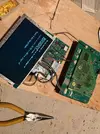
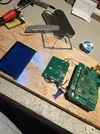
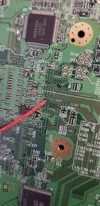
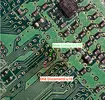
When you say there's no input, do you mean that the screen isn't showing anything when powering it on? It's important to be specific and detailed with this stuff so we can better help you. Pictures also help a lot.Okay I swear this is it, I’m just an idiot and need to update/shame myself. Ribbon cable connecting the screen to the driver pcb was upside down, screen powers on! Issue I’m running into now is there’s no input so I’m kinda stuck trying to figure out if it’s broken Wii vs. bad soldering vs. something else
If you're not getting video like I suggested, I must ask, are you trying with composite video? or VGA? If it's VGA, you'll need to solder mode to 3.3v. Either way, you're going to need to ensure the screen is in the correct video mode to detect your video option. To do so, connect the screen controller PCB to the screen driver board and hit the "Source" button, this will toggle between the video modes. Some screens have multiple composite or VGA modes, so you'll always want to toggle through all the options when testing to make sure you don't miss anything.