Fixing Gamecube Zenith Screen Bracket

Joined
Apr 2, 2018
Messages
9
Likes
0
I wound up blowing a fuse on my gamecube which had a Zenith screen attached. I fixed the Gamecube, but do not know how to fix the screen bracket. The short was caused by using a 12v 3 amp portable battery with a homemade cable.

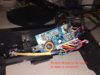
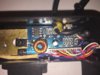
The bracket board seems simple, but I can't see anything labelled as a fuse. And I'm new to soldering and PCBs in general. Nothing immediately looks blown. Any ideas on where to look or how to troubleshoot this thing?

Thanks!

Edit: my homemade cable was just trying to replicate an Intec cable I have (barrel plug to GC connector). So either I blew it using voltage or incorrect polarity?

Also, the bracket power light is bright but dims when the screen is attached. It doesn't seem like the screen gets the power it needs.
 

Attachments
  • IMG_3412.JPG
    IMG_3412.JPG
    2.1 MB · Views: 521
Last edited:
I wound up blowing a fuse on my gamecube which had a Zenith screen attached. I fixed the Gamecube, but do not know how to fix the screen bracket. The short was caused by using a 12v 3 amp portable battery with a homemade cable.

The bracket board seems simple, but I can't see anything labelled as a fuse. And I'm new to soldering and PCBs in general. Nothing immediately looks blown. Any ideas on where to look or how to troubleshoot this thing?

Thanks!

Edit: my homemade cable was just trying to replicate an Intec cable I have (barrel plug to GC connector). So either I blew it using voltage or incorrect polarity?

Also, the bracket power light is bright but dims when the screen is attached. It doesn't seem like the screen gets the power it needs.
Fuses are marked as F[number] on the board, so you could look for it that way. If you have a multimeter, you can check if a fuse is still good by checking continuity between both ends of the fuse.
 
Thanks Stitches. I didn't see any Fs on the board on the front or back. Mostly things labeled C or R. The capacitors looked clean but I will double check. It seems beyond that I have a lot more to learn.
 
How much power is your intec cable providing? It's possible that even with the right voltage and polarity, it's not supplying enough current (amps) to support your setup. On the plug itself, it should say output ad or dc, polarity with a little picture, voltage, and amps. Generally barrel plugs are center positive, meaning the outside metal part you can touch is ground, but that isn't always the case. How many amps can it supply?
 
How much power is your intec cable providing? It's possible that even with the right voltage and polarity, it's not supplying enough current (amps) to support your setup. On the plug itself, it should say output ad or dc, polarity with a little picture, voltage, and amps. Generally barrel plugs are center positive, meaning the outside metal part you can touch is ground, but that isn't always the case. How many amps can it supply?

I swapped to testing using the official Gamecube power supply. 12v 3.25 amps. Using this I have the same issues with the screen bracket.

The intec cable being used is just a connector between the GC power supply and the screen and continues to work fine. I broke my setup by trying to replicate the intec connector myself instead of tracking down extra one. So it seems I fried something within the bracket and I still need to locate what I fried.
 
Are you sure that the gamecube is fully functional? I assume you tested with a tv
 
Are you sure that the gamecube is fully functional? I assume you tested with a tv

Yup. Thanks for asking. I've got extra cubes for testing as well. I'll post more pics of this project later in the week to confirm what is working and what the board looks like.
 
So I've pinpointed one issue. With the screen detached, this blue wire is at 9 volts. When the screen is attached, the voltage drops to 3v. Input voltage is 12v to begin with.

The capacitors look fine and continuity is good. I still think it might be a capacitor issue but I don't know how to test them correctly (especially the middle one).

Otherwise, any ideas on how to get the voltage to run correctly? should I re-route it? (The screen works fine on a different board)

Any ideas on just soldering on a replacement regulator?
 

Attachments

  • IMG_3421.JPG
    IMG_3421.JPG
    2.5 MB · Views: 453
Last edited:
Back
Top