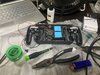
Question Do I need to purchase a new pcb set?

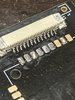
Thanks! Sorry if I’m asking too many questions I just have so many - by the looks of this photo, does it look like these pins are properly soldered? Is there a way to test before assembly ?
 

Attachments

  • D0EF6BBC-993A-4E07-957C-8553DF691B66.jpeg
    D0EF6BBC-993A-4E07-957C-8553DF691B66.jpeg
    1.1 MB · Views: 193
  • 22445DED-407E-4777-8467-E9710F9FA2A5.jpeg
    22445DED-407E-4777-8467-E9710F9FA2A5.jpeg
    1,021.2 KB · Views: 200
The pins look good to me, but if you want to test them you can put the FFC in the socket and use a multimeter to check continuity between the contacts on the other end of the cable and the ends of the socket pads. Also when you're done give it a clean with some isopropyl alcohol to prevent transient shorts
 
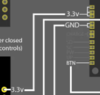
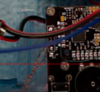
Hello again! I have another couple questions. SO first of all I see in the wiring diagrams that some of the wires look like they lead to multiple pads or connections. I attached a photo for example (3.3v). Do I need to solder wire leading from 3.3v to each of those pads? ---- My next question is kind of a follow up to that, I saw gingerofoz build this and he twisted some magnet wire together but its hard to see where he wired it to. I attached a picture from his stream for an example. Is this to accomplish my first question or is this something else?

Thanks again!
 

Attachments

  • 3pad.png
    3pad.png
    13.4 KB · Views: 194
  • twistedwire.png
    twistedwire.png
    48.7 KB · Views: 193
Hello again! I have another couple questions. SO first of all I see in the wiring diagrams that some of the wires look like they lead to multiple pads or connections. I attached a photo for example (3.3v). Do I need to solder wire leading from 3.3v to each of those pads? ---- My next question is kind of a follow up to that, I saw gingerofoz build this and he twisted some magnet wire together but its hard to see where he wired it to. I attached a picture from his stream for an example. Is this to accomplish my first question or is this something else?

Thanks again!
The PMS boards have multiple output pads for each voltage for convenience. That way you don't have to solder 5 supply wires to 1 pad to feed everything. The diagram is showing that any of the 3 pads is fine to use.
As for the twisted wires, those are the left and right speaker output pads. Those wires supply the audio signal to the speaker inputs on the other boards. Each of the speaker pads has a ground pad, and twisting a signal wire and a ground wire together like that helps mitigate interference. Generally you'll see people twisting signal and data wires with ground wires for this reason, with the exception of the USB and BT module data lines as they are differential and must be twisted with each other rather than a ground wire.
 
Hellooooo once again, so all of the pcb boards are assembled and looking good! Also my wii is already prepared as I purchased it from crazygadgetmods on Etsy.

I am about to start wiring everything together, I will be using the diagrams on 4layertech's website to guide me. ---My question is, are the diagrams provided on their website going to show me everything I need?


Also I have not been able to find much help on how to wire up the screen driver board. So I have a couple questions with it
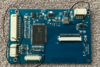
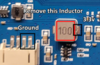
1. I assume I need to remove the circled components right? (attached photo)
2. Where do I wire those pads to?
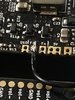
3. It mentions on 4layertech - "modded to power on 3.3v by removing an inductor and wiring 3.3v and ground." I see what it is talking about, but I don't know where to wire 3.3v and ground. (other attached photo)


Thank you again (stiches most likely). You gotta let me know if I start to annoy you with these questions lol I swear I am doing reaserch there is just so much to know.

The diagrams I am referring to - https://4layertech.com/products/ashida-pcb-set
 

Attachments

  • driverboard.png
    driverboard.png
    515.2 KB · Views: 215
  • 3.3 and ground.png
    3.3 and ground.png
    137.9 KB · Views: 205
Last edited:
Hellooooo once again, so all of the pcb boards are assembled and looking good! Also my wii is already prepared as I purchased it from crazygadgetmods on Etsy.

I am about to start wiring everything together, I will be using the diagrams on 4layertech's website to guide me. ---My question is, are the diagrams provided on their website going to show me everything I need?


Also I have not been able to find much help on how to wire up the screen driver board. So I have a couple questions with it
1. I assume I need to remove the circled components right? (attached photo)
2. Where do I wire those pads to?
3. It mentions on 4layertech - "modded to power on 3.3v by removing an inductor and wiring 3.3v and ground." I see what it is talking about, but I don't know where to wire 3.3v and ground. (other attached photo)


Thank you again (stiches most likely). You gotta let me know if I start to annoy you with these questions lol I swear I am doing reaserch there is just so much to know.

The diagrams I am referring to - https://4layertech.com/products/ashida-pcb-set
No worries man. Better to ask lots of questions than make lots of mistakes in ignorance.

I don't know if you need to remove the JST sockets for everything to fit, but you can do it without issue as long as you don't rip out the pads.
The silkscreen on the underside of the screen board has all the pin designations. You just have to match the labelled inputs to the Wii's VGA and composite outputs + a ground wire or two.
According to the diagram, you run a ground wire to the indicated two pins of the nearby 4 pin JST socket, and a 3.3v wire to the right side pad of the inductor footprint (from that view orientation). The 3.3v and ground should come either from the PMS directly, or you can run the wires from any 3.3v/ground spot on the Wii as they are all interconnected on a 4 layer board.
 
Does every one of these pads need to be wired to the wii? There are 3 sets of labeled inputs.

other than that can you think of anything the diagrams that I linked could be missing?
 

Attachments

  • 9287A386-EEC2-4D62-A36C-5415AED1D6BA.jpeg
    9287A386-EEC2-4D62-A36C-5415AED1D6BA.jpeg
    1.4 MB · Views: 194
You're doing the 3.3v mod, so you only need the video data lines and a video ground connection.

R-in, G-in, and B-in are the RGB lines from the Wii.
H and V are H-sync and V-sync respectively.
And AV-CVBS is the composite input.

Each of the RGB inputs has a paired ground pad, so you can do a signal/ground helix twist for each if you're concerned about interference. H-sync and V-Sync can be twisted together for convenience, and composite would benefit mildly from a ground twist.

If the screen board came with a little button PCB that plugs into the finer pitch JST socket, you can set up your brightness/contrast before sealing the unit.
 
These speakers arent going in that easily. Which way do I put them in? One side has a bit of adhesive, I figured that goes in first but I was having to put a ton of pressure for them to fit in

*****Edit***** I think I see now, those pins are supposed to go up and touch the pads underneath the pcb for the connection. They are still hard to get in place but I think I will manage.

So you don't solder those pins to the pcb? I didn't see gingerofoz do it. It seems as though they just make contact when you place the board on top of them.
 

Attachments

  • AFCBC588-FC6B-48E0-8EF3-E7BE7C64BE24.jpeg
    AFCBC588-FC6B-48E0-8EF3-E7BE7C64BE24.jpeg
    4.4 MB · Views: 207
Last edited:
Yeah they just make spring contact with the PCB, no soldering needed
 
I am having troubles desoldering the surface mount components. I found a few different methods and decided to order a heat gun.

The heat gun should be fine to use on the driver board right? I don't have to worry about ruining any components?
 
By "heat gun" I'm hoping you mean a SMD Hot Air Rework Station with proper temperature control, and not the hairdryer on steroids tool you buy from a hardware store.

If it's the hot air station, yeah you can use it safely. 380-400 degrees C air on the inductor for a bit will get it off after a bit. Just make sure to sweep the air a little bit to keep the heat even, and use a lower airflow rate. Here's a basic video to illustrate
 
Alright y’all things are getting exciting.

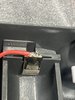
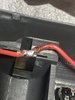
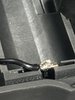
My question right now is how does these connections look? Before I start soldering a bunch of wires I figured I’d ask y’all to see if these will cause any problems

thanks once again :D
 

Attachments

  • 3B70504A-42C6-4981-A4D8-2BD79E08B6D4.jpeg
    3B70504A-42C6-4981-A4D8-2BD79E08B6D4.jpeg
    973.2 KB · Views: 188
  • A501A5DF-808A-4F6A-8F9C-54665CAB6DD9.jpeg
    A501A5DF-808A-4F6A-8F9C-54665CAB6DD9.jpeg
    4.3 MB · Views: 194
  • B666BF40-B1B4-4960-AA0C-9F429E621974.jpeg
    B666BF40-B1B4-4960-AA0C-9F429E621974.jpeg
    1.1 MB · Views: 188
  • E9AF14C5-7261-480D-8843-7A86CE6CE996.jpeg
    E9AF14C5-7261-480D-8843-7A86CE6CE996.jpeg
    1.2 MB · Views: 190
  • EED40A2D-54D6-4FCA-BB6E-80AF566610CB.jpeg
    EED40A2D-54D6-4FCA-BB6E-80AF566610CB.jpeg
    952.6 KB · Views: 192
First joint looks a tad cold, but that might be because of the extra exposed wire poking out the end. Aside from that it looks good, but I'd definitely snip off the bit of wire that's poking out of the joint on the PMS for safety
 
First joint looks a tad cold, but that might be because of the extra exposed wire poking out the end. Aside from that it looks good, but I'd definitely snip off the bit of wire that's poking out of the joint on the PMS for safety

Okay dope I was thinking that too, I think it is just that exposed bit but ill check to be sure
 
You really don't need to expose more than 3mm of wire for joints like that. If you have trouble tinning shorter lengths of wire, the simple trick to resolve that is to bring the iron into contact with the exposed wire with a light touch (you don't want to deform the wire and make it spaghet outwards). You can then apply solder to the iron directly next to where the wire is making contact, which usually causes the solder to immediately schlurp to the wire and give you a neat workable blob. This trick is especially useful for leaded solder, since it likes to oxidise quite quickly. Really any joint can be more easily formed when the iron is making direct contact with the surface/object that you're trying to tin, but it also just gets a lot easier with practice.
 
Hey I also saw that gingerofoz made the left z button the start button and used the bottom two buttons for menu and up I believe. That way he could have some screen controls. Do you know how I would do this as well?
 
Hey I also saw that gingerofoz made the left z button the start button and used the bottom two buttons for menu and up I believe. That way he could have some screen controls. Do you know how I would do this as well?
That should be simple, I believe all you have to do is wire the switches to different pads. For left Z as a start button, you cut the trace going from the left Z footprint to the GC+, then run a wire from the Start pad on the GC+ to the left Z tact switch.
The left grey button that would normally be Start, you connect to the Menu button pad on your screen driver board. And if you aren't relocating the BT module, then you can use the right grey sync button as the Up button on the screen driver board by running a wire to that pad on the screen driver board.

EDIT: Just be aware that without the Down button, you are limited in what adjustments you can make to the display sliders
 
OH, wait I just remembered! @CrazyGadget made this sick screen control board that uses GC controller inputs to trigger certain screen controls. You could DM him and ask about getting one for your Ashida. If the screen board you're using is compatible with it, then you'd have full control
 
Yea I think the main reason for it would be for the auto config so the borders line up with the screen correctly. I sent crazygadget a DM though because I might consider the additional board.

So when you say cut the trace - do you mean I would like scratch out the trace? Scratch it so it is no longer connected to the gc plus so I can wire it to the start pad? If thats the case I would have to scratch out the left and right button traces too right?

I am still new to all this so excuse me if I misunderstood
 
Back
Top