
Blockbuster Pokémon Snap Kiosk Restoration

Joined
Jun 20, 2016
Messages
15
Likes
9
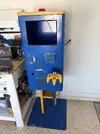
I recently bought a snap kiosk for a pretty good price. I have a friend who lives near me and owns a car wrap shop. He said he could print me the decals if I can make them and size them correctly. I used some references online and chatgpt to recreate the decals. This unit came with the tv and controller but no system. I plan on hooking up a N64 and splitting the video to the TV and to a PC inside. The PC will then take a screenshot and print to a Brother VC-500W sticker printer when the button on the front of the kiosk is pressed. I got all the programming done for that part. I’m currently removing the glue residue on the sides which is super stuck. I have one side done but it used a whole bottle of goo gone and my fingernails haha. For the N64, I know the original kiosk had a port on the front which you could plug your own game into. If I add second cartridge slot, how would I wire that up so I can make it run 2 games? The original kiosk would reboot if a game was plugged in…
 

Attachments

  • IMG_3542.webp
    IMG_3542.webp
    723.4 KB · Views: 1
For the N64, I know the original kiosk had a port on the front which you could plug your own game into. If I add second cartridge slot, how would I wire that up so I can make it run 2 games? The original kiosk would reboot if a game was plugged in…


I'm not sure how they did it in the original kiosk, but I'd assume it was just some sort of signal switching circuit.
I'll warn you, I'm not an expert and someone else may be able to come up with some type of easier multiplexing or microcontroller thing (or maybe something n64 specific that I'm not aware of)
But with my background in analog audio (specifically modular synthesizer design) I've used a lot of bilateral switch chips like the 74HC4066 before. I believe there's similar chips that contain more than 4 switches so possibly look into that as well. But you could use multiple of those wired up to each cart connector's data lines and then have a primary switch that supplies the control signal to all of the switches of the cart you'd like to select, and cuts off the switches from the second cart (so that only one of the carts is active at any given time).

Something like this crude diagram I drew up:
Screenshot 2026-08-18 163434.webp


I'm sure you could probably also automate that primary switch with some simple code or something that swaps the cart connector upon inserting a game if you're trying to get as close as possible to the original behavior you mentioned.
 
Last edited:
Back
Top