Black bars on Ashida Wii

Joined
Feb 22, 2025
Messages
6
Likes
5
Hi all!

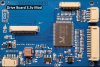
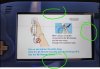
How do I get rid of the black bars on my son's Ashida build? The bars appear on the top, bottom, and most noticeably on the right. It was built with the screen and blue driver board available from 4Layer Tech.

It would be best if we could get the image resized to full screen, or at least just centered. I see lots of pictures online that show it at least the full width of the screen, so I'd imagine it's possible.

Thanks!

ae_zero
 

Attachments

  • black bars.jpg
    black bars.jpg
    303.9 KB · Views: 139
  • Screenshot 2025-02-25 135848.jpg
    Screenshot 2025-02-25 135848.jpg
    226.4 KB · Views: 115
On the blue driver board, you have to short pins with ground to activate the buttons. First hit "Menu", then "Volume Increase (+)" until you get to the "Auto Config" section. Then hit "Menu" to select it. I would highly recommend doing this while you're in a game. It doesn't always configure right in RVLoader. Try Mario Kart Wii with the white background.

For button locations, follow this crappy diagram I made (Top right in the yellow and red boxes)
2A3C42AD-2419-4BA5-82E7-0E3D171877E0.png

It will not come out perfect for Wii games, but it will be better than what you have there. GC games can be stretched using nintendont
 
On the blue driver board, you have to short pins with ground to activate the buttons. First hit "Menu", then "Volume Increase (+)" until you get to the "Auto Config" section. Then hit "Menu" to select it. I would highly recommend doing this while you're in a game. It doesn't always configure right in RVLoader. Try Mario Kart Wii with the white background.

For button locations, follow this crappy diagram I made (Top right in the yellow and red boxes) View attachment 37729
It will not come out perfect for Wii games, but it will be better than what you have there. GC games can be stretched using nintendont

Thanks a lot! I'll give it a try.
 
Back
Top