Question AVE showing no video output

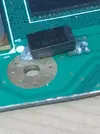
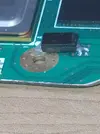
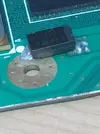
The trim edge looks clean, but yeah that flux blob might have a solder wisp in it. Can you clean the flux off with some isopropyl alcohol and make sure to remove any blobs or wisps?
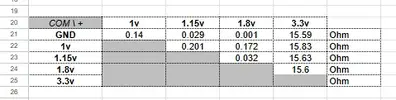
Did and remeasured:
Correct. Black probe goes on the location in the column, red probe goes on the location in the top row.
Yeah, that's what I thought I did the first time. I think I mixed some things up, so I remeasured and got different results.
1765347240237.webp
 
Those readings look much closer to the expected range. Still a 1.15v short to GND somewhere though................
 
You can try that, yeah. Just be very careful to not rip up the pads when doing it
I took it out and cleaned the area. Then I remeasured it without the capacitor. I got similar results. Are there any other tests or things to look for to figure out what's causing the short?
 
I took it out and cleaned the area. Then I remeasured it without the capacitor. I got similar results. Are there any other tests or things to look for to figure out what's causing the short?
Honestly this one is a toughy. The 1.15v voltage traces and vias only exist in a very small part of the motherboard. I have circled that portion in red, the blue dots are 1.15v locations.
Top PCB face:
1765871709260.webp


Bottom PCB face:
1765871473304.webp


The short is somewhere in that circle. If you can post some clear photos of that section of your trim, I can look for anything obvious, but you'll have a better chance eyeballing it under a magnifying glass from several angles.
I recommend checking the via I have marked with a red arrow first. It's on the GND side of the big cap and the most likely to get accidentally blobbed.

 
Honestly this one is a toughy. The 1.15v voltage traces and vias only exist in a very small part of the motherboard. I have circled that portion in red, the blue dots are 1.15v locations.
Top PCB face:
View attachment 40970

Bottom PCB face:
View attachment 40968

The short is somewhere in that circle. If you can post some clear photos of that section of your trim, I can look for anything obvious, but you'll have a better chance eyeballing it under a magnifying glass from several angles.
I recommend checking the via I have marked with a red arrow first. It's on the GND side of the big cap and the most likely to get accidentally blobbed.
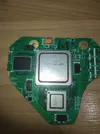
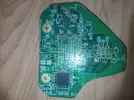
I couldn't find anything. I guess I'll just do the trim. Is this outline correct for LMAO 2?
IMG_20260106_002859.webp
IMG_20260106_002909.webp

I placed my commissioned trim on the Wii and traced. I just want to double check since I never did LMAO 2 before.
 
I did the LMAO 2 trim and got these results:
1768363045634.webp


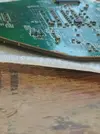
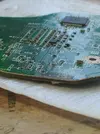
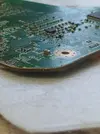
Here is the trim. I don't have good lighting now.
1768363513297.webp

1768363550284.webp

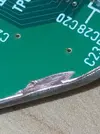
I accidentally scratched into the ground plane with my dremel. Not sure how far it goes, or if it even affects the trim.
1768363646513.webp

Here is the 1.8V tantalum capacitor relocation:
1768364273018.webp

1768364312586.webp

1768364312643.webp

I'll try to post the rest of the edges tomorrow. Hopefully with better lighting.


1768363045634.webp1768363513297.webp1768363550284.webp1768363646513.webp1768364273018.webp1768364312586.webp1768364095327.webp
 

Attachments

  • 1768364095874.webp
    1768364095874.webp
    93.8 KB · Views: 19

Attachments

  • 1768432792110.webp
    1768432792110.webp
    136.3 KB · Views: 20
  • 1768432792011.webp
    1768432792011.webp
    145.9 KB · Views: 14
  • 1768433248423.webp
    1768433248423.webp
    121.1 KB · Views: 20
All looks good aside from that 1.8v to GND short. Like 1.15v, 1.8v only exists in a very small area. Specifically around the RAM and AVE chips, so with any luck this will be easier to find than the previous short.
On the top and bottom faces, the green marked spots are the only 1.8v surface pads.
1768470297098.webp


The internal voltage layer is completely within the boundaries of the LMAO trim. In this case the short can only be coming from a solder blob or solder wisp on the surface of the board by one of the marked locations, or possibly between the old 1.8v tantalum cap location and the internal GND layer. The circled pad from the old cap location is the 1.8v side, so I'd give that a closer look and perhaps a scrape to be sure there isn't a tiny hair making contact between the cut-through solder and the internal GND layer. Also the circled little cap on the left looks like it's covered in flux goop that could be hiding some conductive particles, it needs a clean.
1768470776716.webp
 
I ended up getting rid of the short, but I couldn't get the NAND relocation to work. With regards to my first board, I'm guessing the 1.15 got shorted around here, probably from the solder mask getting damaged and giving way to the ground plane.
IMG_20260219_220616~2.webp

Could I trim this part off and relocate the 1.15V tantalum capacitor, like what I see being done in some Omega trims? (Possibly with a 1.15V capacitor taken from a 6 layer board?)
IMG_20260219_220616~3.webp
 
From your pics, it doesn't look like that 1v15 point is shorted to the ground plane, even though the solder mask has been lifted off. For reference, here is what that area looks like in the compendium:

1771624451556.webp


Trimming that section off and attempting the relocation used for the FD OMEGA would likely lead to more shorting, as it requires digging to the voltage layer, leaving a portion of ground plane exposed on the bottom layer:

1771624580012.webp
 
Back
Top