
You are using an out of date browser. It may not display this or other websites correctly.
You should upgrade or use an alternative browser.
You should upgrade or use an alternative browser.
Worklog Ashida Build with Video out
- Thread starter SamIam
- Start date
Well, I guess I'm not done :/
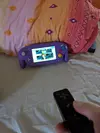
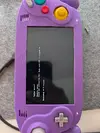
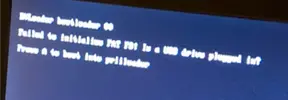
I used my Ashida for a bit more than two weeks now and everything worked fine, but after putting it away for a few hours and picking it back up, I get this error message.
So far I tried a new sd card and I checkt the two USB lines going to the trimmed Wii. When copying over all the files to a different micro SD, there was one file that failed to transfer (I cannot replicate the error message though, so I don't quite remember which one, it was an APP File)
I appreciate any Feedback ^_^
I used my Ashida for a bit more than two weeks now and everything worked fine, but after putting it away for a few hours and picking it back up, I get this error message.
So far I tried a new sd card and I checkt the two USB lines going to the trimmed Wii. When copying over all the files to a different micro SD, there was one file that failed to transfer (I cannot replicate the error message though, so I don't quite remember which one, it was an APP File)
I appreciate any Feedback ^_^
Attachments

Legend
.
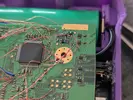
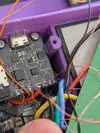
Not sure if you have it already open, and it could very well be a file issue, but could you provide pictures of the usb wiring?
Legend
.
Wiring looks okay! The only hardware stuff I would test is turn the ashida on and make sure that "3V3" and "UP" on the PMS PD are getting power. 3v3 should have 3.3v of course and if i remember correctly, UP should be the same voltage as your batteries as I think its connected to VSYS
Those connections (or at least one of them) power your SD card so I would check that out!
If its not that, then it may be a file structure issue. As painful as it would be to start from scratch as opposed to just copying files over, I would try putting fresh RVLoader files on just to see if it boots if you havent tried that already
Those connections (or at least one of them) power your SD card so I would check that out!
If its not that, then it may be a file structure issue. As painful as it would be to start from scratch as opposed to just copying files over, I would try putting fresh RVLoader files on just to see if it boots if you havent tried that already
I mean it worked fine and I didn't change anything, so it's definitely not file structure. But in case anything got corrupted, how do I reinstall everything if I cannot boot?If its not that, then it may be a file structure issue. As painful as it would be to start from scratch as opposed to just copying files over, I would try putting fresh RVLoader files on just to see if it boots if you havent tried that already
EDIT:
In case this is important: When booting without an SD card, I get only the first line of this message and it reads "RVLoader bootloader 01"
Attachments
Last edited:
Legend
.
Weird. So the drive is technically detected but not initialized.
Maybe there was a bad block in your original SD card and the second one didn't work because of the file error you got when transferring, but im just spitballing. The only thing I can recommend is a fresh format of the SD card and fresh install of RVLoader
your wiring looks good and you've verified power to the PMS-PD, although if you have a drill with an adjustable chuck (not absolutely needed but it helps) you could always try twisting the data lines a little tighter!
Otherwise I cant be too sure what might be causing your issue
Maybe there was a bad block in your original SD card and the second one didn't work because of the file error you got when transferring, but im just spitballing. The only thing I can recommend is a fresh format of the SD card and fresh install of RVLoader
your wiring looks good and you've verified power to the PMS-PD, although if you have a drill with an adjustable chuck (not absolutely needed but it helps) you could always try twisting the data lines a little tighter!
Otherwise I cant be too sure what might be causing your issue

Your USB wires aren't twisted nearly tightly enough. I'm surprised it worked for as long as it did, they need to be a hard helix to prevent corruption. You can use an electric drill or electric screwdriver to achieve a good twist. Put the two wire ends in the chuck and pull the trigger slowly while holding light pressure on the wire so they properly coil together.Thank you for the help!
Does anyone have other inputs on this issue?
And how would I reinstall RVLoader if I don't get it to boot?
If your install on the Wii is scuffed but your new SD card is fine, with fresh files you may be able to start RVLoader in safe mode by holding L+R+Z while starting the system and then selecting the option to re-run the installer. Be sure to patch out wifi and patch in VGA if that's what you did the first time.
Otherwise you can wire in the Wii's reset button and hold it while booting the system to boot to Priiloader. From Priiloader you can boot to the homebrew channel and run RVLoader from there. I think safe mode works when launched that way too. You may need to use composite video for this step.
Legend
.
Happy to see you got it working again!
Yeah that can just happen sometimes, it's really annoying. Also sometimes reformatting the SD card without changing the format type doesn't work properly.IT WORKS! I replaced all the old files again and that fixed it, so I guess something just got corrupted somehow.
When that happens you can normally fix it by reformatting it to a different base format like NTFS, and then reformat again to fat32 with 32k clusters.

xsping
.
- Joined
- Dec 9, 2018
- Messages
- 165
- Likes
- 62
game no picture because its vga,you have to change to ypbpr inputSadly I have a few things to troubleshoot:
1. Audio works, but the volume dial does not work and headphones are not recognized
2.Some games (smash Bros melee or super Mario sunshine) don't have video, I can hear from the speakers that they are running, but the screen is either red or just off. Games like so wind waker, MKWii or Donkey Kong country return work just fine.
Unfortunately no. The Wii's AVE can't output interlaced video and progressive scan video at the same time. If you cut the Mode line to output composite video, VGA turns off, and vice versa. You *could* switch the internal screen to AV and use composite on both, but trying to use one video feed on two displays usually has problems.Oh I see, so there is now way to play MRio Sunshine and Melee on the internal screen when it is connected via VGA?

Similar threads

- Replies
- 14
- Views
- 4K


- Replies
- 8
- Views
- 2K