Worklog A Study in Product Sourcing

Plying Trac!! Isn't life just a barrel of monkeys!!!
Well we all know this to be true, and we also know that the urge to suddenly resume a project that you didn't even realize you'd stopped working on, (I don't understand it either) hits you like several kilograms of hurled cellulite... After you see @Mister M 's latest update.

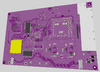
So here you go, some rather large images taken from the 3d render suite:

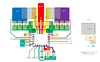
Motherboard front and back
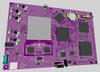
PS2-RE Board show 1.pngPS2-RE Board show 2.png

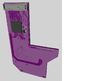
HDD adapter, now using an M.2 SATA III drive, and incorporating the Memory Card slot 1 port
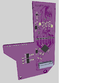
PS2-RE HDD show 1.pngPS2-RE HDD show 2.png
Thanks to this guy for the M.2 idea:


Right then, now for the explanations, and queries lol.

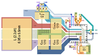
So as you can see, lot's of progress, lot's of changes. First and foremost, I'm not even going to attempt to make my own video converter. For this reason, the large patch of silk screen on the back of the main board is where I will place a lovely little Gem... a RetoGem to be precise! This will also give me the ability to use the 7 inch 1920x1200 MIPI LCD I have... So we'll see what happens, but hopefully it works!! They're kind enough to include a lot of pinouts and info, so it feels like a match made in Heaven.


You may have also noticed the large yellow square on the back of the board, which is going to be where the modchip goes. The Memory Card containing FMCB, and the controller IC however, are fully integrated.


Anyway, what I'm working on right now is the power domains. Texas Instrument's BQ40Z50RSMR-R should make for a good Battery circuit, and I've been thinking of using the TLV62130 for some of the higher current domains, like the 1.2 volt. Then maybe a few TPS628511 for the lower current ones.

Which brings me to the first of my queries; How do I determine how much current each domain needs, and thus which specific regulator to use in terms of output? Given the heavy use of linear regulators in the earlier PS2 designs, I'm guessing the current requirements shown in the 70000 service manual are probably already geared toward the higher degree of loss. So, should I maybe just use a multimeter to see how much current is on each domain during heavy load (playing a game)? Do Buck Converters only output as much current as their load's are asking for? Are they like electrical Chakra pools?

5ee250a71cb4855887e0ae20_vg8ks_DP4-L7iNPzO9IH5iV0V3xV7Nub2f2pzVfYnt4cRYs5OdYhX4XqbCzNfCWL-nhdo...png

Another query related to power; the CON 3.4 Volt rail, and the DIG 3.5 Volt rail, would seem to be fed by the same regulator, separated only by a 2 amp fuse, and a zero Ω resistor (bridge). The multimeter even says they're the same, so can I just let them be the same domain? Like merge the nets for CON 3.4 and DIG 3.5?

Honestly, some of the design choices they made back then...

Anyway, I hope everyone is well!!
Happy tinkering my Dudes!!
 
Last edited:
Excellent, it's great to see these advances in the portable PS2 scene, and this forum fulfills its purpose well, I remember that it was your project that inspired me to work on a new PCB for the PS2.
 
Hello my friends, back at it again with a small update. First and foremost, I've switched to KiCad, as DipTrace started seriously chugging with the number of pins and wires I had already drawn on the board. Not only that, but I had never actually bothered to make a proper schematic of the 70000 service manual (don't ask), so I was making it all much harder for myself than it needed to be. Suffice to say, always make a schematic!

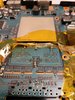
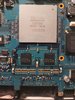
Anyway, in keeping with the theme of product sourcing, I was finally able to find some of the RAM chips used in that one variant of the PS2 slim *just* before they made the 79000 series. These chips are fully encased, and not riding on those flimsy-ass wafer slips like the originals.

ram0.jpg

I had no idea if swapping them out would actually work of course, but I gave it a go on one of my test boards all the same. Besides taking a little time to dial in my hot air station settings, the process actually took way less time than I expected, and this was my first time EVER removing and replacing a BGA chip!

I seriously can't believe this worked, either that or I can't believe I was able to do it... Maybe some combination of the two...
First picture shows the chips removed and the wall of kapton tape to protect the other chips. Second shows the new chips in place, and OMG they look so gooooood!!!

ram1.jpgram2.jpg

The first time booting up the system to see if it would even turn on after this mod was nerve wracking to say the least, but it boots! Just like always!

Now, I haven't actually tried loading a game yet... as it stands I don't actually know if the system would still boot up and go to the ODSYS with one, or both of the RAM chips not functioning properly, or outright missing... But then again I've never heard of a computer system of any kind that would boot up without the RAM installed... Maybe someone here can disprove my worries until I can load up a game and find out once and for all. But either way, I feel pretty awesome right now!

Also, I don't know who needs to hear this, but if you don't have one of these by now, you should get one. I have always found it such a chore to remove the PS2 controller and memory card port, but this thing made it come off on the first try!!! Seriously do yourself a favor and get one if you don't already have.
 
Last edited:
Right then, so what's the deal with the PS2+ project? You know, that Dual Shock emulator on the PIC16 by @Matthew. Seems to be a bit of a debate about exactly how functional it is, and consequently whether it's a good idea to use it.

I saw a brilliant project by @Benge from a few years ago, where he seemed to be able to use it, and with Joycon sticks no less!! I would love to be able to use those Hall effect sticks from Gulikit, which are apparently drop in replacements for the stock Joycons... Seriously if I can use those, I might even be able to use bigger batteries.

Anyway, no more dedicated on-board 8Mb memory card for FMCB, only a reconstructed Modbo booting off MASS. It just makes it easier to update OPL, which I thank God is still being updated!! Plus if I really need FMCB functions, there's port one. Also no more RetroGem. The idea of converting RGB888 to HDMI, then back to RGB888 to drive an LCD just seems silly to me. No, much more sensible would be to program an FPGA to shift the logic a bit, generate a signal or two, and possibly even do it's own HDMI serializing. The Trion T20F256 already seems very well suited to this. Shout out to @Tschicki for getting me started!

Got my battery charger, and 90% of the power system figured out. I know there's a bit of an unspoken preference here on BitBuilt for devices made by Texas Instruments, and they're excellent... But it has to be said that some of the layouts their power managers require is... Very very special, and not quite as robust as I would like... So it's for this reason that I am defecting to Analog Devices.. A bit.

So here is what I'm using:
MAX77961 for the charger, the very same one used by the venerable Steam Deck!
MAX17320 for the cell balancer and maintainer. Pairing that with an amazing little dual FET, the CSD87501L (made by TI) which is the size of a rice grain!
MAX77958 as the USB C PD controller.

All three of these will answer to an RP2040 as lower, and mid level controller. I'm going to have it control and report on battery SOC in one core, and then control both the audio volume, and screen brightness in the other. All done over I2C. The goal is to be able to use the touchscreen on my LCD for the volume and brightness. Also as a side note, even if you don't use the touch screen as a touch screen, the glass panel makes an EXCELLENT protector for the delicate LCD, and it looks uber profesh!! Just saying.

Just look at the layout for the MAX77961 though, do you not see what I mean? It really ties it all together in one little chip:
MAX77961.png
Plus the EVB says you can use multiple layers for the high current power rails.

As for regulators, I've currently got 8 separate TPS292XX handling the lower amperage voltages. Did you know the PS2 slim uses 3 different 1.8 volt lines? It's crazy! Then I have a somewhat higher power MAX77540 for the 3.5 and 1.2 volt lines. Again, I really like the layout lol:
MAX77540.png

Ohh yes, and a pair of appropriately volted LDOs, the TPS709XX for the EVER 3.5 and EVER 1.8 volt. They TINY!!

I have been thinking about trying to use a few of those multi output regulators that Raspberry Pi boards use, but barring any major suggestions for revision, I'd like to be done designing the power system part lol.


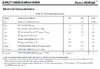
Bit more good news on the RDRAM bus front as well. I was able to find a datasheet for the K4R271669's, and to my relief there was only ever a single reference to impedance in the entire thing! I still know very little about this particular customization, which I'm told is important for proper functioning of the PS2's RAM.
K4R271669 impedance.png
As you can see, it talks about Dynamic output impedance being 150Ω at 0.9 volts. Now, I have *almost* no idea what that means, or how I should apply that to my design, so I could really use some help here everyone! Whatever you can tell me about impedance control in the layout design and fabrication, will help tremendously.

That's all for now, til next time!
 
Last edited:
I found this worklog while working on a similar project, so I happen to have some information that may be of use regarding the RDRAM. On the PCBs that used the EE+GS chips, Sony followed the default recommended RDRAM layout given by Rambus almost verbatim. This makes deciphering their design choices much simpler, assuming that you also have the same documents from Rambus. Unfortunately, if you go to the current Rambus website it seems like they are trying to hide the fact that RDRAM ever existed, and all the old datasheets have been scrubbed from the site. However, you can still find the old layout guides on the internet archive. There are two that I think may be particular use if you are still working on this project. The short channel layout guide, and the long channel layout guide(I added links to the files if you click on their names). If you're just duplicating the default layout the short channel guide will be the most helpful.

The names short channel and long channel were used with RDRAM to refer to how many memory ICs were used on a single interface bus. Short channel busses had one IC per interface, while long channel busses used more. The production models of the PlayStation 2 used 2 interfaces each with one IC, and were therefore short channel busses. You will sometimes see RDRAM ICs marketed as for short or long channel operation. For example the Samsung ICs ending with S6, S8, or S9, like the ones shown previously in this thread, are all for short channel operation. ICs rated for long channel operation can be used in either a long channel, or a short channel configuration. Meanwhile, ICs rated for short channel operation may not function correctly if they are used in a long channel configuration, and they should only be used in short channel configurations. If you switch to different chips you could theoretically add more RDRAM by using a long channel configuration. The PlayStation 2 Development systems actually did this, and they had 8 chips in total to get 128MB or RDRAM.

Realistically, it makes more sense to stay with the short channel configuration. Noting the dynamic impedance on the datasheet; I'm fairly certain that that is referencing the same thing as the short channel layout guide does whenever it refers to impedance. I think the 150Ω figure is given to mean that the impedance has to be less than that amount (although having it listed as a minimum is confusing). Rambus recommended either 34Ω or 40Ω impedances in short channel configurations, and the PlayStation 2 used 40Ω impedances on it's lines. You can check this by looking at the resistors that go from the data and address lines for the RDRAM to the V_TERM net. On the service manual for the GH-035 board they use the name DIG_+1.8V1 to refer to this net. The resistors here are always valued at 1Ω less than the impedance used for the RDRAM interface, which in this case results in a value of 39Ω. The layout guide also has a lot of information about how to route the interface lines to meet the required timing and impedance specifications.
 
Back
Top