Worklog [2026 Contest Entry] Wii Disc Drive Emulator (whoa-DE)

MattDTO

.
.
Joined
Apr 24, 2024
Messages
9
Likes
35
Oh no what am I getting myself into! :facepalm: I'm setting out to build an optical drive emulator (ODE) for the Wii. If you haven't heard of an ODE, basically, it means using a new board to completely replace the disc drive. So the Wii would think its reading from a disc through the drive interface, but its actually reading from a micro SD card using a MCU or FPGA.

So ummm how did I get here?

Well, my journey started about a month ago. Not the actual project, of course. Since I knew the summer building comp was coming up, I needed to go find a broken console to work with. You see, I discovered Bit Built earlier this year, or maybe it was last year, and I've been lurking the forums thinking about joining the next competition. I was really looking forward to it and wanted to try something!

Anyway, I went to a pawn shop and asked if they had any broken consoles in the back. I feel like I got super lucky and was able to pick up this bad boy for $20!
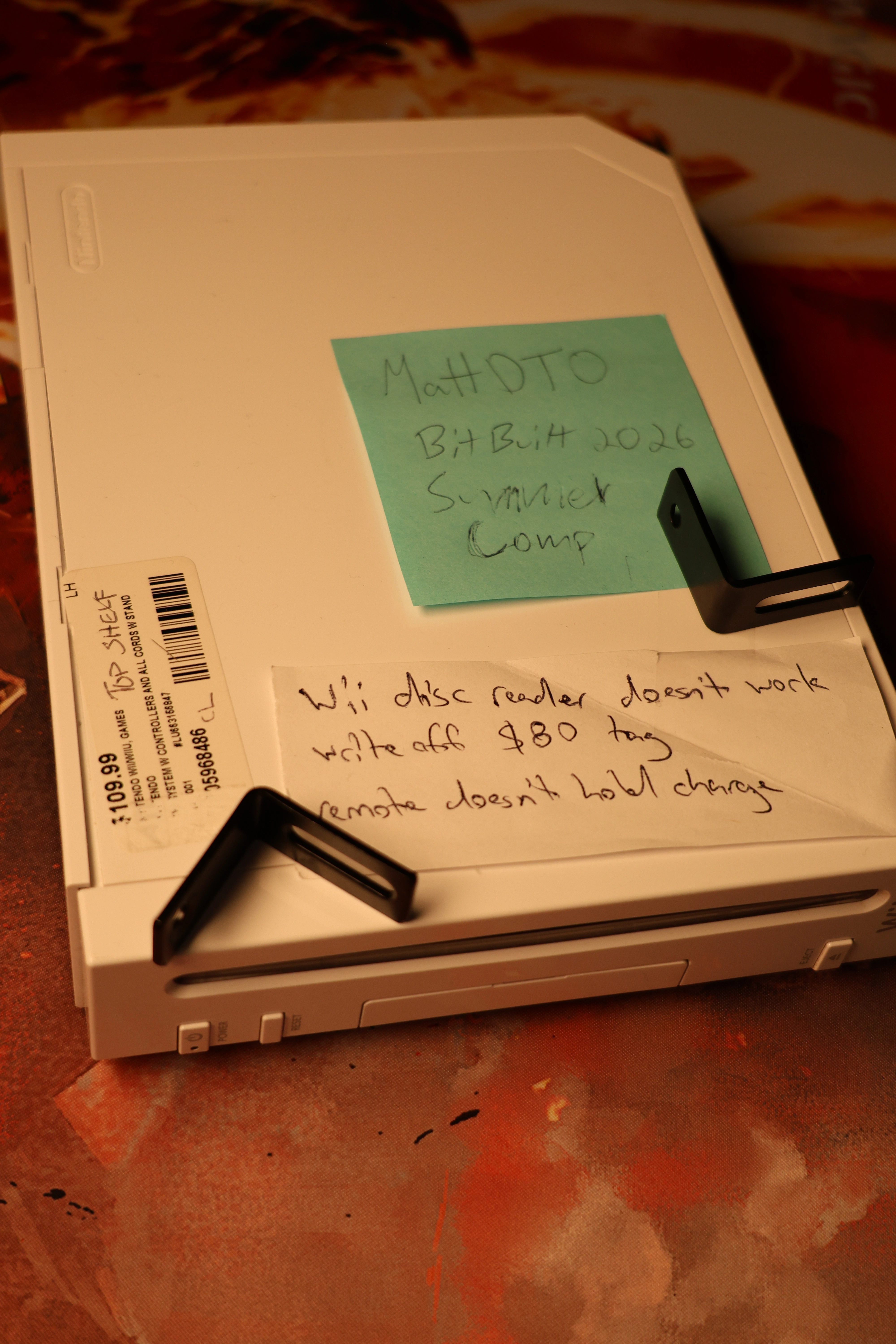
wii from pawn shop.webp


I haven't even turned it on yet, so hopefully there are no surprises.

So as I'm thinking about what to do with it, I found a lot of projects out there already on portabilizing the Wii. Obviously getting rid of the large, heavy disc drive is a necessary step for a portable Wii, which actually makes this pickup perfect for that kind of mod.

But, part of me is really feeling for "reversible" mods. Like I'm a little bit sad to trim an original Wii motherboard myself. No judgement at all for those who do, but I think reversible hardware mods are a really interesting space. The idea is you can reverse the mod, and sell the console someday to a store that only accepts OEM consoles. Or maybe the next owner has nostagia for the original form factor. I decided to keep this in mind as a stretch goal for the project.

The more I thought about it, an ODE is a wonderful project in the spirit of "Giving Life to Old Consoles." It would get my Wii back in working order, but it could potentially let me donate the drive interface board to another Wii. Think about it. If we start modding Wiis to replace the optical drive, then that would flood the world with optical drives people can use to repair Wiis.

Something important to know about the Wii is that during the boot process, the Wii checks for the presence of disc drive interface board to make sure its connected. It does not handle when the board isn't connected. So at first, I was thinking to only build something that spoofs the initialization sequence. That would limit the scope of the project.

I ran this idea by the discord, and @Redherring32 said this:

Nobody has trimmed or for that matter included the disc drive logic board in years cause we have software patches now.

rvloader patches the boot process so it no longer needs the drive interface connected in order for the Wii to work properly. So unfortunately, building a tiny board that spoofs the drive startup has pretty limited value. No need to use it, just patch the software.

But, an ODE. No, an Open Source ODE, would be pretty exciting!

Since the Wii supports booting from software so easily, optical drive emulators have fallen by the wayside over the years. In fact, all the Wii ODEs are now obselete:
Comparing this to the Gamecube, the GC actually has ODEs that are alive and well:
  • GCLoader
  • FlippyDrive
  • cubeODE
As you know, the Wii was released 20 years ago. It's been so long that now people have nostalgia for inaccessible hardmods! The WODE went out of production in 2013, which was 13 years ago!

And as others in the discord pointed out, an ODE for other consoles would be incredibly useful too. I was thinking, if I could build this for the Wii, maybe that would set the groundwork for future projects around ODEs for PS2 or Xbox.

At this point, I'm in too deep. The Wii Wheel is in motion and I'm setting out to build an ODE. Something that is really interesting to me about the summer comp is setting out to build something where you don't know if you'll be successful. Will I abandon the project? Fail to finish? Or will I make an actual hard mod for the Wii from scratch in four months?

Ok we are finally getting to the project requirements.

1. Disconnect the Wii disc drive interface
2. Throw it away (jk)
3. Build something and connect it via the disk drive connector
4. Be able to play a game, specfically TrackMania: Build to Race

Yeah so it will basically be some kind of new circuit board that attaches via the disk drive connector, reads a ROM from an SD card, microSD card, or some kind of storage device. Then it can emulate the exact same interface the Wii disc drive uses to work with the Wii.

Stretch goals:
  • Audio streaming through the drive interface working properly
  • Being able to play gamecube games
  • Buttons or a knob to "eject a disc" and cycle through different games
  • Making it pretty (a new shell or front panel for the Wii, a custom PCB, etc)
Honestly, the stretch goals sound more like "non goals" at this point. We just need to be able to play a game. I'll start with that, and then see how much time there is left :)


Essential: be able to play one game by loading it through the disc drive interface. No disc. No softmods.
Stretch: everything else
 
This is giving me jungle flasher vibes from the xbox 360 disc drive modding days! Good luck and God speed!
 
Starting research

I've been digging through the internet, and before I crack open my Wii, I wanted to dumb some links here.


When you set out to do something, it doesn't hurt to see what people did before you. So the first link is this one:


Argon/InFeCtuS, Argon2, Chiip, CycloWiz, FlatMii, FlatMod, D2Sun, SunKey, SunDriver, OpenWii, Wasabi DX, Wasabi V1, Wasabi V2, Wasabi V3, Wasabi Zero, Wi-ic, Wii-Boss, WiiD, WiiFree, WiiJii, WiiKey, D2CKey, D2Pro, D2Lite, WiiKey 2, DriveKey, WiiKey Fusion, Wiinja, Wiip, Wiip2, WiiRez, WODE Jukebox, YAOSM, Yowii, SureFire

So did that many people build ODEs for the Wii?

No.

Most of them are designed to region-unlock the Wii. Like the WiiKey:

Wiikey0.webp


They are designed to work with the disc drive to unlock it, not fully replace it.

Here's another link: https://wiibrew.org/wiki/Hardware/Disc_Drive

WiiBrew explains that there is a password (which was leaked) used to unlock debug mode on the disc drive controller itself. The advantage to debug mode is if you send that password to the drive controller, then you can unlock it to flash firmware. As in firmware to remove the region blocking on the Wii.

But in the case for this project, I am trying to completely get rid of the disc drive. Projects that are similar to this exist already.

Such as the FlippyDrive: https://www.crowdsupply.com/team-offbroadway/flippydrive

Flippydrive.webp


and GC Loader: https://gc-loader.com/product/gc-loader-pnp-hw2/

IMG_6282-min.webp


But those are both for the gamecube.

Interestingly, I found this article from 2009 for the announcement of WODE too. You'll have to translate it from Dutch to read it: https://tweakers.net/nieuws/62596/hackers-bouwen-nieuwe-mod-oplossing-voor-wii-console.html

Here's a picture of the WODE:

1253530881.webp


I also downloaded the images from here: https://bitbuilt.net/forums/threads/shanks-wii-super-thread.216/

So I could crop this picture of the traces that the Wii uses to connect to the disc drive:

[PUBLIC RELEASE FULL] - Wii RVK-01 Compendium.webp


Another post coming shortly!
 
I want to add a little more information about how the disc drive works in the Wii, along with more links.

First, I spent way too long (like almost 2 hours) drawing this picture:

Wii SOC.webp


In the Wii, the main CPU, Broadway, is not actually connected to the disc drive. https://en.wikipedia.org/wiki/Broadway_(processor)

The Wii has a SOC (System on Chip), Hollywood. https://en.wikipedia.org/wiki/Hollywood_(graphics_chip)

Hollywood is what actually contains the drive interface hardware, along with an ARM processor core.

So in the Wii, the main CPU uses the instruction set PowerPC ISA 1.10, but the ARM coprocessor uses ARMv4T. Pretty interesting!

Just to side track for a second. The Nintendo DS also has an ARM9 processor core, the ARM946E-S. That doesn't mean you can run Nintendo games on the Wii's co-processor. Just that they both run the same instruction set, which is 32 bit ARM assembly with the 16-bit Thumb extension. I just think that's cool.

Wiibrew also has a page about Starlet: https://wiibrew.org/wiki/Hardware/Starlet

And some great information we will need to know later:

Starlet is the first processor to run code in the Wii.
  • Starlet boots from an internal Mask ROM, BOOT0 (about 1300 bytes of code out of 4K possible)
  • boot0 decrypts, verifies, and runs the first few blocks of NAND, BOOT1 (up to the first 47 pages of flash)
  • boot1 locates, loads, decrypts, verifies, and runs BOOT2
  • boot2 starts the IOS
  • IOS loads System Menu into memory and bootstraps the Broadway using the EXI boot vector

There's even more information about the Wii architecture here: https://www.copetti.org/writings/consoles/wii/

This page mentions how the Wii uses AMBA (Advanced Microcontroller Bus Architecture) for the peripheral bus.

Specifically, it said that the APB Bus (Advanced Peripheral Bus) connects the Drive interface. It had a 2008 link to Hackmii as the source of the information: https://hackmii.com/2008/06/wii-hw-architecture-diagram/

That link also contains a PDF you can download to see more about the Wii's architecture.

And specifically, the PDF has "0d8060xx" listed as the address for the drive interface.

That aligns with what Wiibrew has listed here (no need to go to the link, I copied it below)


AddressBitsNameDescription
0x0d80600032DISRDI status register
0x0d80600432DICVRDI cover register (status2)
0x0d80600832DICMDBUF0
0x0d80600c32DICMDBUF1DI command buffers
0x0d80601032DICMDBUF2
0x0d80601432DIMARDI DMA memory address
0x0d80601832DILENGTHDI DMA transfer length
0x0d80601c32DICRDI control register
0x0d80602032DIIMMBUFDI immediate data buffer
0x0d80602432DICFGDI configuration register


And while we are at it, here's another useful table that Wiibrew documented, the pinout for the 32 pin cable.


PinNameDescription
1DID0
2GND
3DID1
4GND
5DID2
6GND
7DID3
8GND
9DID4
10GND
11DID5
12GND
13DID6
14GND
15DID7
16GND
17DIDSTRBDrive IF device strobe
18GND
19DIHSTRBDrive IF host strobe
20GND
21DIDIRDrive IF direction
22DIRSTBDrive IF reset bit
23DICOVERDrive IF cover
24DIBRKDrive IF break
25DIERRBDrive IF error bit
26AISCLKAudio IF serial clock
27AISDATAAudio IF serial data
28AISLRAudio IF serial left/right
29DISC_EJECT
30DOOR_SNSR(NC)
31Unknown(NC)
32SENSE_PWR3.3V

I'm assuming DID0-7, since they are data lines, would stand for "Drive Interface Data" and then the number.

Supposedly there is good information in this talk, I need to watch it later: https://media.ccc.de/v/23C3-1606-en-console_hacking_2006#t=1553

This link has a comparison between the Wii and Gamecube disc drive pinouts. https://www.gc-forever.com/wiki/index.php?title=Using_a_Wii_drive_replacement_on_a_GameCube

And then here is a link about the Gamecube's disc drive: https://www.gc-forever.com/forums/viewtopic.php?t=3362

Ok circling back a bit, to what wiibrew was talking about:

On power-up the Wii will raise DRSTB, which starts the DVD processor working.

1779250828952.webp


Transactions raise DIHSTRB first, then send a 12-byte transaction as described above. STRB lines are low by default and latched on rising edge.

That's how Starlet sends information back and forth to the disc drive interface. But what data is it sending?

Well, there is a ton of information about the drive interface driver here:

And devkitPro is using it here: https://github.com/devkitPro/libogc/blob/master/libdi/di.c

So basically, the driver code running on broadway uses ioctl calls to send requests through the IPC bus to Starlet, which will then communicate with the drive interface that's in hollywood, which will interface with the external disc drive.


Broadway → IPC bus → Starlet (inside Hollywood) → drive interface (inside Hollywood) → (ribbon cable) → disc drive


As long as I can get the emulator to respond in the same way the disc drive would respond to requests from Starlet, then this should work.

The next step is to pick a breakout board compatible with the ribbon cable.

1779251430572.webp


Then I can hook it up to my Sispeed SLogic16U3, and try to read the signals just like we saw Wiibrew talking about!
 
FFC vs FPC vs Ribbon Cable

I'm writing this up in case I'm not the only one who was calling everything a ribbon cable.

Ribbon Cable is a different thing than Flat Flexible Cables (FFCs) and Flexible Printed Circuits (FPCs).

As an example, @emberwolf posted some images of the FFC and FPC used in Gamecube in this post.


I included the pictures here too.

Here's the FFC from the gamecube:

PXL_20221227_065409291.webp


and here is the FPC from the gamecube:

PXL_20221227_065226000.webp


A ribbon cable is basically a bunch of wires glued together, where the above FPC/FFC are more like a sandwich made up of different layers.

Flat Flexible Cables are designed to bend over and over, where Ribbon Cable is more stiff and would wear out if used that way. That's why FFC would be used for something like the Gameboy SP to connect the display to the motherboard. An FPC is like a PCB, but flexible, and it can also use a similar connector that FFC uses to attach to another PCB.

The Wii uses an FFC to connect the disc drive to the motherboard. Funny enough, the Wikipedia page on FFC calls out "DVD players" as an example of where FFC are widely used.


There are tons of different variables that go into the design of an FFC. I gathered some important considerations in this table:

ITEMDescriptionCommon Values
LengthHow long is the cable50mm – 500mm
PitchThe distance between the center of each pin0.3 mm, 0.5 mm, 0.8mm, 1.0 mm, 1.25 mm,1.27mm, 2.54 mm
Pin CountTotal number of pins4 to over 100
Contact Directionif the cable is lying flat, sometimes the other end will have contacts on the opposite sideTop or Bottom
ThicknessHow thick is the cable0.2 mm, 0.3 mm, 0.5 mm, 0.8 mm
Current RatingToo much current, the wire will catch fire or shortUp to 2A per pin
Exposure lengthHow much electrical contact is available at the end of the cable3.5 mm to 10mm
StiffenerMaterial to stiffen the end of the cableStiffener length can be 3.5mm to 20mm, but can come in different materials too

And additionally, when you're connecting the FFC to a PCB, there are different kinds of connectors:

ITEMDescriptionCommon Values
Lock TypeHow to lock the cable into the connectorFlip Lock / Slide Lock / ZIF / LIF / None
Mounting StyleHow the connector attaches to the motherboardSMT (Surface Mount), Through-Hole (THT), or Board-to-board

The most important values are the pitch and the pin count. For the gamecube, the pitch for the white FFC cable is 1mm 12 pin and the orange FPC cable is 0.5mm 20 pin.


Anyway, before I got side-tracked researching FFC cables, I did undo a couple screws on my Wii and take the front panel off.

IMG_1049.webp


IMG_1052.webp


IMG_1060.webp
 
I got the Wii open, and here is a glimpse of the disc drive cables:

IMG_1586.webp


I feel like with this project, it has been interesting for me to dive into every detail of the disc drive interface. It's like I stopped asking whether I need to know something, and instead just exploring every detail I can.

IMG_1135.webp


Like here is the exposed electrical connection of the FFC disc drive cable:

IMG_1127.webp


It has enough detail I can easily count the pins.

1779337618937.webp


And here are where the two disc drive cables attach to the disc drive board.

IMG_1083.webp


I also measured the width of the FFC cable with a caliper.

IMG_1587.webp


So with 32 pins, and knowing 0.5mm is a common pitch for FFC cables, it makes a lot of sense the cable would measure at 16.5mm. The math is mathing. Plus I was pretty sure already it was documented somewhere at .5mm pitch, but I wanted to see for myself.

I set the caliper to 16mm and held it up to the connector.

IMG_1596.webp


LGTM!

And here is a picture of before I detached the cable.

IMG_1071.webp


It has this latch you need to flip up to get the cable out.

IMG_1107.webp


When you flip it up, you can see the logo in the upper left, "HRS".

IMG_1117.webp


That is for Hirose Electric. It's really cool we can see who made the part. Maybe it would be possible to figure out the exact part number! This company still manufactors FFC/FPC connectors today. Here's a link to their page on mouser: https://www.mouser.com/new/hirose/hiroseffcfpc/

This is the other cable that connects the disc drive, and gives power to the disc drive. It looks like a JST SH connector.

IMG_1068.webp


It's worth noting the pinout from the power cable too, got this info from Wiibrew.

PinName
1GND
2GND
33.3V
43.3V
5GND
6GND
75V
85V
9GND
10GND
1112V
1212V

Here's the female connector on the disc drive board.

IMG_1100.webp


Finally, I grabbed a picture of how the traces look coming out from the connectors.

IMG_1124.webp


and almost forgot a picture with my name in it!

matt dto.webp


Here are my measurements:

FFC cable:

32 pin
0.5 mm pitch
0.3 mm thickness
4 mm exposure length

The housing was surface mount with a flip lock.

The power cable is 12 pin with 1mm pitch, using a JST SH connector.

Now I can order breakout boards and hope I was right about this!
 
I have been patiently waiting for the breakout board to make its way to the US from China. I bought a couple from different shops. Here is one of them:

1779868263938.webp


It is on quite a journey!

Screenshot 2026-05-27 025141.webp


Meanwhile, I decided to use this time to get a more detailed picture of the 32p FFC disc drive cable.

I set up the tripod with my Canon R8. The lens I'm using is the Minolta 50mm f/3.5 MD Macro Rokkor-X.

The R8 is a full frame, mirrorless camera, so you can mount vintage lenses to it. This Minolta lens was originally released in 1977. Crazy that it's so old and easily outperforms my iPhone camera!

tripod .webp


Okay quick side track on how I was trying to figuring out what I wanted to use to take pictures.

Canon's flagship macro lens is called the "RF100mm F2.8 L Macro IS USM" and it's like $1,149.00.

For budget options, you can mount a microscope lens to a mirror camera using a 3d printed part. Here is a blog post about it:


And here are the designs for the 3D model:


I didn't go with that option, mainly because I don't have a 3d printer, so it wouldn't end up being cheaper for me than the Minolta lens.

I was pretty tempted to go down the rabit whole of custom, budget microscopes.

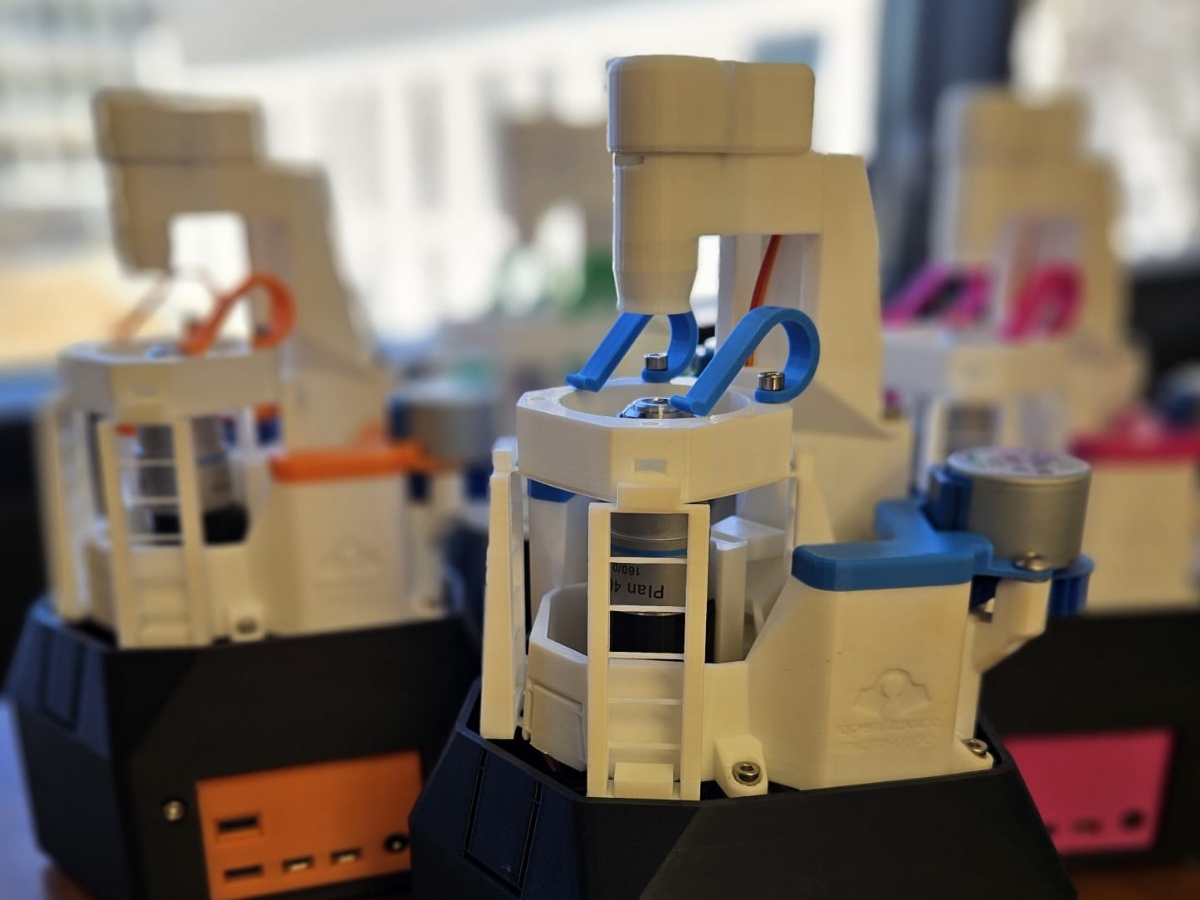
You can 3D print a microscope too:


And what is awesome about that project is that you can get the same performance as expensive microscopes since you can use the same lenses.

And they also have stages you can control with a rasberry pi.


But, most people think of biology microscopes where the sample is lit from below.

For taking close of electronics, you really need a metallurgical microscope, where it will be lit from the top. That way the light bounces back into the scope. Then, you can adapt a mirror camera to the scope, and get some super high quality pictures.

As you get into super close up images, there's a whole field of optics, microscopy, and tons of expensive equipment. But there are also DIY communities researching it.

I found this site, thorlabs, and it sounds like a lot of people will buy parts there and then 3D print the rest to get really specialized setups.


So, in the case of the 3D printed lens adapter, that uses a finite objective, so you have to put a bunch of light from outside into it. And all you need to do is mount it at a specific distance from the camera sensor. Here's an image that illustrates the difference between mounting the objective at a specific distance, and infinite objectives that can be any distance from the sensor.

Screenshot 2026-05-27 032243.webp


Source: https://www.klarscientific.com/microscopy-basics

The infinite objective has a section (where "additional filters" is on the image above, where light rays are parallel to each other. The tube lens will then focus it back on the sensor. So that thorlabs site I was mentioning has tube lenses that you can buy.

For example, this lens from Ali Express would need to be mounted at 160mm from the camera sensor. That's all you need to do to make it work, and it would give 4x magnification.

Screenshot 2026-05-27 032523.webp


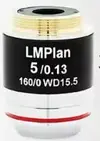
And here is an infinite objective.

Screenshot 2026-05-27 033909.webp


With the infinite objective, you can bounce more light into it so you have the subject being lit from the same side at the camera. This is called Epi-illumination.

Anatomy-of-an-epi-illumination-fluorescence-microscope.webp


One other thing to note is there is a downside to more magnification. You get a more shallow depth of field. The solution for this is image stacking, but you need a macro rail to make that effective. Image stacking would take a bunch of images with different focus, and combine it.

So anyway, the dream would be to have a 3D printed, motorized/automated camera setup that uses an infinite objective, epi-illumination, and image stacking to take amazing close up shots.

But for now, it is a lot more practical for me to add extension tubes to increase the magnification that I get from the Minolta lens. It is basically an empty tube that adds space between the lens and the sensor. You can read about them here: https://photographylife.com/what-is-an-extension-tube

One more thing, I also set up my camera to be control over wifi using CCAPI:


That way I can automate taking pictures with different settings using Python, and I also don't bump the camera or cause vibration while taking a picture.

Code:
$ python .\run.py
f/11  —  shooting 12 frames into exposure_test\f11/
Original settings  →  Tv: 2"  ISO: 1600  shutter: electronic

[ 1/12]  Tv    2"  ISO 100   ... → tv2s_iso100.JPG  (1,834,576 bytes)
[ 2/12]  Tv    2"  ISO 400   ... → tv2s_iso400.JPG  (2,461,256 bytes)
[ 3/12]  Tv    2"  ISO 1600  ... → tv2s_iso1600.JPG  (1,954,487 bytes)
[ 4/12]  Tv   0"5  ISO 100   ... → tv0s5_iso100.JPG  (1,953,073 bytes)
[ 5/12]  Tv   0"5  ISO 400   ... → tv0s5_iso400.JPG  (2,568,323 bytes)
[ 6/12]  Tv   0"5  ISO 1600  ... → tv0s5_iso1600.JPG  (2,782,056 bytes)
[ 7/12]  Tv   1/8  ISO 100   ... → tv1-8_iso100.JPG  (1,450,887 bytes)
[ 8/12]  Tv   1/8  ISO 400   ... → tv1-8_iso400.JPG  (1,943,222 bytes)
[ 9/12]  Tv   1/8  ISO 1600  ... → tv1-8_iso1600.JPG  (2,779,657 bytes)
[10/12]  Tv  1/30  ISO 100   ... → tv1-30_iso100.JPG  (1,041,766 bytes)
[11/12]  Tv  1/30  ISO 400   ... → tv1-30_iso400.JPG  (1,361,854 bytes)
[12/12]  Tv  1/30  ISO 1600  ... → tv1-30_iso1600.JPG  (2,089,129 bytes)

Here is the image I liked the best! I thought it showed the most detail.

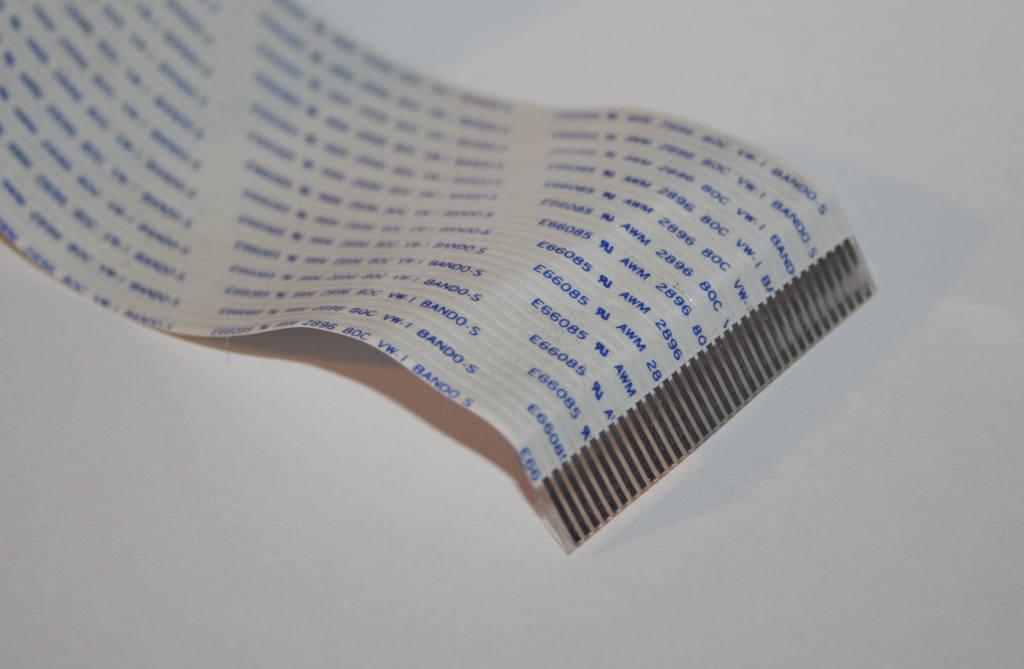
Enjoy the fabulous, 16.5mm wide, 32 pin, Flat Flexible Cable that connects the wii to its disc drive.

IMG_1236.webp
 

Attachments

  • 1779870507242.webp
    1779870507242.webp
    3.3 KB · Views: 2
  • Screenshot 2026-05-27 025141.webp
    Screenshot 2026-05-27 025141.webp
    23.5 KB · Views: 3
  • 1779869884193.webp
    1779869884193.webp
    5.3 KB · Views: 4
This ODE could be a game changer. Excited to see where this goes.
 
I was wondering why your pictures looked so good and then I saw your camera in one of the pictures! I’ve learned a lot just by reading your worklog, can’t wait for the new updates!
 
Back
Top