

Rv loader installer troubles on wiiboy 3

Joined
Mar 31, 2026
Messages
7
Likes
7
Hey everyone,

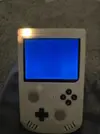
Running portabalize mii V4.7.9, I originally had a verbatim drive which on portabalize mii could run wii and gamecube games but after suspecting that may be the issue I swicthed to a sansdisk ultrafit, that still didnt work so I swicthed to a microsd to usb and still nothing... I have formatted and formatted cluster sizing and tried the 3 .wad files that may help but still no luck, Im not very good at the software side of things and would really appreciate some help! The wiiboy is running a 240p screen and when I asked ai, it said this may be the problem, I already plan on upgrading the screen to 4 layer dd and 480p eventually but wanted to get rvloader running before that, currently when I boot rvloader it boots then the screen goes black but is still backlit.
 

Attachments
  • 1000004454.webp
    1000004454.webp
    413.9 KB · Views: 8
Last edited:
The screen wouldn't be the issue unless you were using and overwrote the VGA patch, which I don't remember being available in the PortablizeMii times.

I don't know what the success rate for updating a PM Wii to a RVLoader Wii is, but my semi-professional opinion is that the Wii is stuffed from too much conflicting CIOS and you'll need to trim an install a new one.
 
The screen wouldn't be the issue unless you were using and overwrote the VGA patch, which I don't remember being available in the PortablizeMii times.

I don't know what the success rate for updating a PM Wii to a RVLoader Wii is, but my semi-professional opinion is that the Wii is stuffed from too much conflicting CIOS and you'll need to trim an install a new one.
Ahh, I'm hoping its a stubborn drive issue and have a lexar drive on the way, if that doesn't work I'm gonna try ModMii which apparently can get the wii back to a stock 4.3U state, if neither work I'll take your advice
 
Ahh, I'm hoping its a stubborn drive issue and have a lexar drive on the way, if that doesn't work I'm gonna try ModMii which apparently can get the wii back to a stock 4.3U state, if neither work I'll take your advice
If you switch the Wii back to stock, you will be forced to relocate the wifi module to boot the board
 
Ahh, I might try to solder both the wifi and bluetooth module on and reset the software as the new lexar drive didnt work either, thanks for the advice
 
It sounds like the issue is likely with storage compatibility or the way the files are loaded, since switching drives hasn’t helped and the screen goes black after boot. Make sure the microSD or USB drive is properly formatted to FAT32 with the correct cluster size, and that all required `.wad` files for RVLoader are correctly installed in the right folders. Also, test on a standard 480p screen if possible, because some low-res screens can cause boot issues with certain Wii/GameCube loaders.
 
It sounds like the issue is likely with storage compatibility or the way the files are loaded, since switching drives hasn’t helped and the screen goes black after boot. Make sure the microSD or USB drive is properly formatted to FAT32 with the correct cluster size, and that all required `.wad` files for RVLoader are correctly installed in the right folders. Also, test on a standard 480p screen if possible, because some low-res screens can cause boot issues with certain Wii/GameCube loader
 
Yes, every drive I have tried I formatted via console ti be fat32 and have the correct cluster sizing, I'm planning on upgrading the screen but was gonna try soldering on the bluetooth and wifi chips back in ti reset the software for a clean boot, the system is running older portabalizemii software so I'm scared that if I don't do that step first then install the new screen it may not output any video... Thanks for your thoughts.
 
Back
Top