Worklog Ashida Worklog

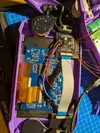
Big update: I have made alot of progress since my last update. I was able to wire up and test my trim, and it boots! Booting was unreliable, I assume because of my wire length, but I will rewire the voltage lines for final assembly. I installed the pms and some of the other boards in the case and wired the batteries to the pms. I put the screen and buttons in to see how it would look, gotta say I love how it looks with these translucent purple buttons and sticks! I also did the 3.3v mod on the driver board. Next step is going to be wiring up audio, VGA, usb , and the controller.
IMG_20260407_200546[1].webp
IMG_20260407_200626[1].webp
IMG_20260410_193245[1].webp
IMG_20260410_193251[1].webp
IMG_20260410_193303[1].webp
IMG_20260410_193310[1].webp
 
The unreliable booting could have been wire length, but it may have also been the U10 wire depending on how your U10 relocation looks. Looking at your board, it doesn't look like you did U10 relocation, so I'm guessing you used the U10 pad on the PMS2. I won't say that's an invalid solution by any means, but U10 on the PMS2 is just one more wire going between boards whereas U10 relocation is just a wire going from a leg of U10 to a via all on the Wii board. There's even a way to relocate it without using any wires for the cleanest result. This shouldn't be necessary, but normal U10 relocation is an alternative to consider if your problem persists. I'm saying all of this because I seem to remember U10 often being the culprit for inconsistent Wii boots (whether it's a cold solder joint, wire length, etc).

Also, be aware that in Ashida, a number of lines usually need to be shielded via twisting a magnet wire tightly with ground. Things like Player 1 data, PMS2 I2C data lines, R, G & B on VGA, etc. I wouldn't be too surprised if U10 also ended up being one of those lines.
 
The unreliable booting could have been wire length, but it may have also been the U10 wire depending on how your U10 relocation looks. Looking at your board, it doesn't look like you did U10 relocation, so I'm guessing you used the U10 pad on the PMS2. I won't say that's an invalid solution by any means, but U10 on the PMS2 is just one more wire going between boards whereas U10 relocation is just a wire going from a leg of U10 to a via all on the Wii board. There's even a way to relocate it without using any wires for the cleanest result. This shouldn't be necessary, but normal U10 relocation is an alternative to consider if your problem persists. I'm saying all of this because I seem to remember U10 often being the culprit for inconsistent Wii boots (whether it's a cold solder joint, wire length, etc).

Also, be aware that in Ashida, a number of lines usually need to be shielded via twisting a magnet wire tightly with ground. Things like Player 1 data, PMS2 I2C data lines, R, G & B on VGA, etc. I wouldn't be too surprised if U10 also ended up being one of those lines.
If I continue to get unreliable booting with the u10 emulation I'll look into the other options. Doubt this makes a difference for the 10, but im using the pms lite, not 2.
 
  • Like
Reactions: cy
Update: I havent been able to work on it that last 2 weeks, hopefully will get back to it soon.
 
Ive been pretty busy since its the end of the school year, I should be able to get back to working on it in about a month.
 
Big update: I have made alot of progress since my last update. I was able to wire up and test my trim, and it boots! Booting was unreliable, I assume because of my wire length, but I will rewire the voltage lines for final assembly. I installed the pms and some of the other boards in the case and wired the batteries to the pms. I put the screen and buttons in to see how it would look, gotta say I love how it looks with these translucent purple buttons and sticks! I also did the 3.3v mod on the driver board. Next step is going to be wiring up audio, VGA, usb , and the controller.View attachment 42344View attachment 42345View attachment 42346View attachment 42347View attachment 42348View attachment 42349
I‘m not 100% sure but if I understand correctly you are not supposed to connect GND and the 3.3V pad but wire them up to a power source
 
I‘m not 100% sure but if I understand correctly you are not supposed to connect GND and the 3.3V pad but wire them up to a power source
I assume you mean wire 3.3v and gnd from the pms to the 3.3v and gnd points on the driver board instead of bridging them like I did?
 
I assume you mean wire 3.3v and gnd from the pms to the 3.3v and gnd points on the driver board instead of bridging them like I did?
Yeah exactly, like so
 

Attachments

  • PXL_20260524_201155983.webp
    PXL_20260524_201155983.webp
    3.1 MB · Views: 1
Yeah it‘s not explained well on the website, at first I copied you (I just finished building my first ashida) but then I looked further through some other buildlogs and saw that this is the way you are supposed to wire it
 
Back
Top