Mini PS2 Slim Build

Joined
Jun 16, 2025
Messages
49
Likes
36
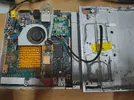
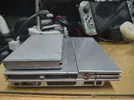
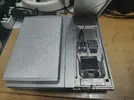
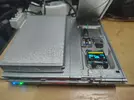
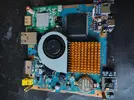
Been working on a mini PS2 from a 7900 board and just wanted to post some pics and give some info:
I'm also working on a second console which will be even more minimalistic as you can see on one of the pics with just a clear case.

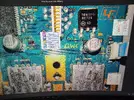
- Cut up a stock case to make a mini-version. It's not clean as I was quite brute cutting up the case etc.. lol But it really didn't end up so bad imho. The power / LED board has been retained and wired directly to the points I've pointed out in another post.
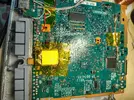
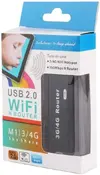
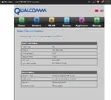
- SMB with aliexpress $10 mini 3G/4G router. It's been modded with 8MB SPI Flash instead of stock 4MB so it can run OpenWRT with LUCI web UI. Also supports NTFS, FAT32, exFat formatted drives of any size. I'm using a 2.5" SATA to USB3.0 enclosure for a 1TB Samsung drive. Added a small heatsink to take care of the heat from the IC. It runs great and it takes maybe 15 seconds from turning on for games to show up on OPL menu. Unlike a Pi, it can be powered off and powered on pretty much anytime you want without causing issues. The reason why I am using openWRT and not the stock firmware (which does support SMB with NTFS ), is that it doesn't seem to support large capacity drives. I could only get USB thumbsitcks and USB-SD card readers to work with the stock firmware. It wouldn't recognize a external HDD but openWRT has no issues detecting it.

For powering the various devices, I'm using a Mini 560 DC-DC buck converter to supply 5V/ 5A max to the router, the 2.5" drive, and the HDMI converter.
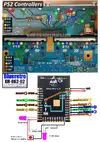
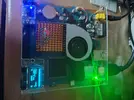
- Blueretro ESP32 WROOM module internal install to both gamepad ports (installed on bottom of the board). On the front are the LED's for each gamepad port and the reset button for blueretro.
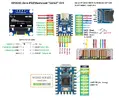
- a custom SD2PSXTD firmware that was slightly modified and compiled for a RPI Zero + PSRAM + SD card reader + OLED screen. It basically has all the functionality of a PSXMemcard Gen2 from bitfunx. If anyone is interested on how i wired it I can share the schematics and firmware.

Since I'm using wireless DS4 controller and have infinite memcards the ports have all been removed to give more space and airflow for the modified cooling system. The stock fan has just been inverted and a generic heatsink was attached with a star 992 type thermal glue which works very well.

I'm very happy with the results as there is nothing to be "plugged in" per say lol.
 

Attachments

  • IMG_20250810_123318751_HDR.webp
    IMG_20250810_123318751_HDR.webp
    327.1 KB · Views: 62
  • IMG_20250813_205943261_HDR.webp
    IMG_20250813_205943261_HDR.webp
    2.5 MB · Views: 65
  • IMG_20250813_210101997_HDR.webp
    IMG_20250813_210101997_HDR.webp
    1.2 MB · Views: 53
  • IMG_20250813_210111570_HDR.webp
    IMG_20250813_210111570_HDR.webp
    2 MB · Views: 53
  • IMG_20250813_210849334_HDR.webp
    IMG_20250813_210849334_HDR.webp
    1.8 MB · Views: 59
Some more pics of the builds and for anyone who wants to build their own PS2 Memcard Gen2 with OLED here is the diagram and firmware used for this build. The SD2PSXTD FW is 1.2.0 if i am not mistaken. There is really not much to it, just wire everything as show in the diagram. the onboard RGB LED has been disabled mainly because it wouldn't work with this option enabled. Parts needed for the build:

- 0.96" SSD1306 OLED I2C
- MicroSD card reader as show in the picture.
- RP2040 Zero. Although it should work with other boards but I cannot guarantee it.
- PSRAM 8MB
- 2 momentary buttons for Left and Right

Edit* Added diagram for blueretro module wiring. It is based from mundo yakara modder who i highly recommend folowing on youtube etc. His PS2 portables are pretty amazing. I've modified it by adding P1 and P2 LED's and removing the status LED. It's really not needed since the P1 LED mymics it.
 

Attachments

  • IMG_20250808_164422617_HDR.webp
    IMG_20250808_164422617_HDR.webp
    1.9 MB · Views: 55
  • IMG_20250714_175317199_HDR.webp
    IMG_20250714_175317199_HDR.webp
    1.4 MB · Views: 67
  • PS2 RP2040 Memcard DIY.webp
    PS2 RP2040 Memcard DIY.webp
    184.3 KB · Views: 56
  • pmczero_psram_oled_fw1.2.0.zip
    pmczero_psram_oled_fw1.2.0.zip
    526 KB · Views: 56
  • PS2 power LED board pinout.webp
    PS2 power LED board pinout.webp
    6 MB · Views: 56
  • blueretro final.webp
    blueretro final.webp
    881.8 KB · Views: 69
Last edited:
This is a pretty neat mod! Reminds me a fair bit of Wesk's PS2 Ultra Slim. Did you have any plans with the additional cooling? Or was it just for the sake of improving the console's thermals? It's really neat to see someone doing all these kinds of enhancements to a slim model! I know that the fat model is usually the only model that supports this type of stuff, so I'm sure having the best of both worlds (portability and better storage, etc) is great!

Also, your wire management is surprisingly clean especially given the nature of these projects
 
This is a pretty neat mod! Reminds me a fair bit of Wesk's PS2 Ultra Slim. Did you have any plans with the additional cooling? Or was it just for the sake of improving the console's thermals? It's really neat to see someone doing all these kinds of enhancements to a slim model! I know that the fat model is usually the only model that supports this type of stuff, so I'm sure having the best of both worlds (portability and better storage, etc) is great!

Also, your wire management is surprisingly clean especially given the nature of these projectsI

Yeah I got the idea of modifying the stock case by Wesk's ultra slim design but I wanted some newer features like the hdmi out, smb support, memcard and blueretro. I think the cooling is very good now. I never liked how the stock cooling has the fan blowing air out of the case and no forced air passing through the tiny heatsink. It just had to go. The new heatsink is bigger and keeps the console very cool. I am yet to hear the fan go on high speed during gaming. I think the slim ps2's are more versatile as you can also portabilize them as well. Wiring management is always difficult which is why I use magnet wires. They are easy to maneuver and handle and you can hide them so easily. I had to change the video signals wiring to a thicker wire. I was originally using 33awg and it had some noise on the signal. Everything else is using 33awg magnet wire for signals and power. I also choose to use the smallest possible "modules" like the ESP32 for blueretro and make a diy version of the psx memcard so that they occupy the minimal amount of space and greater flexibility of placement.

On a side note, I think that mini 3G/4G router for SMB is really one of the most challenging tasks. Had i just opted to use a microSD card instead it would've been easy. Upgrading it to 8MB SPI flash and modifying the bootloader, flashing openWRT and to get it working with minimal services to speed things up took days of trial and error. One of the great things about running openWRT is that it an also run PS3netserv for serving up ps3 games and running Xlink I have not gone down that rabbit hole just yet!
 
Wow! Nice work!

Could you share what you did to get the mini 3G/4G route to work with the HDD I have that same router an would like to put a 2TB in my 77k.

Thanks for sharing this project, it is really cool! I came back to edit this FYI to add that it is really really cool. and that I did this

you-got-it-you-got-it-girl.gif
 
Last edited:
I have followed this online post
https://sudonull.com/post/10330-A-g...-Chinese-mini-router-Hame-A15-aka-unbranded-A
Also here but you need to translate it.

I did some of the mods like the heatsink and capacitor addition. You will need a tool for flashing the SPI flash USB UART or a dedicated flasher from alixpress. I would also check if your router has 16 or 32MB SDRAM. Some older ones seem to have 16MB only and it's gonna be very slow to work with. Mine was a 32MB version.

To power an external HDD and the router you will need at least 5V 1A which the PS2 doesn't have. Which is why I am using a mini 560 DC-DC buck converter.
Everything can be powered by either the mini-USB or the USB 2.0 port as they share the same V+. I am using the USB2.0 and works just fine.

Basically you will need to desolder the 4MB SPI flash and solder a 8 or 16MB fllash. I went with a 8MB harvested from a dead laptop. There is a high risk of messing it up as there are tiny resistors and capacitors nearby which can get knocked off during the process. It happened to me and it wasn't fun putting them back!.

I will update this later with some more info on which openWRT firmware I'm using and the modules installed.
I had removed things like the firewall etc.. to make it leaner and faster. Really like this router. Tiny and versatile I might get another one!
 
Last edited:
  • Like
Reactions: cy
This is a write up for using the mini router for PS2 SMB.

It is cheap, tiny and with a bigger flash it can run openWRT with GUI and SMB support for any external drive.

Aliexpress $10 A5-V11 Mini 3G/4G Router. Modded with 8MB SPI Flash.
Please make sure your router has 32MB SDRAM before trying this mod.
I also highly recommend doing the heatsink and capacitor mod described in the link above.

OpenWRT FW version: LEDE Reboot 17.01.7 Kernel 4.4.182 with LUCI GUI.


It can run SAMBA for PS2 SMB on NTFS, exFAT, FAT32 USB 2.0 drives (Thumb drives, external HDD, etc)
This image is configured for NTFS drives. If you want to use exFAT or other filesystem you will have to disable the "ntfsmount" script in the system->startup menu.
It has PS3NetServ installed as well but not enabled or configured.
Wifi is functional as well. Just connect it as a client to your wifi network to get internet access.

To use this full 8MB flash dump, you will need to replace the stock 4MB Flash to a 8MB Flash (Winbond W25Q64FV, W25Q64BV) and use a SPI programmer (i.e. CH341). First by erasing the chip, then writing the full image.
The firmware used was a compatible device Nexx WT1520 (8M). This was used since it is fully compatible with the A5-V11 hardwarewise.. and has a stock 8MB flash.

I have successfully flashed this image on a second router and it booted up right away to openWRT with no issues.

1- default IP 192.168.10.1 login root/admin
2- support NTFS drive automount via script in etc/init.d/ntfsmount
3- PS3netserv installed but not configured.
4- DHCP is enabled
5- Wifi is working but not configured.
6- SSH access enabled.
7- SMB share enabled with guest access for ease of use.

Connect a NTFS drive and it "should" automount and with SMB share of PS2SMB. Guest is enabled so no need to login with user/pw to access the share.

Below is the list of all packages installed:

Installed packages/base

Package name Version
Remove base-files 173.6-r4030-6028f00df0
Remove block-mount 2018-04-16-6609e98a-1
Remove busybox 1.25.1-4
Remove ca-bundle 20190110-1
Remove ca-certificates 20190110-1
Remove dnsmasq 2.78-6
Remove dropbear 2017.75-5
Remove fstools 2018-04-16-6609e98a-1
Remove fwtool 1
Remove hostapd-common 2016-12-19-ad02e79d-7
Remove iw 4.9-1
Remove iwinfo 2016-09-21-fd9e17be-1
Remove jshn 2018-11-16-4382c76d-1
Remove jsonfilter 2016-07-02-dea067ad-1
Remove kernel 4.4.182-1-ee013860974..6c4
Remove kmod-cfg80211 4.4.182+2017-01-31-15
Remove kmod-eeprom-93cx6 4.4.182-1
Remove kmod-fs-exfat 4.4.182+2017-01-03-8d..3-1
Remove kmod-fs-ntfs 4.4.182-1
Remove kmod-fs-vfat 4.4.182-1
Remove kmod-fuse 4.4.182-1
Remove kmod-gpio-button-hotplug 4.4.182-2
Remove kmod-leds-gpio 4.4.182-1
Remove kmod-lib-crc-ccitt 4.4.182-1
Remove kmod-lib-crc-itu-t 4.4.182-1
Remove kmod-mac80211 4.4.182+2017-01-31-15
Remove kmod-nls-base 4.4.182-1
Remove kmod-nls-cp437 4.4.182-1
Remove kmod-nls-iso8859-1 4.4.182-1
Remove kmod-nls-utf8 4.4.182-1
Remove kmod-ppp 4.4.182-1
Remove kmod-rt2800-lib 4.4.182+2017-01-31-15
Remove kmod-rt2800-mmio 4.4.182+2017-01-31-15
Remove kmod-rt2800-soc 4.4.182+2017-01-31-15
Remove kmod-rt2x00-lib 4.4.182+2017-01-31-15
Remove kmod-rt2x00-mmio 4.4.182+2017-01-31-15
Remove kmod-scsi-core 4.4.182-1
Remove kmod-slhc 4.4.182-1
Remove kmod-usb-core 4.4.182-1
Remove kmod-usb-ohci 4.4.182-1
Remove kmod-usb-storage 4.4.182-1
Remove kmod-usb-storage-extras 4.4.182-1
Remove kmod-usb-uhci 4.4.182-1
Remove kmod-usb2 4.4.182-1
Remove lede-keyring 2017-01-20-a50b7529-1
Remove libblobmsg-json 2018-11-16-4382c76d-1
Remove libc 1.1.16-1
Remove libgcc 5.4.0-1
Remove libip4tc 1.4.21-3
Remove libip6tc 1.4.21-3
Remove libiwinfo 2016-09-21-fd9e17be-1
Remove libiwinfo-lua 2016-09-21-fd9e17be-1
Remove libjson-c 0.12.1-1
Remove libjson-script 2018-11-16-4382c76d-1
Remove liblua 5.1.5-1
Remove libnl-tiny 0.1-5
Remove libopenssl 1.0.2s-1
Remove libpthread 1.1.16-1
Remove libstdcpp6 7.5.0-2
Remove libubox 2018-11-16-4382c76d-1
Remove libubus 2017-02-18-34c6e818-1
Remove libubus-lua 2017-02-18-34c6e818-1
Remove libuci 2018-01-01-141b64ef-1
Remove libuci-lua 2018-01-01-141b64ef-1
Remove libuclient 2018-11-24-3ba74ebc-1
Remove libustream-openssl 2018-05-22-5322f9db-1
Remove libxtables 1.4.21-3
Remove logd 2017-03-10-16f7e161-1
Remove lua 5.1.5-1
Remove luci-app-samba git-19.271.72080-7b230b0-1
Remove luci-base git-19.167.54478-71e2af4-1
Remove luci-lib-ip git-19.167.54478-71e2af4-1
Remove luci-lib-jsonc git-19.167.54478-71e2af4-1
Remove luci-lib-nixio git-19.167.54478-71e2af4-1
Remove luci-mod-admin-full git-19.167.54478-71e2af4-1
Remove luci-proto-ppp git-19.167.54478-71e2af4-1
Remove luci-theme-bootstrap git-19.167.54478-71e2af4-1
Remove mtd 23.1
Remove netifd 2017-01-25-650758b1-1
Remove ntfs-3g 2016.2.22-1-fuseint
Remove odhcpd 2018-05-27-59339a76-4
Remove opkg 2019-01-18-7708a01a-1
Remove procd 2018-01-22-9a4036fb-2
Remove ps3netsrv 20240210a-1
Remove rpcd 2018-11-28-3aa81d0d-1
Remove samba36-server 3.6.25-8
Remove swconfig 11
Remove ubox 2017-03-10-16f7e161-1
Remove ubus 2017-02-18-34c6e818-1
Remove ubusd 2017-02-18-34c6e818-1
Remove uci 2018-01-01-141b64ef-1
Remove uclient-fetch 2018-11-24-3ba74ebc-1
Remove uhttpd 2018-11-28-cdfc902a-1
Remove uhttpd-mod-ubus 2018-11-28-cdfc902a-1
Remove usign 2015-07-04-ef641914-1
Remove wpad-mini 2016-12-19-ad02e79d-7
Remove zlib 1.2.11-1

A lot of time was spent configuring and trying out different firmwares / packages before I got it working properly. So I don't really recommend upgrading to newer openwrt firmwares.
 

Attachments

This is a write up for using the mini router for PS2 SMB.

It is cheap, tiny and with a bigger flash it can run openWRT with GUI and SMB support for any external drive.

Aliexpress $10 A5-V11 Mini 3G/4G Router. Modded with 8MB SPI Flash.
Please make sure your router has 32MB SDRAM before trying this mod.
I also highly recommend doing the heatsink and capacitor mod described in the link above.

OpenWRT FW version: LEDE Reboot 17.01.7 Kernel 4.4.182 with LUCI GUI.


It can run SAMBA for PS2 SMB on NTFS, exFAT, FAT32 USB 2.0 drives (Thumb drives, external HDD, etc)
This image is configured for NTFS drives. If you want to use exFAT or other filesystem you will have to disable the "ntfsmount" script in the system->startup menu.
It has PS3NetServ installed as well but not enabled or configured.
Wifi is functional as well. Just connect it as a client to your wifi network to get internet access.

To use this full 8MB flash dump, you will need to replace the stock 4MB Flash to a 8MB Flash (Winbond W25Q64FV, W25Q64BV) and use a SPI programmer (i.e. CH341). First by erasing the chip, then writing the full image.
The firmware used was a compatible device Nexx WT1520 (8M). This was used since it is fully compatible with the A5-V11 hardwarewise.. and has a stock 8MB flash.

I have successfully flashed this image on a second router and it booted up right away to openWRT with no issues.

1- default IP 192.168.10.1 login root/admin
2- support NTFS drive automount via script in etc/init.d/ntfsmount
3- PS3netserv installed but not configured.
4- DHCP is enabled
5- Wifi is working but not configured.
6- SSH access enabled.
7- SMB share enabled with guest access for ease of use.

Connect a NTFS drive and it "should" automount and with SMB share of PS2SMB. Guest is enabled so no need to login with user/pw to access the share.

Below is the list of all packages installed:

Installed packages/base

Package name Version
Remove base-files 173.6-r4030-6028f00df0
Remove block-mount 2018-04-16-6609e98a-1
Remove busybox 1.25.1-4
Remove ca-bundle 20190110-1
Remove ca-certificates 20190110-1
Remove dnsmasq 2.78-6
Remove dropbear 2017.75-5
Remove fstools 2018-04-16-6609e98a-1
Remove fwtool 1
Remove hostapd-common 2016-12-19-ad02e79d-7
Remove iw 4.9-1
Remove iwinfo 2016-09-21-fd9e17be-1
Remove jshn 2018-11-16-4382c76d-1
Remove jsonfilter 2016-07-02-dea067ad-1
Remove kernel 4.4.182-1-ee013860974..6c4
Remove kmod-cfg80211 4.4.182+2017-01-31-15
Remove kmod-eeprom-93cx6 4.4.182-1
Remove kmod-fs-exfat 4.4.182+2017-01-03-8d..3-1
Remove kmod-fs-ntfs 4.4.182-1
Remove kmod-fs-vfat 4.4.182-1
Remove kmod-fuse 4.4.182-1
Remove kmod-gpio-button-hotplug 4.4.182-2
Remove kmod-leds-gpio 4.4.182-1
Remove kmod-lib-crc-ccitt 4.4.182-1
Remove kmod-lib-crc-itu-t 4.4.182-1
Remove kmod-mac80211 4.4.182+2017-01-31-15
Remove kmod-nls-base 4.4.182-1
Remove kmod-nls-cp437 4.4.182-1
Remove kmod-nls-iso8859-1 4.4.182-1
Remove kmod-nls-utf8 4.4.182-1
Remove kmod-ppp 4.4.182-1
Remove kmod-rt2800-lib 4.4.182+2017-01-31-15
Remove kmod-rt2800-mmio 4.4.182+2017-01-31-15
Remove kmod-rt2800-soc 4.4.182+2017-01-31-15
Remove kmod-rt2x00-lib 4.4.182+2017-01-31-15
Remove kmod-rt2x00-mmio 4.4.182+2017-01-31-15
Remove kmod-scsi-core 4.4.182-1
Remove kmod-slhc 4.4.182-1
Remove kmod-usb-core 4.4.182-1
Remove kmod-usb-ohci 4.4.182-1
Remove kmod-usb-storage 4.4.182-1
Remove kmod-usb-storage-extras 4.4.182-1
Remove kmod-usb-uhci 4.4.182-1
Remove kmod-usb2 4.4.182-1
Remove lede-keyring 2017-01-20-a50b7529-1
Remove libblobmsg-json 2018-11-16-4382c76d-1
Remove libc 1.1.16-1
Remove libgcc 5.4.0-1
Remove libip4tc 1.4.21-3
Remove libip6tc 1.4.21-3
Remove libiwinfo 2016-09-21-fd9e17be-1
Remove libiwinfo-lua 2016-09-21-fd9e17be-1
Remove libjson-c 0.12.1-1
Remove libjson-script 2018-11-16-4382c76d-1
Remove liblua 5.1.5-1
Remove libnl-tiny 0.1-5
Remove libopenssl 1.0.2s-1
Remove libpthread 1.1.16-1
Remove libstdcpp6 7.5.0-2
Remove libubox 2018-11-16-4382c76d-1
Remove libubus 2017-02-18-34c6e818-1
Remove libubus-lua 2017-02-18-34c6e818-1
Remove libuci 2018-01-01-141b64ef-1
Remove libuci-lua 2018-01-01-141b64ef-1
Remove libuclient 2018-11-24-3ba74ebc-1
Remove libustream-openssl 2018-05-22-5322f9db-1
Remove libxtables 1.4.21-3
Remove logd 2017-03-10-16f7e161-1
Remove lua 5.1.5-1
Remove luci-app-samba git-19.271.72080-7b230b0-1
Remove luci-base git-19.167.54478-71e2af4-1
Remove luci-lib-ip git-19.167.54478-71e2af4-1
Remove luci-lib-jsonc git-19.167.54478-71e2af4-1
Remove luci-lib-nixio git-19.167.54478-71e2af4-1
Remove luci-mod-admin-full git-19.167.54478-71e2af4-1
Remove luci-proto-ppp git-19.167.54478-71e2af4-1
Remove luci-theme-bootstrap git-19.167.54478-71e2af4-1
Remove mtd 23.1
Remove netifd 2017-01-25-650758b1-1
Remove ntfs-3g 2016.2.22-1-fuseint
Remove odhcpd 2018-05-27-59339a76-4
Remove opkg 2019-01-18-7708a01a-1
Remove procd 2018-01-22-9a4036fb-2
Remove ps3netsrv 20240210a-1
Remove rpcd 2018-11-28-3aa81d0d-1
Remove samba36-server 3.6.25-8
Remove swconfig 11
Remove ubox 2017-03-10-16f7e161-1
Remove ubus 2017-02-18-34c6e818-1
Remove ubusd 2017-02-18-34c6e818-1
Remove uci 2018-01-01-141b64ef-1
Remove uclient-fetch 2018-11-24-3ba74ebc-1
Remove uhttpd 2018-11-28-cdfc902a-1
Remove uhttpd-mod-ubus 2018-11-28-cdfc902a-1
Remove usign 2015-07-04-ef641914-1
Remove wpad-mini 2016-12-19-ad02e79d-7
Remove zlib 1.2.11-1

A lot of time was spent configuring and trying out different firmwares / packages before I got it working properly. So I don't really recommend upgrading to newer openwrt firmwares.
Thank you for sharing. I'll be sure to give you creds in my documentation

I gots some chips and a programmer on the way.
 
You're welcome. Glad to see you're going to try this mod.
For the CH341a programmer, just make sure before connecting the chip that the voltage to the chip Vss is 3.3v. I've read that some older models would send 5V and could damage the chip so a modification is needed.
This is a good guide on how to use it. https://www.onetransistor.eu/2017/08/ch341a-mini-programmer-schematic.html
One gotcha for me when installing drivers is that you have to use the CH341PAR driver which allows for both reading and programming the SPI flash. Forget about the serial driver. I used the Asprogrammer and it was pretty straight forward.

When desoldering the chip I used hot air at 400C and put some aluminum foil around the caps nearby to prevent them from blowing up lol I think it's good measure.
Just make sure to pick the chip straight up and not touch those tiny resistors /caps nearby!

This programmer is quite versatile as it allows you to do many other things as pointed out here:

Thanks for recommending the mini router earlier in my build!
 
hi moahdib , Thanks for sharing your fw, just tested and some more info:
-The board consumes about 200-250mA with a USB stick connected.
-The modification also works with a larger chip (I only had that one, lol), but obviously from the same family and therefore compatible. In my case, it was an MX25L128.
-
I only added the missin capacitor
Everything worked the first time without any changes, but the router actually heats up quite a bit even after just a few minutes. The Wi-Fi is actually active, and if we could block it permanently, we could probably reduce energy and heat consumption.
 
I'm glad it worked on a 16MB flash. I believe openwrt will still recognize it as 8MB since that's what the firmware was built for. You can check in the software section and see how much free space there is on the flash.
The chip does heat up but it seems to be the "normal" operation range. I added a small heatsink on mine to help dissipate the heat.
If you want to disable it completely at the kernel level, you can experiment by removing the wifi driver in the software page by deleting kmod-rt2800-soc.
Let me know if that helps with the power consumption and heat.
 
Just a quick update. I'll be trying to get this router to work with UDPBD protocol soon, which should be faster than SMB and use less memory, cpu
Look here:

This will allow us to remove things like SMB server and NTFS which is huge!

For install files look at the first page of the post under downloads for linux.
My configuration of openWRT already has the libstdc++6 file mentioned above so no need to install it. exFAT filesystem is also already supported as well.
Just copy udpbd-server.elf (24kb) to usr/bin directory and set permission to 0777 for execute. I used WinSCP in windows to login to the router, copy the file and set permission.
Make a startup script as below and save to: etc/init.d/udpbd_srv

#!/bin/sh /etc/rc.common

START=99
start() {
udpbd-server.elf /dev/sda1
}

I'll update this as I go along since I have to setup a new drive formatted in exFAT and do some testing....
 
I removed the component you mentioned, the Wi-Fi is now disabled - not working. At first glance, consumption and heat actually seem to have decreased. I subsequently converted it to USB C + heatsink. Using another measuring instrument, the average consumption is between 200-230 mAh.

IMG_20250915_145643.webp
IMG_20250915_162253.webp
 
That's great. I wish there was just an on/off switch for wifi but the only real way is to just delete the driver. Re-installing wifi will require to download and install various packages again. You should be able to power even a 2.5" external drive from the USB by powering it with 5V and up to 1amp. I am using a 1TB drive with a sata to usb 3.0 adapter and consumes at most 0.7amp with smb and wifi working. Using UDPBD instead of SMB should also help decrease power consumption and heat. I have just got it to work last night with very small changes and so far it seems to work great.

Here is my write up to change from SMB to UDPBD on OpenWRT:


A5-V11 router- Install UDPBD server.

Download the files for UDPBD server for openWRT (see previous post)

Remove the current SMB setup and change to UDPBD:

Go to System > Startup
Disable samba

Change router IP address:
Network > Interfaces > LAN > Edit

Set router IPv4 Static= 192.168.1.1 This is mandatory as UDPBD server is hardcoded to use that IP.

Setup your drive by formatting to exfat in windows and configure it with OPL Manager. Copy some games to DVD folder, download cover art, etc..

Plug in your drive and go to System > Mount Points and find out the name of your USB drive (dev/sda1, dev/sda2, etc...). If it's mounted to /mnt/usb it's fine as it won't affect the server functionality. I believe the drive needs to be mounted for this to work.

Add a startup script. Make a new txt file and name it udpdb_srv
Add the following lines below with your own drive name:

#!/bin/sh /etc/rc.common

START=99
start() {
udpbd-server.elf /dev/sda1
}

Copying files to the router:

Run WinSCP and connect to 192.168.1.1 on port 22 with root/admin

1- Copy udpbd-server.elf to /usr/bin/ folder.
Right click on file and click properties
Set permission to 0777

2- Copy udpbd_srv to /etc/init.d/ folder.
Right click in file and click properties
Set permission to 0777

libstdc++6 is already installed in the firmware so there is no need to copy it again. Now the server should run at bootup.

On the PS2, transfer the beta OPL file
OPNPS2LD-v1.2.0-Beta-1973-88079d7-UDPBD.ELF to your freemcboot card.

Launch it and in OPL configuration:

Network:
set IP address to 192.168.1.10

ETH = off in settings.
BDM manual. IN BDM devices Ilink and mxsio off

That should do it! In my testing so far it's working great and faster than SMB! Gotta love this cheap $10 router for what it's capable of with some mods. I am sure the whole thing can be setup on the original 4MB flash as well since both smb and ntfs modules can now be removed.
 
great, the only thing I'm skeptical about is whether all new versions of openps2loader will support this new UDPBD protocol.
hoping so if it increases compatibility and execution speed, the best would be an ultra-light fw that activates only this specific function in order to squeeze as little as possible from this poor cpu lol
 
Yes It's still pretty new in beta and it really hasn't caught up to the community at large yet. I haven't even seen a proper write up on setting it up on openwrt. Due to changes to psx-place forum ppl can't even post properly there including myself. Which is why I'm just posting my worklog here instead lol

There is another thing you can do to the router which is disable IPV6 by looking in the interface settings for LAN and also disable 4 ports which don't have a physical connection.
Just add the following lines to System>Startup very bottom of page under Local Startup.

swconfig dev switch0 port 1 set disable 1
swconfig dev switch0 port 2 set disable 1
swconfig dev switch0 port 3 set disable 1
swconfig dev switch0 port 4 set disable 1
swconfig dev switch0 set apply
exit 0
 
Yes It's still pretty new in beta and it really hasn't caught up to the community at large yet. I haven't even seen a proper write up on setting it up on openwrt. Due to changes to psx-place forum ppl can't even post properly there including myself. Which is why I'm just posting my worklog here instead lol

There is another thing you can do to the router which is disable IPV6 by looking in the interface settings for LAN and also disable 4 ports which don't have a physical connection.
Just add the following lines to System>Startup very bottom of page under Local Startup.

swconfig dev switch0 port 1 set disable 1
swconfig dev switch0 port 2 set disable 1
swconfig dev switch0 port 3 set disable 1
swconfig dev switch0 port 4 set disable 1
swconfig dev switch0 set apply
exit 0
I still have not done this yet, lol! Do you think that openWRT can fit on the standard flash if you set it up for udpbd?

I gonna try setting this up, stock with a 2TB WD blue, Sata to USB adapter with udpbd. Then use NHDDL w/nuetrino. I am hearing that OPL will eventually be abandoned. so NHDDL w/nuetrino instead of OPL.
 
Yeah. it's possible to fit the barebones for udpbd in 4mb flash specially without any wifi drivers. Perhaps even be able to fit the LUCI gui. Stick to a firmware close to LEDE 17.01 as it is still small enough to fit.
I hope there is a better solution than OPL because it is a mess with so many forks, it's confusing af!
 
Yeah. it's possible to fit the barebones for udpbd in 4mb flash specially without any wifi drivers. Perhaps even be able to fit the LUCI gui. Stick to a firmware close to LEDE 17.01 as it is still small enough to fit.
I hope there is a better solution than OPL because it is a mess with so many forks, it's confusing af!
I asked about nhddl and nuetrino with udpbd over at PS2 Scene Discord and I also asked about using udpbd on these mini routers over at PS Space discord. I'll report back if someone has any more information.
 
Last edited:
@moahdib I’ve been working on this for a while now without much success. I’m using the MX25L12835FM2I-10G (the newer 16 MB chip). I updated the firmware you posted for 16 MB and dumped it in, but on the A5-V11 (mini WiFi) I only get dim red and blue LEDs—I assume it’s not booting properly.


After re-reading your posts, I think my CH341A programmer might be the problem. When connected, I measured 5V on pin 1 (CS#) and 3.3 V on pin 8 (VCC) of the flash. From what I’ve read, this means the programmer is driving 5V logic into the chip, which could be corrupting writes or even damaging it. I’ve already tried five chips with different binaries, all with the same result, so I suspect they weren’t programmed correctly until I fix the voltage issue.


Can you please confirm if my understanding is right:
  1. Once the programmer is properly fixed for 3.3 V, I should be able to dump the 8 MB firmware (expanded to 16MB) you posted into the MX25L12835F for SMB, correct?
  2. And for UDPBD, do I simply apply the recent changes you outlined in the same binary you posted before?

Thanks for helping me verify—I just want to make sure I’m on the right track before I burn through more chips, lol!.
 
Back
Top