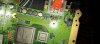
Question HELP! How would I fix this

Joined
Mar 22, 2025
Messages
11
Likes
3
I soldered in an area I wasn't supposed to an accidentally ripped it off. The Wii works fine except for the video signal. Does anyone know how to get video signal out of a Wii that is messed up like this?
 

Attachments

  • IMG_20250327_205250.jpg
    IMG_20250327_205250.jpg
    2.8 MB · Views: 100
How did you manage that? did you use a blowtorch or something? From what it looks like, that's supporting components for the analog video out... In my opinion that looks like a pain in the ass to fix, I'd honestly just clean the area and install a video output alternative like an AVE-HDMI or something like that, which bypasses all that componentry, and call it a day, honestly...
 
Are you going to be trimming this Wii?
 
How did you manage that? did you use a blowtorch or something? From what it looks like, that's supporting components for the analog video out... In my opinion that looks like a pain in the ass to fix, I'd honestly just clean the area and install a video output alternative like an AVE-HDMI or something like that, which bypasses all that componentry, and call it a day, honestly...
Thanks I'll see I'm just going to use my backup for now
 
Not really sure what you were trying to accomplish in the first place but you should probably practice soldering on scrap boards before pointing a soldering iron to electronics you care about... And BTW if you ever plan to use that board for a portable, those components are not going to matter at all.
 
Not really sure what you were trying to accomplish in the first place but you should probably practice soldering on scrap boards before pointing a soldering iron to electronics you care about... And BTW if you ever plan to use that board for a portable, those components are not going to matter at all.
Well I can't really portableize it Now because there's no picture coming from the display meaning I can't download rvl loader
 
Yes you can, you can get composite out from a trimmed board by grabbing composite right out of the AVE, so you can do it on yours too. I'd strongly suggest you practice first though.
 
If you clear the blobs away and remove the filtering components, you can repair the traces by soldering a wire from each of the matching round electrolytic capacitors to the pad closest to the AV port. As shown in this high quality diagram I just made
1743128783090.png
 
Wouldn't you need all those filtering caps tho? I suppose for a temporary solution (like prepare the board for portabilizing) that would do but I'd imagine they're there for a reason...
 
They're there for safety and signal clarity. The capacitors clean the signal some before it gets sent through the AV cable, and if a static shock finds its way to those pins, the inline diode will prevent the shock from damaging the AVE. They're not essential for operation, but they're definitely recommended. In this case they can be removed and bypassed to restore operation to the console at the potential cost of some longevity
 
Ah, that makes sense... Not just the AVE, a positive charge coming from the av port would hit those electrolytic caps on the negative terminal... I suppose it'll work as a last resort but honestly I'd much rather either use the board for a portable build or invalidate the video lines completely and install an AVE-HDMI or something similar lol
 
If you clear the blobs away and remove the filtering components, you can repair the traces by soldering a wire from each of the matching round electrolytic capacitors to the pad closest to the AV port. As shown in this high quality diagram I just made
View attachment 38106
Thank you so much this actually works but the picture is black and white for some reason
Do you think it would be possible to use the RGB pins that are under the AV port I could probably get a much better connection through there

EDIT: Merged Multipost
 
Last edited by a moderator:
Is this with composite or component video out? If it's component, then your Y line has been repaired but the Pb and Pr lines have not. Can you post a photo of the current state of your repair?
 
Is this with composite or component video out? If it's component, then your Y line has been repaired but the Pb and Pr lines have not. Can you post a photo of the current state of your repair?
i managed to get coulor however it was very mismatched there were greens where the yellows were so i thought why not and transferd some save data and then installed rvl loader with the vga patch so i wont have video signal until the screen arrives
 
That isn't going to solve your display issue. VGA uses the same colour lines as component video. If there's an issue with one of the lines still (which it sounds like there is), it will affect VGA the same way
 
That isn't going to solve your display issue. VGA uses the same colour lines as component video. If there's an issue with one of the lines still (which it sounds like there is), it will affect VGA the same way
I think it's where I wired it up to the underside of the component video out port I think the round guys are fine
 
i managed to get coulor however it was very mismatched there were greens where the yellows were so i thought why not and transferd some save data and then installed rvl loader with the vga patch so i wont have video signal until the screen arrives

you can still use composite tho. Also if you go for the DD instead of the VGA screen then chances are whatever is going on with the color lines wouldn't really matter.
 
Back
Top