- Joined
- Dec 24, 2016
- Messages
- 180
- Likes
- 273
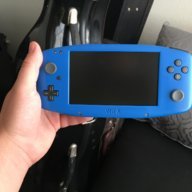
This is just THE sexiest thing.It's getting close. I need to get those shoulder buttons in there. Other than that it's just about done.
View attachment 2945
View attachment 2946
This is just THE sexiest thing.It's getting close
View attachment 2945
View attachment 2946


GameCube buttons are too big for the case. Also, there is a huge supply of buttons from the DS family of consoles due to 3rd party replacement shells but GC buttons must be harvested from a 1st party or 3rd party lookalike controller.I really like what you've done! I just found out about this entire console modding scene last night, and it's so intriguing. For your design (which is astounding btw), why did you use DS Lite buttons? I understand the 3DS joysticks, as I've looked at other projects and seen them, but is there an advantage of the DS Lite buttons?
I understand the use of DS buttons - they're not as crazy as the GC ones. I'm just curious why he used the DS Lite buttons on both of his portables, instead of another model. Are there any differences?GameCube buttons are too big for the case. Also, there is a huge supply of buttons from the DS family of consoles due to 3rd party replacement shells but GC buttons must be harvested from a 1st party or 3rd party lookalike controller.

The DS lite Is the only one that has squishy buttons and they’re also slightly taller. This makes them easier to use with 3D printed casesI understand the use of DS buttons - they're not as crazy as the GC ones. I'm just curious why he used the DS Lite buttons on both of his portables, instead of another model. Are there any differences?

The main reason is what @Aurelio said, the DS Lite buttons have a squishy membrane that I prefer over tactile buttons.I'm just curious why he used the DS Lite buttons on both of his portables, instead of another model. Are there any differences?

I can't quite do that with the internal controllers since there is no nunchuckDude, can you do an Okami gameplay video?
 . But at least I could connect a separate controller for a video. I may do that.
The 4.3" screen is good for widescreen games. I wouldn't go any smaller. The 3.5" screen is basically the same height, but a 4:3 ratio instead of 16:9, so it's just as good when you don't need widescreen.is 4.3 screen too small for gaming? is is 3.5 okay?

Doing something like that is definitely possible, although it's not idealAll of these custom PCBs have given me an idea: could you design a board that would translate a button push into shaking a Wiimote? Shaking a portable around generally isn't the smartest thing, but your internals are looking so solid that it probably wouldn't matter!

Yeah, I'm sure you could emulate the accelerometer with a microcontroller or something similar. The accelerometer has a publicly available datasheet, so all the info should be out there. I've been shaking my prototype a lot and not heard any rattling yet, so I think I'm goodAll of these custom PCBs have given me an idea: could you design a board that would translate a button push into shaking a Wiimote? Shaking a portable around generally isn't the smartest thing, but your internals are looking so solid that it probably wouldn't matter!
.

 .
.
Yes, it's exactly the same bus. The speaker and the EEPROM work on this bus as well. Pretty much the only thing that does not work on this bus is the accelerometer. The read address for the camera is B1 (write address is B0), so the Wii remote sends out this address on the I2C bus whenever it wants to read from/write to the camera. I had to make a microcontroller respond to that address to act as the camera.You say it's on the wiimote peripheral I2C bus, which I'm assuming refers to the same bus that hosts the classic controller, motion plus, etc. How is it then passing IR data? Is the camera on that selfsame bus?
What I did was take a single touch screen coordinate and separate it into two blobs equidistant from the actual coordinate. Then the blob data has to be sent in one of three different ways, determined by the Wii remote. I referenced this information a ton because I don't have any logic analyzer or oscilloscope and only had this to go on.I was aware it doesn't pass pixel data but blob coordinates, but I wasn't aware it was functionally a peripheral. Care to share your code?