- Joined
- Sep 3, 2020
- Messages
- 446
- Likes
- 985
- Portables
- 8
Introduction:
Along the way of making your first Wii portable, you're going to run into some wiring diagrams that ask a lot of someone who's new to soldering. From U10 relocation, to USB wiring, to VGA signals, to even audio wiring, Wii builds are infested with these tiny solder points. This guide aims to assist new users who may be intimidated by, or struggling with, Wii micro soldering. Although it can be intimidating at first, you can rest easy knowing that most of the Wii's micro soldering can be made far easier with the right equipment and approach.
Supplies:
This section lists some of the supplies that I personally use. I'll provide a link to everything used to reproduce my soldering except for my solder as I got mine locally and wasn't able to find a link for it. Keep in mind that my supplies may not be the best; these are just what I use, and should be enough for you to get the job done.
Flux: Chipquik SMD 291 (It says no clean flux, but you still need to clean it!)
Soldering Iron: Weller WE1010NA (I like to solder at 622°F, but everyone has their preferred soldering temps)
Wire: Magnet Wire (34 AWG)
Tip Cleaner: Brass Sponge (great for cleaning solder off your iron's tip)
Soldering to Vias:
Most of the smaller soldering you’ll be doing will involve tiny holes, or “vias,” on the back of the Wii motherboard. The good news is that there’s a tried-and-true way to get great solder joints on these! Before we begin, identify whether your Wii’s vias are tented or untented:
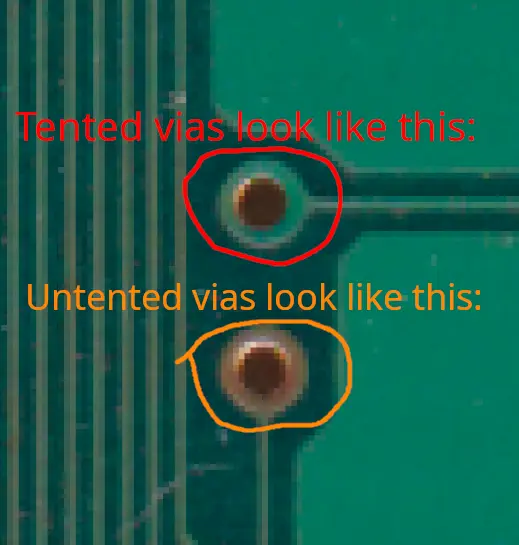
If your vias are tented, you’ll need to scrape away the solder mask to expose the copper before you can solder to them. If they are untented, however, there’s no need to scrape them. I don’t have any Wiis with tented vias, so I’m unable to show this process. It’s not difficult - just take your time, remember that it doesn’t take much force, and clean the dust away with isopropyl alcohol to check your progress.
Once the via is ready, tin a small section of the end of your magnet wire like so:

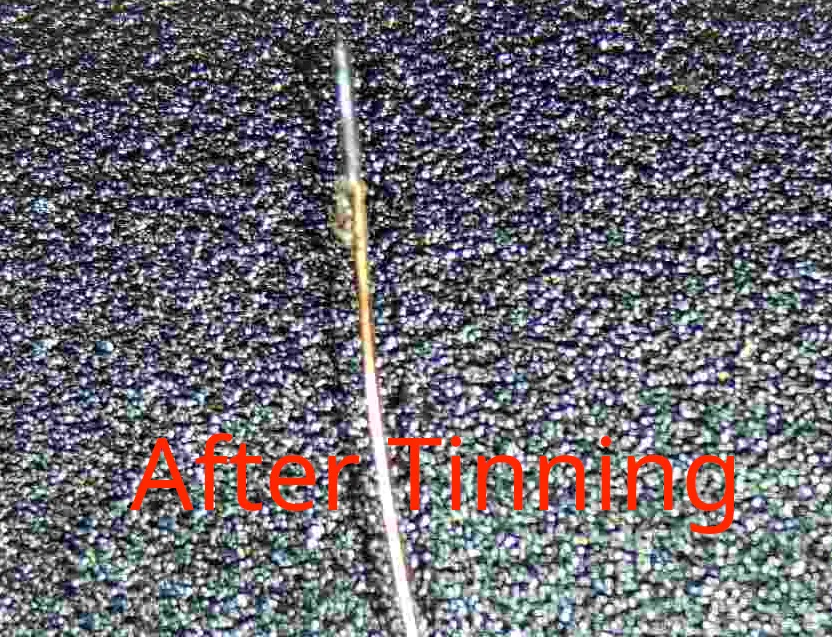
Your magnet wire should look something like the second image here. Alternatively, your wire may look like this:

Something like this can be ideal since there's already enough solder to make the connection, but it also may not work depending on what you end up with. Either way, from here you'll want to try and push the tinned end of the wire into the via like this:
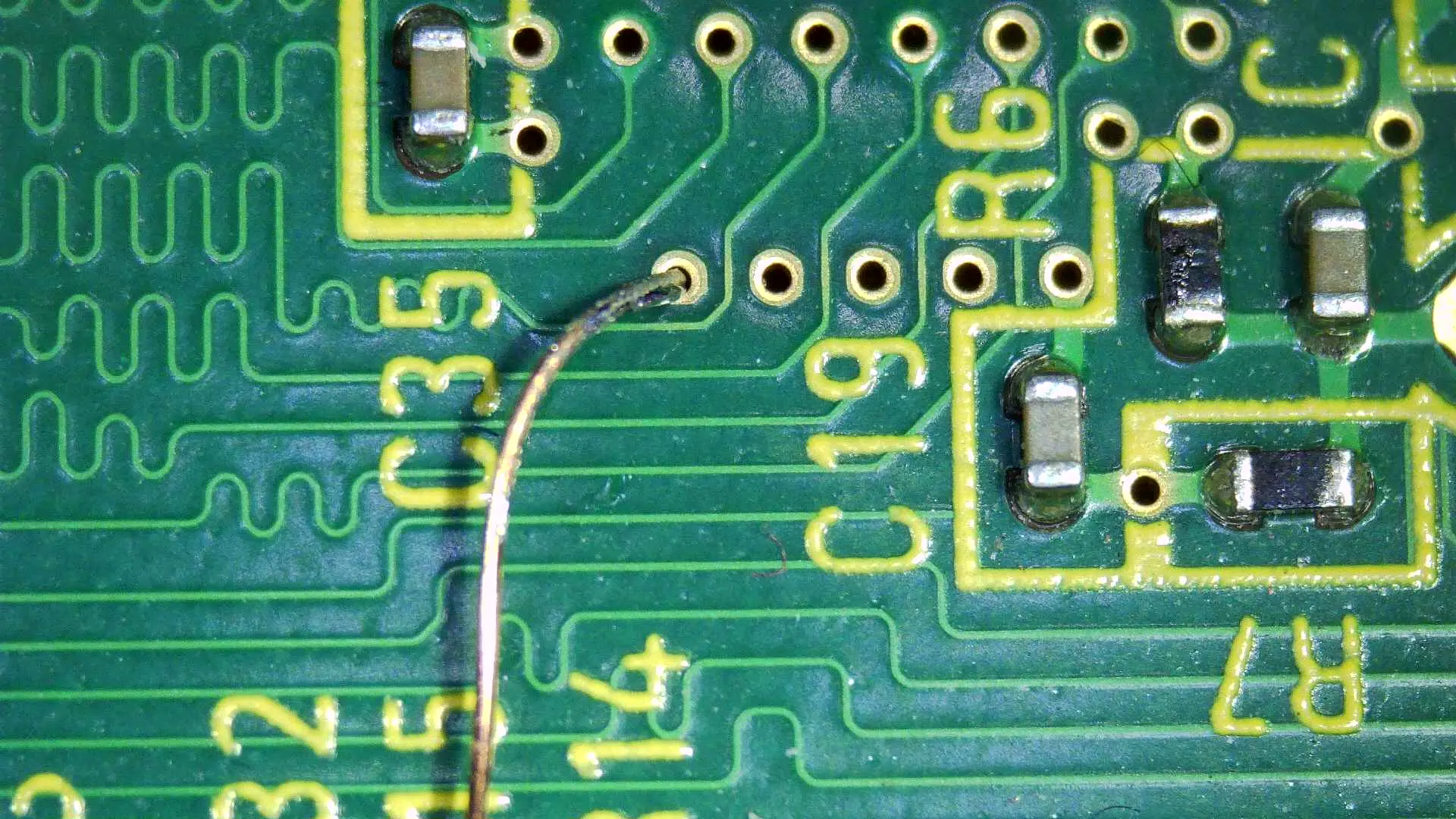
If you're able to fit the wire through the via enough to where it isn't difficult to hold in place, then you can proceed with the next step. If not, clean the solder off your solder tip and get any excess solder off the magnet wire. Once you're able to get the wire into the via, flux it like so:
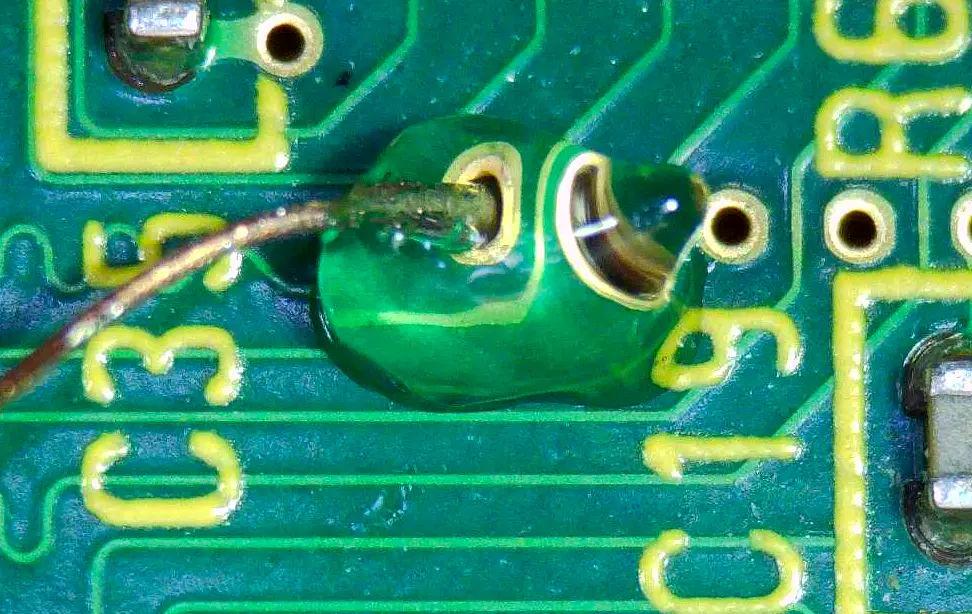
After this, you’re free to heat the via with your soldering iron. If there isn’t enough solder to make the connection, tin your iron with a small amount of solder. Remember that tiny solder joints require only a tiny bit!
These two pictures showcase exactly what your solder joint should look like:
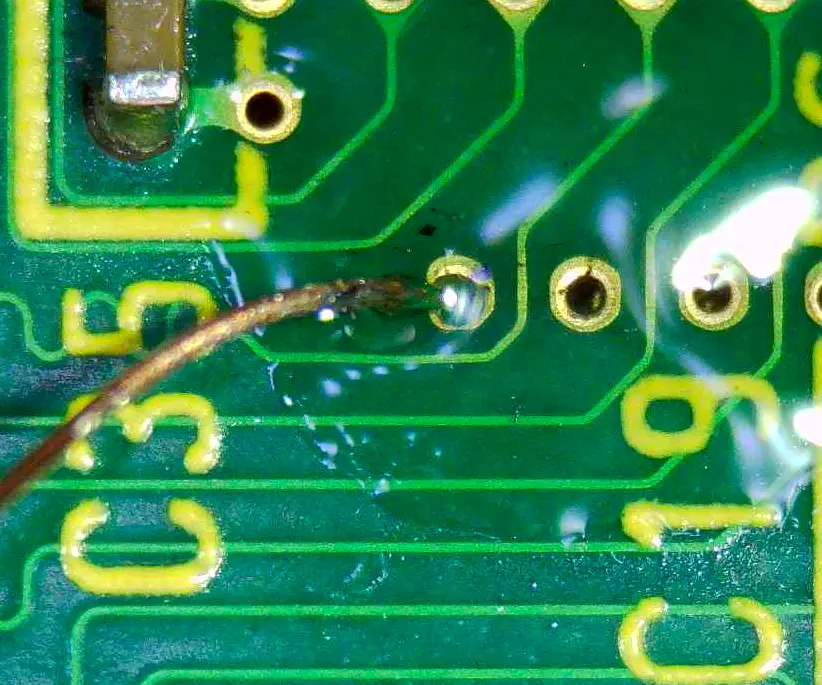
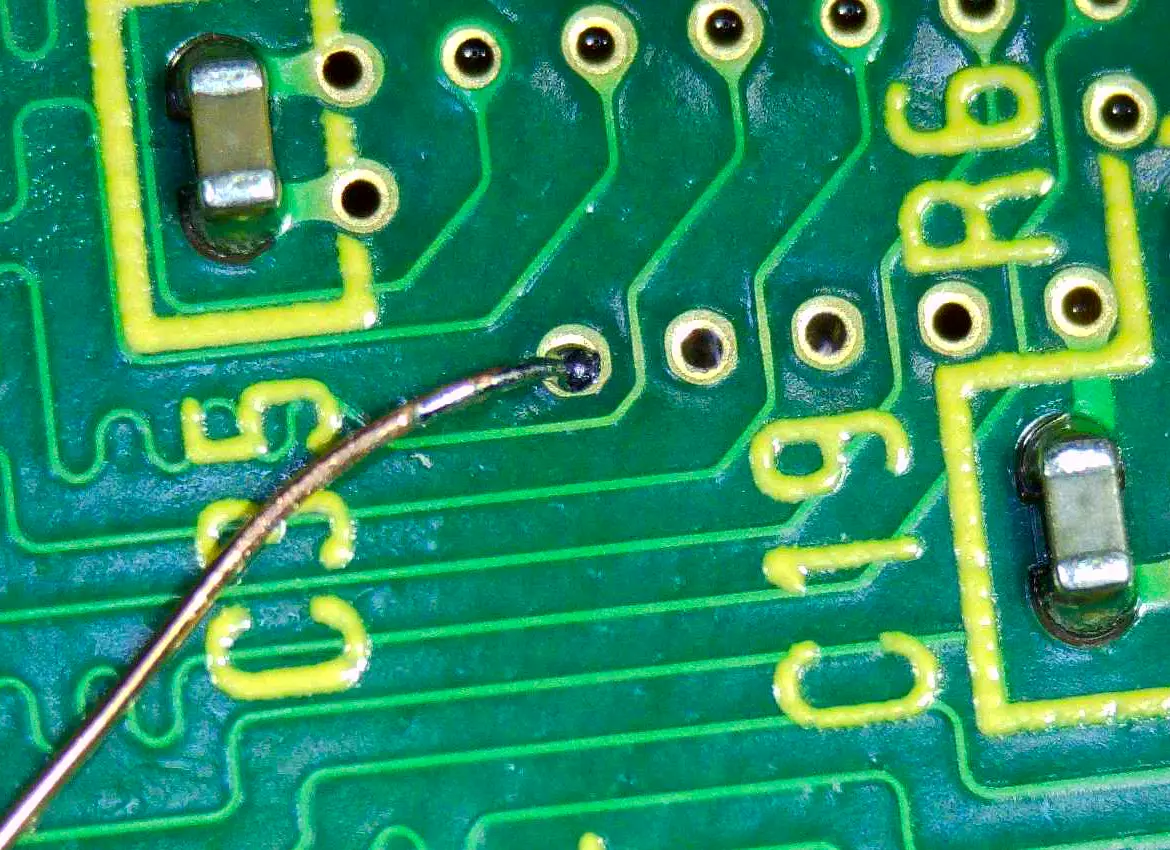
The first image here was taken immediately after the solder joint was made. There’s still flux residue on the board, so remember to clean it up with some isopropyl alcohol. The second image shows what your solder joint should look like after cleaning off the flux. It's a nice, smooth, shiny, round, solder joint - exactly what we want!
Some steps in building a portable Wii require you to solder multiple wires to multiple neighboring vias, like so:
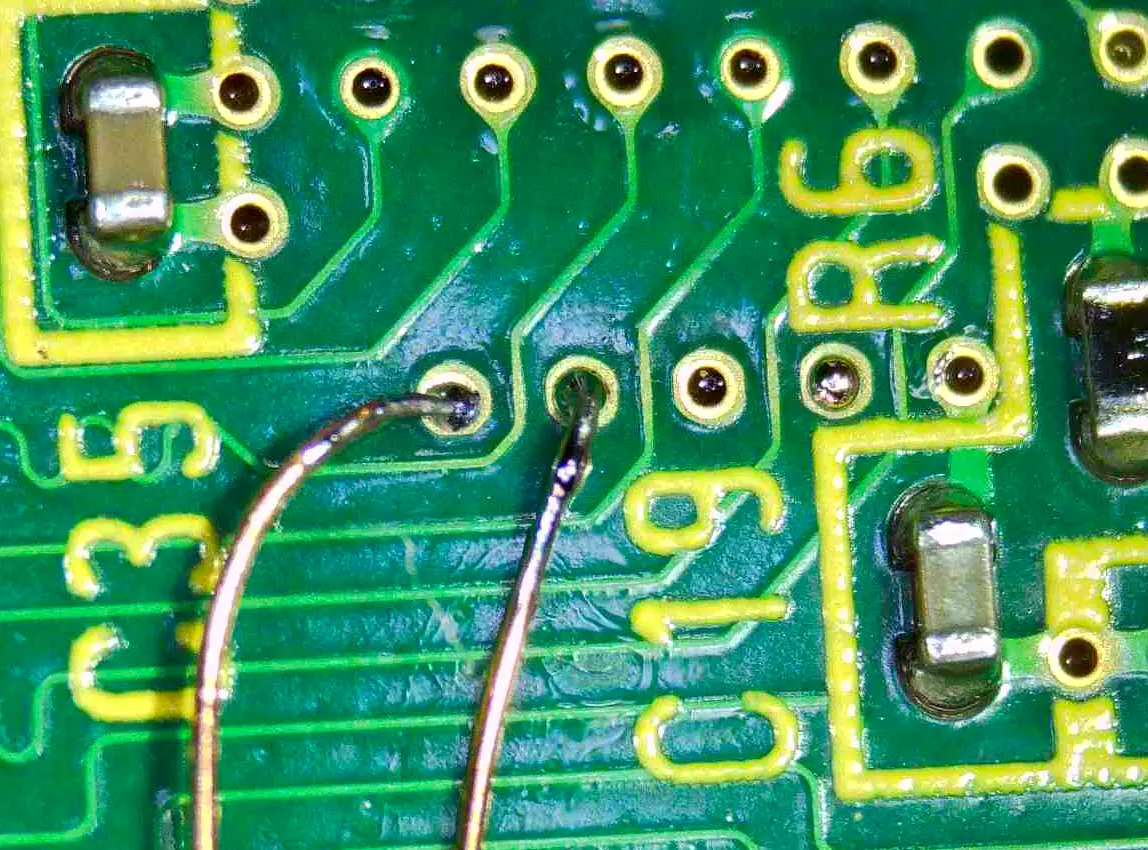
In this example, I soldered a second wire to the right of the one shown in the first image. This was a calculated approach that I thought of before even soldering the first wire. My old pal ShockSlayer taught me that if you're right-handed, you'll want to solder from left to right, but if you're left-handed, you'll want to solder from right to left. So, if you’re left-handed, you’d actually want to solder to the via on the far right first - unlike what I did - because I’m right-handed. You need to keep order in mind when soldering like this. Doing so should make soldering the second, third, and fourth wires in the line just as easy as soldering the first.
With this, you should have a solid foundation on how to properly solder to vias on the Wii. There are other approaches that work, but this method is best since it allows you to create a solder joint stronger than the wire itself! Vias make up almost all the micro soldering on a Wii portable. If you're able to learn this method, you'll be able to make all the required connections needed on a Wii portable. This guide doesn't yet cover all the optional micro soldering, but it'll at least get you the bare minimum you need for a functional portable Wii.
VGA H-Sync & V-Sync:
H-Sync and V-Sync for VGA are the hardest solder joints to make in a standard Wii portable. This is because both solder joints are on the Audio Video Encoder (or AVE) and are right next to each other. Luckily, the advice I have to offer for soldering these will make the process easier.
The first thing to consider before even attempting either of these lines is something I went over earlier in the via wiring section. That is, if you're right-handed you should solder the leftmost wire first and then work your way over to the right, one wire at a time. Recall also that the opposite is true if you are left-handed. With this in mind, we can figure out which line to solder to first. In my case, I solder to H-sync first since I'm right-handed. Now, as before with via wiring, we want to tin a small section of magnet wire. Having an extremely small amount of solder on your wire is okay here, just remember that the more solder you have, the more likely you are to create a bridge. If you are unsure of how much solder your wire should have on it, look back on the via section at the "after tinning" picture, as this is also appropriate for the H&V-sync wires.
Next you'll want to put some flux on the chip. Be sure to apply a healthy amount of flux before attempting to solder; you can always clean up any excess later! With this, make sure your soldering iron has absolutely NO solder on the tip. We don't need much solder to make these connections after all! With your iron, wire, and board prepared accordingly, hold the wire in place carefully where you want it to go. When you're ready, come in with the iron and heat it for around half a second. This time may vary depending on how hot your soldering iron is.
If you used the correct amount of solder, flux, and positioned your wire correctly, you should now have a good joint on either the H or V sync lines.
The process is going to be about the same for your second wire so long as you follow the left or right hand advice I gave earlier. Just make sure your solder joint is solid on the first wire before moving on to the second one. If all goes according to plan, you should be left with H&V-Sync wires that look like this:
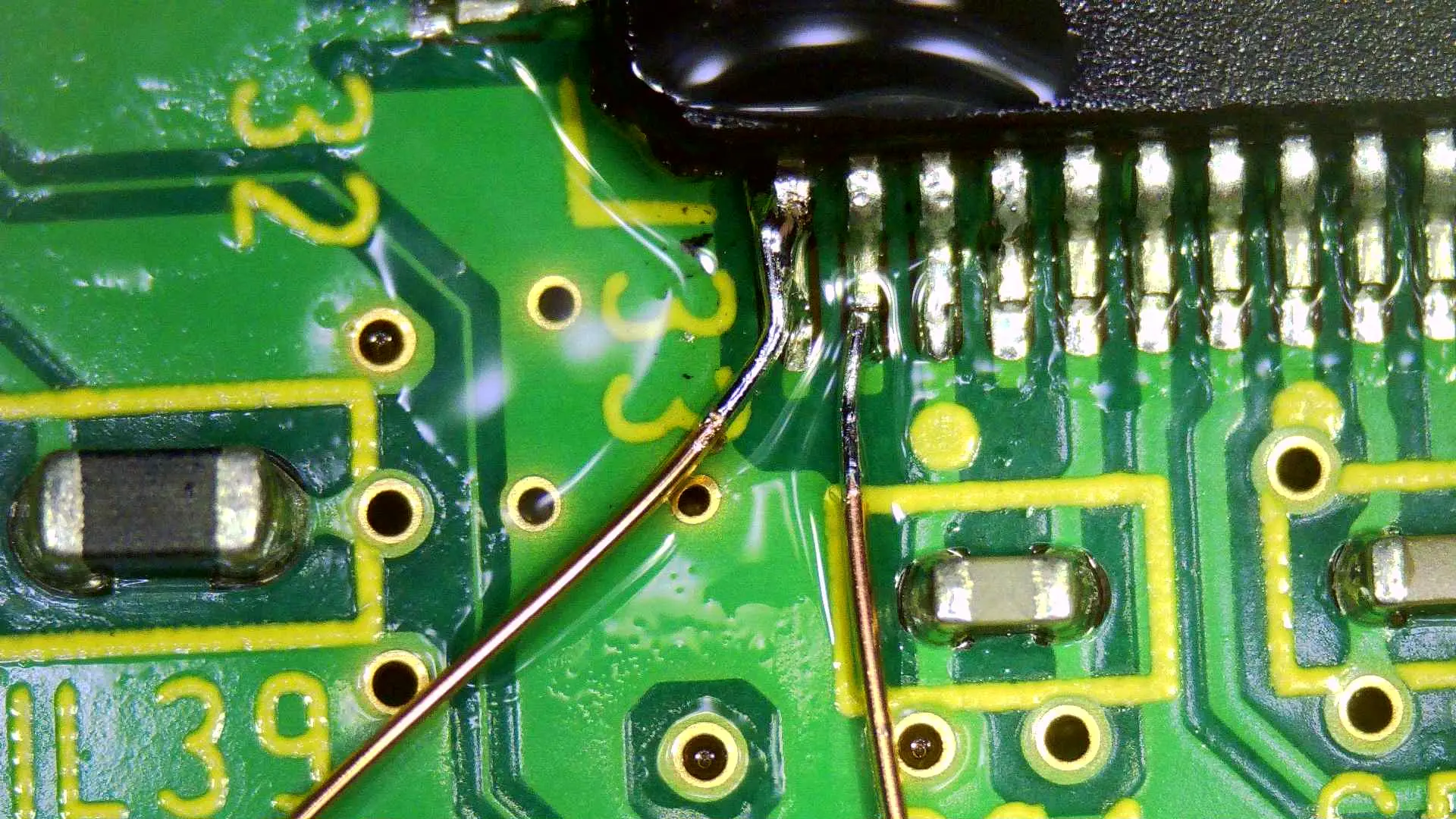
Remember to clean up the flux, and you should be golden!
Note:
The H&V-Sync wires should NOT be twisted or shielded. The R, G, and B, lines do however need to be twisted with ground or shielded with antenna wire in order to combat interference. Know also that some screen driver boards have misprinted H&V-Sync lines, so sometimes you'll need to swap them in order to get a proper signal!
In the next part of this guide, I'll cover soldering to the bluetooth data traces.
Hope this helps!
Along the way of making your first Wii portable, you're going to run into some wiring diagrams that ask a lot of someone who's new to soldering. From U10 relocation, to USB wiring, to VGA signals, to even audio wiring, Wii builds are infested with these tiny solder points. This guide aims to assist new users who may be intimidated by, or struggling with, Wii micro soldering. Although it can be intimidating at first, you can rest easy knowing that most of the Wii's micro soldering can be made far easier with the right equipment and approach.
Supplies:
This section lists some of the supplies that I personally use. I'll provide a link to everything used to reproduce my soldering except for my solder as I got mine locally and wasn't able to find a link for it. Keep in mind that my supplies may not be the best; these are just what I use, and should be enough for you to get the job done.
Flux: Chipquik SMD 291 (It says no clean flux, but you still need to clean it!)
Soldering Iron: Weller WE1010NA (I like to solder at 622°F, but everyone has their preferred soldering temps)
Wire: Magnet Wire (34 AWG)
Tip Cleaner: Brass Sponge (great for cleaning solder off your iron's tip)
Soldering to Vias:
Most of the smaller soldering you’ll be doing will involve tiny holes, or “vias,” on the back of the Wii motherboard. The good news is that there’s a tried-and-true way to get great solder joints on these! Before we begin, identify whether your Wii’s vias are tented or untented:
If your vias are tented, you’ll need to scrape away the solder mask to expose the copper before you can solder to them. If they are untented, however, there’s no need to scrape them. I don’t have any Wiis with tented vias, so I’m unable to show this process. It’s not difficult - just take your time, remember that it doesn’t take much force, and clean the dust away with isopropyl alcohol to check your progress.
Once the via is ready, tin a small section of the end of your magnet wire like so:
Your magnet wire should look something like the second image here. Alternatively, your wire may look like this:
Something like this can be ideal since there's already enough solder to make the connection, but it also may not work depending on what you end up with. Either way, from here you'll want to try and push the tinned end of the wire into the via like this:
If you're able to fit the wire through the via enough to where it isn't difficult to hold in place, then you can proceed with the next step. If not, clean the solder off your solder tip and get any excess solder off the magnet wire. Once you're able to get the wire into the via, flux it like so:
After this, you’re free to heat the via with your soldering iron. If there isn’t enough solder to make the connection, tin your iron with a small amount of solder. Remember that tiny solder joints require only a tiny bit!
These two pictures showcase exactly what your solder joint should look like:
The first image here was taken immediately after the solder joint was made. There’s still flux residue on the board, so remember to clean it up with some isopropyl alcohol. The second image shows what your solder joint should look like after cleaning off the flux. It's a nice, smooth, shiny, round, solder joint - exactly what we want!
Some steps in building a portable Wii require you to solder multiple wires to multiple neighboring vias, like so:
In this example, I soldered a second wire to the right of the one shown in the first image. This was a calculated approach that I thought of before even soldering the first wire. My old pal ShockSlayer taught me that if you're right-handed, you'll want to solder from left to right, but if you're left-handed, you'll want to solder from right to left. So, if you’re left-handed, you’d actually want to solder to the via on the far right first - unlike what I did - because I’m right-handed. You need to keep order in mind when soldering like this. Doing so should make soldering the second, third, and fourth wires in the line just as easy as soldering the first.
With this, you should have a solid foundation on how to properly solder to vias on the Wii. There are other approaches that work, but this method is best since it allows you to create a solder joint stronger than the wire itself! Vias make up almost all the micro soldering on a Wii portable. If you're able to learn this method, you'll be able to make all the required connections needed on a Wii portable. This guide doesn't yet cover all the optional micro soldering, but it'll at least get you the bare minimum you need for a functional portable Wii.
VGA H-Sync & V-Sync:
H-Sync and V-Sync for VGA are the hardest solder joints to make in a standard Wii portable. This is because both solder joints are on the Audio Video Encoder (or AVE) and are right next to each other. Luckily, the advice I have to offer for soldering these will make the process easier.
The first thing to consider before even attempting either of these lines is something I went over earlier in the via wiring section. That is, if you're right-handed you should solder the leftmost wire first and then work your way over to the right, one wire at a time. Recall also that the opposite is true if you are left-handed. With this in mind, we can figure out which line to solder to first. In my case, I solder to H-sync first since I'm right-handed. Now, as before with via wiring, we want to tin a small section of magnet wire. Having an extremely small amount of solder on your wire is okay here, just remember that the more solder you have, the more likely you are to create a bridge. If you are unsure of how much solder your wire should have on it, look back on the via section at the "after tinning" picture, as this is also appropriate for the H&V-sync wires.
Next you'll want to put some flux on the chip. Be sure to apply a healthy amount of flux before attempting to solder; you can always clean up any excess later! With this, make sure your soldering iron has absolutely NO solder on the tip. We don't need much solder to make these connections after all! With your iron, wire, and board prepared accordingly, hold the wire in place carefully where you want it to go. When you're ready, come in with the iron and heat it for around half a second. This time may vary depending on how hot your soldering iron is.
If you used the correct amount of solder, flux, and positioned your wire correctly, you should now have a good joint on either the H or V sync lines.
The process is going to be about the same for your second wire so long as you follow the left or right hand advice I gave earlier. Just make sure your solder joint is solid on the first wire before moving on to the second one. If all goes according to plan, you should be left with H&V-Sync wires that look like this:
Remember to clean up the flux, and you should be golden!
Note:
The H&V-Sync wires should NOT be twisted or shielded. The R, G, and B, lines do however need to be twisted with ground or shielded with antenna wire in order to combat interference. Know also that some screen driver boards have misprinted H&V-Sync lines, so sometimes you'll need to swap them in order to get a proper signal!
In the next part of this guide, I'll cover soldering to the bluetooth data traces.
Hope this helps!
Last edited: