Menke
.
- Joined
- Jul 15, 2024
- Messages
- 8
- Likes
- 10
The ultimate goal of this build is to have a Wii that you can take anywhere and easily plug into a tv via HDMI or play somewhere outdoor with friends. The sensorbar would be embedded in the bezel.
The usage of a laptop has some advantages such as relatively large space, good space for batteries, comes with a screen attached and speakers. It also has a keyboard and touchpad, which could potentially be a cool to implement and used to control the system or even game with it. However, a laptop is also rather slim, making fitting in a wii also challenging at the same time.
My victim became an Acer Aspire ES1, 15.6" fully functional but has a shitty CPU, perfect candidate for the job!
I then went looking for a used Wii and managed to get one donated (faulty disc drive) by someone that thought this project was pretty cool. It was also a boot2 compatible Wii which I was looking for at the time.
The display
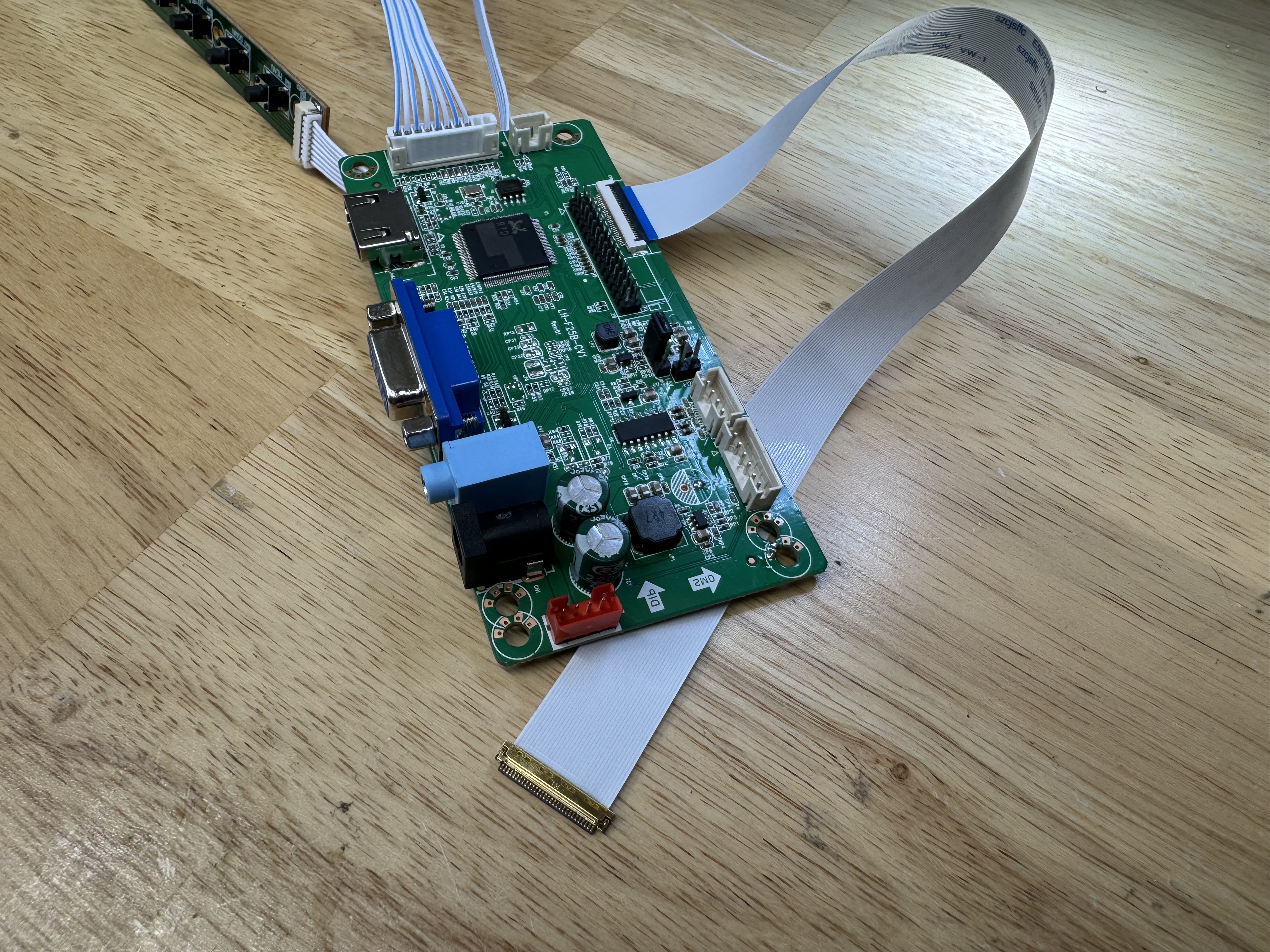
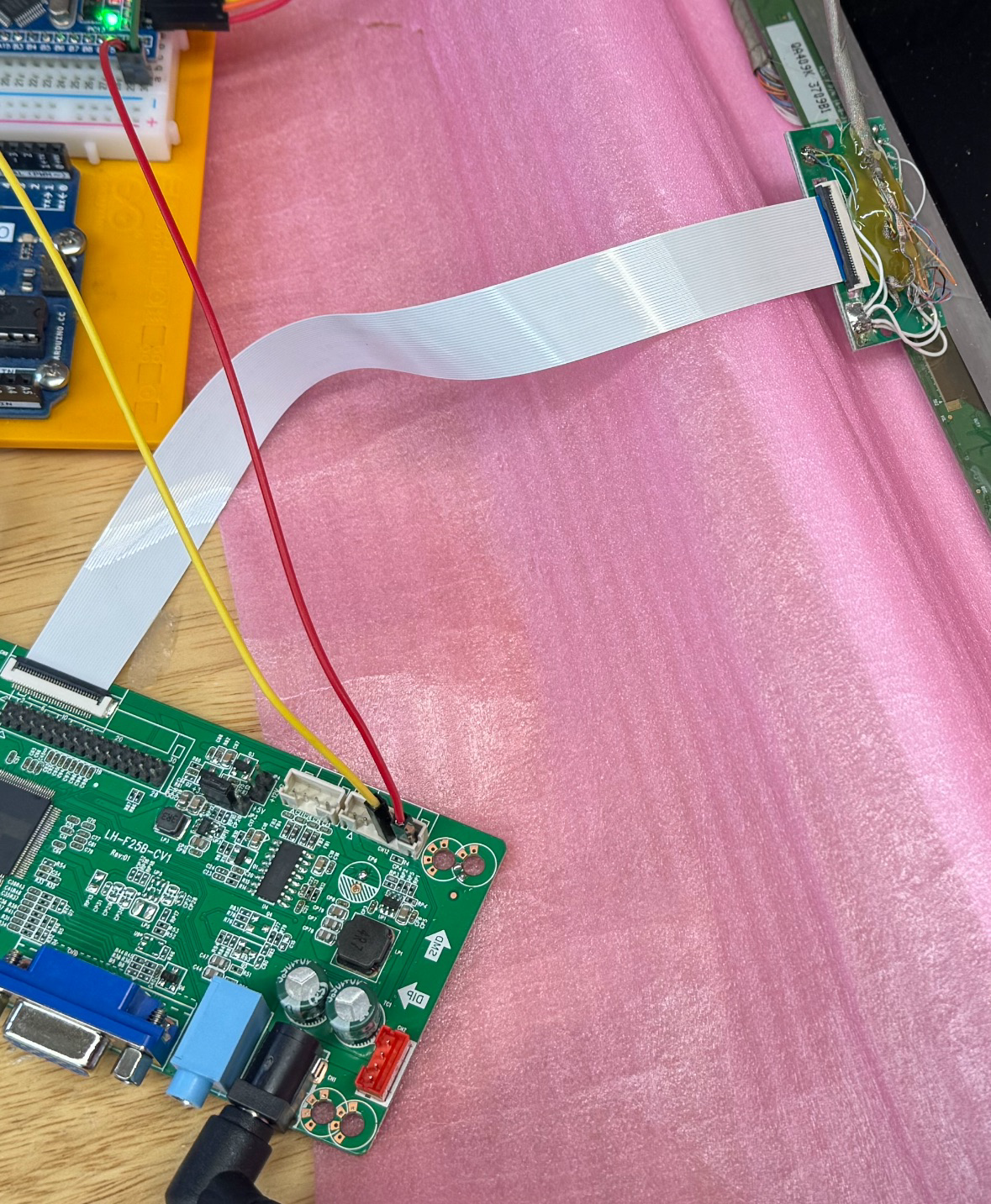
My display is an LP156WHB-TPA1, which according to the datasheet uses a 1-lane eDP signal to drive the 1366x768 display. A quick AliExpress search landed me on a driver board using the RTD2556 chip. After receiving the board the chips identification was lasered off, unless this is some square variant of the rtd2556, I think its one of its cousins. It also comes with a flat ribbon cable to drive the LCD, not usable in our case as I can't route this through the hinge to the display. The only option left was breaking up the existing cable (which does route through the hinge) to a 30 pin fpc breakout board. Although it doesnt look that great as I used hotglue to secure the cable to the breakout board, it does work just fine. Looking at the datasheet there is also an option to dimm the screen via a PWM signal at 200-1000Hz using a duty cycle of 5-100% at 3.3V.
Audio
The laptop came with 2 tiny speakers, I doubt they're the best ones out there, but they sit there nicely. Fortunately, the driver board contains an audio amp (PAM8003). Pin 12 of this audio amp takes a DC voltage of 0-5V to set the volume.
Powering the Wii
The laptop came with a 3S 40Wh battery, great to be reused again. As I had plans to integrate the keyboard, I decided to challenge myself to also make a nice integrated solution for charging and powering on the Wii. Despite there being already well-made solutions out there such as RVL-PMS2, I also wanted to design my own for the sake of learning about PCB design. I opted for the TPS25750D + BQ25792, USB C PD charging up to 45W with there being an easy solution to develop the firmware and reference designs that can almost be copied. Using this 3S battery meant that my VSYS would be at ±12V but could fluctuate. To offer some stability and the easy ability to turn it on and off I decided to drive the display via a regulator at a nice 8.5V. I also added regulators for 1V, 1.15V and 3.3V. I selected a chip that fullfilled my requirements, the TPS62933. I then used Texas Instruments Webbench power designer tool to generate me some schematics which worked wonderfully.
Cooling the wii
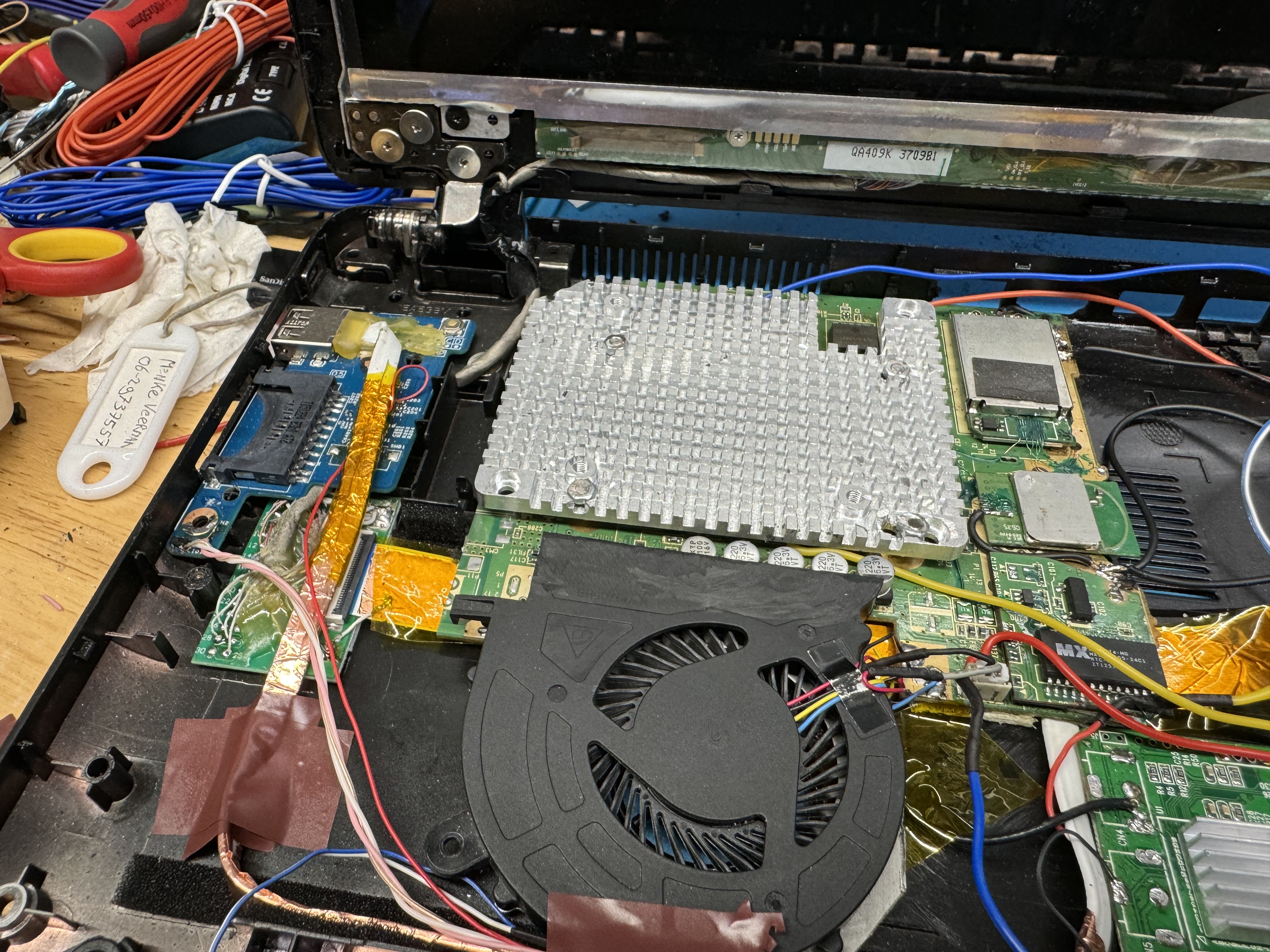
After a lot of searching for a low profile heatsink I opted for an HDD heatsink and would just drill some holes where needed. In the end this became still very hot when passively cooled hence I added a fan in there to blow some air through it.
MCU
I also needed to control the system somehow. I didnt want to go with an esp as they can be quite power hungry and I didnt need their speed/wireless capabilities. As I felt that an arduino would feel a bit “toysy” + a 3.3V ic is better. I opted for an STM32 to step up my game a bit as well. I repurposed the hall sensor of the laptop to set the STM32 into hibernation and wake it up again. For this I added a dedicated 3.3V ldo that only powers the hall sensor and stm32. This tiny LDO is always on and powered directly from VSYS out of the BQ25792. All other stuff is powered from the switched (3.3V) regulator. This implementation also supported my decision to not power the display directly from VSYS. This STM32 also was going to interface with the keyboard, fan, display beightness and audio volume. I also wanted to add a tiny OLED display (SSD1306) to display some information when changing some stuff.
Keyboard
The keyboard contains 18 rows and 8 colums. I cant dedicate 26 pins of my MCU to this and hence decided to go with 4 shift registers instead. They were attached to an spi port for full duplex reading and writing of the keyboard. This allowed me to detect any keypress and act upon it.
Layout
I decided that my wii should go on the left to reuse the fan holes that were present. Making my motherboard sit on the right hand side as I had a gaping gap there, allowing me to create connectors such as some programming headers along with the usb c power port.
The laptop also had a mini daughterboard on the left hand side, containing an sd slot, usb and the hall sensor + power button. This power button was definitely going to be my reset switch for the STM32. The usb port would be rewired to the wii so I can have a usb in there to easily change games.
Lessons learned
As time was pressing, i had to hit order at some point if i wanted to make my deadline. Because of this I missed to add some capacitors near the bq25792/tps25750. Causing it to enter HIZ mode or overvoltage errors when plugging in a charger.
I also made a classic mistake of ordering 32Kilobit eeproms instead of a 32Kilobyte… Explaining my “not enough space” errors during the firmware flashing.
I digged through my old motherboards and found an old server with a compatible eeprom.
When coding the keyboard i got some weird behaviour, i left the input pins floating. Easily fixed using 2 array resistors (again from the same server motherboard).
I also had issues with the external oscillator of the STM32, probably mismatched capacitors. I just used the High speed internal oscillator instead.
Another problem I ran into was the flickering of the display and weird errors with the usb. Noise, fixed this by shielding wires by adding some copper tape to them. This is again an issue resulting from a bad layout. Causing signals and wires to be longer than what they could be.
The layout also was pretty bad as a lot of wiring had to overlap. I had wires going all the way from left to right while having the wii on the right hand side and video driver board on the left made more sense. I also found out that my plastic case was conductive after frying 2 chinese ypbpr/av->hdmi boards. Somehow the wii survived that although the ave rvl might have taken a few punches as it doesnt seem to output audio anymore.
I added a 5V ldo (ams117) that initially was going to be powering just the USB, for which I accepter the losses. However as a fan was added later (due to the wii getting so hot), it drew about 0.5A. As I stepped down from 8.5V this is nearly 2w of heat. I found out about this problem as the BQ25792 started throwing overheating errors. The ldo was within 1.5cm of the BQ25792, which had an ntc next to it. I cut out a 5V switching regulator from another old motherboard and dropped that in place instead.
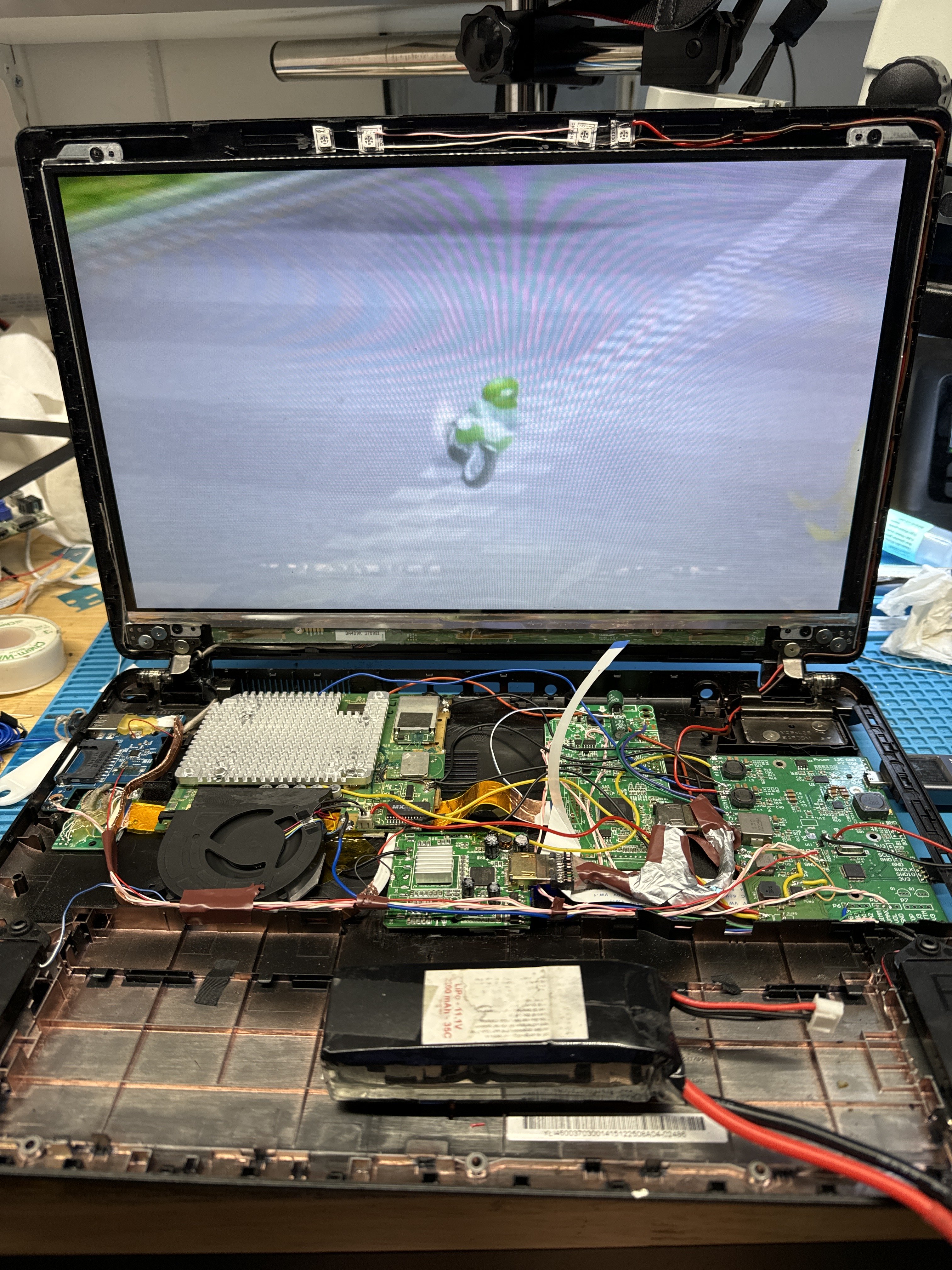
I tried everything to get vga or ypbpr->hdmi to display on the screen. Plugging it into an external monitor worked fine but would display a black screen on the display driver board. Hence I went with the last resort of using CVBS, the image looks kinda shit rn.
All in all the system does somewhat work, but far from great. Lots of ideas for another revision, along with a switch to a 4-layer board for power draw as currently the entire system uses about 18 watts (of which the wii uses about 12).
The usage of a laptop has some advantages such as relatively large space, good space for batteries, comes with a screen attached and speakers. It also has a keyboard and touchpad, which could potentially be a cool to implement and used to control the system or even game with it. However, a laptop is also rather slim, making fitting in a wii also challenging at the same time.
My victim became an Acer Aspire ES1, 15.6" fully functional but has a shitty CPU, perfect candidate for the job!
I then went looking for a used Wii and managed to get one donated (faulty disc drive) by someone that thought this project was pretty cool. It was also a boot2 compatible Wii which I was looking for at the time.
The display
My display is an LP156WHB-TPA1, which according to the datasheet uses a 1-lane eDP signal to drive the 1366x768 display. A quick AliExpress search landed me on a driver board using the RTD2556 chip. After receiving the board the chips identification was lasered off, unless this is some square variant of the rtd2556, I think its one of its cousins. It also comes with a flat ribbon cable to drive the LCD, not usable in our case as I can't route this through the hinge to the display. The only option left was breaking up the existing cable (which does route through the hinge) to a 30 pin fpc breakout board. Although it doesnt look that great as I used hotglue to secure the cable to the breakout board, it does work just fine. Looking at the datasheet there is also an option to dimm the screen via a PWM signal at 200-1000Hz using a duty cycle of 5-100% at 3.3V.
Audio
The laptop came with 2 tiny speakers, I doubt they're the best ones out there, but they sit there nicely. Fortunately, the driver board contains an audio amp (PAM8003). Pin 12 of this audio amp takes a DC voltage of 0-5V to set the volume.
Powering the Wii
The laptop came with a 3S 40Wh battery, great to be reused again. As I had plans to integrate the keyboard, I decided to challenge myself to also make a nice integrated solution for charging and powering on the Wii. Despite there being already well-made solutions out there such as RVL-PMS2, I also wanted to design my own for the sake of learning about PCB design. I opted for the TPS25750D + BQ25792, USB C PD charging up to 45W with there being an easy solution to develop the firmware and reference designs that can almost be copied. Using this 3S battery meant that my VSYS would be at ±12V but could fluctuate. To offer some stability and the easy ability to turn it on and off I decided to drive the display via a regulator at a nice 8.5V. I also added regulators for 1V, 1.15V and 3.3V. I selected a chip that fullfilled my requirements, the TPS62933. I then used Texas Instruments Webbench power designer tool to generate me some schematics which worked wonderfully.
Cooling the wii
After a lot of searching for a low profile heatsink I opted for an HDD heatsink and would just drill some holes where needed. In the end this became still very hot when passively cooled hence I added a fan in there to blow some air through it.
MCU
I also needed to control the system somehow. I didnt want to go with an esp as they can be quite power hungry and I didnt need their speed/wireless capabilities. As I felt that an arduino would feel a bit “toysy” + a 3.3V ic is better. I opted for an STM32 to step up my game a bit as well. I repurposed the hall sensor of the laptop to set the STM32 into hibernation and wake it up again. For this I added a dedicated 3.3V ldo that only powers the hall sensor and stm32. This tiny LDO is always on and powered directly from VSYS out of the BQ25792. All other stuff is powered from the switched (3.3V) regulator. This implementation also supported my decision to not power the display directly from VSYS. This STM32 also was going to interface with the keyboard, fan, display beightness and audio volume. I also wanted to add a tiny OLED display (SSD1306) to display some information when changing some stuff.
Keyboard
The keyboard contains 18 rows and 8 colums. I cant dedicate 26 pins of my MCU to this and hence decided to go with 4 shift registers instead. They were attached to an spi port for full duplex reading and writing of the keyboard. This allowed me to detect any keypress and act upon it.
Layout
I decided that my wii should go on the left to reuse the fan holes that were present. Making my motherboard sit on the right hand side as I had a gaping gap there, allowing me to create connectors such as some programming headers along with the usb c power port.
The laptop also had a mini daughterboard on the left hand side, containing an sd slot, usb and the hall sensor + power button. This power button was definitely going to be my reset switch for the STM32. The usb port would be rewired to the wii so I can have a usb in there to easily change games.
Lessons learned
As time was pressing, i had to hit order at some point if i wanted to make my deadline. Because of this I missed to add some capacitors near the bq25792/tps25750. Causing it to enter HIZ mode or overvoltage errors when plugging in a charger.
I also made a classic mistake of ordering 32Kilobit eeproms instead of a 32Kilobyte… Explaining my “not enough space” errors during the firmware flashing.
I digged through my old motherboards and found an old server with a compatible eeprom.
When coding the keyboard i got some weird behaviour, i left the input pins floating. Easily fixed using 2 array resistors (again from the same server motherboard).
I also had issues with the external oscillator of the STM32, probably mismatched capacitors. I just used the High speed internal oscillator instead.
Another problem I ran into was the flickering of the display and weird errors with the usb. Noise, fixed this by shielding wires by adding some copper tape to them. This is again an issue resulting from a bad layout. Causing signals and wires to be longer than what they could be.
The layout also was pretty bad as a lot of wiring had to overlap. I had wires going all the way from left to right while having the wii on the right hand side and video driver board on the left made more sense. I also found out that my plastic case was conductive after frying 2 chinese ypbpr/av->hdmi boards. Somehow the wii survived that although the ave rvl might have taken a few punches as it doesnt seem to output audio anymore.
I added a 5V ldo (ams117) that initially was going to be powering just the USB, for which I accepter the losses. However as a fan was added later (due to the wii getting so hot), it drew about 0.5A. As I stepped down from 8.5V this is nearly 2w of heat. I found out about this problem as the BQ25792 started throwing overheating errors. The ldo was within 1.5cm of the BQ25792, which had an ntc next to it. I cut out a 5V switching regulator from another old motherboard and dropped that in place instead.
I tried everything to get vga or ypbpr->hdmi to display on the screen. Plugging it into an external monitor worked fine but would display a black screen on the display driver board. Hence I went with the last resort of using CVBS, the image looks kinda shit rn.
All in all the system does somewhat work, but far from great. Lots of ideas for another revision, along with a switch to a 4-layer board for power draw as currently the entire system uses about 18 watts (of which the wii uses about 12).