Discussion Screen Compatability

Joined
Oct 3, 2020
Messages
60
Likes
16
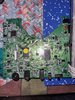
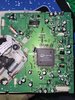
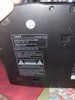
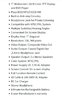
Hello all! I ve been scourgeing the internet for a good big screen and managed to find an old COBY DVD player. From what I've seen online, it has TFT color display, and has composite out for the video output. I have pictures of the DVD player itself with its model number and the driver. I still don't know much about the main board. This screen SHOULD WORK(still unsure if its even compatible with a ps2) but idk what other requirements I'm missing for the screen and the console to work. To be honest, ive taken a VERY long time making this ps2 and I don't want to let my anxiety get in the way anymore. I appreciate any input I can get so I can finish this beast once and for all!
EDIT: I forgot to send a picture of its specs, now I go back to looking at the older threads LMAO.
 

Attachments
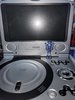
  • 20230417_182811.jpg
    20230417_182811.jpg
    1.6 MB · Views: 237
  • 20230417_182602.jpg
    20230417_182602.jpg
    2.8 MB · Views: 201
  • 20230417_182535.jpg
    20230417_182535.jpg
    2.5 MB · Views: 215
  • 20230417_182823.jpg
    20230417_182823.jpg
    1.5 MB · Views: 223
  • Screenshot_20230417_185948_Chrome.jpg
    Screenshot_20230417_185948_Chrome.jpg
    316.8 KB · Views: 202
Last edited:
It might be within your best interest to go with a dedicated screen and driver board, rather than trying to salvage one from a DVD player, as it has all of that other DVD player crap on the PCB. Here's one I found on aliexpress, but if you search anything along the lines of "7 inch 16:9 IPS", you're bound to find something that will work for your needs
 
Like CrazyGadget said, that PCB will just waste space and the screen isn't that good. Even if you're on a tight budget I still recommend to get atleast a driverboard that is smaller and is def modable to run at 5v. Also with that kind of resolution I do not recommend it
 
Dang, well I do have a 6 inch hannstar TFTLCD screen with its driver board that I can use (honestly thought the old stuff was easier to implement LMAO). What's the easiest way to connect the ps2 to said driver board, through its VGA cables? Or using a ps2tohdmi?
 
Dang, well I do have a 6 inch hannstar TFTLCD screen with its driver board that I can use (honestly thought the old stuff was easier to implement LMAO). What's the easiest way to connect the ps2 to said driver board, through its VGA cables? Or using a ps2tohdmi?
The PS2 mostly outputs interlaced VGA, which only a handful of small screens will accept. If you have one of the old generation 5 inch Eyoyo screens, they accept YPbPr input, but the old ones aren't sold anymore. Composite video works on pretty much all cheap screens, but if you're going for decent quality I'd go for one of the 4:3 5" GoodDisplay screens. They accept interlaced VGA, so most games should display properly
 
Just bought
The PS2 mostly outputs interlaced VGA, which only a handful of small screens will accept. If you have one of the old generation 5 inch Eyoyo screens, they accept YPbPr input, but the old ones aren't sold anymore. Composite video works on pretty much all cheap screens, but if you're going for decent quality I'd go for one of the 4:3 5" GoodDisplay screens. They accept interlaced VGA, so most games should display properly

Just bought a 5"6 GoodDisplay screen, I'm gonna use component to connect the system to the driver board(Y/Pr/Pb, and the H&V syncs are the only things I need to wire , i dont need to wire any of the composite, luma or chroma pinouts?)
 
Just bought


Just bought a 5"6 GoodDisplay screen, I'm gonna use component to connect the system to the driver board(Y/Pr/Pb, and the H&V syncs are the only things I need to wire , i dont need to wire any of the composite, luma or chroma pinouts?)
Nope, just the YPbPr/RGB and HV points. Also it would probably be a good idea to go into the BIOS settings and swap the system display mode to RGB before doing any trimming
 
It might be within your best interest to go with a dedicated screen and driver board, rather than trying to salvage one from a DVD player, as it has all of that other DVD player crap on the PCB. Here's one I found on aliexpress, but if you search anything along the lines of "7 inch 16:9 IPS", you're bound to find something that will work for your needs
Are these displays actually IPS or are they just using it as a keyword?
 
Are these displays actually IPS or are they just using it as a keyword?
Impossible to know for sure. You can look at the purchase reviews to see if any mention incorrect screens, but that's about it
 
Nope, just the YPbPr/RGB and HV points. Also it would probably be a good idea to go into the BIOS settings and swap the system display mode to RGB before doing any trimming

I already trimmed w/o changing the BIOS setting. I assume that I can still turn it on but it'll look ugly (I HOPEi can still see video LMAO). Im also thinking of connecting the boards with 40 AWG Magnet wire. It'll be a pain in the ass to connect them but it should be more efficient than using 24 AWG (saves space too)
 
You should be able to use composite video to do it
 
Word, Thanks for the help! im just gonna use composite instead. I just looked into what Luma and chroma are, when would ever need to use these pinouts?
They are usually to do with S-video from what I remember as in S-video they are separate pins on the connector.
 
Word, Thanks for the help! im just gonna use composite instead. I just looked into what Luma and chroma are, when would ever need to use these pinouts?
As goodie said, they're for the old and very defunct S-Video standard. It was kinda a midpoint between composite and yPbPr component quality
 
Back
Top