RVLoader v2.1

Hello

I'm new to making portable Wii consoles and I have a problem with my RVLoader(I use RVLoader 2.0)
and I installed it on a SD card and prepared a USB drive. When I launched the Homebrew Channel and RVLoader app, RVLoader launches directly without using its installer and I cannot launch its installer from the settings menu.But I need the VGA and Wi-Fi patch because I am building an Ashida.

I don't know what to do,I tried reinstalling it, changing the SD card, USB port, and USB key, but it doesn't work.

Can you help me please?

Sorry if my English isn't very good, but I'm French and I don't speak English very well.

What do you mean that you can't boot the installer from the settings? It should boot. Anyways you also try booting into the safe menu (holding L+R+Z) while booting. After the bootloader text it should boot into the safe menu and you can boot the installer from there
 
Note: my Wii boots on wii menu and not in RVLoader
Remove the SD card and place all RVLoader files exclusively on the FAT32 formatted USB drive. RVLoader is designed to be run from USB drives only, and splitting the files up between SD and USB does not work correctly.
 
Hello

I have another problem
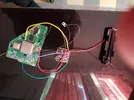
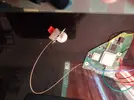
I trimmed my wii and connected the pms2 but it looks not turning on
yet I feel like I've connected everything correctly...

Can you help me please?

I hope my wii is not died...
 

Attachments

  • 20250918_155707.webp
    20250918_155707.webp
    595.6 KB · Views: 53
  • 20250918_155714.webp
    20250918_155714.webp
    578.4 KB · Views: 53
It's my pms ...
It don't working (I realized that I have bridged fan pads on pms and I replaced c10 which was incorrectly placed on the pms)

I measured its consumption and it was around 10mA

It is died?
 
OOPS...


I just didn't know how to turn on the PMS2:facepalm:

It works
I tested with the fan and 5v output and my multimeter on 3.3v output and it all works

I haven't tried to turn on my Wii yet, but I'll do it tomorrow.
 
Lamentablemente no, realmente no he podido concentrarme en GC2Wiimote.
¿Será posible el modo multijugador en algún momento usando mandos de GameCube con GC2Wiimote? ¿Se podrá integrar el mando de Wii Pro para emular mejor los mandos de GameCube?
 
OOPS...


I just didn't know how to turn on the PMS2:facepalm:

It works
I tested with the fan and 5v output and my multimeter on 3.3v output and it all works

I haven't tried to turn on my Wii yet, but I'll do it tomorrow.
Just be aware that sometimes a single cell is not enough to properly boot a Wii. The current requirements are just on the edge of what standard cells are rated for, so if you have troubles it's worth adding a second cell (in parallel) as a sanity check.
 
Hi

I have a problem with my screen

When I did the 3.3v mod and powered the board with 3.3v with my power supply, the screen doesn't turning on and the consumption varies and
when I power it with 3.3v with the pms, the pms just turning off directly

Is this a common problem?
And can you help me please?

There is a photo joined
I asked help on the ashida forum and I no have response since a week and I go to other country this holidays and I wish the Ashida was finished so I could take it.
 
Hi

I have a problem with my screen

When I did the 3.3v mod and powered the board with 3.3v with my power supply, the screen doesn't turning on and the consumption varies and
when I power it with 3.3v with the pms, the pms just turning off directly

Is this a common problem?
And can you help me please?

There is a photo joined
I asked help on the ashida forum and I no have response since a week and I go to other country this holidays and I wish the Ashida was finished so I could take it.
This is not an RVLoader problem, what you have is either a PMS or wiring fault. You'll need to provide clear photos of your PMS wiring in the ashida forum for us to be of any help
 
It is doing the same problem with my adjustable power supply, it's a problem of the motherboard of the screen or the screen itself
 
Check the LCD driver for a short between 3.3v and GND
 
  • Like
Reactions: cy
Hello

I have a big problem with my gc+2.0
I installed the gc+2.0 configurator and did a update and now, the controller is just not working
The configurator update bar was stopped at 5.6% and wrote "Press any button to exit " but it is not working
I cannot make soldering because I'm traveling in a island and I haven't my soldering iron

Can you help me please ?
 
I have a new version number that starts with 3 and more of 2 numbers before the point
It's normal ?
 
Last edited:
Back
Top