Modding a $15,000 Keratometer

GingerOfOz

no wario
Staff member
.
.
.
2020 2nd Place Winner
2022 3rd Place Winner
Joined
Dec 16, 2016
Messages
1,143
Likes
2,867
Location
The Oregon Wildlands
Portables
just so many i am so cool
Weird project I could use some advice on, so I figured I'd make a thread.

Short version of the story is that I've got a tinkerer nearby who knows a decent amount about coding, but is clueless on hardware. He's working on modifying an existing keratometer to be more flexible, and run automatically without a technician.

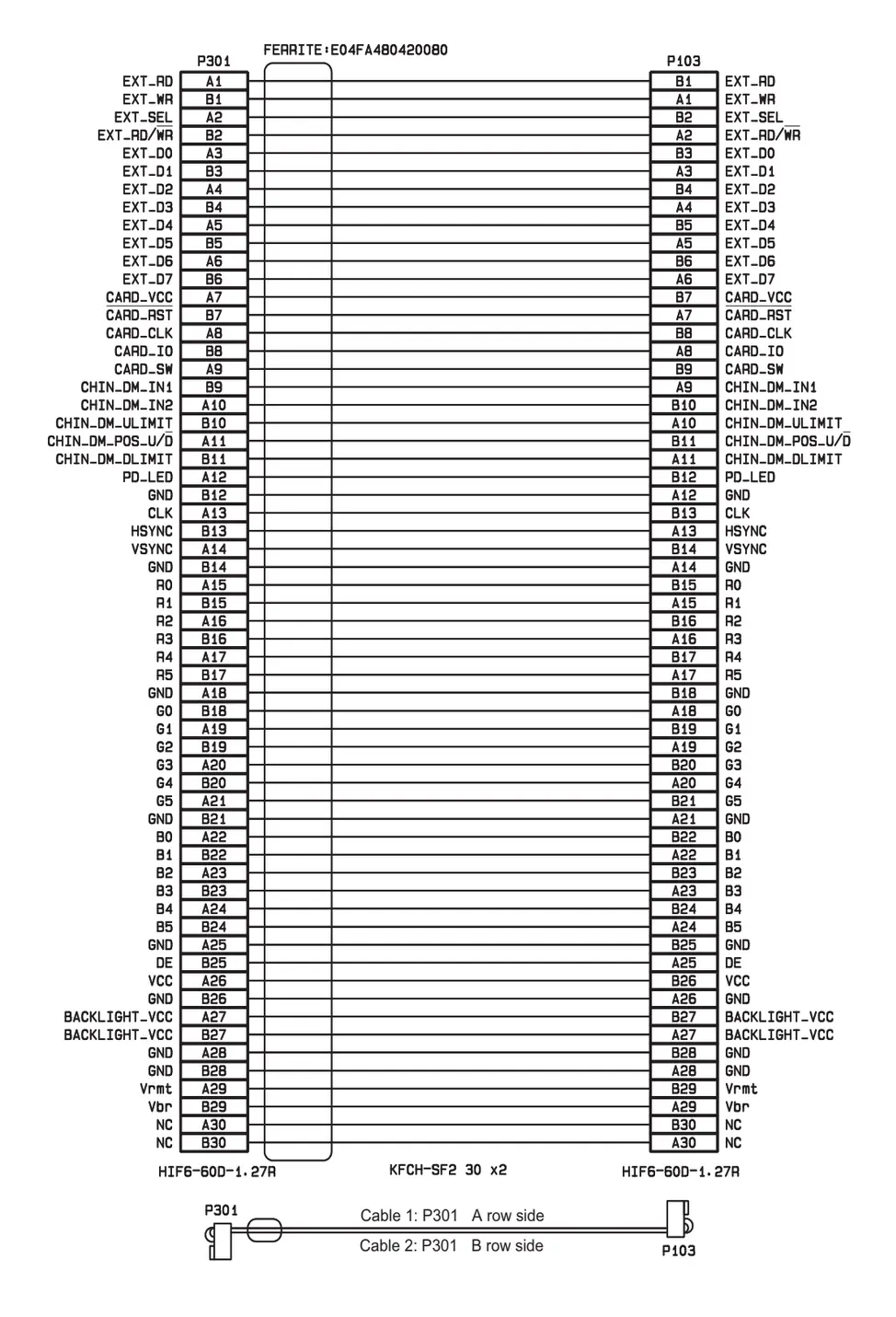
There's a few things he wants me to help with, one of which is getting the data that appears on the built-in display piped in to a separate computer. After looking through the technician docs, there's a pinout that pretty clearly shows some points I can get the 6-bit parallel RGB data from.
1775618814631.webp


Now my task is to figure out a way to adapt that into a video signal we can capture. Right now, I'm thinking the ADV7125 will work well for converting the 6-bit RGB into a VGA signal, that I can then adapt into something capturable fairly easily.

One caveat is that the resolution of the screen on the keratometer is 320x240, which is not a resolution most capture methods will play nicely with. For now, I can use a Retrotink for testing, but I'll want something else for a more final version of the prototype.

Appreciate anyone who has some input!
 
Cool project! Here are a few ideas:
  • RGBtoHDMI, which uses a Raspberry Pi Zero + CPLD hat to convert RGBS to HDMI. This would require some kind of DAC, either an integrated one like you mentioned, or a resistor ladder. Also an XNOR sync combiner circuit. Overkill, but very easy and flexible.

  • GBS8200 or Shinobi Scaler 2. They accept 240p RGB and output 480p - 1080p VGA, which you could pipe into a VGA USB capture card. This approach also needs a DAC and sync combiner.

  • Use a generic 240p to HDMI adapter cable ("Pound cable") and a USB HDMI capture dongle. PS1, PS2 and Saturn ones usually have RGBS input. You'll have virtually no control over the scaling, but maybe that's OK. DAC and XNOR sync combiner required.

  • RP2350B (Pico 2) can sample the RGB666 and output HDMI, which you can pipe into a cheap USB HDMI capture dongle. Capturing parallel RGB of this bandwidth and outputting higher linedoubled resolutions with the RP2350 is well-tested with projects like NeoPicoHD

  • Pipe the RGB666 into an off-the-shelf HDMI transmitter IC, such as ADV7513, Sil9022a, or IT66121, and configure the transmitter over I2C to enable pixel repetition. This doubles the horizontal resolution, getting the pixel clock high enough for normal HDMI sinks to accept it. But there's no guarantee a cheap USB HDMI capture dongle would play nice with a pixel-doubled signal.

    1775686178163.webp


  • Chrontel CH7035B, an HDMI transmitter IC that accepts RGB666 and has a built-in scaler to get around HDMI's minimum pixel clock requirement. You'd need to design a custom board and configure the transmitter with an MCU by referencing this codebase. Awful lot of work for a one-off, and the part is EoL, but it's worth mentioning.
 
Cool project! Here are a few ideas:
  • RGBtoHDMI, which uses a Raspberry Pi Zero + CPLD hat to convert RGBS to HDMI. This would require some kind of DAC, either an integrated one like you mentioned, or a resistor ladder. Also an XNOR sync combiner circuit. Overkill, but very easy and flexible.

  • GBS8200 or Shinobi Scaler 2. They accept 240p RGB and output 480p - 1080p VGA, which you could pipe into a VGA USB capture card. This approach also needs a DAC and sync combiner.

  • Use a generic 240p to HDMI adapter cable ("Pound cable") and a USB HDMI capture dongle. PS1, PS2 and Saturn ones usually have RGBS input. You'll have virtually no control over the scaling, but maybe that's OK. DAC and XNOR sync combiner required.

  • RP2350B (Pico 2) can sample the RGB666 and output HDMI, which you can pipe into a cheap USB HDMI capture dongle. Capturing parallel RGB of this bandwidth and outputting higher linedoubled resolutions with the RP2350 is well-tested with projects like NeoPicoHD

  • Pipe the RGB666 into an off-the-shelf HDMI transmitter IC, such as ADV7513, Sil9022a, or IT66121, and configure the transmitter over I2C to enable pixel repetition. This doubles the horizontal resolution, getting the pixel clock high enough for normal HDMI sinks to accept it. But there's no guarantee a cheap USB HDMI capture dongle would play nice with a pixel-doubled signal.

    View attachment 42295

  • Chrontel CH7035B, an HDMI transmitter IC that accepts RGB666 and has a built-in scaler to get around HDMI's minimum pixel clock requirement. You'd need to design a custom board and configure the transmitter with an MCU by referencing this codebase. Awful lot of work for a one-off, and the part is EoL, but it's worth mentioning.
Could you provide me with the 640x480 firmware for SHINOBI2?
 
Got an update on this project, and a bit of a cry for help.

After taking the machine apart and looking at the screen, we realized that the screen was actually using a serializer on the RGB lines and sending 5 LVDS data streams to the screen. It was pretty easy to source an appropriate receiver, we're using the THC63LVD84C. We also found that the screen on the machine is actually 640x480, so setting up a capture setup will be a lot easier than we'd expected.

The current setup sends the serial lines into the THC63LVD84C, and those signals then get sent to a GM7123 module off of Aliexpress to get VGA output. The issue is that this setup isn't working at all, and I'm worried I made a dumb mistake somewhere.

1779817114729.webp

1779817335334.webp


There are a lot of bodges on this board. A couple of the vias weren't aligned properly since I forgot to reexport the drill files after a couple of adjustments, the input port has been jankily mounted to get the appropriate orientation, and I guessed wrong on the pitch of the pins of the GM7123, so everything has been hand wired. i painstakingly checked everything with the multimeter and couldn't find any shorts or shoddy connections, so I'm back to the drawing board a bit.

Currently, my plan is to borrow an oscilloscope and make sure that everything on my green PCB is actually spitting out the proper signals. Hopefully that will reveal something, as I feel like I'm running out of things to check.
 
Back
Top