Worklog Kunai - An RP2040 Based Dualshock Emulator

Joined
Jan 3, 2025
Messages
6
Likes
24
Location
Fort Worth, Texas
I figure it's a good time as any, I'd like to announce this project to the forums. I've been working on this off-and-on for a few months now and figure it might be useful for a few folks here.
1773113467654.webp

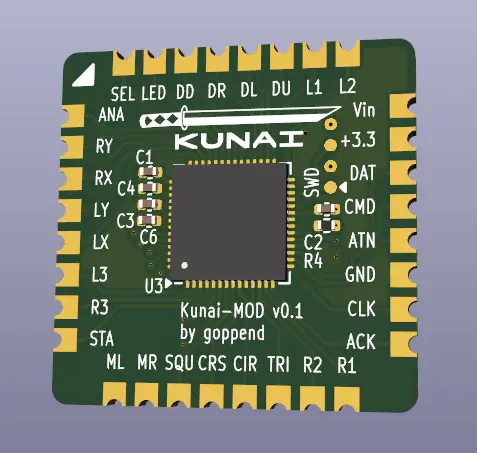
Project Kunai is an open source emulator for Dualshock controllers using the RP2040 microcontroller.
Github: https://github.com/goppend/Kunai/

My current goals are to develop a customizable firmware and minimal hardware implementation for use in PS1 or PS2 portables. By default, it's got all-digital inputs ala Dualshock 1, but it's capable of being configured to use analog pressure sensitive inputs for maximum compatibility with certain PS2 titles, though that does require external ADC ICs and pressure sensors such as an Ohmite FSR05BE or the squishy Alps SKEYAJA010 tactile switch.

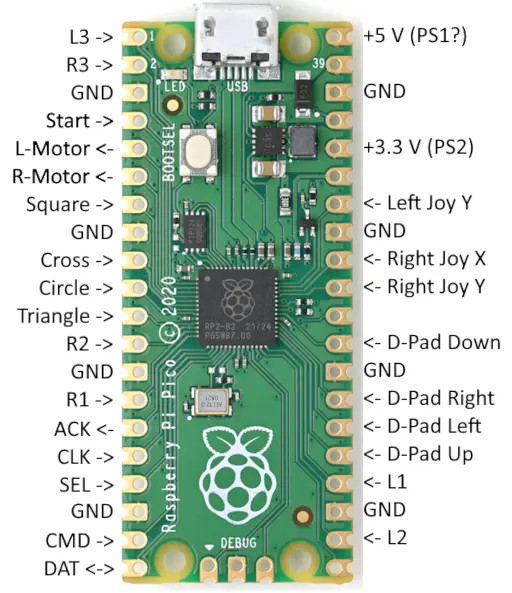
As of this posting, the v0.1 firmware is mostly functional on a stock Raspberry Pi Pico connected as follows:
1773117020569.webp

Only the left analog stick and select button are unconnected without modifying the Pico and/or firmware config. A FET is required to drive each of the vibration motors also.

The Kunai firmware is better experienced on the reference hardware implementation, though the version currently on the repo has some hardware bugs, this will be remedied soon.

Looking for hackers, testers, tweakers, and modders! This project is a work-in-progress, with many planned features and revisions ahead of it. If you're so inclined to wire this up to your console or portable, I'd love to see it! Any contributions, comments, or criticism are welcome.

 
Looks like a fantastic alternative, and it's great to both have a drop-in custom board as well as an alternative firmware for the standard board.

In my personal opinion, I would find it more useful to have Left analog and Select over the two motor pins, as I have yet to want to integrate any rumble feature into my portables.
Additionally, having the analog button would be potentially useful (for PS1 games), though that's another GPIO pin that would be needed.
Same issue with a lack of GPIO, but it would be very cool if someone also integrated button combos for various things, such as console reset or analog toggle.

Overall, I think this is a fantastic addition to the community, and I look forward to testing it in my next PS1/2 portable!
 
Glad you shared this to the forums! This is going to be a great addition to any PS1/PS2 as it gets polished!

I have a lot on my plate project wise, however I'll definitely be a tester/ tweaker/ modder to help get this where you want it!

Great work man!
 
Just out of curiosity, is it written from scratch or with a santroller-type base? Tested on games like Final Fantasy 12, does it see itself as a DualShock 2?
For the analog input, if you can map an external analog multiplexer like a santroller (for example, a 74HC4051), you can easily get all the buttons. Or does the Pico have a hidden 4-pin analog input called GP29 used to read the supply voltage. It can be used by removing the 3-pin transistor (the pin is the one on the right side of transistor between gnd and gp28).
 
Looks like a fantastic alternative, and it's great to both have a drop-in custom board as well as an alternative firmware for the standard board.

In my personal opinion, I would find it more useful to have Left analog and Select over the two motor pins, as I have yet to want to integrate any rumble feature into my portables.
Additionally, having the analog button would be potentially useful (for PS1 games), though that's another GPIO pin that would be needed.
Same issue with a lack of GPIO, but it would be very cool if someone also integrated button combos for various things, such as console reset or analog toggle.

Overall, I think this is a fantastic addition to the community, and I look forward to testing it in my next PS1/2 portable!
Thank you for the feedback! Those are fair points, what I showed above just happens to be the pinout on an unmodified Pico. The analog and select buttons and the left analog stick are all supported, just not on a stock Pico without modification. The module PCB I developed supports the full button set and rumble motors without too much hassle.
Button combinations are a cool idea. I'll certainly add it to the wishlist.

Glad you shared this to the forums! This is going to be a great addition to any PS1/PS2 as it gets polished!

I have a lot on my plate project wise, however I'll definitely be a tester/ tweaker/ modder to help get this where you want it!

Great work man!
Thanks, I look forward to it!

Just out of curiosity, is it written from scratch or with a santroller-type base? Tested on games like Final Fantasy 12, does it see itself as a DualShock 2?
For the analog input, if you can map an external analog multiplexer like a santroller (for example, a 74HC4051), you can easily get all the buttons. Or does the Pico have a hidden 4-pin analog input called GP29 used to read the supply voltage. It can be used by removing the 3-pin transistor (the pin is the one on the right side of transistor between gnd and gp28).
Oh wow, I had never heard of Santroller, it's a cool project. I had a look through the source code of their configurator, and it seems like they used the same PIO code by Dangiu, so there's some common code. I also got the code in `psx-device` from Loc15's PicoGamepadConverter project, everything else in the Kunai repo was written by me. These original authors and more info are credited in the attribution section in the repos readme.
I haven't had a chance to play any games at all with it yet, since I haven't made a full controller, just prototypes. The PS2 padtester program does show all the same info as a normal DS2 for what it's worth.
I like the idea of using an analog mux! I originally considered something like that for my first prototype but decided against it, thinking it would cause too much noise. Turns out there was enough noise using external ADCs that I had to implement a smoothing function anyway, so I might give this a try.
 
I plan to make a test board of my own for this soon as I'd like to see if I can get a few external features working such as a toggle for pressure sensitive buttons to turn them off and on if desired, a stick configurator (if there isnt one already), and potentially add a feature for a custom PMS that allows for in game reset with a button combo, plus some other stuff, bit this is a really solid starting point for that!

Once I have a test PCB, I'd also like to test compatibility in games and had the idea of "de-compiling" certain PS2 games so to speak so we can analyze the .irx files such as PADMAN.irx for example which handles the controller side of things. This will save from having to hook a logic analyzer up to the controller port to see whats going on to debug. I do however have one set up on my PS2 already so when I have time, I'd love to help polish kunai as much as I can!

Again, this is a solid project! Thanks for sharing it!
 
Knowing that the code is written by you is very encouraging as it could be easily adapted or fixed in case of bugs.
Yes I would say in addition to the analog one we could, as written, use the 4th analog input of the pico if the ps2 actually detects it as the original dualshock 2 to avoid having blocks, for example ff12
 
Here's a small update since I had some time over the last week to work on my v0 prototype.
I've managed to program the prototype, though I haven't had any luck getting it to do anything. All signs point to the RP2040 being completely dead or inactive at best. Maybe someone out there could point me in a direction that could help me diagnose the issue? I followed a guide to program the flash chip via SWD with another Pico, and it seems to program and verify OK. I'm holding on to my belief that this shows that the micro isn't dead, but I'm starting to doubt this.

That being said, I've found a few bugs in the hardware that could be preventing the RP2040 from showing life:
First I found out the LDO regulator I have in the design currently has too high a drop to run off of a console. To temporarily remedy this, I bypassed it with a small bit of wire. This is a bit risky since providing anything higher than the max of 3.6 V could damage the RP2040 and I've heard that some consoles may provide 5 V, though I haven't personally seen this on any of my North American consoles (SCPH-7501, SCPH-75001, and SCPH-7900X) or my Japanese PSX (DESR-7100). This uncertainty is why I added the regulator in the first place, so before connecting it I'm making sure the input voltage is safe. For the future, I replaced the old regulator with one that has a lower dropout voltage (a NCP115AMX330TCG has 215-260 mV and it's replacement is a STLQ020C33R that has 15-160 mV), and added a 3.3V input to the previously NC pin 23. A better approach could be to use the exact same regulator as on the Pico, but I'm concerned that adding more components to the bottom of the board would make assembly unnecessarily more complex.
Next, I found a more serious error I made in the design, the ADC_AVDD pin was pulled to VSYS rather than 3.3 V. I fear this may have killed the RP2040, but I'm not really sure how to confirm this further than building another without this connection.

I've updated the design files to remedy the above issues and I'm calling it v0.1. I haven't pushed these to the repo yet, and I wouldn't recommend ordering PCBs until I get the prototype working. I'm hoping that I can do this soon and move forward with application testing, building a controller and playing some games with it.

Thanks for reading!
 
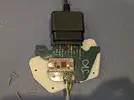
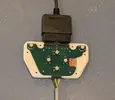
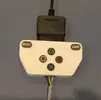
I made a similar emulator a while back. Mine was just for a little interface box that I use with some Dance Dance Revolution Pads. I used the KB2040 board from Adafruit since it has castellated edges, and soldered it to an interposer PCB. I found the code from that project, and I added it to a GitHub repository (My Code Is Right Here). It only implements a response to the digital poll command, but it may be of use if you need something to compare against.
 

Attachments

  • PXL_20260514_233817910.webp
    PXL_20260514_233817910.webp
    1.9 MB · Views: 5
  • PXL_20260514_233849878.webp
    PXL_20260514_233849878.webp
    337.8 KB · Views: 3
  • PXL_20260514_234218796.webp
    PXL_20260514_234218796.webp
    203.4 KB · Views: 1
Back
Top