Solved GC+2.0 Emulated Wiimote issues

Joined
Nov 30, 2024
Messages
38
Likes
53
I’m having issues with my GC+2.0 particularly with wii games. It seems like the Wii games can’t choose between using the gamecube controller or the emulated wii controller and seems to rapid-fire between the two several times in a fraction of a second, especially in Sonic Colors. The first portable I made doesn’t have this issue but it’s the only one using the RVL-PMS-lite. The others portables that have this issue use the RVL-PMS-2. None of them have the bluetooth chip and all of them have an MX chip and use the same revision of RVLoader. If anyone has any idea of what’s going on, I would be very grateful. Happy Easter!

Edit: Also, they all use composite video for my soldering abilities and tools
 
Try changing PADReadMode in game's settings from RVLoader (press B on a selected game)
 
The problem persists whether or not I enable GC2Wiimote. The game shows an error message that the wiimote lost connection when it’s disabled
 
I’m not seeing that option. Is it in Wii games or another setting?
It's a specific game setting in RVLoader. Are you on version 2.1?

The problem persists whether or not I enable GC2Wiimote. The game shows an error message that the wiimote lost connection when it’s disabled
Does it happen for all games? Or just specific ones?
 
it happens with all wii games that have the option to use the gamecube controller. i updated to 2.1 and even ran the install process
 
I’m having a weird issue where when I enable GC2WiiMote and configure the GameCube controller to a Wii game, the controls won’t work. The only game I tested to work with this is Super Paper Mario. Other games such as Animal Crossing City Folk and Mario Strikers Charged won’t work at all. Any help with this?
 
I’m having a weird issue where when I enable GC2WiiMote and configure the GameCube controller to a Wii game, the controls won’t work. The only game I tested to work with this is Super Paper Mario. Other games such as Animal Crossing City Folk and Mario Strikers Charged won’t work at all. Any help with this?
You need to change PADReadMode configuration in game settings from RVLoader
 
Sorry, that I’m getting to this late, but what did you mean by this?
In RVLoader, select a game, press B to access game's settings and change PADReadMode to something other than Auto and try again.
 
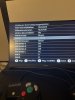
image.jpg

here it is. On Mario Strikers Charged, all 3 modes on PADReadMode do not work by the way, just tried to test it now.
 
Can you also show GC2Wiimote configuration?
Apologies for the very late reply, but here’s my GC2WiiMote configuration for Mario Strikers Charged. PADReadMode is set to Auto.
 

Attachments

  • image.jpg
    image.jpg
    1.4 MB · Views: 114
eh screw it. i’m making a new one just for wii games. the final prints are being made now. started designing exactly a week ago
image.jpg
image.jpg
 
Back
Top