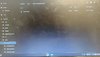
Bunnizer . Joined Mar 15, 2023 Messages 64 Likes 11 Mar 29, 2023 #1 Is this the correct file structure for rvloader? Attachments B8A727E1-196D-4139-83F8-EC2AAE6FD0DC.jpeg 1.9 MB · Views: 208
Stitches 2 and a Half Dollarydoos Staff member . . . Joined Feb 5, 2017 Messages 4,646 Likes 3,593 Location Banana Bender Land, Australia Portables 6 Mar 30, 2023 #2 No. Take the WBFS file out of the Animal Crossing folder so it's just sitting in the WBFS folder, and that's correct for Wii games
No. Take the WBFS file out of the Animal Crossing folder so it's just sitting in the WBFS folder, and that's correct for Wii games
Bunnizer . Joined Mar 15, 2023 Messages 64 Likes 11 Mar 30, 2023 #3 Stitches said: No. Take the WBFS file out of the Animal Crossing folder so it's just sitting in the WBFS folder, and that's correct for Wii games Click to expand... Ok thanks. For gamecube is it like that as well? Last edited: Mar 30, 2023
Stitches said: No. Take the WBFS file out of the Animal Crossing folder so it's just sitting in the WBFS folder, and that's correct for Wii games Click to expand... Ok thanks. For gamecube is it like that as well?
Stitches 2 and a Half Dollarydoos Staff member . . . Joined Feb 5, 2017 Messages 4,646 Likes 3,593 Location Banana Bender Land, Australia Portables 6 Mar 30, 2023 #4 Bunnizer said: Ok thanks. For gamecube is it like that as well? Click to expand... No, each Gamecube game must have its own folder within the games folder, and the iso file within that folder must always be named game.iso The file structures are outlined here https://bitbuilt.net/forums/index.php?threads/setting-up-wii-and-gamecube-games.3583/
Bunnizer said: Ok thanks. For gamecube is it like that as well? Click to expand... No, each Gamecube game must have its own folder within the games folder, and the iso file within that folder must always be named game.iso The file structures are outlined here https://bitbuilt.net/forums/index.php?threads/setting-up-wii-and-gamecube-games.3583/