I've got a lot to say in this post, so please stick with me because all of what I have to say is good advice.
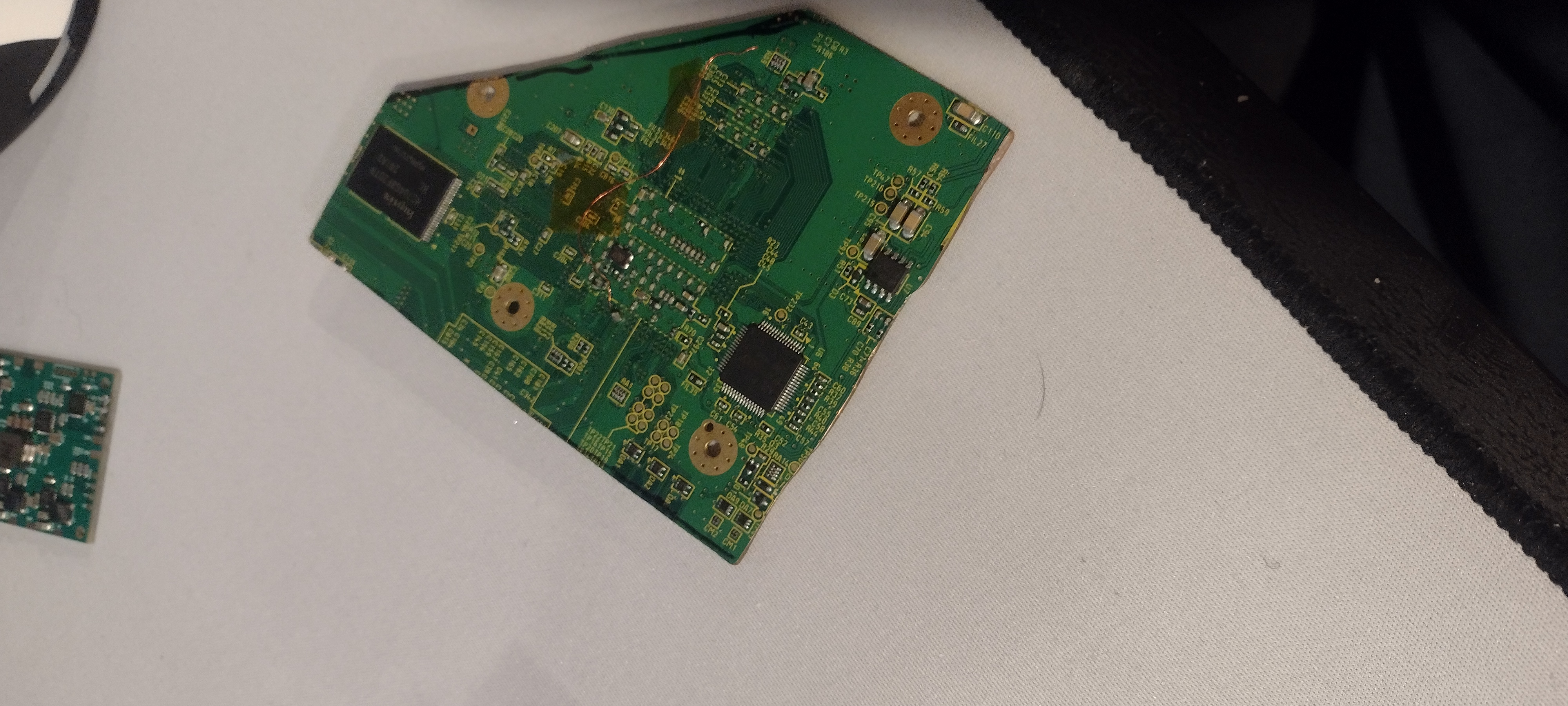
First off, the edges of the trim look very jagged. Have you sanded the edges of it at all? If you have, you definitely haven't sanded enough. I would strongly recommend reading through
The Wii Trimming Guide if you haven't already. It details the different grits and shows what your Wii should look like post trim. I can tell that if you have sanded, you definitely haven't sanded enough, cold hard truth.
This brings me to my next point being your trim lines. For literally every trim I've done, I've trimmed a bit outside of the trim lines. This isn't really necessary if you're careful and precise with your lines, trimming, and sanding. But it makes life a lot easier since you can more slowly move towards the actual trim lines. To speed up the sanding process I picked up some 60 grit sand paper to sand down parts of the board that are really far outside the trim lines. In your case, you trimmed really closely to the NAND which is going to make it extremely difficult (if not impossible) to sand down that edge without destroying the capacitor that is right next to it. The capacitor isn't absolutely necessary, but you are better off leaving it on there.
Now for the soldering...
I'm seeing too much solder on the U10, those blobs don't look very good and I'd absolutely put on a healthy amount of flux and touch those joints up.
Your soldering to the via for U10 is a bit difficult to make out, but I would probably also redo this since I wouldn't say it looks "good". The key to creating good solder joints is to use plenty of flux, and to ensure the surface you're soldering to has plenty of exposed copper (or copper with solder already on it). In the case of your U10 via solder joint, it looks like the motherboard has tented vias meaning that there is solder masking covering the via; this gives you virtually nothing to solder to meaning you likely don't have a very good connection there.
Many people find soldering to the Wii's vias to be tricky, but others like myself find it trivial since we do the following:
1: Scrape the via you're trying to solder to. Whether or not the Wii has tented vias, carefully scraping the via to better expose the copper works wonders for actually getting the solder to stick. I would also recommend cleaning the surface of the via with isopropyl alcohol and cotton swabs before and after scraping. Once you see a fair bit of copper exposed, you'll know you've scraped it enough.
2: Tin your magnet wire and then get as much solder as you can off the wire. This will actually allow you to push the magnet wire into the via if you do it correctly.
3: Put a fair bit of flux on the via.
@YveltalGriffin taught me the magic of using
Chipquik SMD291 flux and I now swear by the stuff.
4: Put the tinned wire into the via. Doing so might be a little challenging since the flux might distort your vision. If need be, you can push the tinned wire into the via and then flux it afterwards.
5: Hold the wire in place and heat it with your soldering iron. This should simultaneously tin the via and create a solid solder connection to the via. If need be, you can also feed a tiny bit more solder on it.