Worklog 3D Model Of My Console, Critique?

Joined
Jan 16, 2020
Messages
36
Likes
3
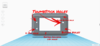
This is a WIP 3D model of my Wii portable I really want to know what I'm doing and if I'm doing it wrong, here are some essential things you need to know from looking at this model.

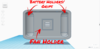
  1. Those cylinders on the back plate are to hold the batteries and also double as grips I'm working on a small plastic piece I can screw into the cylinder to keep it in place)
  2. Those holes on the very back are for an exhaust fan
  3. The 4 holes in the bottom of the front plate are for a power indicator since the only power indicator i saw how to make featured multiple LED lights, if anyone wants to give me any advice on how to make a one LED power indicator I would love the help
  4. The 4 holes in the top of the back plate are for the USB Port and the Charger respectively, and the other 2 are for the shoulder buttons (I plan to use Wii U game pad shoulder buttons so that's why they're on the corners)
  5. The power button is located above the right stick
  6. Those 2 buttons on the top left were a mistake as I originally was gonna put the USB and Charger port there
So those are my models. Please tell me what all of ya'll think.

~AniMike

P.S

Also pictures for those of you who don't wanna download a zip file from a creepy internet stranger person.
 

Attachments

  • Back Plate.zip
    Back Plate.zip
    125.4 KB · Views: 381
  • Front Plate.zip
    Front Plate.zip
    88.9 KB · Views: 388
  • PicsArt_03-22-03.02.50.png
    PicsArt_03-22-03.02.50.png
    834 KB · Views: 385
  • PicsArt_03-22-03.01.41.png
    PicsArt_03-22-03.01.41.png
    60.2 KB · Views: 383
  • PicsArt_03-22-02.47.00.png
    PicsArt_03-22-02.47.00.png
    431.3 KB · Views: 374
  • PicsArt_03-22-03.04.54.png
    PicsArt_03-22-03.04.54.png
    49.5 KB · Views: 370
  • PicsArt_03-22-02.28.25.png
    PicsArt_03-22-02.28.25.png
    385.8 KB · Views: 374
  • PicsArt_03-22-02.48.32.png
    PicsArt_03-22-02.48.32.png
    477.7 KB · Views: 388
  • PicsArt_03-22-02.47.39.png
    PicsArt_03-22-02.47.39.png
    467.2 KB · Views: 392
  • PicsArt_03-22-02.50.44.png
    PicsArt_03-22-02.50.44.png
    313.2 KB · Views: 385
  • PicsArt_03-22-02.49.42.png
    PicsArt_03-22-02.49.42.png
    503.1 KB · Views: 394
  • PicsArt_03-22-02.56.55.png
    PicsArt_03-22-02.56.55.png
    404.2 KB · Views: 416
  • PicsArt_03-22-02.56.18.png
    PicsArt_03-22-02.56.18.png
    436.5 KB · Views: 370
  • PicsArt_03-22-03.00.48.png
    PicsArt_03-22-03.00.48.png
    806.5 KB · Views: 375
Last edited:
Can you send pics instead?
I don't like downloading random zips, also Pics would be more accessible to people who know what they are talking about, but are for example, on a phone. So pics would give more accessibility to see what it looks like, faster, and safer!
 
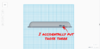
Ah alrighty then friendo, I can understand not wanting to download files from a random internet man, in hindsight it makes way more sense to post pics because I could outline specifically what I was talking about, here you go. (I'll add these to the original post later with more details drawn in)
 

Attachments

  • FrontPlate(Bottom).png
    FrontPlate(Bottom).png
    55.6 KB · Views: 375
  • FrontPlate(Top).png
    FrontPlate(Top).png
    941.3 KB · Views: 362
  • BackPlate(Bottom).png
    BackPlate(Bottom).png
    66.3 KB · Views: 377
  • BackPlate(Top).png
    BackPlate(Top).png
    913 KB · Views: 389
  • BackPlate(Left).png
    BackPlate(Left).png
    437.3 KB · Views: 352
  • BackPlate(Right).png
    BackPlate(Right).png
    341.9 KB · Views: 351
  • BackPlate(Back).png
    BackPlate(Back).png
    451.1 KB · Views: 379
  • FrontPlate(Right).png
    FrontPlate(Right).png
    516.9 KB · Views: 371
  • FrontPlate(Back).png
    FrontPlate(Back).png
    507.2 KB · Views: 365
  • FrontPlate(Left).png
    FrontPlate(Left).png
    508.3 KB · Views: 373
  • FrontPlate(Front).png
    FrontPlate(Front).png
    398.8 KB · Views: 383
  • BackPlate(Front).png
    BackPlate(Front).png
    390.1 KB · Views: 369
  • BackPlate(Front).png
    BackPlate(Front).png
    390.1 KB · Views: 373
Aren't the buttons/dpad a bit too far away from the stick holes?
 
Are they?... I dont really know lol.
Probably a good idea to do a 1:1 scale print of the face onto paper and cut it out and stick it to some cardboard to get an idea of the ergonomics.
 
I would personally move the buttons a bit upwards, so uncomfortable to use the buttons at the bottom
 
In term of ergonomics, your thumbs rotate. meaning that you probably won't find it comfortable to put the buttons/dpad directly underneath the joysticks. In addition to moving the d-pad and buttons closer to the joy sticks, you may consider moving them inwards towards the screen. This will allow you to rotate your thumbs for a more comfortable transition. If you are 3d printing your shell, you may consider making it wider to give you more surface area to do this. You'll see what I mean on most modern controllers.
 
I'd start first by changing 3d modeling programs, Try Fusion360 instead, you can get an educational license for free, which includes Highschool it turns out btw.
Second I'd buy a Caliper, it will help out a lot when measuring things accurately. it doesn't need to be an expensive one, I think mine cost like $5 or $10, just make sure it's accurate.
Third, Measure your stuff as you are making it. When you're putting in button holes, measure your buttons. don't forget clearances for your holes! I would also know what parts you are using, so you can accurately measure it.
Your base case doesn't look too bad, I think most of the problems lay within the program you are using instead.

and always remember, Measure twice, cut once ツ
 
Hi, you cat print the model using pepakura software, i do that to test the designs that i made, you printed a 3d model on paper.
Regards
 
Back
Top