Worklog G-Wii Attempt 2026

Forgive the spam, I’m using this thread as a personal work log so I’m going to post some WIP photos.
Nothing to forgive my friend, you can update your own worklogs as often as you like. It's chainposting in general threads or other people's worklogs that we don't approve of.
 
Hey did you want some breakout boards for the controller side so you dont need to solder into plastic?
I recreated the CAD files a couple months ago and got some made for my own G-Wii revival project.
I'm in Melbourne too so happy to shoot them your way along with some orange squishy tacts if it helps your project along.
20260403_151452.webp
 
Hey did you want some breakout boards for the controller side so you dont need to solder into plastic?
I recreated the CAD files a couple months ago and got some made for my own G-Wii revival project.
I'm in Melbourne too so happy to shoot them your way along with some orange squishy tacts if it helps your project along.
View attachment 42260
Oh man, that would be fantastic! How could I say no?

Donating? Or selling? Either way I'm interested.

I'll message you, thanks man!
 
IMG_3665.webp


Hmmm, this might be an issue. This is composite video from a modded (but not chopped) Wii with RVLoader. Set to 4:3 I should note.

The screen appears to interpret the signal as 16:9 and it stretches off the screen. No menu options on the screen driver board appear to be related to this. I’ve tried it with other 4:3 sources (PS2, GameCube) and it’s fine, just Wii.

Hopeful that there’s two possible solutions. 1) The screen likes VGA signal better (it sends a dedicated sync channel right?), or 2) I can change the video output in settings, like forcing a 640x480p output?

Let me know if you’ve seen something like this before. I’ll be quite annoyed if I can’t use this screen, especially after mutilating the shell so much

 
View attachment 42262

Hmmm, this might be an issue. This is composite video from a modded (but not chopped) Wii with RVLoader. Set to 4:3 I should note.

The screen appears to interpret the signal as 16:9 and it stretches off the screen. No menu options on the screen driver board appear to be related to this. I’ve tried it with other 4:3 sources (PS2, GameCube) and it’s fine, just Wii.

Hopeful that there’s two possible solutions. 1) The screen likes VGA signal better (it sends a dedicated sync channel right?), or 2) I can change the video output in settings, like forcing a 640x480p output?

Let me know if you’ve seen something like this before. I’ll be quite annoyed if I can’t use this screen, especially after mutilating the shell so much
That happens sometimes with a 60hz PAL composite signal. For some reason it's just a dogshit signal that bugs out all the time. It will go away if you use VGA instead
 
Oh thank god. You’ve seen this before? (Or seen people post about it?)

I still need to run a VGA test though, a lot of soldering but I can’t risk it.
 
Hey did you want some breakout boards for the controller side so you dont need to solder into plastic?
I recreated the CAD files a couple months ago and got some made for my own G-Wii revival project.
I'm in Melbourne too so happy to shoot them your way along with some orange squishy tacts if it helps your project along.
I know these boards aren't the topic of this thread, but I always loved how people were able to streamline the G-Wii with these. It'd be really neat to see a version of these boards where the ABYX buttons use membranes instead of the orange tact switches. It'd require precise trimming of the buttons, but it'd get rid of the annoying unevenness the A button has in this build. I might have to mess around with this sometime if I remember.
 
I know these boards aren't the topic of this thread, but I always loved how people were able to streamline the G-Wii with these. It'd be really neat to see a version of these boards where the ABYX buttons use membranes instead of the orange tact switches. It'd require precise trimming of the buttons, but it'd get rid of the annoying unevenness the A button has in this build. I might have to mess around with this sometime if I remember.
I don't want to derail this thread of course - I'll post my KiCAD files and you're more than welcome to play with them.
 
Huge thank you to @buzzyc for hooking me up with a bunch of boards and buttons. We're both in the same city so we organised a handover yesterday, very appreciative of his generosity.

IMG_3738.webp


Most of these are breakout boards for are usually 3D printed button/stick mounts. I'm still extremely green but I think these will make life a bit easier. The board on the left I must confess that even though he kindly explained it to me I'm still slightly confused. I believe it helps keeps the wiring clean, especially between the halves. (Also ignore the cat hair...)

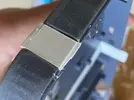
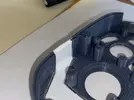
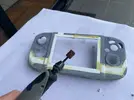
As for my build, still working on adapting the shell for the bigger screen. Almost there, waiting for the last of the glue to dry then it's on to epoxy, a huge sanding all over then we're going to cast a mould. Check out my dodgy build work:

IMG_3732.webp
IMG_3723.webpIMG_3733.webp

I'm operating under the belief that epoxy, sanding and patience can forgive most sins.
 
It's coming along great!
Covet those orange squishies, they were discontinued years ago ha.

I posted a worklog this morning that may give insight to how those other boards fit into a build
 
D-Pad Sidequest!

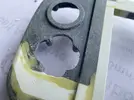
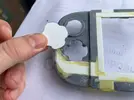
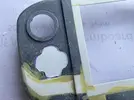
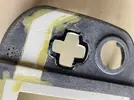
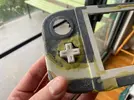
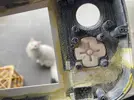
My friend whos been helping me with the shell has covid so while I'm waiting I let the impulsive thoughts win and swapped out the D-Pad.

I bought one of those cheap ali express Wii Classic Controllers. Obviously the build quality is trash but I'm only harvesting the buttons, especially that nice meaty d-pad. Same basic design as the GameCube's d-pad, just bigger.

D-PAD 001.webpD-PAD 002.webpD-PAD 003.webpD-PAD 004.webpD-PAD 005.webpD-PAD 006.webpD-PAD 007.webp

I'll need to test the new D-Pad to see how the clearence is, might need to take the screw posts down a little to get a nice tight feel. The rest of the buttons will stay the same, this was my only major bugbear.
 
Back
Top