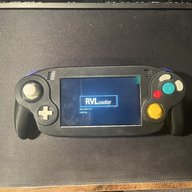
Ashida Wii Portable

I printed the Noctua variant of the back of the Ashida, and while I am waiting for some parts, started to fit some of the parts I have to see how it would look, but I noticed two things. One, the Noctua fan is a really tight fit. Two, the connector can't fit through the hole where you're supposed to route the wires through. If anyone could provide me with insight, that would be great.
 
Last edited:
I can't remember the noctua fan being a tight fit.
The connector will be cut anyway because you solder it directly to the PMS.
IMG_20231112_160948007.jpg
 
I can't remember the noctua fan being a tight fit.
The connector will be cut anyway because you solder it directly to the PMS.
View attachment 37288
Ah, okay, that makes sense. I had thought that I would use the adapter included with the fan, but had no clue where the rest of the cable went. The tight fit is probably because of the inaccuracy of FDM printers. Even the best aren't near the quality of resin. Thanks for the quick reply!
 
I don't know if there is a faq page for this, but I live in a country where some of the materials are not available for shipping on the sites listed from the BOM. I did find the same (and/or with minor color differences) components on other websites like ebay. Would parts like these be adequate for building an ASHIDA
 
It depends on which components do you mean.
 
Yeah the majority of the general parts can be substituted for local equivalents so long as the values for things like resistance and panel dimensions match up
 
Like Stiches said, as long as it fits in the case and has the right value you are good.
 
Is the ashida built to use The RVL-DD driver board or the stock driver board?
 
Both. There are two different mounts you can print.
 
Is the ashida built to use The RVL-DD driver board or the stock driver board?
It was originally intended to use RVL-DD. That is why there are no screen control buttons. I would totally recommend the RVL-DD over the regular driver board. You will get much better picture, actual brightness control, and slightly better battery life.
 
Idk if this is the right place to ask this, but in the BOM for the Ashida it says that I can harvest the potentiometers and stuff from a gamecube or wii classic controller. How many controllers would i need if I were to go with that option? And also is there any tutorial for actually harvesting it?
 
For either you would only need one controller but if you use a GameCube controller your going to need to buy a second Z button and if u use a classic controller your going to have to buy GameCube buttons but they sell them in numerous different colors on aliexpress and eBay for less than 7$
 
aight thanks
To answer your other question, you would need either one good condition gamecube controller and a z button, or one wii classic controller and two sets of gamecube buttons, or one set and an extra z button (depending on how you can buy them online)
I would definitely recommend the wii classic controller route, as it is cheaper in the end, and wii classic controllers are sold in like new condition a lot cheaper than gamecube controllers are in bad condition. To "harvest" the buttons, potentiometers and sticks from the controller, you simply use a soldering iron and solder braid, solder sucker, or a desoldering gun to remove the solder, and take off the component(s)
 
For my first ashida build, would it be worth the extra 100$ for the rvldd or is the stock driver board enough?
 
The quality with the RVL DD is great and the brightness control really nice.
If you plan to play with your Ashida, I think it is worth.
 
It's actually more like 80, since you'll need to spend close to 20 for the other board if you opt to not use the dd. I think it's worth it.
 
For my first ashida build, would it be worth the extra 100$ for the rvldd or is the stock driver board enough?
I haven't finished building mine yet, but the quality difference and features it brings (like brightness, and way easier widescreen) is worth the 80 dollars IMO.
 
Back
Top